Evaluating hardware performance in a commercial or media environment requires strict methodology, privacy, and automation. This benchmarking software operates as the industry-standard suite designed specifically for hardware manufacturers, quality assurance laboratories, and technology journalists. Instead of merely outputting a basic performance score, this desktop application provides detailed, reproducible stress testing and component analysis. It isolates GPU rendering capabilities, CPU thread scaling, and storage bandwidth using specific workloads like Time Spy, Speed Way, and the CPU Profile. These modules generate baseline metrics used by the technology industry to compare architectural differences between competing silicon designs.
Because business users process hundreds of test runs across unreleased hardware configurations, relying on consumer-grade diagnostics or browser-based tools is inadequate. A native desktop application is necessary to directly interface with low-level graphics APIs such as DirectX 12 Ultimate and Vulkan. By running locally on the workstation, the software bypasses the overhead of virtualization or web browsers, ensuring that every frame time measurement and temperature fluctuation reflects the exact physical capabilities of the hardware. Furthermore, native execution allows the benchmark to poll motherboard sensors in real time, matching visual rendering tasks directly against power draw, clock speed behavior, and thermal output over prolonged periods.
Professionals choose this commercial tier over standard consumer editions because it unlocks programmatic control over the entire testing workflow. Test engineers can script batch runs, loop stability tests indefinitely, and parse the output data through XML without touching the graphical user interface. Automating these steps reduces human error associated with manual benchmarking, freeing up technicians to analyze the data rather than actively monitoring the machines. Additionally, the ability to store unreleased hardware results entirely offline prevents confidential architectural data from leaking to public leaderboards before a vendor officially announces their new components to the market.
Key Features
- Command-Line Automation: Test engineers can bypass the graphical interface entirely by using the executable from a command prompt. By passing arguments such as definition XML files or loop parameters, users can queue multiple workloads to run overnight. This allows hardware labs to execute structured, repeatable test scripts across dozens of machines simultaneously, ensuring standardized testing conditions without manual intervention.
- Private Offline Results: Maintaining confidentiality is critical when handling embargoed graphics cards or unreleased processors. The application allows users to save all benchmark scores and telemetry data locally on the host machine. This prevents sensitive performance metrics from automatically uploading and leaking into public online databases, a crucial function for tech journalists under non-disclosure agreements.
- Image Quality Tool: Verifying how different architectures handle proprietary rendering techniques requires intense visual scrutiny. This module extracts unscaled, raw frames directly from the rendering pipeline during a run. Engineers can then inspect these images pixel-by-pixel to ensure that driver updates, variable rate shading, or upscaling algorithms do not introduce visual artifacts into the final output.
- XML Data Export: Businesses need to ingest testing data into corporate tracking systems for long-term analysis. The software exports complete benchmark results, including granular frame pacing, thermal sensor logs, and clock speed charts, directly into structured XML files. This format makes it easy to parse the information with custom data visualization tools or database scripts for deeper hardware comparisons.
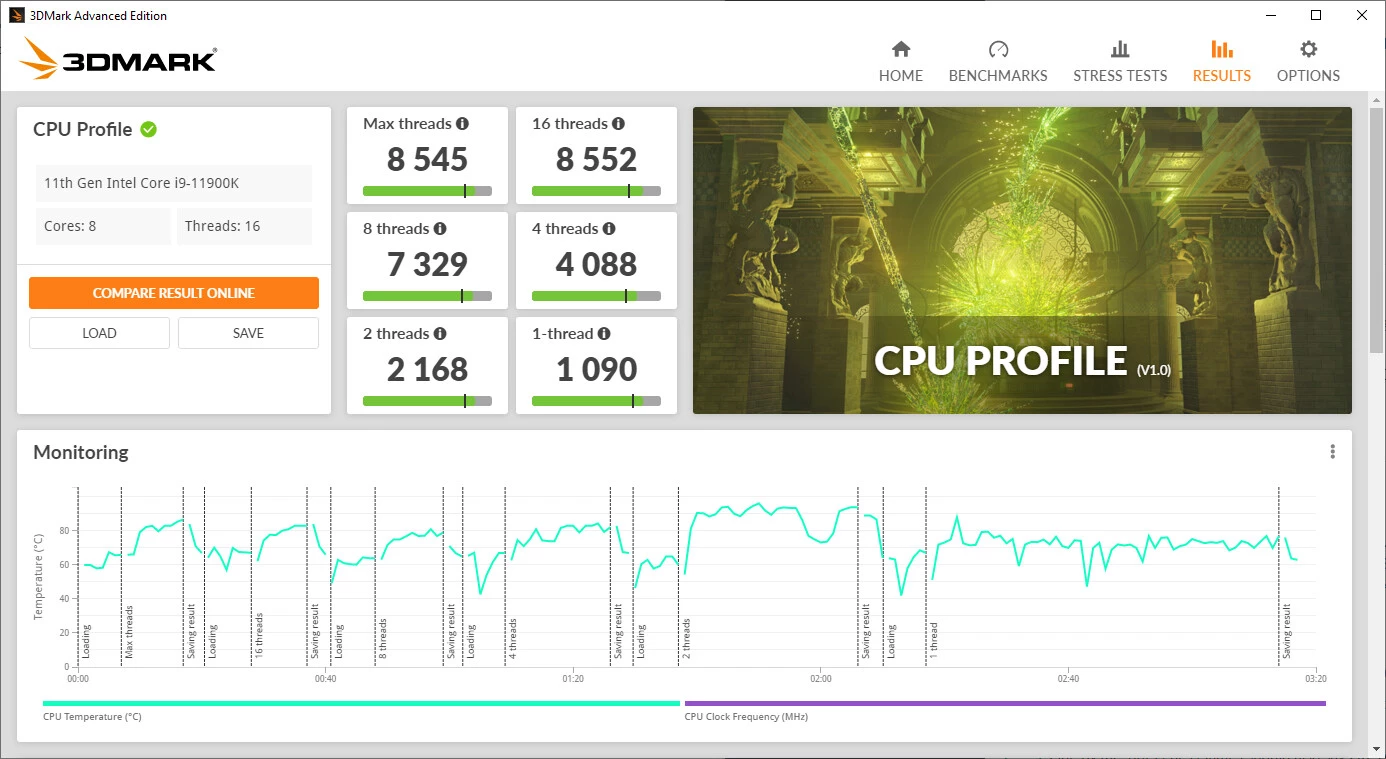
- Granular Component Profiling: Modern systems require isolated testing to identify specific performance bottlenecks. The suite includes targeted modules such as the CPU Profile, which measures scaling from a single thread up to maximum core utilization. Similarly, the Storage module tests how solid-state drives handle actual gaming workloads, such as moving large assets, saving game states, or recording gameplay video streams.
- Infinite Loop Stress Testing: Evaluating cooling solutions and VRM stability requires sustained workloads rather than short sprints. Users can configure tests like Solar Bay or Fire Strike to loop indefinitely until manually stopped. This sustained thermal output quickly reveals if a laptop or desktop configuration suffers from thermal throttling under continuous load, providing realistic data on acoustic profiles and fan curves.
How to Install 3DMark Professional on Windows
- Navigate to the official enterprise portal and log in using your commercial account credentials to access the business software repository.
- Download the standalone Windows offline installer package. Keep in mind that the base download primarily contains the main graphical user interface and the core architectural framework, rather than the full library of large 3D assets.
- Launch the setup executable using a Windows administrator account. Elevated privileges are required because the setup must install the Futuremark SystemInfo background service, which interacts directly with low-level motherboard sensors and hardware drivers.
- Follow the setup wizard prompts to choose your destination directory. Select a drive with plenty of available space, as downloading all modern ray-tracing modules and high-resolution textures will rapidly consume tens of gigabytes of storage.
- Launch the desktop application. Before running any workloads, navigate immediately to the Options menu to input your commercial registration string. The application will contact the vendor servers to validate your active annual subscription.
- Navigate to the Benchmarks tab within the graphical interface. Here, you can selectively download only the specific test modules required for your current hardware project, which prevents your local disk from filling up with legacy tests you do not intend to use.
- For automation purposes, open your advanced system properties and add the software installation path to your Windows environment variables. This configuration allows you to call the application executable directly from external scripts without navigating to the folder manually.
3DMark Professional Free vs. Paid
The licensing structure for this benchmarking software separates casual home users from business environments. The Professional Edition is strictly a paid commercial product, operating on an annual subscription model that costs $1,495 USD per year. This tier provides the legal rights necessary for business and commercial use, making it the required choice for hardware manufacturers, system builders, quality assurance labs, and tech media outlets that monetize their testing content.
Purchasing this annual commercial license unlocks every benchmark, feature test, and downloadable module available in the ecosystem. Furthermore, it activates the enterprise-specific capabilities that businesses rely on, including command-line scripting, the Image Quality validation tool, private offline result handling, and structured XML data exporting. Customers who hold older perpetual licenses for this tier must upgrade to the current annual subscription model to access newly released modules, such as the Speed Way test.
For users who do not require commercial rights, command-line execution, or offline privacy, the Advanced Edition offers a more limited feature set for a one-time fee of $34.99. This version is designed for home enthusiasts and extreme overclockers who simply want to test their personal hardware and submit scores to the public Hall of Fame. A restricted Basic Edition is also available at no cost, but it lacks custom run settings, prevents loop testing, and limits the user to a small handful of default workloads.
3DMark Professional vs. PassMark PerformanceTest vs. Unigine Superposition
PassMark PerformanceTest serves as a diagnostic alternative for IT professionals who need to evaluate the entire scope of a computer system rather than focusing primarily on 3D graphics. While it includes 3D rendering checks, its real strength lies in benchmarking 2D operations, RAM latency, network speeds, and CPU integer calculations. For general office environments, server diagnostics, or quick workstation checks, PassMark provides a wider net of basic system data. However, its graphics modules are less demanding and less recognized by the gaming industry, making it insufficient for rigorous graphics card validation or checking hardware-accelerated ray tracing capabilities.
Unigine Superposition is a visually intense benchmark that pushes modern graphics cards to their thermal and power limits. It is favored by overclockers and hardware enthusiasts because it features an interactive free-roam mode, allowing users to explore the rendered environment while adjusting settings on the fly. It is effective for a quick thermal burn-in to verify that an overclock is physically stable. However, it lacks the structured enterprise features found in this professional benchmarking suite, offering no native XML data export, no separate CPU thread-scaling breakdown, and no official commercial licensing structure designed specifically for hardware quality assurance labs.
3DMark Professional is the better fit when your organization requires strict methodology standardization, command-line automation, and legally compliant commercial usage rights. While Unigine provides an excellent visual burn-in and PassMark covers general IT inventory needs, neither offers the granular control necessary for automated batch testing. When an engineering team needs to script overnight thermal loops, extract raw frame images for driver validation, and keep unreleased silicon scores offline, this suite provides the exact workflow tools required to complete the job accurately.
Common Issues and Fixes
- DirectX 12 tests fail to launch from PowerShell. When triggering automation scripts via PowerShell, full-screen DirectX 12 applications often crash or fail to initialize due to window-handling limitations. You can bypass this restriction by appending the window maximization argument directly to your command, structuring it as
start /max 3DMarkCMD.exe. - Hardware details hang or scan indefinitely. The background polling module can lock up if it conflicts with other hardware monitoring applications running simultaneously, such as MSI Afterburner or HWiNFO. To resolve the hang, close all competing polling software, and manually download the latest Futuremark SystemInfo installer from the vendor website to repair the local service.
- Image Quality Tool generates noisy frames. Rendering an image capture immediately after a camera cut when using early versions of NVIDIA DLSS can result in visible temporal accumulation artifacts. Ensure you are testing with DLSS 2 or a newer implementation, and allow the rendering engine a few frames to settle after a scene transition before capturing the output.
- Commercial license drops to Advanced Edition status. The application relies on active internet validation to verify your annual subscription, and a strict corporate firewall can block this communication. Ensure your IT department whitelists the required vendor license servers, or use the command line parameter
--register=followed by your license string while temporarily connected to an unrestricted network. - Storage Benchmark module fails to find the target drive. The storage test requires a specific amount of contiguous free space to write temporary game files and asset packages during the run. Ensure the target solid-state drive is formatted in NTFS, possesses at least 30 gigabytes of unallocated free space, and is not actively managing a system page file during the test.
Version 2.32.8743 — December 2025
- Added a dedicated button to all benchmark and feature test result pages for directly exporting results as PDF (Professional Edition).
- Improved the functionality of the search filter located on the benchmarks selection page.
- Updated and refined the German language localization within the application.