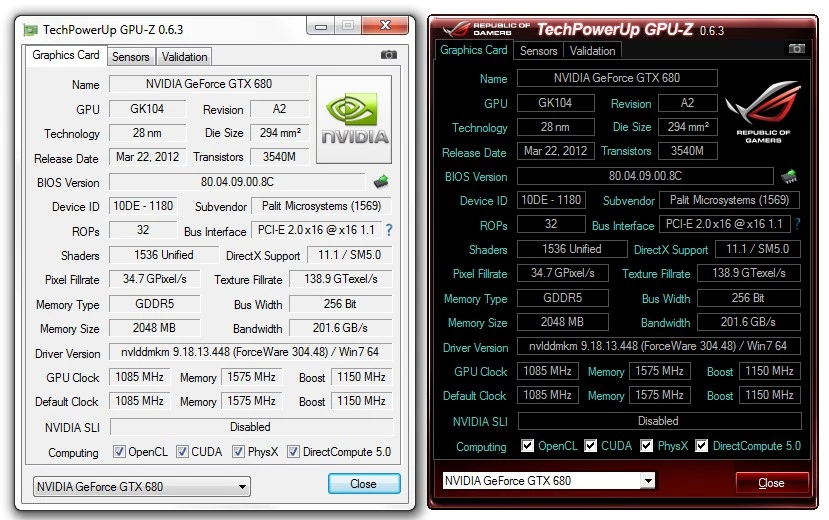
GPU-Z is a specialized hardware diagnostic utility engineered exclusively for analyzing and monitoring graphics subsystems on Windows machines. Instead of navigating through vague built-in system menus or relying on limited information provided by generic display drivers, users run this application to extract exact specifications regarding their video card's physical silicon, memory configuration, and driver status. The software directly queries the hardware at a low level, bypassing standard operating system abstractions to deliver raw diagnostic data. This data ranges from physical characteristics like die size, transistor count, and release lithography to active technical parameters such as the PCI-Express bus interface and the exact BIOS firmware currently flashed to the board.
The application serves a demanding spectrum of technical users, including system builders verifying component authenticity, overclockers tracking thermal limits, and PC gamers diagnosing performance bottlenecks. Its primary interface consolidates critical metrics—such as base clocks, boost clocks, memory bandwidth, raster operations pipelines, and compute unit counts—into a single, tightly organized panel. This eliminates the need to dig through multiple menus or run heavy benchmarking suites just to confirm what hardware is actively running. Secondary tabs provide real-time sensor readouts, allowing users to graph thermal hotspots, fan rotation speeds in RPM, and precise power draw across both the GPU core and the VRAM memory modules while the system is under heavy rendering loads.
Beyond standard diagnostic readouts, the utility provides specific hardware verification mechanisms that have made it a staple in the PC building community. It allows users to read the exact manufacturer of their video memory chips, such as Samsung, Micron, or SK Hynix, which is a critical detail for users tuning memory timings. Furthermore, it includes specialized routines for saving the raw Video BIOS to a standalone file and detecting modified firmware often used by scammers to sell counterfeit graphics cards. By relying on an internal database of known hardware signatures, the application ensures users can definitively prove what hardware they are running, making it an essential tool for verifying second-hand market purchases.
Key Features
- Fake Graphics Card Detection: Identifies hardware intentionally flashed with modified firmware to appear as a higher-tier model. When the application detects a mismatch between physical processor characteristics and the reported device string, it replaces the vendor logo with a warning triangle and explicitly labels the hardware as counterfeit. This prevents buyers from being scammed by rebranded older generation cards on the second-hand market.
- Real-Time Sensor Telemetry: Tracks telemetry data directly from the graphics card's integrated sensors. Users can monitor the main die temperature, memory junction temperature, thermal hotspot variance, fan rotation speeds, and total board power consumption. This data can be logged directly to a text file for post-session analysis or left running to track extreme values during extended rendering tasks.
- Video BIOS Extraction: Copies the raw firmware file directly from the graphics card memory to a standard ROM file saved on your local storage drive. This serves as a critical backup step before attempting custom firmware modifications, undervolting flashes, or when sharing factory BIOS data with hardware support communities.
- PCI-Express Bus Render Test: Includes a built-in graphical load tool designed specifically to force the graphics card out of idle, low-power states. Running this localized test allows users to verify if their motherboard, physical slot wiring, and video card correctly negotiate the maximum available PCIe lane width and interface generation limit.
- Memory Vendor Identification: Queries hardware to determine the exact manufacturer of the GDDR or HBM memory modules soldered to the printed circuit board. Knowing whether the card utilizes Samsung, Micron, or SK Hynix memory allows overclockers to predict memory tuning overhead, apply correct voltage limits, and follow specialized overclocking guides.
- Advanced API Capability Scanning: Scans the underlying hardware and installed driver stack to confirm exactly which graphics APIs and rendering features are physically supported. The interface uses an organized grid to indicate hardware-level compatibility with DirectML, Vulkan, hardware-accelerated Ray Tracing, and specific video decoding formats.
How to Install GPU-Z on Windows
- Download the Windows installer executable package directly to your local storage drive, ensuring you have administrative privileges on your active Windows account.
- Double-click the executable file to initiate hardware detection, which will immediately prompt you with an optional installation dialog rather than forcing a traditional setup wizard.
- Choose whether to run the utility immediately as a standalone portable application by selecting the Not Now option, or proceed with standard installation by clicking Yes to integrate it into the operating system.
- If you opt for standard installation, review the destination folder path, typically the Program Files directory, and select your preferred shortcut options for desktop and Start Menu access.
- Proceed through the final setup prompt, allowing the application to extract and place the low-level driver files required for directly querying hardware sensors and bypassing operating system abstractions.
- Accept the User Account Control prompt when the application launches, as the utility strictly requires administrative privileges to read physical memory addresses and query internal hardware components.
- Upon first launch, allow the tool a few seconds to scan your PCI-Express bus and query the graphics subsystem before the main diagnostic panel populates with your specific hardware data.
GPU-Z Free vs. Paid
TechPowerUp provides this diagnostic utility entirely free of charge for both personal home use and commercial deployment. There are no premium tiers, paid versions, subscription requirements, or feature-locked menus hidden within the application. Every user receives the exact same diagnostic capabilities, real-time sensor readouts, BIOS extraction tools, and validation features without ever navigating paywalls or entering license keys. The continuous development, internal database updates, and server maintenance required for the validation feature are supported through the main website ecosystem and occasional in-app sponsor links or themed editions. Users might notice a small hardware-related banner at the bottom of the interface or specific manufacturer branding—such as the Asus ROG or MSI Gaming themed editions—but these visual changes do not interfere with the functionality, accuracy, or layout of the diagnostic data presented. There are no watermarks on exported sensor logs, no artificial delays when launching the program, and no limitations on background monitoring.
Because the utility relies heavily on an updated internal hardware database to recognize newly released graphics architectures and detect counterfeit hardware, regular updates are provided at no cost. Users do not need to register an account, provide an email address, or sign in to a cloud service to download these updates, ensure hardware detection accuracy, or export their sensor telemetry data to a local CSV file. The application functions entirely offline for standard hardware reading and sensor monitoring, only requiring an active internet connection if the user explicitly chooses to upload their results to the public validation database.
GPU-Z vs. HWiNFO vs. AIDA64
HWiNFO excels at extensive system-wide hardware monitoring, pulling exhaustive sensor data from the main processor, motherboard VRMs, system RAM, and storage drives alongside the graphics card. Users who need to log total system power draw, track individual CPU core frequencies, or trigger specific alerts based on motherboard chipset temperatures often configure HWiNFO to run continuously as a background service. However, its interface presents hundreds of rows of raw data in a sprawling tree format that requires manual sorting and filtering to isolate specific graphics metrics.
AIDA64 serves as a broader, commercial system diagnostic and benchmarking suite, focusing heavily on synthetic stress testing, network auditing, and detailed memory bandwidth analysis. It provides extensive reports on installed software, operating system licensing, and overall system stability under heavy artificial loads. While AIDA64 reads graphics card sensors accurately and offers highly customizable sensor dashboard capabilities, its primary strength lies in whole-system validation, enterprise-level hardware auditing, and custom panel displays rather than serving as a lightweight, specialized video card diagnostic tool.
GPU-Z is the better fit when the sole focus is analyzing the graphics subsystem quickly without navigating complex configuration menus or managing dense telemetry trees. It distills the most critical video card specifications—like memory manufacturer, ROP count, active bus interface, and firmware version—into a single, instantly readable window. Users choosing to verify a second-hand graphics card purchase, check Resizable BAR status, or extract a firmware ROM will find this utility much faster, more direct, and significantly less resource-intensive than setting up a full-system benchmarking suite.
Common Issues and Fixes
- Problem description. Anti-cheat software flags the application during multiplayer gaming. The utility uses a custom low-level system driver to read hardware sensors and query physical memory addresses, which some aggressive game security monitors mistake for a memory-editing tool or unauthorized overlay. Close the application completely and ensure its background driver service is terminated via the Windows Task Manager before launching competitive games protected by kernel-level anti-cheat systems.
- Problem description. Sensor tab shows blank values, unknown device names, or missing temperatures. This occurs when running the utility on newly released graphics architectures or obscure OEM laptop chips that have not yet been added to the application's internal identification database. Check the developer's official website for an updated executable release that includes the necessary device ID strings and specific sensor mapping required for your exact hardware generation.
- Problem description. The PCI-Express bus interface field displays a lower bandwidth speed than the hardware supports. Modern motherboards and graphics cards aggressively downclock the PCIe link state to conserve power and lower temperatures during idle desktop usage. Click the question mark icon next to the Bus Interface field to launch the built-in graphical render test. This localized test will force a computational load on the card and cause the link to ramp up to its actual maximum negotiated bandwidth.
- Problem description. Video BIOS extraction fails with a device in use or unsupported error. Certain laptop graphics configurations, heavily customized vendor board designs, or active multi-monitor display drivers can block the memory-reading process required for a clean firmware extraction. Try temporarily disabling the specific graphics driver in the Windows Device Manager, extracting the firmware to your local drive, and then immediately re-enabling the driver to restore full screen resolution.
Version 2.68.0 — August 2025
- Introduced support for new NVIDIA laptop GPUs, including GeForce RTX 5050, RTX Pro 2000 Blackwell, and RTX 3050 A.
- Enabled detection and detailed reporting for Moore Threads S3000E graphics cards.
- Enhanced security protocols for the extraction of kernel-mode driver files.
- Resolved a stability issue that caused the application to crash immediately after running the installer.
- Fixed a critical bug causing blue screen errors on startup for Arm64-based devices.
- Corrected the vendor identification for "Monster Notebook" to display as "Monster Computer".