Parkdale operates as a lightweight, highly specific disk benchmark utility designed to measure the true read and write throughput of storage devices. Whether users are testing a newly installed solid-state drive, an aging mechanical hard drive, a network-attached storage array, or even an optical drive, this tool captures specific data transfer rates. System builders, IT administrators, and hardware enthusiasts rely on this utility to verify manufacturer speed claims, diagnose failing storage hardware, and identify connectivity bottlenecks in their storage infrastructure. The software isolates drive performance from other system variables, giving hardware testers a clear look at local storage health and controller efficiency.
Measuring data transfer rates is crucial when setting up backup servers, video editing workstations, or gaming rigs where load times matter. Hardware reviewers and IT support staff often encounter situations where a system feels sluggish despite having a modern solid-state drive installed. In these scenarios, isolating the storage medium from background software processes allows technicians to determine if the hardware itself is degrading. Using a dedicated utility eliminates the guesswork associated with simply copying large folders and timing the result with a desktop stopwatch.
Running storage diagnostics requires direct communication with the operating system's file management layer and the physical disk controller, a task impossible for browser-based tools or basic cloud diagnostics. A dedicated desktop application can bypass standard cache layers, write specific file sizes directly to disk sectors, and measure latency across different data block sizes. By operating entirely from the local machine, the software can push the maximum bandwidth of SATA, NVMe, and USB interfaces without network interference or browser memory limits artificially capping the test results. This direct hardware access is critical for mapping out input/output operations per second and sustained data streams.
Instead of navigating through diagnostic suites that require deep installation into the Windows registry, users deploy this utility as a portable executable. This specific approach allows technicians to carry the tool on a flash drive and test multiple machines rapidly. By offering distinct testing methodologies—ranging from standard filesystem operations to raw sector data manipulation—the program provides actionable metrics that help users decide whether a drive needs replacing, a network cable requires upgrading, or an external enclosure is limiting a drive's potential throughput.
Key Features
- QuickAccess Mode: This primary testing interface utilizes the Windows filesystem to execute single-click speed tests. The application measures both sequential read and write throughput alongside random access speeds using 4KB blocks and 32 concurrent threads, generating a realistic profile of daily workload performance.
- FileAccess Mode: Instead of generic benchmark patterns, this mode reads and writes a standard file directly through the operating system's filesystem. This approach allows administrators to see exactly how the drive behaves when handling normal file transfers, mimicking real-world copy and paste operations.
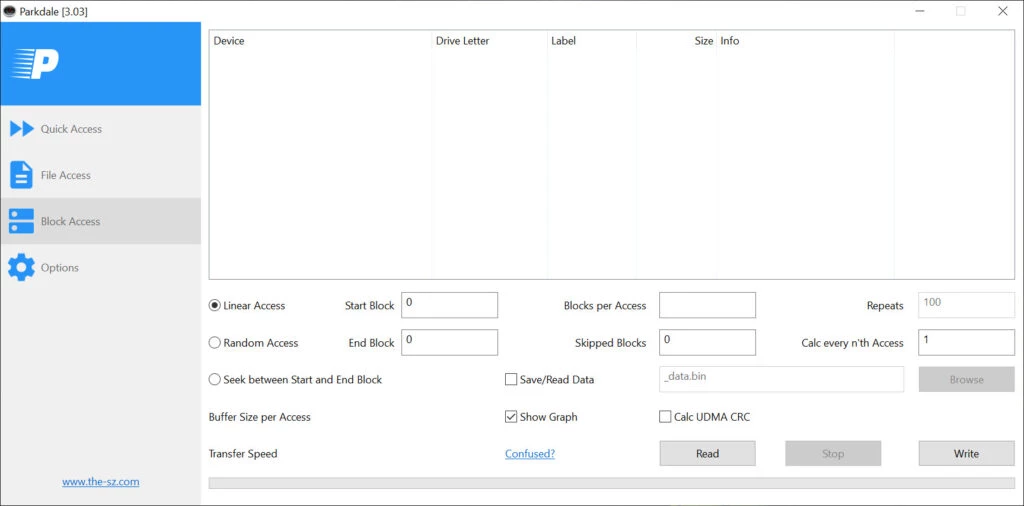
- BlockAccess Mode: For advanced hardware testing, this mode bypasses the filesystem entirely to read and write data directly to the physical disk sectors. The interface generates a graphical representation of the transfer rate over time, which helps identify thermal throttling or controller cache exhaustion during sustained workloads.
- Multi-Drive Queuing: Users can select multiple storage devices from the left-hand panel before initiating a benchmark. The utility will automatically test each selected drive sequentially and output the combined results into a single log file, allowing for direct performance comparisons across an entire system array.
- Optical Media Benchmarking: Unlike modern tools built exclusively for solid-state storage, this application retains full compatibility for testing CD-ROM and DVD drives. Users can measure the exact read speeds of optical media to determine if a disc is degrading or if an older optical drive is failing to maintain its rated spin speed.
- Command-Line Interface Support: System administrators can execute benchmarks entirely through a command prompt or batch script by utilizing specific arguments. Running the executable with the designated help flag reveals all available parameters for automating storage tests across multiple workstations.
- Data Export and Logging: All generated metrics and speed test results can be saved directly to a standard text file. This function provides IT support staff with documented proof of hardware performance, which is useful when submitting warranty claims for underperforming drives or maintaining a historical record of server speeds.
How to Install Parkdale on Windows
- Download the ZIP archive containing the Windows application files from the official vendor source.
- Locate the downloaded archive in your local folder and right-click the ZIP file to select the standard Windows extraction tool.
- Unpack the contents into a new folder on your local disk or copy them directly to a portable USB flash drive for mobile testing.
- Open the extracted folder and double-click the primary executable file to launch the application without requiring a traditional installation.
- Grant any necessary User Account Control permissions if prompted, specifically when planning to run raw sector tests that require administrative access.
- Upon the first launch, review the left panel to ensure all your connected local drives, network shares, and optical media are correctly recognized by the software.
- Select your target drive, choose your preferred testing mode from the top tabs, and click the Start button to begin your first storage benchmark.
Parkdale Free vs. Paid
Parkdale operates under a strict freeware licensing model, meaning the application is completely free to download, use, and distribute. The developer provides the entire feature set without imposing paywalls, subscription fees, or trial limitations. Users have immediate access to all testing modes, including QuickAccess, FileAccess, and the advanced BlockAccess system, immediately upon launching the executable.
Unlike many commercial benchmark utilities that restrict advanced reporting or batch testing to a premium or enterprise tier, this tool does not artificially cap functionality. There are no watermarks on the generated graphs, no restrictions on the number of drives you can test, and no locked command-line arguments. System administrators can deploy the tool across hundreds of corporate machines for hardware auditing without navigating volume licensing agreements or purchasing seat licenses. It does not display advertising banners, and it does not bundle third-party sponsored software during the launch process.
Because there is no paid version, the software relies on an independent development cycle. The developer maintains the project as a portfolio endeavor, offering periodic updates to fix bugs, refine the user interface, or add translation files. The open nature of the tool allows the community to contribute interface translations, ensuring the software remains accessible to users across different regions without requiring paid localization packs. Users looking for formal customer support contracts, guaranteed response times, or enterprise-level service agreements will not find them here, as the project is distributed as-is without commercial backing.
Parkdale vs. CrystalDiskMark vs. ATTO Disk Benchmark
CrystalDiskMark focuses heavily on providing a standardized, highly recognizable interface for reviewing solid-state drives. It offers deeply customizable testing profiles, allowing users to specify exact queue depths, thread counts, and test file sizes, which makes it a staple in hardware review publications. Users should choose CrystalDiskMark when they need to publish benchmark screenshots that are easily comparable to mainstream hardware reviews, or when they want to utilize specific visual skins to customize their testing environment.
ATTO Disk Benchmark takes a different approach by running continuous tests across a wide ramp-up of specific transfer sizes, typically starting from 512 bytes and escalating to 64 megabytes. This methodology produces a highly detailed bar chart that maps exactly where a drive controller reaches its peak throughput and where it struggles with specific I/O sizes. Hardware testers should choose ATTO Disk Benchmark when evaluating RAID array controllers, measuring specific hardware cache performance, or identifying exactly which file size causes a storage device to slow down.
Parkdale becomes the better fit when users require a single, highly portable utility that can test network servers and optical drives alongside standard solid-state hardware. While the competitors excel at specific NVMe and SATA profiling, this application's unique inclusion of a raw BlockAccess mode that bypasses the Windows filesystem entirely provides a distinct diagnostic advantage. It is the optimal choice for technicians who need a utility on a flash drive that can quickly verify a network share's throughput in one click, then analyze an external hard drive's sector performance in the next.
Common Issues and Fixes
- Random access tests taking too much time to complete. The QuickAccess mode performs intensive random read and write tests using 4KB blocks and 32 concurrent threads, which can be extremely slow on older mechanical hard drives or generic USB flash drives. You can skip these specific random access tests by holding down the Ctrl key while clicking the Start button.
- BlockAccess mode fails to execute on the main system drive. The BlockAccess test requires direct, raw access to the physical disk sectors, bypassing the standard Windows filesystem. The operating system will block this action on any partition containing active system files, so this mode should only be used on secondary drives, external storage, or unmounted partitions.
- Network attached storage does not appear in the drive list. The application relies on the Windows filesystem to identify available storage targets. Ensure your network share is fully mapped to a specific drive letter in Windows File Explorer before launching the utility, as it cannot browse raw UNC paths directly.
- The application fails to log test results for multiple drives. When queuing multiple drives for sequential testing, the software requires write permissions in its own directory to generate the log file. If you are running the executable from a read-only location like a CD-ROM or a locked network folder, move the application to a writable local directory or flash drive.
- Command-line arguments are not recognized. Standard command-line execution requires specific syntax and parameters. Ensure you are using the exact flags required by the application, which you can review by launching the executable from the command prompt with the question mark argument to display the help documentation.
Version 3.08 — 2025
- Updated Greek localization for improved language support.
- Enhanced overall application stability and performance.
- Fixed minor internal bugs and issues.