JDownloader operates as a specialized, Java-based download management utility built specifically to handle complex file transfers from hosting services, storage lockers, and streaming platforms. While standard browser tools adequately handle direct links from dedicated servers, they falter when confronted with multi-part archives, mandatory wait times, and visual captchas typically employed by consumer file-sharing sites. This application intervenes in that workflow by automating the tedious mechanics of modern file retrieval. Users simply copy large blocks of text containing mixed URLs, and the software extracts the valid links, verifies their online status, and orchestrates the entire fetching sequence without requiring constant supervision or manual clicking on individual buttons.
The distinction between a dedicated desktop client and basic browser extensions becomes evident when managing heavy queues. Transferring a massive digital library scattered across hundreds of separate links requires constant connection monitoring, error recovery, and bandwidth management. If a specific hosting service enforces a thirty-minute wait period between free transfers, this utility automatically pauses the queue, monitors the countdown, and resumes the exact moment the server permits access. Furthermore, the application relies on a modular, open-source architecture maintained by a vast community of contributors who constantly update the internal site parsers. When a popular storage locker alters its webpage structure to break automated tools, the client receives a silent background update, ensuring that the link extraction mechanics continue to function normally.
Beyond handling standard lockers, the software organizes complex media fetches from popular video and audio platforms. Instead of pulling a single compressed video file, it analyzes the target URL and breaks down the available streams into selectable components, allowing users to isolate an audio track, choose a specific video resolution, or secure the associated subtitle file. By consolidating premium account management, archive extraction, and strict traffic scheduling into a single Windows interface, the application removes the friction from bulk file acquisition. It targets advanced users, data archivists, and anyone who routinely processes heavy fragmented files that demand more control than a typical browser affords.
Key Features
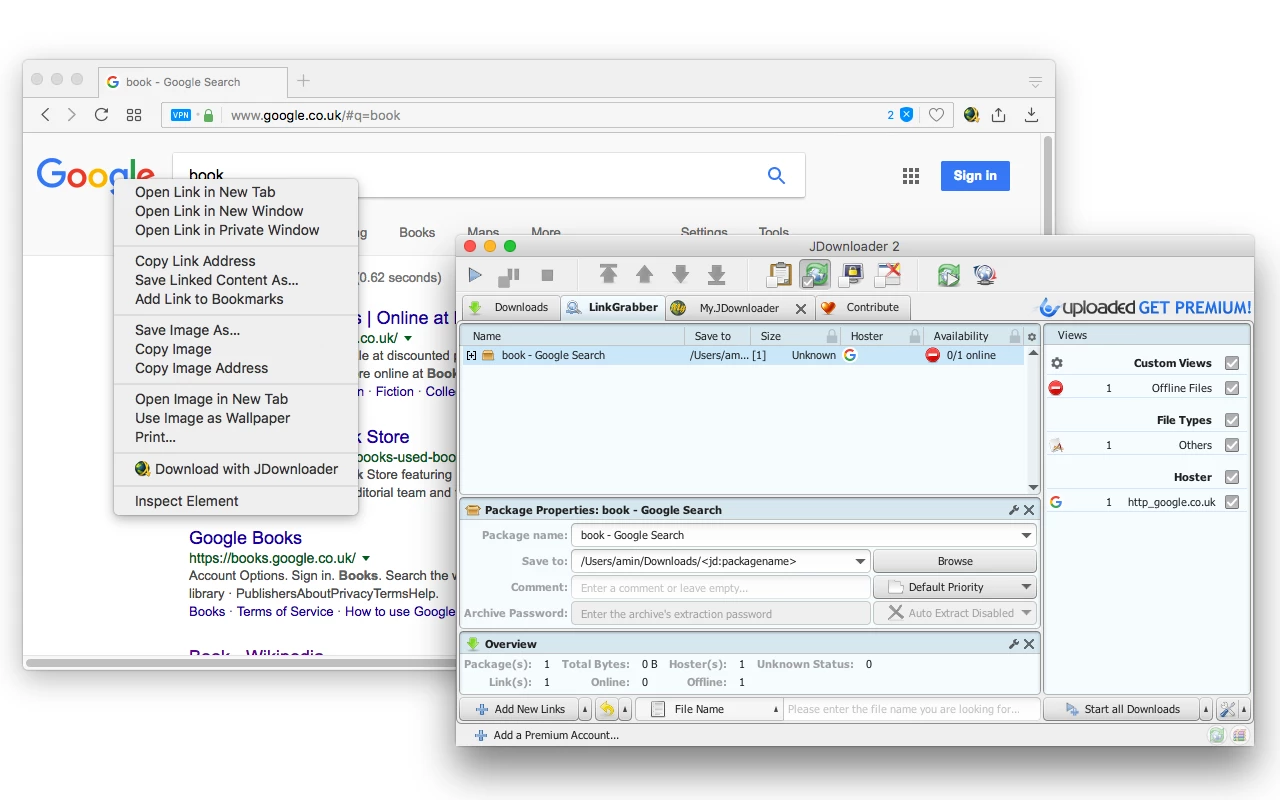
- Clipboard Monitoring and LinkGrabber: Once activated, the software runs quietly in the system tray and actively monitors the Windows clipboard for copied text. Whenever it detects recognized URL structures, it pulls those links into the LinkGrabber interface, queries the remote servers for file names, online availability, and exact file sizes, and displays this metadata so users can organize their queue before initiating any actual data transfers.
- Automated Captcha Recognition: Fetching files from free tiers of hosting platforms often requires solving visual puzzles to prove human interaction. The application utilizes an integrated AntiCaptcha module to handle standard text and image puzzles automatically, and for more complex visual challenges, it routes the prompt directly to an external browser window or connects with external solving APIs configured within the user settings.
- Premium Account Management: Navigating multiple paid subscriptions across different storage providers creates significant friction in a standard browser environment. The built-in Account Manager lets users input their authentication credentials for dozens of supported hosts directly into the interface, allowing the utility to bypass free-tier speed limits and manage daily bandwidth quotas automatically without requiring manual website logins.
- Automatic Archive Extraction: Managing multi-part RAR or ZIP archives split across numerous hosted links requires substantial manual assembly. Upon completing the final segment of a split file sequence, the internal Archive Extractor recombines the pieces, inputs required passwords from a saved master list, unpacks the contents into a designated folder, and deletes the original compressed volumes to conserve local disk space.
- Bandwidth Control and Scheduling: To prevent large transfer queues from degrading local network performance during active working hours, the interface provides strict traffic shaping tools. Users can define precise speed limits in kilobytes per second, establish maximum concurrent connections per host, and configure a built-in scheduler to pause activity during the day and resume intensive network transfers overnight.
- Media Stream Extraction: When provided with a URL from a supported video platform, the application parses the available streams and presents a list of distinct components rather than a fixed file. Users select exact video resolutions, isolate the audio track as an independent M4A or MP3 file, download the thumbnail image, or grab the subtitle file by expanding the platform link within the main queue.
- Headless Remote Control: For users maintaining dedicated media servers or network-attached storage on Windows setups, the software accommodates remote management through the MyJDownloader web ecosystem. By linking the desktop client to a central account, users can access a web dashboard or mobile application to paste links, monitor active queues, and adjust bandwidth limits from entirely different physical locations.
How to Install JDownloader on Windows
- Download the official Windows installer package directly from the verified vendor website to ensure you receive the most current core files.
- Execute the downloaded setup file, which requires standard administrative privileges to write data to the primary Windows disk.
- The installer will check for the Java Runtime Environment; if your system lacks a compatible version, the setup process will deploy a bundled Java runtime tailored specifically for the application to prevent system conflicts.
- During the initial setup screens, carefully review all promotional software offers. The standard web installer frequently includes third-party advertisements, which you must manually decline by selecting the "Skip All" or "Decline" buttons to prevent unwanted toolbar or utility additions.
- Choose your destination directory on the local drive. The default path typically installs into the hidden AppData folder for the current user, but you can redirect the installation to a secondary storage drive or custom program folder if preferred.
- Select your preferred file associations, enabling the application to automatically capture standard container formats like DLC or CCF directly from the Windows file explorer when double-clicked.
- Complete the installation process and launch the desktop client. Upon first run, the software connects to the official update server and spends several minutes downloading the latest hoster plugins, language packs, and core files before presenting the main interface.
- Navigate to the Settings panel immediately to define your primary download destination folder and input any known archive passwords into the extraction module before pasting your first batch of links.
JDownloader Free vs. Paid
JDownloader operates under an open-source development model and is available entirely free of charge. The core application does not restrict transfer speeds, limit the number of active queues, or place features behind a premium subscription wall. The development team finances the project through optional user donations and by bundling third-party promotional software within the standard Windows web installer. Users who wish to avoid the bundled advertisements during setup can seek out the clean, offline installer officially provided in the developer forums.
It is crucial to distinguish between paying for this software and paying for the hosting services it interacts with. While the desktop client itself costs nothing, the third-party file storage websites you download from enforce strict free-tier limits, including throttled bandwidth, mandatory wait times between files, and daily data caps. To achieve maximum network speeds, users must purchase premium subscriptions directly from those specific hosting providers, not from the application developers.
Once a user purchases a premium account from a supported storage locker, they input those credentials into the built-in Account Manager. The application then uses that authentication to pull files at the maximum speed permitted by the hoster. Additionally, the MyJDownloader remote control web service, which allows users to manage their desktop client from a separate device, is also provided as a free service, ensuring that advanced network setups do not incur hidden operational costs.
JDownloader vs. Internet Download Manager vs. Free Download Manager
Internet Download Manager (IDM) operates as a premium, paid utility that focuses heavily on raw transfer speed and deep browser integration. It excels at capturing standard direct links by aggressively splitting individual files into smaller chunks and downloading them simultaneously. However, IDM struggles significantly with complex file lockers, as it lacks the specialized parsers required to navigate countdown timers, visual captchas, and multi-part archive extraction natively. IDM requires a purchased license after a brief trial period, whereas the Java-based alternative relies entirely on an open-source framework.
Free Download Manager (FDM) provides a clean, modern interface and serves as an excellent general-purpose utility for fetching standard web links and BitTorrent files. Unlike IDM, FDM is completely free, making it easily accessible for standard users. While it handles basic file scheduling and bandwidth limits effectively, it does not possess the deep plugin architecture needed to interact with heavily restricted storage lockers, nor does it specialize in automated premium account management or sophisticated link grabbing from heavy text blocks.
Users should choose JDownloader when their primary workflow involves extracting files from commercial storage lockers, bypassing hoster wait times, handling captchas, and managing split archives. While IDM dominates in raw speed for simple direct links and FDM offers excellent BitTorrent support, neither competitor matches the sheer automation capabilities of the Java-based client when dealing with massive, fragmented libraries stored across various third-party file hosts.
Common Issues and Fixes
- Links display an "Offline" or "Plugin Defect" status. This frequently occurs when a file hosting website alters its webpage layout, breaking the internal scraper. To fix this, click the update button in the top menu bar to force a manual refresh, as the developer community usually pushes revised plugins within hours of a hoster changing its site structure.
- Automatic archive extraction fails with a password error. When downloading split RAR or ZIP files secured by the original uploader, the internal extractor cannot recombine the parts without the key. Navigate to the Settings menu, select the Archive Extractor tab, and add the required password to the master list so the software can attempt it automatically upon completion.
- Captcha dialogs do not appear or loop infinitely. Fetching files from heavily restricted free tiers sometimes triggers complex visual puzzles that the application cannot process internally. Install the official browser extension, which routes the complicated visual challenges directly to your primary web browser, allowing you to solve them manually before the transfer resumes.
- Downloads stall at very low speeds despite a fast internet connection. This behavior stems from the strict free-tier limitations imposed by the specific hosting service rather than a malfunction in the application itself. Authenticating a premium account for that specific hoster in the Account Manager, or utilizing a supported multi-hoster service, resolves the bottleneck and restores maximum network speeds.
Version Latest — 2025
- Enhanced Video Platform Support: Resolved critical download interruptions and throttling issues for major streaming sites, including updated decryption handling for YouTube playlists and Shorts.
- Plugin Definition Updates: Deployed extensive compatibility patches for popular file hosting services (such as Rapidgator, 1fichier, and Real-Debrid) to address changes in their API and captcha challenges.
- Core Stability Improvements: Optimized the link crawler engine for faster parsing of large link lists and fixed minor memory leaks that occurred during prolonged sessions.
- FFmpeg Integration: Updated the internal media processing libraries to ensure smoother merging of video and audio streams for high-resolution downloads.
- Bug Fixes: Addressed various user-reported issues, including fixes for connection timeouts on specific ISPs and improved clipboard monitoring responsiveness.