Anyone who has ever tried to move terabytes of data using the standard Windows Explorer knows the anxiety of watching a progress bar freeze halfway through. Moving massive folders full of varied file types—ranging from small text documents to video assets—frequently exposes the limitations of the default operating system file handler. A single locked file, a momentary network drop, or a corrupted sector can crash the entire operation, leaving users guessing which files actually transferred and which were lost. TeraCopy Pro replaces this default behavior with a highly specialized, intelligent transfer engine designed explicitly for data integrity and uninterrupted operation. The application installs at the system level, intercepting typical drag-and-drop actions and keyboard shortcuts to route them through its own optimized pipeline.
For IT professionals handling system migrations, video editors archiving raw footage, or home users managing vast server backups, a standard transfer utility is simply too brittle. TeraCopy Pro introduces dynamic buffering and asynchronous read and write processes that maximize the physical limits of modern solid-state drives and mechanical hard disks. Instead of relying on blind faith, the software operates with strict oversight. It actively identifies problem files during a transfer, skips them to keep the queue moving, and completes the bulk of the workload. Once the main job finishes, it presents an interactive log detailing exactly what went wrong, allowing users to retry only the failed items. This shift from a fragile, all-or-nothing copy process to a resilient, verifiable workflow saves countless hours of troubleshooting.
Beyond simple error handling, the software brings forensic-level certainty to local data management. It performs cryptographic checksum verification on the fly, hashing the source and destination files to guarantee byte-for-byte exactness without relying on cloud-based syncing tools that consume massive internet bandwidth. When moving sensitive client backups or irreplaceable personal media, knowing that the destination data matches the source perfectly provides essential peace of mind. By blending native operating system integration with advanced diagnostic tools, TeraCopy Pro transforms a mundane system task into a highly reliable data management operation entirely on local hardware.
Key Features
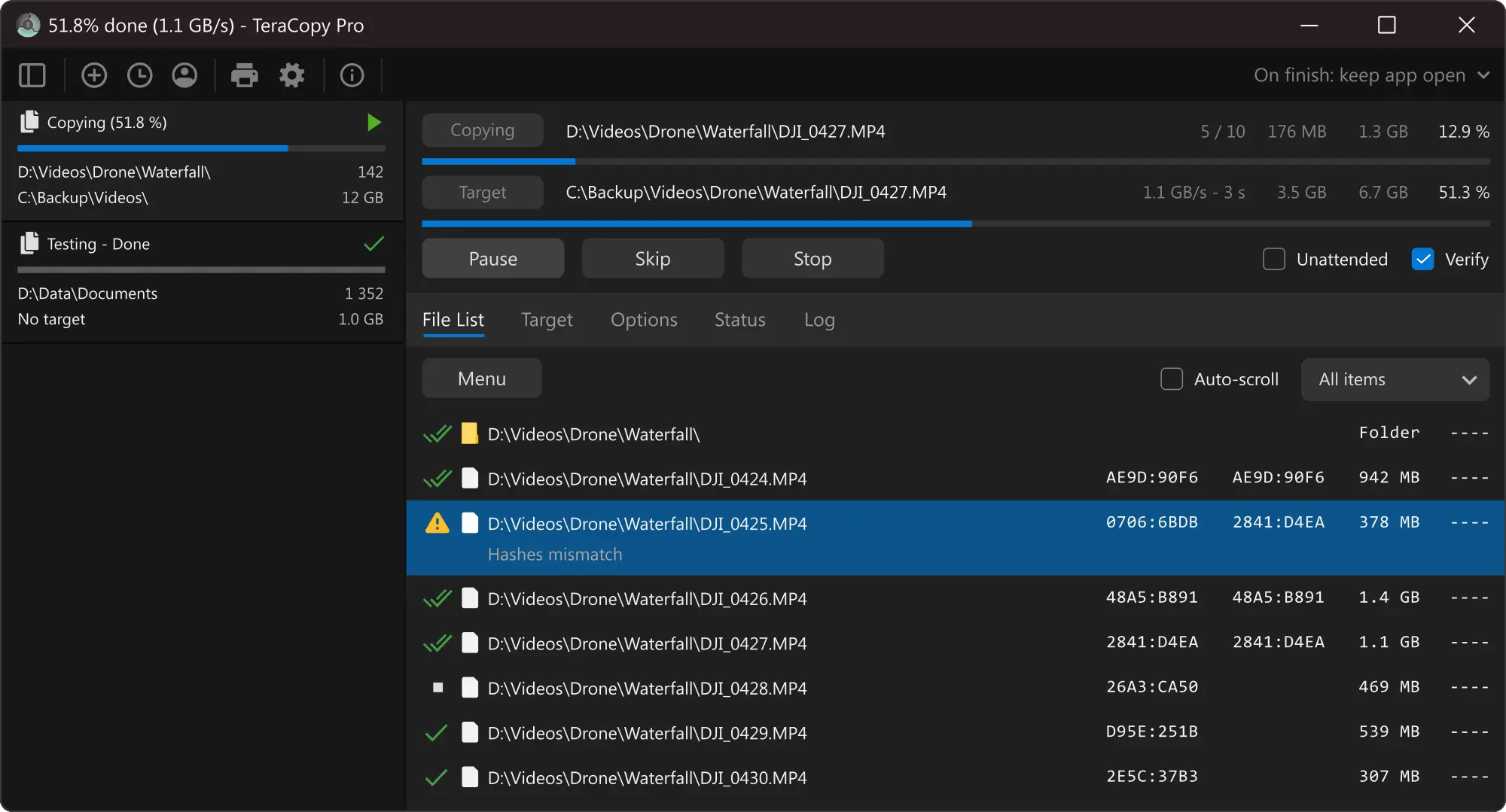
- Interactive File List and Queuing: During a transfer, the interface displays an active, scrolling log of file names, individual sizes, and current status markers. The Pro tier allows users to pause the queue and manually edit this list, removing unnecessary directories or specific file extensions before the engine processes them, saving disk bandwidth.
- Intelligent Error Recovery and Skipping: When the engine encounters a locked system file, a read error, or a momentary network timeout, it initiates a retry protocol. If the file remains inaccessible, the software skips the specific item and proceeds with the rest of the directory, ensuring that a single corrupted image does not abort an overnight backup job.
- Cryptographic Checksum Verification: To ensure data integrity, the application calculates hashes immediately after a file reaches the destination drive. Users can select from 17 different algorithms, including CRC32 for speed, or SHA-256, BLAKE3, and xxHash3 for security-grade verification, with the interface clearly flagging any hash mismatch.
- Native Windows Shell Takeover: The utility binds directly to the operating system's interface, meaning users do not need to launch a separate application window to initiate a transfer. Simply dragging and dropping a folder on the desktop or pressing the standard Ctrl+C and Ctrl+V keyboard shortcuts triggers the custom engine automatically.
- Advanced Multi-Threading Optimization: To capitalize on the bandwidth of modern NVMe solid-state drives, the engine utilizes advanced multi-threading capabilities. By directing more than two simultaneous CPU threads, it processes parallel read and write tasks, drastically reducing the time it takes to move thousands of small files across local storage buses.
- Multi-Target Backup Output: Available exclusively in the Pro tier, this feature allows users to define several destination paths for a single source. The engine copies the data to multiple physical drives or network locations simultaneously, performing independent checksum verifications for each target.
- Transfer Report Exports: Upon completion of a large workload, administrators can export detailed operation logs. The software generates these reports in HTML, CSV, or TXT formats, detailing successful transfers, skipped items, and the exact hash values of every file for data compliance audits.
How to Install TeraCopy Pro on Windows
- Download the official Windows installer package directly from the Code Sector website or retrieve the application from the Microsoft Store to ensure you receive an untampered, digitally signed executable.
- Launch the downloaded setup executable, clicking Yes when the Windows User Account Control dialog prompts you to grant the necessary administrative privileges for system-level integration.
- Review and accept the end-user license agreement, then select the local directory path where the application files will reside, typically leaving the default Program Files path unchanged.
- During the component selection phase of the wizard, verify that the option to register the utility as the default Windows copy handler is checked; this is necessary to intercept standard drag-and-drop actions.
- Choose whether to associate the software with common checksum file extensions, such as .md5, .sha, and .sfv, which allows the application to automatically verify external data archives when you double-click them.
- Click Install to write the core files to your disk, then click Finish to close the wizard. The background service will launch silently and sit in the Windows system tray.
- To test the integration, right-click any local file and look for the newly added custom application icon in the context menu, or simply drag a file to a new folder to see the custom progress window appear.
- If you purchased a commercial license, open the main application window, click the settings gear icon, and enter your alphanumeric registration key into the designated field to unlock advanced features like HTML log exports and multi-target copying.
TeraCopy Pro Free vs. Paid
The standard version of TeraCopy is provided completely free of charge for personal, non-commercial use. This tier is not a time-limited trial, nor does it impose artificial speed caps or insert watermarks into your data. Home users moving personal media libraries, consolidating hard drives, or performing routine backups receive the full benefit of the optimized transfer engine, the native Windows interface integration, and the critical cryptographic checksum verification features. The free edition also includes standard error recovery and basic queue management, making it highly capable for everyday desktop file management tasks.
TeraCopy Pro operates on a perpetual license model, requiring a one-time payment of $29.95. Purchasing this tier is mandatory for any commercial environment, business, or government organization. Beyond the legal commercial license, the Pro upgrade unlocks a specific set of advanced administrative features designed for power users and IT professionals who handle high-volume data workflows. The software requires a license key input to activate these features, and there are no recurring subscription fees to maintain access to the core utility.
The most notable technical additions in the Pro tier include advanced multi-threading capabilities that push past the two-thread limit, drastically speeding up transfers of massive directories containing thousands of small files. Pro users also gain the ability to copy a single source folder to multiple target destinations simultaneously, which streamlines redundant backup workflows. Furthermore, the paid license unlocks the ability to export detailed transfer logs in CSV or HTML formats, edit the active queue to remove pending files, and establish persistent ignore lists that automatically exclude specific file extensions from all future transfers. Volume pricing discounts scale up based on the number of seats required.
TeraCopy Pro vs. FastCopy vs. Ultracopier
FastCopy is heavily optimized for absolute raw transfer speed and minimal resource consumption. It relies on advanced asynchronous I/O and direct operating system calls to push data as fast as the physical storage hardware allows. In synthetic benchmarks, FastCopy often finishes moving millions of tiny files faster than competing utilities. However, FastCopy utilizes a purely standalone, somewhat dated user interface. It does not natively replace standard Windows keyboard shortcuts or mouse actions out of the box, meaning users must manually open the FastCopy window, select a source, and define a destination path for every job.
Ultracopier is an open-source alternative that focuses heavily on granular operational control and cross-platform compatibility. It provides users with deep configuration options, including the ability to set strict speed limits so that a background transfer does not consume all available disk bandwidth and slow down active applications. Ultracopier also features a plugin architecture for custom behaviors. Despite its deep technical flexibility, Ultracopier relies on a clunky, overly complex graphical interface that can be confusing to navigate, and its error logging is less intuitive for quickly identifying and retrying failed files.
TeraCopy Pro provides the most practical balance of data safety, transfer speed, and user convenience for Windows desktop environments. While FastCopy might win strict speed benchmarks and Ultracopier offers extreme speed throttling, TeraCopy Pro operates automatically in the background of normal daily tasks. By natively taking over the default Windows copy handler, it ensures that every drag-and-drop action benefits from advanced error recovery and checksum verification without requiring extra steps. Its clean interactive log and straightforward retry mechanics make it the superior choice for users who prioritize data integrity and workflow efficiency over raw benchmarking.
Common Issues and Fixes
- Network drive disconnects aborting the transfer queue. When transferring massive directories to a NAS over Wi-Fi, momentary network drops can cause the destination path to become unavailable. To fix this, map your network storage using a direct UNC path instead of a mapped Windows drive letter, and simply wait for the network to stabilize before clicking the retry button on the interactive log to process only the skipped items.
- Third-party extraction tools bypassing the custom copy handler. If you extract a compressed archive using 7-Zip or WinRAR directly to a final destination folder, the extraction software uses standard Windows APIs, bypassing the custom transfer engine entirely. To ensure proper hash verification, extract the archive to a local temporary folder on your main drive first, then manually drag and drop the uncompressed files to their final destination.
- Hash mismatch warnings on the destination drive. If the interactive log displays red checksum errors after a transfer finishes, it means the copied files are physically different from the source data. Delete the corrupted files from the destination drive, temporarily disable any aggressive third-party antivirus software that might be scanning files in transit, and initiate the transfer again to rule out hardware failure.
- The interactive progress window fails to appear on drag-and-drop. Occasionally, the background service loses its hook into the Windows graphical interface, causing standard transfers to revert to the default operating system dialog. Open the main application settings, toggle the default copy handler option off, apply the changes, and then toggle it back on to refresh the graphical hooks.
- Access Control Lists and permissions failing to copy. Moving directories between entirely different domain environments or to external drives formatted as exFAT can strip advanced Windows security permissions. Ensure your destination drive is formatted as NTFS, then open the application's configuration panel and verify that the specific metadata option to copy security information is actively checked before initiating the transfer.
Version 4.0 RC 2 — September 2025
- Introduced a new queuing system to better manage multiple simultaneous copy operations.
- Added a dedicated TeraCopy entry to the modern Windows Explorer context menu.
- Improved handling and support for extremely long file names and directory paths.
- Refined the light theme interface to provide better contrast and visibility.
- Enhanced compatibility and stability when working across multiple monitor setups.