reaConverter Pro serves as an industrial-grade batch image processing application engineered to convert, edit, and organize massive libraries of digital assets. Photographers, architectural firms, and archiving departments use this desktop tool to standardize thousands of files in a single pass without relying on browser-based processing. By operating entirely locally on a Windows machine, the application provides strict data privacy for sensitive corporate files while bypassing the severe upload bottlenecks inherent to web-based converters. This local execution ensures that massive visual databases can be transformed as fast as the local storage drive can read and write the data.
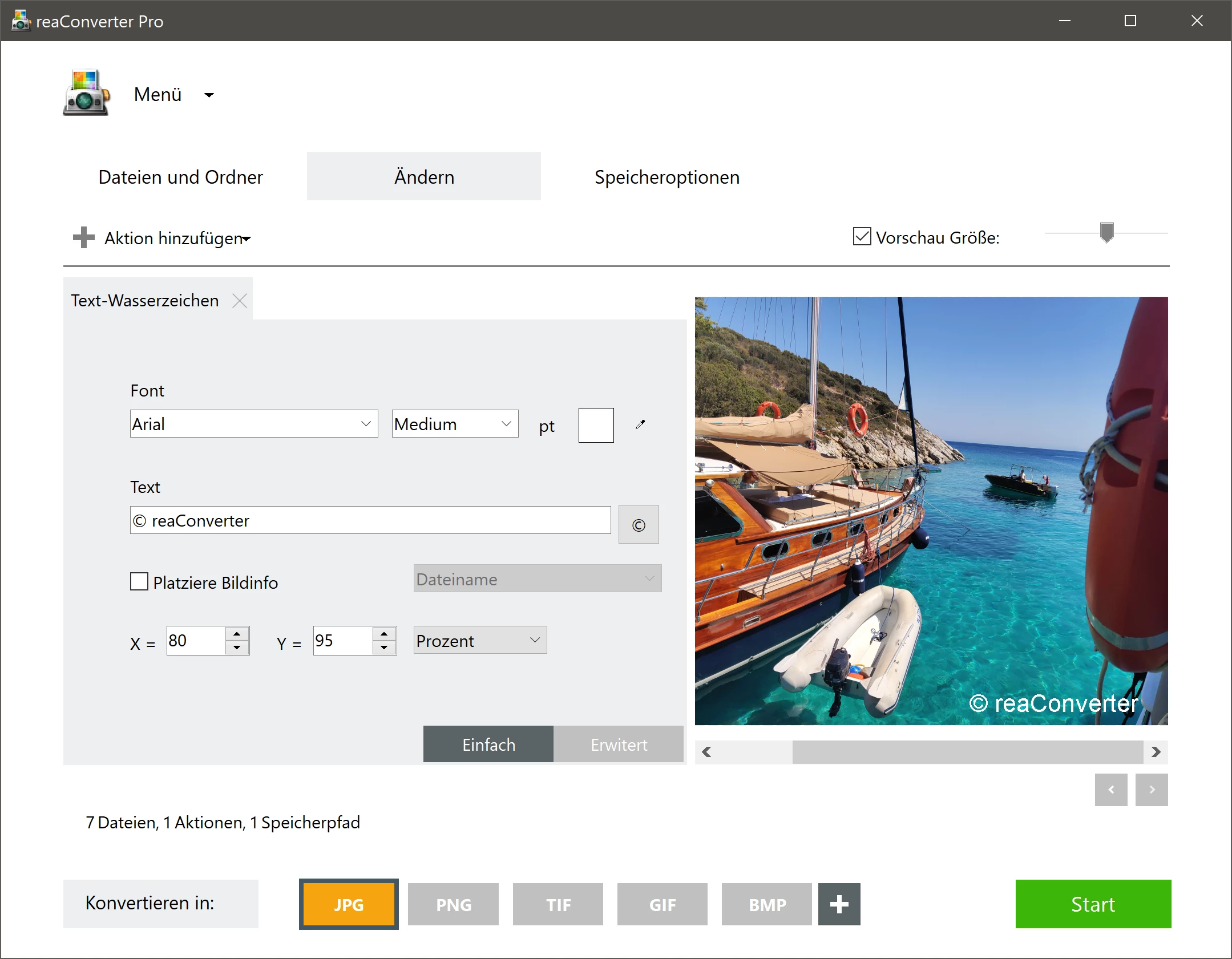
Rather than just handling common web graphics, this utility decodes over 600 distinct read formats, spanning from proprietary camera formats to specialized medical imaging files. Users build customized transformation workflows that not only change file extensions but also apply specific resizing rules, color profile adjustments, and visual watermarks simultaneously. This procedural approach to image management turns hours of manual photo editing into a fully automated background task, making it a critical asset for high-volume content pipelines. Instead of requiring users to open heavy authoring programs to manually export each asset one by one, the converter handles the heavy lifting directly from the file system.
The desktop environment gives the software deep access to the operating system, allowing it to monitor local directories and trigger conversions automatically as new files arrive. This level of hardware access means the software can utilize multi-core processing to chew through heavy workloads, such as converting architectural blueprints into standard portable document formats or rendering out thousands of high-resolution product photos for an e-commerce catalog. The focus remains strictly on utility and mass operations, stripping away the distraction of manual canvas painting tools in favor of strict, rule-based automation.
Key Features
- Massive Format Support: The engine decodes over 600 read formats and writes to over 60 output types. This allows direct conversion of specialized files like CAD drawings, DICOM medical images, vector graphics, and proprietary camera raw formats into standard JPEGs, PNGs, or PDFs.
- Automated Watch Folders: Users can configure the application to monitor specific system directories in the background. As soon as a new file is dropped into a designated watch folder, the software automatically applies a predefined chain of edits and conversions, moving the final output to a separate destination. This allows teams to set up network drop folders where raw assets are automatically standardized for client delivery without manual intervention.
- Advanced Editing Chains: Before converting a file, the tool can execute a sequence of alterations such as cropping, resizing by exact pixels or percentages, applying color correction, and overlaying graphical watermarks with alpha channel transparency. These customized edit chains can be saved as profile presets to ensure visual consistency across multiple batches of assets over time.
- Command-Line Interface: Server administrators and developers can execute conversions entirely through a command-line utility without ever opening the graphical window. This allows the processing engine to be integrated into existing automated scripts, continuous integration pipelines, or triggered by external applications for fully headless operation.
- Context Menu Integration: The software embeds itself directly into the Windows Explorer right-click menu for immediate access. Users can highlight multiple files or an entire folder, open the context menu, and initiate immediate format conversions or resizing operations. This bypasses the need to navigate through the main application interface for quick, everyday file transformations.
- Multi-Core Processing: To accelerate rendering times for massive archives, the engine distributes conversion tasks across multiple CPU threads. This hardware utilization significantly reduces the time required to process thousands of high-resolution files compared to older single-threaded converters, making full use of modern multi-core processor architectures.
- Metadata Retention and Management: When processing photographs, the application optionally preserves original EXIF and IPTC metadata from the source files. This data can also be utilized dynamically during the conversion process to execute advanced renaming conventions, ensuring that camera settings, dates, and copyright information survive the transition to a new file format.
How to Install reaConverter Pro on Windows
- Navigate to the official vendor website to acquire the offline Windows installer package, ensuring you download the executable directly to your local storage drive.
- Locate the downloaded executable in your downloads folder and launch the setup process, accepting the User Account Control prompt to grant the installer administrator privileges.
- Review the end-user license agreement presented on the initial screen, accept the terms to proceed, and click next to reach the destination folder selection.
- Choose the installation path on your local storage drive, leaving the default directory as is unless you have a specific secondary drive dedicated to software installations.
- Select the additional component options when prompted, making sure to leave the Windows Explorer context menu integration enabled if you plan to use right-click conversion shortcuts.
- Click the install button to begin extracting the core application files, command-line utilities, and formatting profiles to your system storage.
- Once the progress bar completes, exit the installer and launch the application from the newly created desktop shortcut or start menu entry.
- Upon the first launch, a prompt will appear asking you to enter a purchased license key or select the evaluation option to start the 15-day trial period.
reaConverter Pro Free vs. Paid
The developer structures the software into distinct tiers based on the level of automation and format support required by the user. The entry point is reaConverter Lite, which operates as a completely free tool focused strictly on basic context-menu conversions for common consumer image formats. This free tier lacks the advanced batch automation capabilities, specialized file format support, and deep editing features, making it suitable primarily for casual home users who occasionally need to change a file extension.
For serious workloads, the Standard edition requires a paid perpetual license and unlocks access to the full library of over 600 file formats and complex batch editing workflows. It is priced at a flat rate for a single user license, providing a massive upgrade in capability over the free tier. However, the Standard tier still excludes certain background automation features, meaning users must manually initiate their conversion batches through the main graphical interface each time they need to process files.
The Pro edition sits at the top of the standard pricing model and targets power users, IT administrators, and corporate environments. Purchasing the Pro license activates the Command-line Interface, dynamic link library support, and the background Watch Folders feature, allowing the software to operate entirely unattended. Enterprise users who need to deploy the software on a centralized processing machine can also purchase a dedicated Server license.
Unregistered users can evaluate the full capabilities of the Pro or Standard features via a 15-day free trial. During this evaluation period, the software restricts batch processing to a limit of five files per conversion run. This limitation allows potential buyers to verify that their specific obscure file formats and editing chains work correctly before committing to a purchase, without allowing the trial to be used for massive one-off archival projects.
reaConverter Pro vs. XnConvert vs. Zamzar
XnConvert operates as a dedicated desktop batch image processor that excels at handling standard raster formats and offers a highly visual interface for creating step-by-step edit chains. It is widely favored by individual users because it is provided at no cost for personal, non-commercial use, making it highly accessible. However, it focuses heavily on standard photography and web graphics, lacking the deep support for vector formats, architectural CAD files, and complex document types found in enterprise-focused applications. It also relies on manual execution rather than automated folder monitoring.
Zamzar takes a completely different approach as a cloud-based file conversion service that operates entirely within a web browser, requiring no local software installation. It is incredibly convenient for quick, one-off file transformations on locked-down office machines where installing new desktop applications is strictly prohibited. The downside is that Zamzar restricts maximum file sizes on its free tier, requires a constant internet connection, and forces users to upload their potentially confidential files to a third-party server, which violates strict corporate data privacy policies.
reaConverter Pro is the better fit when organizations need to process thousands of heavy, specialized files entirely offline while maintaining strict data control. Its deep system integration through automated Watch Folders and command-line execution makes it the preferred tool for businesses that require unattended conversion pipelines. The ability to convert esoteric file types without relying on expensive authoring suites or cloud subscriptions makes it highly practical for dedicated production environments.
Common Issues and Fixes
- Problem: The Windows Explorer right-click menu does not show the expected conversion options. This usually occurs if the shell integration was skipped during the initial setup or if the registry keys were disabled by an aggressive system update. To fix it, open the application's configuration settings, locate the context menu options, and toggle the integration off and on again.
- Problem: Background Watch Folders fail to trigger conversions when new files are added. This happens when the application lacks the necessary operating system permissions to read the source directory or write to the destination path. Verify that the software is actively running in the background and that folder permissions are set to allow local application access.
- Problem: Massive batch jobs take an unusually long time to process. Slow performance during heavy operations is frequently linked to storage drive bottlenecks rather than CPU limits. Move the source files to a local solid-state drive before processing, and ensure that the multi-core execution setting is explicitly enabled in the program preferences.
- Problem: Specific RAW camera files appear distorted or trigger an unrecognized format error. Proprietary camera formats change frequently as hardware manufacturers release new camera bodies. Fix this by ensuring the application is fully updated, which includes the latest codec profiles necessary to decode newly released proprietary formats correctly.
- Problem: The application stops processing after converting exactly five files. Users often confuse this intentional trial limitation with a software crash or bug. To resolve this, you must process large jobs in very small manual batches or purchase and enter a valid license key to unlock unrestricted processing limits.
Version 8.0.172 — December 2025
- Added support for new RAW image formats produced by modern digital cameras.
- Improved performance of batch processing engine to operate faster while consuming less system memory.
- Enhanced command-line scripting capabilities for better automation and integration.
- Fixed compatibility issues to ensure better stability on Windows 11 version 24H2.
- Resolved various minor bugs and implemented small user interface improvements.