ISO Workshop Pro by Glorylogic is a specialized desktop utility designed to handle every aspect of disc image management on Windows systems. This software serves as a centralized hub for creating, burning, and manipulating virtual disc files, providing a reliable bridge between physical optical media and digital storage. As modern desktop environments continue to move away from built-in optical drives, the need to properly archive legacy discs, extract data from downloaded archives, and create bootable system installation media remains a daily requirement for system administrators and power users. This utility strips away bloated interfaces in favor of a straightforward, six-button main menu that directs users precisely to the task they need.
Users looking to digitize audio CDs, back up aging DVDs, or prepare custom operating system images rely on desktop-based image managers for predictable local processing. Cloud services and browser-based tools cannot interface directly with local optical drives or handle large, raw sector-by-sector data copies efficiently. By executing these tasks locally, this application ensures that read and write processes operate at the maximum speed supported by your hardware, without internet dependencies or unexpected background telemetry. The tool requires minimal memory during operation, preventing system slowdowns even when verifying large Blu-ray disc burns in the background.
Choosing a dedicated image utility over a generic file archiver provides distinct advantages when working with specific optical formats. While a standard archive tool might open an ISO file, it lacks the specialized routines required to translate sector data into a bootable format or burn it back to a physical disc with the correct file system structure. This utility understands the technical requirements of ISO 9660, UDF, and Joilet file systems, ensuring that backups retain their original folder hierarchies and boot sectors. Whether the goal is protecting fragile installation discs from scratches or converting obscure image formats into universally recognized files, the application focuses entirely on practical, concrete imaging workflows.
Key Features
- Make Standard and Bootable ISOs: The application includes a dedicated "Make ISO" module that compiles local files and folders into a single disc image. Users can choose between standard data structures or specify a local boot record file to generate bootable media for system recovery or OS installation. The interface allows manual selection of the target file system, ensuring the resulting image behaves exactly like a factory-pressed disc when mounted or burned.
- Extract Disc Images Without Mounting: Through the "Extract Files" menu, users can browse the internal folder structure of a disc image just like a standard directory tree. This eliminates the need to install third-party virtual drive drivers simply to retrieve a single document or setup executable from a downloaded archive. The extraction tool supports an extensive array of formats including ISO, BIN, NRG, MDF, and CDI, covering almost every historical and modern disc dump standard.
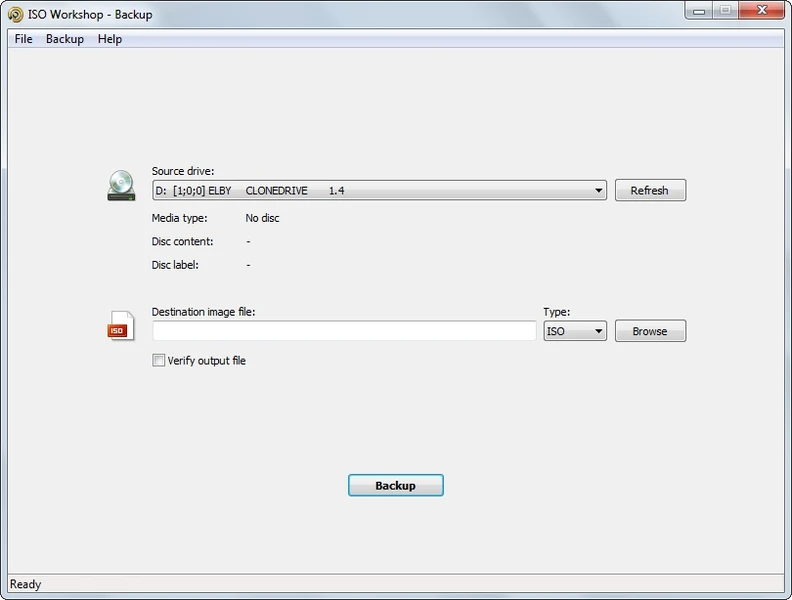
- Direct Disc Backup: The "Backup Disc" function performs a direct read of optical media, saving an exact digital replica to a local hard drive. This tool processes standard data CDs, movie DVDs, and high-capacity Blu-ray discs, generating either an ISO or a CUE/BIN pairing depending on the source media type. Sector-by-sector copying guarantees that hidden files, specific directory structures, and original disc labels remain intact in the resulting backup.
- Native Image Burning: Unlike minimal imaging tools that only create files, this software incorporates a native burning engine to write existing images back to blank media. The "Burn ISO" tool detects connected CD-R, DVD-R, DVD+R DL, and BD-RE drives automatically. It provides granular control over the writing speed to prevent buffer underruns and includes a post-burn verification pass to confirm that the written data matches the source file exactly.
- Format Conversion Engine: Because different authoring environments utilize proprietary image formats, the "Convert ISO" feature acts as a universal translator for disc files. Users can input older formats like Nero's NRG or CloneCD's IMG and rewrite them into the universally compatible ISO standard or the raw BIN format. This conversion happens locally and quickly, ensuring that legacy disc images remain usable on modern operating systems without hunting down discontinued authoring suites.
- Optical Drive Erasing: For environments that still rely on rewritable optical media for temporary backups, the application provides a straightforward utility to blank these discs. It supports both quick erasing, which simply removes the file table to make the disc appear empty, and full formatting, which physically overwrites the existing data blocks. This targeted function keeps rewritable DVD-RW and BD-RE discs ready for the next backup cycle without requiring a separate formatting tool.
How to Install ISO Workshop Pro on Windows
- Download the official Windows installer package from the authorized vendor website or designated software repository.
- Locate the downloaded executable in your local directories and double-click to launch the setup wizard. You may need to confirm a Windows User Account Control (UAC) prompt to allow the installer to make local system changes.
- Review and accept the end-user license agreement presented by Glorylogic to proceed with the installation steps.
- Select the destination folder on your local drive. The installer defaults to the standard Program Files directory, which is recommended for proper user permission handling, but you can choose a secondary drive if desired.
- Review the file association options during the setup flow. Checking these boxes configures Windows to use the application as the default handler for specific extensions like .iso and .bin, allowing you to open them directly from File Explorer.
- Choose whether to create a desktop shortcut or Start menu entry for quick access to the main interface.
- Click the final install button to copy the application files to your system. The process typically takes only a few seconds due to the small footprint of the software.
- Click finish to exit the setup wizard. You can now launch the application immediately; no mandatory system reboot is required before starting your first disc imaging task.
ISO Workshop Pro Free vs. Paid
Glorylogic utilizes a dual-tier distribution model to separate casual home users from business environments. The standard version of the software is available at no cost for personal, non-commercial use. This free tier provides access to the core modules, allowing home users to create, extract, burn, and convert disc images without hitting artificial file size limits or encountering intrusive watermarks on their processed files. For individuals archiving a personal CD collection or building a home recovery drive, the free tier supplies all the necessary mechanical functions.
The Professional tier targets commercial users, businesses, and enterprise environments where software licensing compliance is legally required. Purchasing the Pro version grants the legal right to deploy the utility on corporate workstations and use it for business-related tasks. The pricing model is structured around a perpetual license, meaning users pay a one-time fee of approximately $30 rather than committing to a recurring monthly or annual subscription. This one-time payment secures the current software release indefinitely.
Beyond licensing compliance, the Professional version entitles the license holder to priority technical support directly from the developer. While the feature set between the personal and commercial versions remains functionally identical, the paid tier ensures that organizations have a direct line to troubleshooting assistance if they encounter issues with specific hardware configurations or obscure image formats. The vendor handles licensing through a standard registration code entered directly into the application interface, avoiding the need for constant online account checks or mandatory cloud sign-ins.
ISO Workshop Pro vs. PowerISO vs. AnyBurn
PowerISO operates as a heavyweight competitor in the disc image category, offering complex capabilities that extend beyond basic imaging. Its standout feature is the ability to open an ISO file, directly add, delete, or rename internal files, and save the changes without rebuilding the entire image from scratch. PowerISO also includes a built-in virtual drive manager to mount images directly into Windows File Explorer. However, PowerISO is strictly commercial software; its unregistered trial version enforces a strict 300MB limit when saving or editing files, rendering it largely ineffective for handling modern DVD or Blu-ray images without a paid license.
AnyBurn takes a different approach by providing an entirely free, functionally dense application suitable for both personal and commercial use without size limitations. It includes a wide array of secondary tools, such as the ability to rip audio CDs directly to MP3 or FLAC, create bootable USB flash drives, and run directly from a portable folder without installation. The trade-off is its older, somewhat cluttered interface, which presents a long list of text-based tasks rather than a modernized dashboard. It sacrifices visual polish in favor of offering as many discrete utilities as possible within a small file size.
ISO Workshop Pro is the better choice when users prioritize a streamlined, highly focused interface over exhaustive secondary features. If you do not need to directly manipulate the internal contents of an existing ISO or rip audio tracks to MP3, this software avoids the menu bloat of AnyBurn and the trial restrictions of PowerISO. It provides a clean, six-button layout that directs users immediately to their intended task. By focusing strictly on creating, extracting, converting, and burning, it delivers a stable, predictable workflow for administrators and home users who want to accomplish basic disc imaging tasks quickly and without a steep learning curve.
Common Issues and Fixes
- Cannot directly add or delete files inside an existing ISO image. The software operates strictly as an image compiler and extractor, lacking a direct, in-place editing engine. To modify the contents of a disc image, you must first use the "Extract Files" tool to unpack the image to a local folder, make your changes in Windows File Explorer, and then use the "Make ISO" tool to compile the modified folder back into a new image file.
- The burn process fails or the post-burn verification reports errors. Write errors generally stem from a mismatch between the optical drive's capabilities, the blank media quality, and the selected write speed. Navigate to the burning options prior to starting the process and manually lower the write speed to 4x or 8x instead of the hardware maximum. If errors persist, try using a different brand of optical media or cleaning the drive's laser lens.
- Newly created bootable ISO files fail to boot on startup. This occurs when the necessary boot record file is missing or incorrectly specified during the creation process. Ensure you select the specific "Bootable ISO" option rather than a standard data ISO, and verify that the boot image file (such as a DOS boot sector or Windows bootmgr file) you provided is compatible with the target system's BIOS or UEFI environment.
- The program fails to read an older, heavily scratched CD or DVD during the backup process. Scratched media causes read retries that can eventually time out or crash the backup module. Try cleaning the physical disc with a soft microfiber cloth wiping outward from the center. If the hardware still struggles, the damage may be too severe for a standard sector copy, requiring specialized recovery hardware rather than standard desktop imaging software.
Version 13.6 — November 2025
- Added enhanced compatibility for the latest Windows 11 updates to ensure stable operation.
- Improved the internal disc burning SDK to optimize performance and reliability during burn processes.
- Fixed a bug that caused errors when loading the image structure while opening specific ISO files.