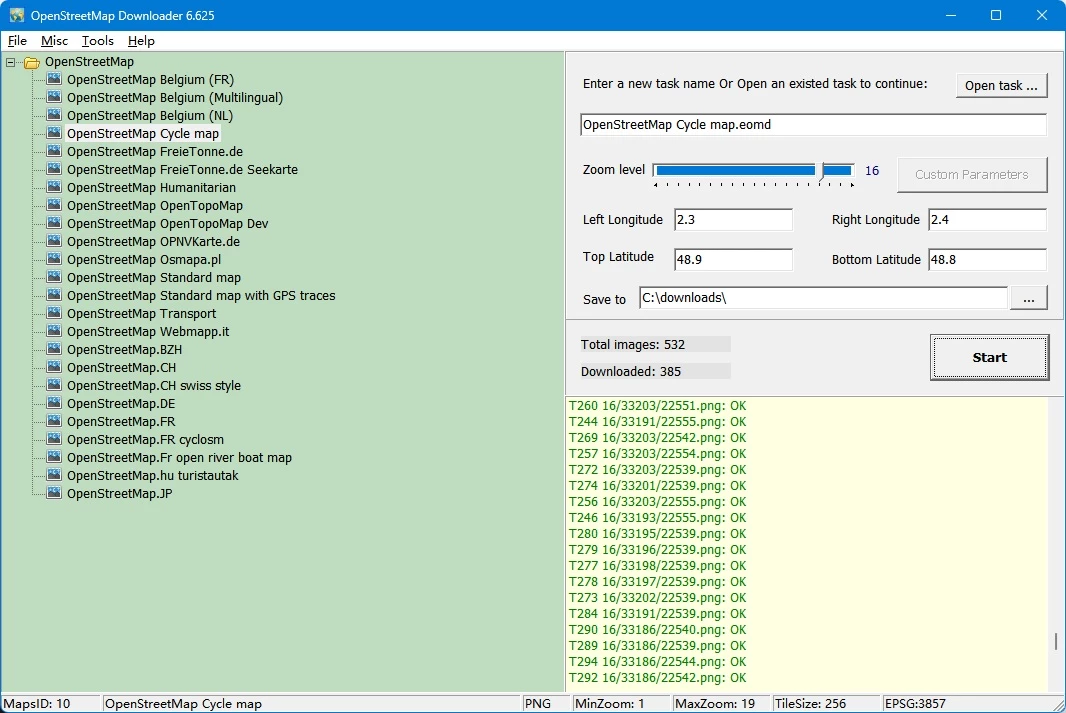
Geographic information system (GIS) analysts, logistics planners, and outdoor researchers frequently need reliable map data in environments where internet access is unavailable. While web-based mapping portals are convenient for casual navigation, professional workflows require static, locally stored map layers. AllMapSoft OpenstreetMap Downloader is a dedicated desktop utility designed to pull raster map tiles directly from OpenStreetMap servers and save them to a local Windows drive. Instead of forcing users to navigate complex Python scripts or manual API rate-limit management, this tool acts as a structured download manager specifically tuned for geographical coordinates.
The software addresses a specific gap in the mapping workflow: converting online vector-rendered map tiles into offline raster databases or large cohesive image files. Users define a geographic bounding box using latitude and longitude coordinates, select their desired zoom levels, and allow the software to automate the tile-fetching process. This is distinctly different from downloading raw OpenStreetMap XML data for database imports. The focus here is on visual representation—grabbing the exact visual grid pieces needed to display a map inside offline tracking applications, printed materials, or custom desktop software. It functions as a reliable bridge between dynamic online tile servers and static local storage.
Relying on a desktop application for this process provides concrete advantages over browser-based export tools. Web browsers struggle to manage thousands of simultaneous image requests and lack the memory management required to stitch large tile grids together. By handling the requests locally, the application can pause, resume, and organize thousands of tiny image files without crashing. It provides a controlled environment for building local map caches, ensuring that remote workers, emergency responders, or urban planners have exact street-level visual data regardless of their network connectivity. The interface remains stripped down to the essentials, keeping the hardware footprint minimal while managing heavy network loads.
Key Features
- Area Bounding Box Selection: Define download regions by entering the left, right, top, and bottom longitude and latitude coordinates in decimal format. This strict coordinate entry ensures you only fetch the exact geography needed for your project, preventing wasted local storage space on irrelevant map areas.
- Granular Zoom Level Control: Choose the exact zoom levels to retrieve, from global geographic overviews down to detailed street-level tiles. You can instruct the software to grab multiple zoom depths in a single task, allowing offline viewers to zoom in and out naturally without losing image quality or loading blank squares.
- Map Combiner Tool: Stitch thousands of individual tiny square map tiles into a single cohesive image file. The software can export these grids as BMP, JPG, or TIF files, making it practical for printing physical map posters or importing the raster data into secondary architectural design software.
- Database Export Formats: Convert your downloaded tile sets directly into SQLite database files or MBTiles format. These specific container formats are natively required by mobile mapping applications like Oruxmaps, RMaps, and LocusMap, allowing you to transfer your desktop downloads directly to a smartphone or tablet for live GPS tracking in the field.
- Multiple Layer Support: Switch between different OpenStreetMap visual styles before executing a download task. The software supports the standard street layout, specialized cycle maps, transport networks, and open sea topology layers, giving you the exact visual context required for your specific geographic or maritime project.
- Built-In Maps Viewer: Review your downloaded geographic data immediately without needing third-party GIS software. The application includes a standalone desktop viewer tool that lets you pan and zoom through your locally stored tile cache to verify visual clarity and coordinate accuracy before you commit to exporting the data to external devices.
How to Install AllMapSoft OpenstreetMap Downloader on Windows
- Download the official Windows installer package directly from the AllMapSoft website to your local storage drive, ensuring you avoid unofficial mirrors.
- Locate the downloaded executable file in your downloads folder and double-click it to initiate the Windows setup wizard.
- Review and accept the End User License Agreement to proceed to the directory configuration step.
- Select your preferred installation path. The software defaults to the standard program files directory, but you can choose a custom local drive if you plan to store large map caches alongside the core application folder.
- Select whether to create a desktop shortcut and a Start Menu folder for quick access to the main downloader interface and the secondary combiner utilities.
- Click the install button to extract the application files and core utilities to your Windows system, which typically completes in a few seconds due to the small file size.
- Finish the setup wizard and launch the program. The application opens directly to the main task configuration window, requiring no mandatory account creation, license activation checks, or online sign-in to begin configuring your first map task.
AllMapSoft OpenstreetMap Downloader Free vs. Paid
The software operates on a traditional shareware model, offering a restricted trial tier alongside a paid perpetual license. The free trial allows users to navigate the interface, configure geographic bounding boxes, test the server connection, and complete actual download tasks. However, it imposes a strict limitation on map detail: the trial tier caps the maximum zoom level at 13. Zoom level 13 is sufficient for regional overviews and major highway layouts, but it cannot display granular street names, individual building footprints, or minor topographical details that professionals typically require.
To unlock street-level imaging, which typically requires zoom levels 14 through 18, users must purchase the full license. The paid tier costs $39.95 for a single computer license. This flat-fee payment removes the zoom restriction entirely, granting full access to the deepest available tile resolution on the OpenStreetMap servers. Users receive a registration key via email, which is entered directly into the desktop application to unlock the higher zoom tiers.
The licensing model is straightforward, avoiding the complexities of recurring billing. There are no mandatory monthly subscriptions, ongoing cloud storage fees, or hidden add-on costs required to operate the core desktop software. The vendor specifies that the downloaded imagery is intended for personal, non-commercial use, which aligns with standard OpenStreetMap tile server usage policies designed to prevent server overload. Users are paying for the utility of the download manager itself, not for the underlying open-source map data, ensuring a transparent transaction for the provided automation tools.
AllMapSoft OpenstreetMap Downloader vs. Universal Maps Downloader vs. SAS.Planet
Universal Maps Downloader is a sibling product developed by AllMapSoft that pulls map tiles from thousands of different map providers, rather than focusing solely on OpenStreetMap. While it offers a wider variety of satellite and terrain sources—including proprietary search engine maps—it operates differently on a technical level by only downloading a single zoom level per task. The dedicated OpenStreetMap Downloader handles multi-zoom level downloads in a single sweep, making it the more efficient choice for users who exclusively rely on OSM data and need layered zoom depths for offline mobile apps.
SAS.Planet is a widely used, open-source mapping utility that acts as both an offline viewer and a downloader for dozens of satellite and map sources. It offers an array of technical tools, complex layer overlays, GPS tracking integration, and path-drawing capabilities. However, its interface is highly technical and can be overwhelming for users who simply want to plug in coordinates and retrieve a tile set. SAS.Planet requires navigating complex menus to manage caches and export formats, whereas the AllMapSoft utility provides a guided, single-purpose workflow with clearly labeled buttons for exporting to mobile databases.
Users should choose AllMapSoft OpenstreetMap Downloader when they need a straightforward, lightweight Windows utility focused purely on grabbing OpenStreetMap tiles with zero configuration overhead or complex interface navigation. Those who need to pull satellite imagery from multiple commercial providers, or who require advanced drawing tools before exporting their maps, will find Universal Maps Downloader or SAS.Planet better suited to their demands.
Common Issues and Fixes
- Server timeout errors during large tasks. When requesting large bounding boxes at high zoom levels, the OpenStreetMap servers may temporarily block your connection to prevent network abuse or bandwidth strain. Pause your download task in the manager, wait a few minutes, and resume the process to continue fetching tiles without starting over from the beginning.
- Combined map images fail to generate. If you use the Map Combiner tool on tens of thousands of tiles, Windows might run out of memory trying to render a single large BMP or JPG file, resulting in an error prompt. Export your maps to an SQLite database or MBTiles format instead of attempting to build a single flat image for an entire region.
- Missing street details in downloaded maps. If your local maps lack building footprints, minor road labels, and localized topography, you are likely hitting the trial restriction. The free tier caps downloads at zoom level 13; you must purchase a license to access zoom levels 18 or higher for full street detail.
- Inaccurate map borders or blank tiles. If the downloaded map area does not match your target region or returns completely blank ocean tiles, your longitude and latitude coordinates were likely entered in the wrong format. Ensure you are using decimal degrees and verify that negative symbols are correctly applied for Western and Southern hemisphere coordinates.
Version 6.625 — November 2025
- Updated core download engine to improve stability with OpenStreetMap tile servers.
- Optimized the map combining tool for faster processing of large exported images.
- Resolved minor bugs affecting specific export formats (JPG/PNG/TIF).
- General performance improvements for offline map viewing.