For individuals and system administrators needing to reclaim storage without navigating complex menus, BleachBit offers a strictly open-source utility designed for precise data elimination. Unlike commercial utilities that bundle unwanted toolbars or active background monitoring agents, this application focuses entirely on deleting junk data and protecting privacy through targeted file removal. Users frequently turn to this utility to empty application cache directories, clear browser histories, and securely shred temporary files that accumulate continuously during daily computer usage.
When a local storage drive fills up with unneeded error logs, outdated installation remnants, and fragmented application data, the operating system can suffer from reduced responsiveness. While basic built-in tools handle routine trash emptying, they often leave behind application-specific tracking data, tracking cookies, and deep system logs hidden within localized application data folders. A dedicated desktop utility is necessary because deep system cleaning requires direct, low-level read and write access to the local storage drive to overwrite physical sectors and rebuild complex database structures. Operating entirely locally on your machine, the application does not require an internet connection for its core cleaning tasks, meaning sensitive file paths, user habits, and directory structures are never broadcasted to external telemetry servers.
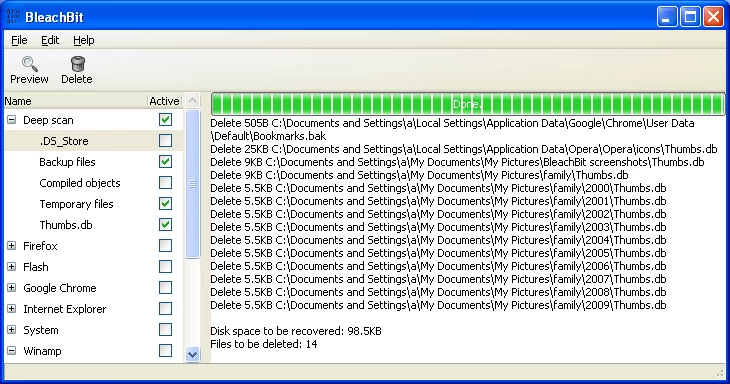
By providing a straightforward interface composed of categorized application lists and specific checkboxes, users can pinpoint exactly what data they want to remove. The primary interface displays a list of detected programs on the left panel, allowing operators to check distinct options such as cookies, site preferences, localization files, or crash reports. A dedicated preview function then calculates the exact byte count that will be recovered, ensuring users know exactly which individual files will be permanently deleted before committing to the actual cleaning action. This explicit transparency helps avoid accidental data loss and gives technical users complete visibility into the exact file paths being modified.
Key Features
- Winapp2.ini Community Integration: BleachBit supports importing the community-maintained Winapp2.ini file directly through the Preferences menu under the Edit tab. This text-based database adds precise cleaning rules for thousands of additional third-party applications that are not included in the default installation. By mapping specific transient data paths to their parent applications, the utility targets obscure caches and temporary folders without relying on generic file-extension sweeps.
- Secure File Shredding: Standard file deletion merely removes the file index pointer, leaving the actual binary data intact on the physical storage drive until overwritten. The file shredding feature overwrites the targeted sectors with random data passes, permanently preventing recovery tools from restoring sensitive documents. Users can access this function directly through the File menu at the top of the interface to target individual files or entire custom directories manually.
- Free Disk Space Wiping: When users delete files using standard operating system commands, the invisible remnants stay on the local drive. The free space wiper function generates large temporary files filled with random data to overwrite all unallocated space on the physical disk. This specialized process obscures traces of previously deleted files, which is particularly useful when preparing to transfer ownership of a physical machine or external drive.
- Browser Database Vacuuming: Modern web browsers store user bookmarks, browsing history, and site settings within SQLite database files that fragment and bloat over time. The vacuuming function rebuilds these databases by copying the active data into a contiguous structure and discarding the empty gaps left by deleted entries. This defragmentation process reduces the database file size on the disk and measurably improves browser startup speeds after heavy daily use.
- Command-Line Interface: System administrators can bypass the graphical interface entirely by running the utility through the standard Windows command prompt. The executable accepts specific arguments to run predefined cleaning profiles silently, allowing users to automate routine maintenance via the Windows Task Scheduler. This exact capability makes it highly practical for deploying standardized cleanup routines across multiple office workstations without requiring manual user input.
- Explicit Preview Operations: Before committing to any permanent file deletion, operators can click the Preview button located in the top toolbar to simulate the exact cleaning process. The application scans the selected directories and generates a detailed log in the main window showing exactly which files are targeted, the total number of items, and the exact byte count that will be recovered. This explicit verification step prevents accidental data loss when experimenting with unfamiliar application cleaners.
How to Install BleachBit on Windows
- Navigate to the official project website and download the standard Windows installer executable file to your local drive.
- Locate the downloaded executable in your local downloads directory and double-click the file to launch the setup wizard.
- Review the GNU General Public License terms presented on the first screen and click the agree button to proceed with the setup.
- Select the destination folder for the application files, or simply accept the default directory path provided by the wizard.
- Choose which specific components to install, including the core application files and optional desktop or start menu shortcuts.
- Click the install button to extract the core application files and write the necessary executable data to your local storage drive.
- Finish the setup process and launch the application to view the default interface and begin configuring your local preferences.
- Open the Preferences menu on the first run and check the box to download community cleaners, which immediately updates the application with expanded software support.
BleachBit Free vs. Paid
The application is entirely open-source, meaning there are no premium tiers, commercial licenses, or subscription fees required to use the software. Every built-in function, including the advanced file shredding, database vacuuming, and free space wiping tools, is available immediately upon initial installation. The development team does not lock features behind a paywall, nor do they restrict usage based on personal, educational, or commercial environments. Users have full access to the source code to audit the cleaning algorithms or modify the behavior to suit their specific administrative or enterprise needs.
Unlike commercial system utilities that rely on aggressive upsells or background advertising, this software operates on a purely donation-based business model. The developers accept voluntary financial contributions through platforms like PayPal, GitHub Sponsors, and various cryptocurrency networks to offset server hosting and ongoing development costs. This direct funding approach ensures the interface remains free of adware, third-party software bundles, and hidden tracking telemetry that frequently accompany typical freeware utilities.
Because the tool does not require license activation or account registration, it functions completely offline. There are no trial periods to expire, no export limits, and no artificial restrictions placed on the amount of data users can delete or the number of custom command-line scripts they can deploy. The only network activity occurs if the operator explicitly opts into downloading updates or pulling the latest Winapp2.ini community cleaner rules from the external repository.
BleachBit vs. CCleaner vs. PrivaZer
CCleaner provides a highly polished graphical interface and includes additional system management tools such as a software updater and a startup manager. It relies heavily on active background monitoring to prompt users when temporary files reach a certain threshold, making it convenient for those who prefer automated maintenance notifications. However, the free tier includes advertisements for related products and telemetry data collection, which deters users looking for a strictly offline, quiet experience.
PrivaZer focuses heavily on forensic-level deep cleaning and adaptive intelligence that automatically adjusts its overwriting algorithms based on whether the target drive is a solid-state drive or a mechanical hard disk. It scans deeply into the local file system to uncover obsolete registry traces, old installation remnants, and complex tracking data that standard utilities completely miss. While highly capable, its interface is heavily technical, and its deep scans take significantly longer to complete compared to standard cache-clearing operations.
BleachBit is the preferred choice for users who demand a completely open-source, ad-free environment without background services draining system resources. It lacks the continuous background monitoring of CCleaner and the automated hardware adaptation of PrivaZer, but it compensates with an incredibly straightforward, on-demand execution model. Administrators running scripts and users requiring immediate, verifiable file deletion will find its command-line support and explicit preview functions more practical for daily maintenance.
Common Issues and Fixes
- Wipe free space takes hours or appears frozen. The free space wiper works by creating a massive temporary file filled with zeroes to overwrite unused sectors on the physical drive. Depending on the exact size of the drive and the hardware interface speed, this specific process can take several hours to complete. Let the process finish naturally, or uncheck this specific option if you only intend to perform a routine cache cleanup.
- Custom application settings revert to defaults after a scan. The utility aggressively targets localized configuration files if the parent application is checked in the left-hand menu. If a specific program loses its saved preferences or custom layouts, expand that program's category in the side panel and explicitly uncheck the "Preferences" or "Settings" boxes before running the next scan.
- Saved browser passwords are deleted unexpectedly. Checking the top-level box for a web browser automatically selects all sub-categories underneath it, including saved login credentials. Expand the browser tree in the primary interface and explicitly uncheck the "Passwords" option to preserve your authenticated sessions while still clearing the cache and temporary internet files.
- Application crashes on startup with a traceback error. This typically occurs when the local configuration file becomes corrupted or when the application lacks the necessary file system read permissions for certain system directories. Launch the utility by right-clicking the desktop shortcut and selecting "Run as administrator," or use the debugging terminal shortcut to isolate and delete the specific broken configuration file.
- VPN or local network connections drop after cleaning. Some virtual private network clients store their active kill-switch rules or network state data in temporary system folders. If you lose network connectivity after a scan, review your selected options, uncheck your specific network applications in the sidebar, and reinstall the network client to restore the necessary configuration files.
Version 5.0.2 — October 2025
- Introduced font size adjustments allowing users to scale text using keyboard shortcuts (Ctrl +/-) or the mouse wheel.
- Added a new full-screen mode toggle accessible via the F11 key for better visibility.
- Resolved a database error occurring when vacuuming Firefox version 140 and newer.
- Implemented new cleaning capabilities for Pacman cache and disabled Snap packages on Linux systems.
- Fixed a stability issue on Windows where the application could hang while cleaning Windows updates.
- Corrected the command-line debug logging option to ensure messages are properly displayed.
- Improved system stability for KDE environments by excluding sensitive files from the system cache cleaner.
- Addressed various localization updates and introduced support for new languages including Gaeilge and Sinhala.