MiniTool MovieMaker 7.4

MiniTool MovieMaker 7.4

If you cut a lot of short videos for socials, clients, or side projects, MiniTool MovieMaker is the editor that turns scattered clips into a finished story without throwing you into pro‑NLE complexity. You drop footage on the timeline, trim the noise, layer music and bubble text, and export in 1080p or 4K – all on a regular Windows laptop. For anyone searching a real Windows Movie Maker alternative that is still actively updated, this free video editing software sits in a very comfortable middle ground.

Key Features

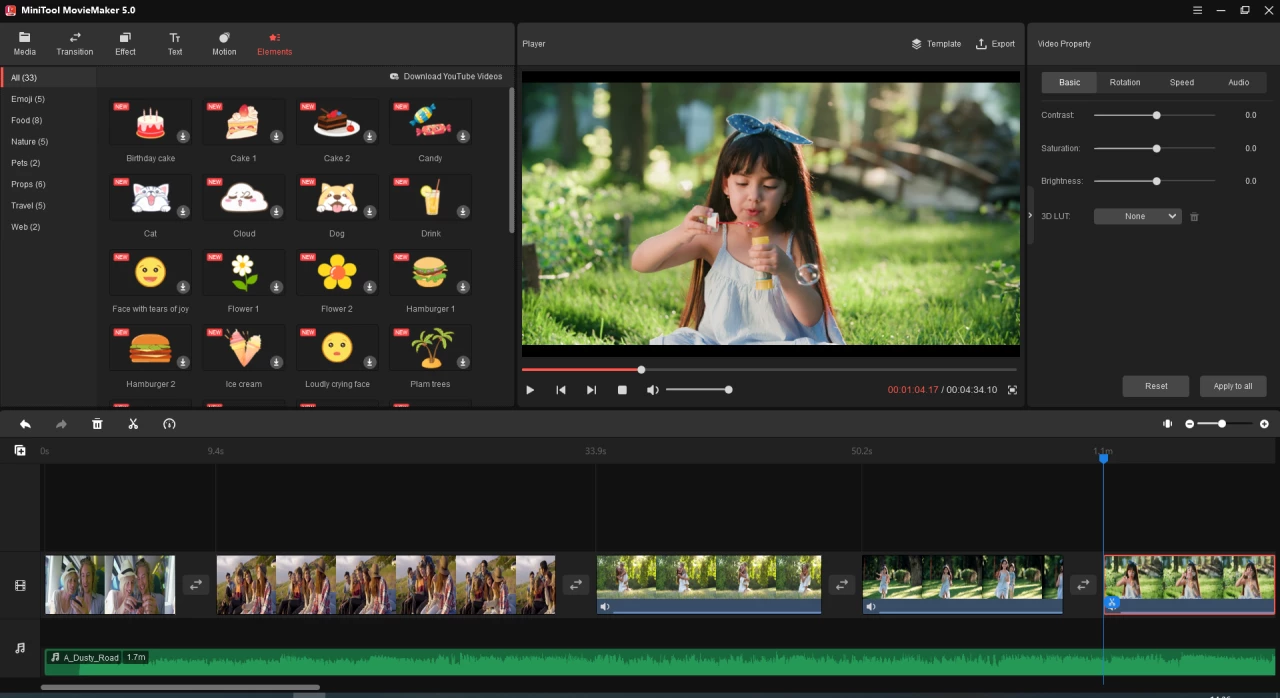
A free video editor for Windows that respects your time. MiniTool MovieMaker opens to a clean, track‑based layout: media bin on the left, preview in the middle, multi‑track timeline at the bottom. You get enough tools for a serious MiniTool MovieMaker review – trimming, splitting, merging, cropping, speed ramping, reverse video, freeze frame, and multiple video and audio tracks – without the wall of panels you see in pro suites.

Text and titles that do not look like a slideshow from 2005. The title module covers intros, lower thirds, captions, credits, and now speech‑bubble text for YouTube, TikTok, or explainer content. Drag a preset onto the clip, edit font, color, outline, and animation, and you have clean motion graphics without designing them from scratch.

Effects and transitions that ship, not shout. MovieMaker includes filters, LUT‑style color looks, pan‑and‑zoom motions, and a sane set of transitions. Used lightly, they make a beginner video editing project feel intentional instead of “template‑spam,” which matters both for viewers and for any honest MiniTool MovieMaker review you write later.

Audio tools that cover the basics. You can detach audio from clips, layer background music, adjust volume and fades, and stack sound effects from your own files or stock packs. For most casual creators searching “free video editor for YouTube on Windows,” this is exactly the level of control needed to keep narration, music, and ambience in balance.

MiniTool MovieMaker 7.4

What’s New in MiniTool MovieMaker

Version 7.4 leans into polish and social‑first design. The headline feature is Bubble Text: ready‑made speech bubbles and callouts that you can drop on memes, tutorials, or reaction videos, with control over fonts, colors, opacity, and borders. Alongside that, MiniTool added new Christmas‑style resources and refined text handling so seasonal and promo content is faster to build.

Earlier 8.x builds tackled nuts‑and‑bolts workflow: one‑click application of transitions or motions to multiple clips, better real‑time preview behavior, and bug fixes around crashes, export issues, and timeline slider glitches. Taken together, the changelog shows a product that is still evolving, not abandonware – a key point for anyone comparing MiniTool MovieMaker vs Movie Maker or other free video editors in 2025.

Practical How‑To

1) Start with intent, not with effects.
Create a new project, pick an aspect ratio based on destination – 16:9 for YouTube, 9:16 for Shorts/Reels, 1:1 for certain feeds – then import only the clips and images that actually serve the story. MiniTool MovieMaker templates can give you a rough structure, but treat them as a starting point, not the goal.

2) Build a clean rough cut.
Drop clips onto the timeline, trim aggressively, and get a watchable rough cut before touching filters or transitions. Keep B‑roll on upper tracks, primary footage on the base track, and use markers or simple naming to keep longer projects sane.

3) Add titles, bubble text, and light effects.
Once timing is locked, layer in titles and bubble text where context, jokes, or instructions are needed MiniTool MovieMaker makes this fast enough that you can iterate until it reads well. Use just a handful of transitions and color looks across the whole edit so your video feels cohesive and does not trigger the “amateur slideshow” vibe.

4) Shape audio like a radio mix.
Bring in music and SFX, then ride levels so dialogue stays king: duck music under voice, trim overly long intros, and avoid clipping on peaks. If you are reviewing MiniTool MovieMaker as a YouTube editor, this is where you’ll feel its limits compared with pro EQ and compression – but for most creators, it is enough.

5) Export for the platform that matters.
Use high‑bitrate MP4 exports at 1080p or 4K for YouTube lighter presets for messaging apps and short‑form. Double‑check frame rate and resolution match your footage to avoid stutter, and consider saving a “master” export plus platform‑specific versions for reuse.

Free Download – MiniTool MovieMaker 7.4

Download links

More you can find useful tools in our video editing category.

Pro Tips That Actually Ship

Think of MiniTool MovieMaker as a training ground for story, pacing, and structure, not for exotic effects. Shoot more coverage than you think you need, then be ruthless in the editor: jump cuts beat rambling. Treat project folders like real productions – separate media, exports, and assets – so when a brand or client asks for a change three months later, you are not hunting through Downloads.

If you outgrow the free video editing software tier and want fewer limits, the MiniTool MovieMaker Ultimate Plan and lifetime license options are there, but only upgrade once you consistently hit the ceiling on export length or feature set. Until then, squeeze the free version hard mastering its constraints will make any jump to a heavier NLE much easier.

Comparisons and System Requirements

Against heavyweight editors like Premiere Pro or DaVinci Resolve, MiniTool MovieMaker wins on simplicity, install size, and learning curve while clearly losing on advanced color grading, audio mixing, and collaboration. Against the usual Windows Movie Maker alternatives, it feels more modern: 4K export, PiP overlays, reversed clips, and animated bubble text give you more headroom for “real” content, not just slideshows.

MiniTool MovieMaker runs on Windows 7, 8, 8.1, 10, and 11, with 64‑bit Windows 10/11 strongly recommended, plus at least an Intel i5‑class CPU, 8 GB of RAM, and roughly 10 GB of free disk space for projects and cache. A mid‑range GPU (Intel HD 5000 or newer, or a modest GeForce/Radeon card) keeps previews smoother and 4K exports tolerable in time. For a free video editor that aims at beginners but scales into more serious use, that is a fair hardware ask.

Frequently Asked Questions about Free Download MiniTool MovieMaker

1. Is MiniTool MovieMaker free?

MiniTool MovieMaker is a free video editor for Windows with optional Pro upgrades, and you can download the Free Full Version directly from our website.

2. What is MiniTool MovieMaker used for?

MiniTool MovieMaker is an easy‑to‑use, feature‑rich video editing software for creating movies, slideshows, and social media videos with templates, filters, transitions, text, and music.

3. What are the main features of MiniTool MovieMaker?

The program offers a multi‑track video timeline, trim/split/crop tools, speed and reverse controls, filters, transitions, animated elements, and color correction for creative video editing.

4. What formats and systems does MiniTool MovieMaker support?

MiniTool MovieMaker runs on Windows and supports most common video and image formats, letting you edit clips and export projects in standard and HD resolutions up to 4K.

Discussion on MiniTool MovieMaker 7.4

Tips, Help With Activation, Sharing Cracks