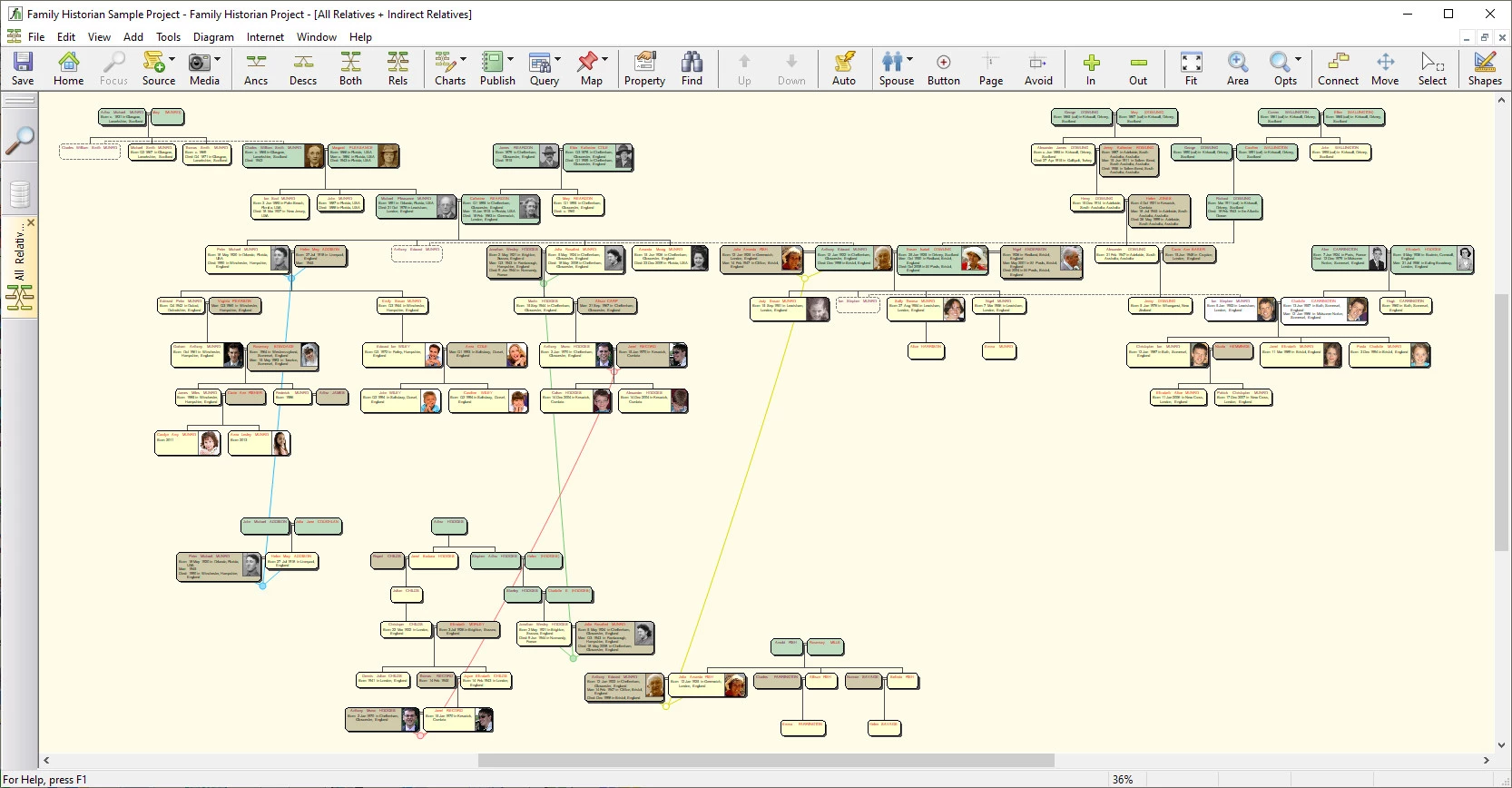
Genealogy research requires balancing rigid historical facts with the often chaotic reality of human relationships, and generic family tree builders frequently fall short when attempting to track complex, non-linear ancestries. Family Historian addresses this gap by offering a source-driven desktop application tailored for researchers who prioritize precise documentation over simple name-gathering. Instead of forcing users to build a tree first and attach evidence later, this software allows genealogists to work directly from primary materials. You can transcribe a census record, birth certificate, or parish register, and the application will generate the corresponding individuals, events, and relationships based on the source data. This method aligns with professional historical standards, ensuring that every claim in the database ties back directly to a specific piece of evidence.
Keeping genealogical data offline in a dedicated desktop environment solves several persistent issues for serious researchers. While browser-based tools run the risk of altering user data through automated tree-matching algorithms or locking exports behind subscription paywalls, a local application guarantees total control over the database and associated media assets. Users manage their own high-resolution photographs, document scans, and GEDCOM files directly on their Windows file system. This approach prevents third-party platforms from compressing archival imagery or restricting access to the research if an online subscription lapses, ensuring decades of work remain accessible in a standardized format. The offline nature also allows researchers to work in remote archives or libraries without relying on a stable internet connection.
Beyond simple data entry, the program excels at turning raw historical research into presentable formats. The software bypasses standard spreadsheet-style data entry by implementing an interactive visual interface, where the charts themselves serve as the primary workspace. Researchers can connect new family members, link spouses, and correct dates directly within the diagram view. This visual workflow, combined with native word processing tools, provides a clear path from cataloging dusty parish records to printing fully formatted, index-linked family history books. Instead of treating printing as an afterthought, the software provides granular control over how text, citations, and images appear on the final page.
Key Features
- Interactive Smart Trees: Instead of relegating charts to an export-only function, the software uses interactive diagrams as a primary workspace via the Focus Window. Users can click and drag graphical boxes to map out new relatives, expand or collapse specific familial branches, and edit demographic details in the docked Property Box without navigating away from the visual layout. This reduces the friction of moving between lists and forms.
- Source-Driven Data Entry: Rather than starting with a person, researchers can begin with a historical document using the dedicated Automatic Source Citation pane. By entering the details of a marriage certificate or military draft card, the software automatically applies the appropriate citations to every fact, event, and individual derived from that specific document. This ensures that no individual is added to the database without a verifiable origin.
- Direct Face Linking in Media: When uploading group photographs to the Media Window, researchers do not need to manually crop out individual portraits using external photo editors. The media manager allows users to draw bounding boxes around specific faces in a single high-resolution image, linking those selected areas directly to the corresponding individual profiles across all charts. The original image remains intact while individual faces appear in reports.
- Integrated Word Processing: The dedicated Note Window functions as a localized text editor that supports font styling, embedded tables, and direct hyperlinks to other records within the project. This allows researchers to draft detailed biographical narratives with inline source citations, which can then be directly compiled into professional family history booklets. You can insert specific hash tags to organize complex research notes for later retrieval.
- Advanced Diagramming Engine: The application generates highly customizable visual layouts, including standard pedigree and hourglass charts, alongside specialized structures like the Everyone and Waterfall diagrams. These charts automatically calculate and display the age of an individual at the time of specific historical events, and can be exported as PDF files or interactive web pages. Users can adjust box sizes, border colors, and background images to suit their publishing needs.
- Custom Scripting and Plugins: The software supports an active extension ecosystem where users can download free tools directly from the vendor's Plugin Store. These scripts, written in Lua, allow researchers to perform complex batch operations, such as standardizing location names, checking for data anomalies, or exporting project data into specialized formats for web hosting. This extensibility means the community can build fixes for niche workflow problems that the main interface does not address.
How to Install Family Historian on Windows
- Download the Windows installer package directly from the vendor's official website.
- Launch the downloaded setup executable and follow the standard on-screen prompts to deploy the core application files to your local drive.
- Complete the installation wizard and launch the program for the first time while your computer remains connected to the internet.
- Log into your vendor account when prompted by the initial launch screen to verify your identity and validate your session.
- Enter your purchased license code or trial activation code into the validation field to unlock the software interface.
- Allow the program to generate its default workspace within your Windows Documents folder, where it will automatically extract a sample project to demonstrate how data should be formatted.
- Configure your automated local backup routine by navigating to the preferences menu and assigning a secondary storage drive or external disk for your project archives.
Family Historian Free vs. Paid
Family Historian operates on a traditional, perpetual-license model. Instead of charging a recurring monthly or annual fee, the developer sells the software as a one-time purchase. Buying a standard digital download, which typically costs around £50, grants permanent offline access to the application. This allows users to build and maintain their databases indefinitely without worrying about losing access to their files if a subscription expires. The base purchase covers the main application, while multi-user licenses are available at a reduced per-seat cost for households that require the software on multiple computers simultaneously.
For new users wanting to test the workflow, the developer offers a fully functional 30-day free trial. This trial is not a restricted or watermarked version; it provides complete access to all data entry tools, chart generation, and export capabilities. To initiate the trial, users must register an email address on the official website to receive a temporary activation code. Once the 30-day period concludes, the software will lock its editing functions. The project data and GEDCOM files, however, remain safely stored on the local hard drive, ready to be reactivated upon purchasing a permanent license.
It is important to note that while the application itself requires no ongoing fees, it does feature a web hints tool that queries external genealogical databases for matching records. If a researcher wishes to view the full details of a hint or download actual document images from providers like MyHeritage or Findmypast, they will need a separate, paid subscription to those specific third-party services. The core desktop software remains fully operational for manual data entry, charting, and local media management regardless of external subscriptions. Minor application updates are provided at no extra cost, while moving to a future major release typically requires a discounted upgrade fee.
Family Historian vs. RootsMagic vs. Legacy Family Tree
RootsMagic is widely recognized for its direct integration with major online repositories, particularly its two-way syncing capabilities with Ancestry and FamilySearch. Researchers who rely heavily on pulling data down from these specific cloud platforms often prefer RootsMagic, as it automates much of the transfer process and minimizes manual transcription. However, its user interface is often considered more utilitarian, lacking the fluid, drag-and-drop visual diagramming capabilities that make navigating complex family structures intuitive. Users who prioritize publishing visually appealing charts may find RootsMagic restrictive compared to dedicated diagramming engines.
Legacy Family Tree is another established desktop application that appeals to genealogists focused on strict sourcing standards and detailed reporting. It offers a free standard edition alongside a paid premium tier, making it accessible for beginners who want to test a desktop workflow without temporary time limits. The software excels at generating text-heavy forms and navigating chronological timelines, but it relies primarily on traditional dialogue boxes and cascading menus for data entry. This text-heavy approach can feel restrictive for visual thinkers who prefer working directly within graphical charts.
Family Historian is often the better choice for researchers who are visual thinkers and prefer to build their databases organically through interactive diagrams. Its direct face-linking feature and advanced word processing tools make it highly suited for users whose ultimate goal is publishing detailed, photo-rich family history books. While it does not feature the automated two-way cloud syncing found in RootsMagic, its strict adherence to standard GEDCOM formats and emphasis on source-driven data entry ensure that the resulting database remains structurally accurate and independent of third-party platforms.
Common Issues and Fixes
- Installation blocked by Windows Defender. The setup wizard fails to complete or cannot create the default workspace directory on a new computer. This is usually caused by the Controlled Folder Access feature in Windows Defender, which frequently blocks unrecognized applications from writing to the Documents folder. To fix this, temporarily disable this security feature during installation, or manually add the application's executable file to the allowed apps list in your Windows Security settings.
- Application fails to run after install. The software refuses to launch after a successful installation, closing immediately without displaying an error code. Strict Data Execution Prevention settings on certain Windows configurations can interfere with the program's background processes. Open your System Control Panel, navigate to the advanced performance settings, and add the main executable to the exception list to allow it to run properly.
- Custom interface settings lost during migration. Moving the software to a new computer leaves behind custom reports, plugin configurations, and query templates. Manually copying your project files from the Documents folder only transfers your database, not your registry-level interface configurations. Download and run the official Backup and Restore settings plugin to package your custom layouts and preferences into a portable archive before migrating to the new machine.
- Web hints fail to import records. Automated web hints appear in the interface but do not import the associated historical records into the database. The web hints feature only alerts you to potential matches on external platforms; it does not bypass their paywalls or perform automated syncing. You must maintain a separate, active subscription to the third-party provider, view the record in your web browser, and transcribe the data into your project manually.
Version 7.0.24.1 — October 2024
- Enhanced the Direct Import from Legacy feature to include medical notes and research notes for individuals.
- Resolved an issue during Legacy import where alternative names were occasionally excluded.
- Expanded source citation imports from Legacy to cover citations for names, marriage events, and record-level details.
- Adjusted the handling of Legacy source citation notes and surety levels to align better with standard GEDCOM interpretation.
- Fixed a display bug in "All Relatives" diagrams that could cause boxes to be positioned incorrectly.
- Corrected an issue where reports would be truncated if they contained missing or corrupt image files.
- Added a new warning when labels or expressions in the Individual Summary Report or Family Group Sheet exceed supported lengths.
- Rectified display errors in the Media Report affecting the visibility of Title, Format, and File fields.