RootsMagic functions as a centralized offline database for genealogists and family historians who need to structure, organize, and verify complex ancestry research. While browser-based family trees provide a quick way to look at shared hints, a dedicated desktop application offers absolute control over sensitive data, living-relative privacy limits, and local high-resolution media storage. Researchers use this application to construct extensive pedigree charts spanning centuries, merge thousands of historical documents into a single timeline, and write proper academic citations without relying on a constant internet connection or paying recurring software subscription fees to access their own compiled work. It acts as a primary local master file, preventing the risk of accidental alterations by other users on public collaborative trees.
The core advantage of managing a family tree locally is strict data ownership and offline security. Online platforms frequently alter their interface, modify their pricing tiers, or experience server outages, but a local SQLite database remains fully accessible on your own hard drive. The software allows researchers to maintain this offline isolation while still actively connecting to external online repositories when an internet connection is available. It pulls down census records, draft cards, and birth certificates from major online archives directly into the local workspace, allowing the user to review the evidence side-by-side with their existing data before merging the facts into their personal database.
Beyond simple data entry, the application acts as a specialized word processor and charting engine. It translates raw dates, geographical places, and biological matches into readable narrative books and visual descendant charts. Instead of manually typing out hundreds of formatted footnotes, researchers use built-in templates to document exactly where a specific piece of evidence originated. This prevents the common problem of unsourced family legends spreading across the internet, ensuring that every connected generation is backed by verifiable historical documents and properly structured citations.
Key Features
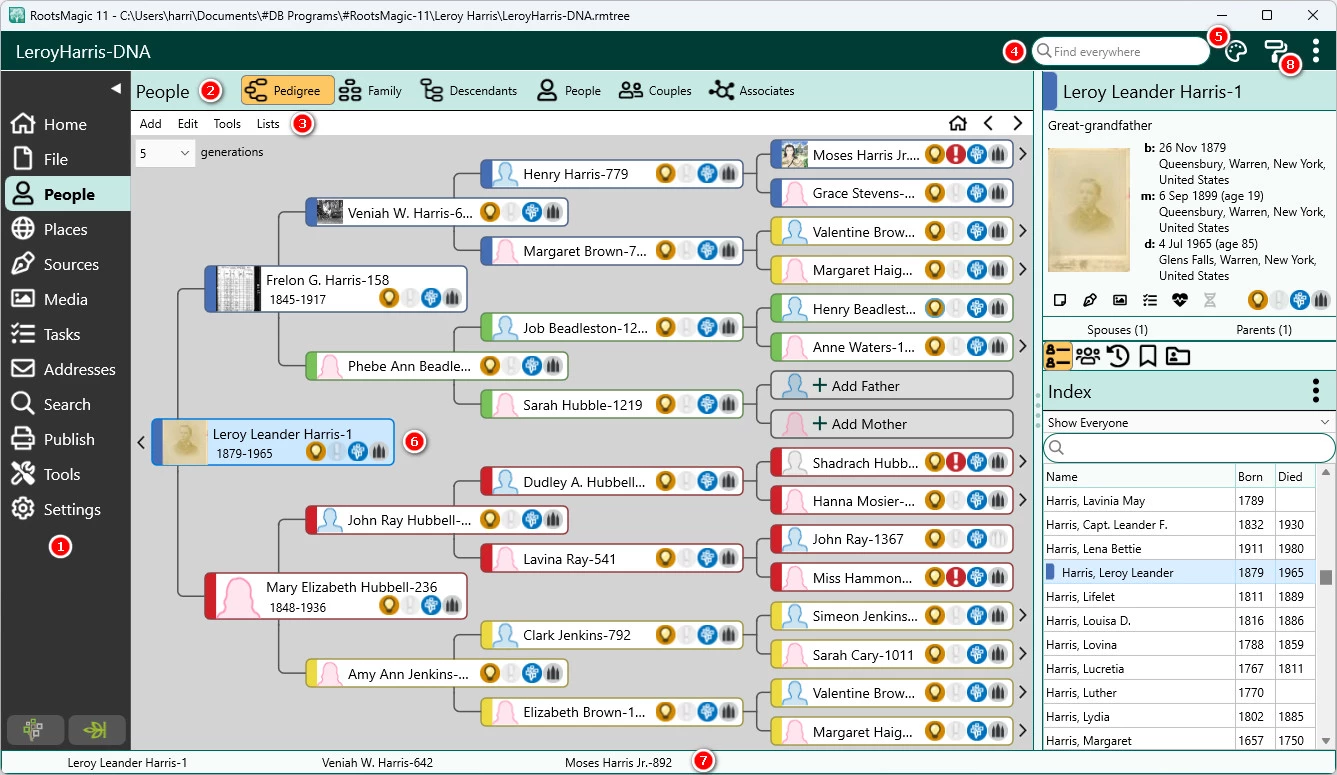
- Feature Name: WebHints and TreeShare. The application actively connects to major external repositories such as Ancestry, FamilySearch, and MyHeritage to locate matching historical records. When the software identifies a potential match for a person in the local database, it displays a lightbulb icon next to their name. Users can then review the external census data or birth certificates and pull those specific facts directly into their local file without manually retyping the dates and locations.
- Feature Name: SourceWizard Citation Builder. Documenting evidence correctly is critical in genealogy, and the built-in citation generator prevents users from relying on unverified assumptions. By selecting a specific template—such as a cemetery headstone, an 1880 census return, or an oral interview—researchers fill in blank text fields, and the software automatically formats the footnote to meet academic standards. This ensures that every fact attached to an ancestor can be traced back to its exact origin point by future researchers.
- Feature Name: DNA Match Management. Tracking genetic relationships requires specialized data fields that go beyond simple birth and death dates. The software includes a dedicated DNA menu where users can log test results from various providers, input the amount of shared centimorgans (cM), and record the largest segment sizes. By linking these genetic matches directly to individuals in the standard pedigree view, historians can generate specific relationship probability reports and confirm paper-trail theories using biological evidence.
- Feature Name: Find Everywhere Search. Locating a specific misplaced fact in a database containing tens of thousands of individuals requires strict indexing. The Find Everywhere tool allows users to input a text string and simultaneously search across people, family relationships, isolated text notes, citation sources, media captions, and research logs. The results appear in a unified list, allowing the user to jump directly to the exact interface menu where the data is stored and make immediate corrections.
- Feature Name: Database Maintenance Tools. Because the application stores all text data in a single SQLite file, preventing data corruption over years of editing is a primary focus. Users have access to a dedicated Database Tools menu containing commands to rebuild file indexes, compress the database to clear out deleted records, and test file integrity. Running these tools regularly reorganizes the underlying data structure, preventing errors such as missing cross-references or phantom family connections that can occur after massive file imports.
- Feature Name: Portable USB Installation. Researchers frequently need to reference their databases while visiting physical libraries, courthouses, or family reunions where installing new software is impossible. A specialized utility allows the user to install the entire application, along with their specific database and attached media files, directly onto a removable USB flash drive. The program can then be launched on any compatible Windows host machine directly from the external drive without leaving temporary files or requiring administrative installation privileges.
How to Install RootsMagic on Windows
- Download the official Windows installer package directly from the vendor's website to ensure you receive the unmodified application.
- Launch the setup executable to open the installation wizard and accept the end-user license agreement.
- Choose the destination folder for the application files, which typically defaults to the standard program files directory on your primary Windows drive.
- Select whether to create a desktop shortcut and whether to associate standard genealogy file formats, such as GEDCOM files, with the application.
- Click the install button and wait for the installer to extract the necessary application files, libraries, and built-in reporting templates to your hard drive.
- Finish the setup and launch the application from the Start menu or desktop shortcut.
- On the initial startup screen, enter your purchased license key to unlock the full feature set, or select the option to run the program in the free Essentials mode to begin building your database immediately.
RootsMagic Free vs. Paid
The developer offers a completely free tier known as RootsMagic Essentials, which acts as an excellent entry point for casual users or those looking to test the interface. This free edition is not a time-limited trial and does not restrict the number of people you can add to your family tree. It includes all the basic tools necessary to manually build a pedigree, attach photos, print standard charts, and import or export data using standard GEDCOM files. It is a highly functional local database for users who do not need complex web integration or advanced publication tools.
Upgrading to the paid tier requires a one-time purchase, typically priced at $39.95 for new users, with discounts available for those upgrading from older desktop applications. This is a perpetual license for the desktop software itself, meaning there are no mandatory monthly subscriptions to keep using the program or accessing your local data. The paid tier unlocks the advanced integration features, including TreeShare, WebHints, the SourceWizard citation generator, advanced color-coding organization, and the ability to generate customized narrative books.
It is important to note the distinction between the software license and external repository access. While the paid application includes the tools to synchronize and download records from sites like Ancestry, MyHeritage, and Findmypast, viewing the actual historical documents on those third-party platforms still requires separate active subscriptions with those specific companies. However, pulling data from the free FamilySearch platform works immediately without any external subscription costs.
RootsMagic vs. Family Tree Maker vs. Legacy Family Tree
Family Tree Maker serves as the primary choice for researchers who do the vast majority of their work directly on Ancestry. It offers the most direct and extensive synchronization with Ancestry trees, allowing users to back up their online work locally with minimal friction. However, it requires significantly more system resources, carries a higher upfront purchase price, and limits its external hints primarily to the Ancestry ecosystem, making it less flexible for genealogists who rely heavily on alternative international archives or free record hubs.
Legacy Family Tree appeals to highly academic researchers who prioritize strict genealogical standards and deep reporting capabilities. It provides incredibly detailed formatting options for printing books and charts, and it offers a highly functional free standard edition. The main drawback is its aging interface, which relies on a older Windows design language that can feel cluttered to new users, and its synchronization tools are not as automated or visually straightforward as newer competitors on the market.
RootsMagic strikes the best balance for the majority of family historians by offering a lightweight, fast interface that pulls automated hints from multiple platforms simultaneously. Instead of locking the user into a single ecosystem, it displays potential matches from Ancestry, FamilySearch, and MyHeritage on the same screen. It is easier to learn than Legacy Family Tree, runs faster on older Windows machines than Family Tree Maker, and provides the most cost-effective one-time purchase model for users who want multi-platform integration without heavy system requirements.
Common Issues and Fixes
- SQLite Database Error 11 or malformed disk image warnings. This indicates structural corruption in the single-file database, often caused by a background backup process interfering while the file is actively open. To fix this, open the File menu, select Database Tools, and run the Rebuild Indexes and Test Database Integrity commands to reorganize the tables.
- Failure to log into FamilySearch or Ancestry. Application programming interfaces (APIs) for external repositories update frequently, and older security protocols are routinely deprecated. To fix connection failures, ensure your Windows operating system is fully updated with the latest TLS security patches, and run the built-in software updater to download the newest API configuration from the developer.
- Broken media links displaying blank image placeholders. When you move your family tree file and your photos folder to a new Windows computer, the local file paths change, breaking the connection. Open the Media Gallery and use the Fix Broken Media Links tool to point the application toward the new master folder where your images are currently stored.
- Massive duplicate entries appearing after a GEDCOM import. Merging a large file from a relative often creates duplicate profiles for the same historical figure. Navigate to the Tools menu and use the Smart Merge feature, which allows you to place two potential duplicates side-by-side, compare their attached dates and places, and consolidate them into a single clean profile without losing source citations.
Version 11.0.4 — December 2025
- Resolved an issue where some users experienced stack overflow errors while navigating the Places list.
- Fixed a runtime error (217) affecting RM To-Go drives created with version 11.0.3.
- Addressed a specific runtime error (21) that could occur when using Shareable Drives generated in the previous update.
- Corrected the display of Proof and Privacy icons for alternate names within the Life Summary view.
- Fixed a bug in Life Summary where unlinking siblings or children could incorrectly display the wrong family unit.
- Improved the responsiveness of sliding edit panels on Mac systems to prevent lag.
- Enhanced media thumbnail rendering to fix issues where images appeared fuzzy in certain situations.
- Resolved an SQLite Error 1 that occurred when selecting Associations during the Import Lists process.