Managing compressed files is a core desktop task that has historically relied on aging utility software with interfaces stuck in the past. While the default Windows file explorer offers basic zipping capabilities, it lacks the performance, format support, and security configurations required for heavy daily use. NanaZip steps into this gap as an open-source file manager and extraction utility built specifically for current hardware and visual standards. By taking the proven compression engine of an older open-source standard and wrapping it in an updated architecture, this utility provides the exact same extraction and archiving capabilities without the visual clunkiness.
The application targets system administrators, software developers, and general desktop operators who routinely handle large data batches, software packages, or encrypted backups. Instead of navigating multiple windows or fighting against hidden context menus, users can simply right-click a massive data directory, apply AES-256 encryption, and package it into a compressed archive in a few clicks. The desktop environment remains the ideal place for this work, as browser-based extractors or web tools simply cannot handle multi-gigabyte files, deep folder hierarchies, or the local processing requirements for advanced LZMA2 compression algorithms.
Choosing this archiver means upgrading the daily file management workflow. Whether extracting a downloaded batch of high-resolution RAW photos, dividing a massive database export into smaller chunks for a FAT32 thumb drive, or opening obscure disk image formats, the tool handles the operation locally and quickly. It bridges the gap between raw command-line utility and an interface that actually feels native to a modern operating system.
Key Features
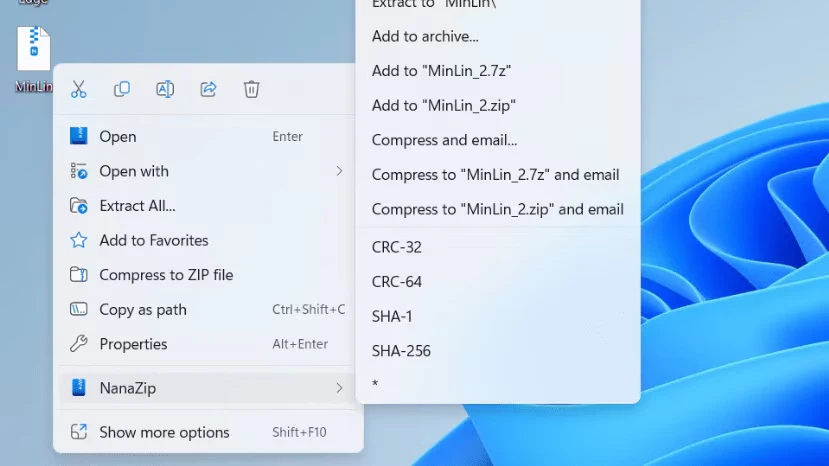
- Native Context Menu Integration: Instead of forcing users to click through secondary legacy menus to find extraction commands, the application places its core options directly in the primary right-click menu. Right-clicking an archive immediately reveals options to extract files here, extract to a new folder, or open the archive viewer, eliminating repetitive navigation steps.
- Advanced Compression Engine: The utility utilizes the LZMA and LZMA2 algorithms to shrink file sizes significantly. When packing data, users can select the 7z format from the dropdown menu and adjust the dictionary size to maximize space savings, resulting in smaller final file sizes compared to standard zip compression.
- Extensive Format Support: The archiver is capable of unpacking almost any compressed file type encountered on the web. It natively reads and extracts common formats like ZIP and RAR, alongside heavy-duty or specialized formats such as TAR, GZIP, BZIP2, XZ, and WIM, ensuring you rarely encounter an unreadable archive.
- Strong AES-256 Encryption: Securing sensitive data is handled directly within the archiving prompt. By typing a password into the encryption field before compressing a folder, the application locks the contents behind AES-256 cryptography, preventing unauthorized access to personal documents or financial records stored in the resulting file.
- Modern UI Design and Mica Support: The graphical interface abandons the flat, gray look of older utilities in favor of an updated aesthetic. The application natively supports dark mode and utilizes the Windows Mica material effect, meaning the main window and file browser blend naturally with the rest of your current desktop theme.
- Smart Extraction and Security Tags: The software includes a Smart Extraction rule that prevents archive contents from spilling messily across your desktop. Furthermore, it propagates Mark-of-the-Web security tags to extracted files by default, ensuring that Microsoft Defender and your local antivirus correctly identify and scan files originating from the internet.
How to Install NanaZip on Windows
- Launch the Microsoft Store from your taskbar or Start menu, or open your browser to the official GitHub repository releases page.
- If utilizing the Store, type the application name into the search bar and navigate to the official product page published by M2Team.
- Click the "Get" or "Install" button to initiate the deployment. The system will download the MSIX package and handle the integration in the background.
- If choosing the manual route via GitHub, download the provided MSIXbundle file to your local drive.
- Double-click the downloaded MSIXbundle file to open the native App Installer prompt, review the publisher information, and click the "Install" button.
- Wait a few seconds for the status bar to complete; the application is lightweight and does not require complex setup wizards or bundled software declines.
- Right-click any file or folder on your desktop to confirm that the new extraction and compression commands appear directly in your primary context menu.
- Open the main application window from the Start menu to verify the interface loads correctly and to adjust any default compression settings or theme preferences.
NanaZip Free vs. Paid
The software is entirely free and operates under an open-source licensing model. Users do not need to worry about trial periods, artificial export limits, delayed startup screens, or nagging popup windows asking for a license key. The core application provides full access to all compression algorithms, encryption tools, and extraction features immediately upon installation.
There are no professional, enterprise, or premium tiers that lock away advanced functionality. Because it is built on a foundation of open-source development, the utility respects user privacy and relies entirely on local processing without demanding cloud subscriptions or online account registrations. Every feature, from AES-256 encryption to interface scaling, is available out of the box at zero cost.
For those who wish to support the ongoing development, the creator offers a Sponsor Edition through the storefront. This edition is functionally identical to the standard free application and does not unlock any hidden features or faster compression speeds. It acts purely as a formalized donation method, allowing users to financially support the project while receiving a digital badge of contribution. Home users and enterprise deployments alike can rely entirely on the main free application without missing anything.
NanaZip vs. 7-Zip vs. WinRAR
7-Zip is the foundational architecture upon which many modern extractors are built, renowned for its raw speed and exceptional compression ratios. However, its interface remains utilitarian, and it struggles to integrate gracefully with updated right-click menus, often forcing users into secondary menus to access basic extraction tools. You should stick with 7-Zip if you are managing older operating systems, deploying strictly via command line on legacy hardware, or if you prefer an interface that has remained unchanged for over a decade.
WinRAR is a commercial staple that has existed for decades, built around its proprietary RAR format and a familiar layout. It offers unique features like the Recovery Record, which can repair slightly corrupted archives, making it valuable for users dealing with unstable data transfers. The drawback is its shareware model, meaning you will eventually be prompted to pay for a license, and it is the only software legally permitted to create new RAR files, which limits open-source alternatives.
NanaZip bridges the gap by taking the raw mathematical capabilities of 7-Zip and wrapping it in an updated, well-integrated package. It is the better fit for anyone who wants advanced LZMA2 compression and fast extraction speeds without dealing with outdated menus or commercial nags. If you primarily work with standard ZIP or 7z files and value a tool that actually feels like it belongs on a modern desktop, this utility provides the best balance of aesthetics, performance, and workflow integration.
Common Issues and Fixes
- Context menu entries are missing. This usually happens if the system disables the required background hooks. To fix this, navigate to your Windows Settings, go to Apps, find the App execution aliases menu, toggle the application switch off and back on, then restart the Explorer process via Task Manager.
- Access Denied errors when creating archives on the C: drive. Because the application is packaged as an MSIX, it runs with specific directory restrictions and cannot immediately prompt for Administrator elevation in root folders. To bypass this, compress your files in a user-owned directory like Documents or the Desktop, then manually move the finished archive to your desired system location.
- Cannot create new RAR archives. This is not a bug but a legal restriction, as the RAR format is proprietary to a different company. To solve your compression needs, select the 7z format from the application's drop-down menu instead, which generally provides equal or superior file size reduction.
- Legacy third-party plugins fail to load. The storefront installation locks the application directory to read-only, preventing old plugins from executing correctly. If your workflow absolutely demands custom extensions, you will need to rely on a portable installation of an older archiver, as this modern implementation prioritizes system security over unchecked code execution.
- Interface freezes when dragging and dropping from an executable. Some users report brief freezes when extracting specific configuration files directly from self-extracting exes via drag-and-drop. If this happens, use the standard "Extract" button on the top toolbar to pull the files out safely without locking the application window.
Version 6.0.1632.0 — February 2026
- Transitioned the project to a new community-driven development model.
- Updated system requirements to Windows 10 version 2004 (Build 19041) or newer, and completely discontinued 32-bit (x86) support.
- Introduced official portable binary packages for both Modern and Classic editions, intended primarily for testing and debugging environments (excludes the NanaZip File Manager).
- Synchronized the underlying compression engine with the 7-Zip 26.00 mainline release for improved performance and algorithms.
- Revamped the user interface layout of the address bar to prevent cramped text.
- Fixed visual glitches in the 2-panel view by making the splitter bar completely white in light mode and adding proper Mica effect support in dark mode.
- Implemented dark mode support across Win32 task dialogs.
- Streamlined the "Folders History" menu by transitioning it to a native Win32 TaskDialog implementation.
- Rolled out Group Policy Administrative Templates (ADMX/ADML) to assist with enterprise configuration and management.
- Resolved several crash and hang bugs tied to read-only support for .NET Single File Application bundles and ROMFS filesystems.
- Addressed multiple security vulnerabilities and expanded security mitigation policies, including improved Mark of the Web (MoTW) enforcement and DLL planting protections.