KeePass Password Safe operates as a strictly offline, locally hosted credential manager designed to store sensitive authentication data without relying on third-party cloud servers. Rather than broadcasting vault data across the internet to synchronize between devices, this desktop application retains the password database entirely on the user's local Windows machine. By utilizing industry-standard encryption protocols, the software locks account credentials, secure notes, personal identification numbers, and file attachments behind a single master password or an external key file, ensuring complete authority over personal and professional digital security.
For computer users managing hundreds of different website logins, database credentials, or software licenses, the application solves the risk of centralized server breaches by removing the cloud attack vector entirely. Workers in high-security corporate environments, IT system administrators, and privacy-conscious individuals rely on this tool to prevent credential exposure. Instead of paying monthly subscription fees or trusting external infrastructure to hold their most valuable data, users maintain their own encrypted vault files. They can place these files on localized backup drives, route them through personal network shares, or store them on encrypted removable media based on their own customized access policies.
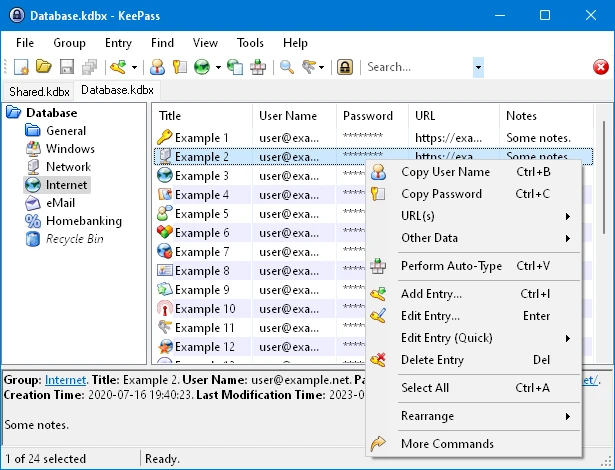
The desktop client provides direct control over password generation, entry organization, and automated login execution through precise keyboard shortcuts. While browser-based alternatives offer instant cross-device convenience, a dedicated local application prevents malicious browser extensions from scraping background data or losing access during unexpected internet outages. By keeping the interface modular and strictly functional, the software supports extensive plugin additions and automated triggers. This allows technical operators to build specialized credential workflows that fit strict corporate compliance rules, or to craft personal data hoarding setups that rely exclusively on internal networks and air-gapped workstations.
Key Features
- Local Database Encryption: The application secures the vault file using AES-256, ChaCha20, or Twofish algorithms, applying multiple key derivation rounds to delay brute-force attempts. All entries are stored in a standard .kdbx file format that never leaves the hard drive unless manually copied, exported, or synchronized by the user to a secondary location.
- Global Auto-Type Functionality: Pressing the default keyboard shortcut Ctrl+Alt+A prompts the software to locate a matching credential entry and automatically inject the username and password into the active application window. This mechanism circumvents manual clipboard copying, reducing the risk of background clipboard monitors intercepting sensitive string sequences during the login process.
- Two-Channel Auto-Type Obfuscation: When enabled for specific database entries, this security measure splits the typed characters into simulated keystrokes and clipboard pastes. This technique obscures the actual password sequence from background keylogger applications attempting to capture typing inputs while you log into banking sites or corporate portals.
- Advanced Password Generator: A dedicated generation tool creates highly randomized character sequences based on strict user-defined rules, including length constraints and specific character sets like brackets or high ANSI symbols. Custom generator profiles can be saved for websites that enforce specific, unusual character requirements or prohibit standard special symbols.
- Trigger Automation System: Users can define custom event-condition-action workflows within the software menu to automate routine database management tasks. A common trigger configuration automatically saves and synchronizes the local database with a secondary backup folder or a specific network path whenever the vault is closed, locked, or modified.
- Customizable Entry Fields: Beyond standard username and password text boxes, the interface allows attaching external files, adding expiration dates to enforce password rotations, and writing extended plain-text notes. Entries can be organized into nested hierarchical groups with custom display icons to separate financial logins from administrative server credentials.
How to Install KeePass Password Safe on Windows
- Download the official Windows installer package directly from the vendor repository to ensure you are receiving the untampered executable file.
- Ensure the host machine has the required Microsoft .NET Framework installed, as the desktop application relies on this specific runtime environment to execute its core interface and cryptographic functions.
- Launch the downloaded executable file to initiate the standard Windows setup wizard, bypassing any user account control prompts if required by your administrative settings.
- Review the end-user license agreement and select the destination folder within the default Program Files directory, or specify a custom local path for the installation files.
- Choose whether to associate the .kdbx file extension with the application during the setup prompt; this configuration allows opening password databases directly by double-clicking them in Windows Explorer.
- Finish the setup process, decline any optional shortcuts you do not need, and launch the application from the Start menu or desktop shortcut.
- Click the "File" menu item and then select "New" to create the initial password database, assigning a long Master Password or generating a distinct external key file to lock the newly created .kdbx vault before saving it to your hard drive.
KeePass Password Safe Free vs. Paid
KeePass Password Safe operates under a strictly open-source licensing model and is completely free to download, install, and use for both personal and commercial purposes. The primary developer does not lock any features behind a premium tier, nor does the software impose restrictions on the number of passwords saved, the number of devices you use, or the size of the encrypted database file.
Because there is no corporate entity demanding recurring revenue for cloud hosting infrastructure, there are no subscriptions, trial periods, watermark limitations, or license keys involved. All encryption protocols, automated typing mechanisms, customized trigger workflows, and plugin capabilities are available out of the box in the standard Windows release without requiring a user account or email registration.
The open-source project sustains its ongoing maintenance, security audits, and feature development through voluntary user donations rather than forced paywalls or enterprise tiers. Users transitioning from expensive monthly credential managers will find no hidden costs or sudden upgrade prompts here. However, they must manage their own file synchronization and backup routines since commercial cloud storage, automated syncing servers, and dedicated customer support are not bundled with the application.
KeePass Password Safe vs. Bitwarden vs. 1Password
Bitwarden provides an open-source alternative but operates primarily as a cloud-first architecture rather than a local-only tool. It synchronizes vaults automatically across browsers and mobile devices through a central server out of the box, which appeals to users wanting immediate multi-device access without manual file handling or plugin configuration. However, it requires an internet connection for initial setup and background syncing, whereas KeePass operates completely offline and requires the user to physically move or synchronize their own .kdbx vault files.
1Password is a commercial, closed-source password manager focused on polished interfaces, minimal configuration, and built-in family or team sharing features. It charges a mandatory monthly subscription fee to maintain the user vault on proprietary servers and provides dedicated customer support for billing and technical problems. Users who want heavily guided account recovery procedures, automatic breach monitoring alerts, and sleek browser extensions tend to prefer 1Password, though they sacrifice local-only storage capabilities and must pay recurring costs to keep their vaults active.
KeePass Password Safe is the better fit for technical users, IT administrators, and privacy advocates who refuse to store their critical authentication credentials on third-party servers. It costs absolutely nothing, supports deep customization through triggers and external plugins, and guarantees that the encrypted vault remains strictly on the local Windows hard drive unless the user actively decides to move it across a localized network or encrypted USB drive.
Common Issues and Fixes
- Forgotten Master Password. Because the application uses localized encryption without a backdoor or central authentication server, there is no automated account recovery process or password reset email available. The only fix is to restore a previous backup if you configured a secondary authentication method like a key file, or manually remember the password, as the vault cannot be decrypted by the developers under any circumstances.
- Auto-Type fails to enter credentials. This usually happens when the title of the active browser tab or application window does not match the title of the entry in the password vault. Edit the specific credential entry, navigate to the Auto-Type tab, and add a custom target window string that matches the exact browser tab title to force the application to recognize the window.
- Synchronization conflicts with external storage. When keeping the database in a basic shared folder mapped to a cloud drive, saving changes simultaneously from two different machines can corrupt the file or overwrite data. Fix this by navigating to Tools, opening the Triggers menu, and setting up an event action to "Synchronize active database with a file/URL" instead of relying on a standard file overwrite.
- Cannot open older .kdb database files. The older database format used by previous iterations of the software might not open automatically if the file association is misconfigured or if you double-click the file directly. Fix this by opening the modern application first, clicking the File menu, selecting Import, and choosing the legacy format option to convert the old vault into the modern .kdbx format.
Version 2.60 — November 2025
- Added a new setting to include group paths when utilizing the quick search box (enabled by default).
- Introduced optional columns for "Group Name" and "Group Path" in the primary entry list.
- Implemented a new import tool specifically for Mozilla Firefox CSV password files.
- Added the ability to select all items simultaneously in supported list views using the Ctrl+A keyboard shortcut.
- Enabled the use of the Delete key to remove selected items directly within applicable list interfaces.
- Included helpful empty state messages for list views that currently contain no items.
- Improved the quick search drop-down menu by adding full keyboard navigation support.
- Improved Bitwarden JSON imports by accurately recognizing Base32-only TOTP values as shared secrets.
- Increased the display font size when viewing time-based or HMAC-based one-time passwords for better readability.
- Enhanced accessibility by adding a tooltip to the clipboard countdown bar and making it function as an alert for screen reading software.
- Added a conflict warning dialog for users of the new French Standard AZERTY keyboard layout regarding the Ctrl+Alt+A global auto-type hotkey.
- Upgraded the ShInstUtil component to support the generation of native ARM64 images on ARM64 environments.
- Fixed an issue with the MSI installer where manual taskbar or start menu shortcuts would break during version updates.
- Temporarily disabled the quick search auto-completion feature to resolve an underlying visual bug.