Materialise Magics operates as specialized data preparation software designed for the additive manufacturing industry, acting as the critical bridge between raw CAD designs and physical 3D-printed parts. When engineers design complex components in standard solid modeling applications, the resulting files rarely export as perfect, print-ready geometry. This desktop application provides the specific engineering toolset required to import, inspect, and mathematically repair those models, ensuring that industrial 3D printers receive watertight, error-free instructions. Rather than functioning as a basic slicer, it acts as a complete pre-production digital environment where operators handle part orientation, hollowing, volumetric nesting, and structural support generation before a single layer of physical material is laid down. By catching geometrical defects early in the digital phase, facilities prevent catastrophic hardware failures that waste expensive raw materials.
Targeting professional 3D printing service bureaus, aerospace manufacturers, medical device creators, and automotive engineers, the software tackles the high-stakes reality of industrial production. In these environments, a failed metal or polymer print can cost thousands of dollars in lost titanium powder, specialized resin, and machine time. A heavy-duty local Windows workstation application is necessary for this specific workflow, as it allows organizations to process massive, proprietary geometric files locally without uploading sensitive intellectual property to browser-based cloud slicers. By keeping the computational load on local desktop hardware, facilities maintain strict control over their confidential manufacturing data while utilizing the local GPU and CPU acceleration necessary to handle meshes containing millions of individual polygons.
Operators choose this specific software environment instead of generic category tools because it directly integrates with multi-technology machine parks. Whether a manufacturing facility runs selective laser sintering, stereolithography, or direct metal laser sintering equipment, the software standardizes the preparation workflow into a single, highly controlled graphical interface. Instead of retraining staff on five different proprietary slicers for five different printer brands, organizations use this central hub to finalize the file, applying machine-specific shrinkage compensation and customized scanning strategies before sending the job to the factory floor.
Key Features
- Advanced STL Repair: 3D meshes frequently suffer from broken geometries after CAD conversion. Users can open the "Part Fixing Info" tab and utilize the "AutoFix" ribbon to automatically close planar holes, flip inverted normals, and stitch bad edges. For persistent topological errors, manual tools allow operators to move individual part points, filter sharp triangles, and resolve intersecting triangles with exact millimeter precision, ensuring the file represents a mathematically solid object.
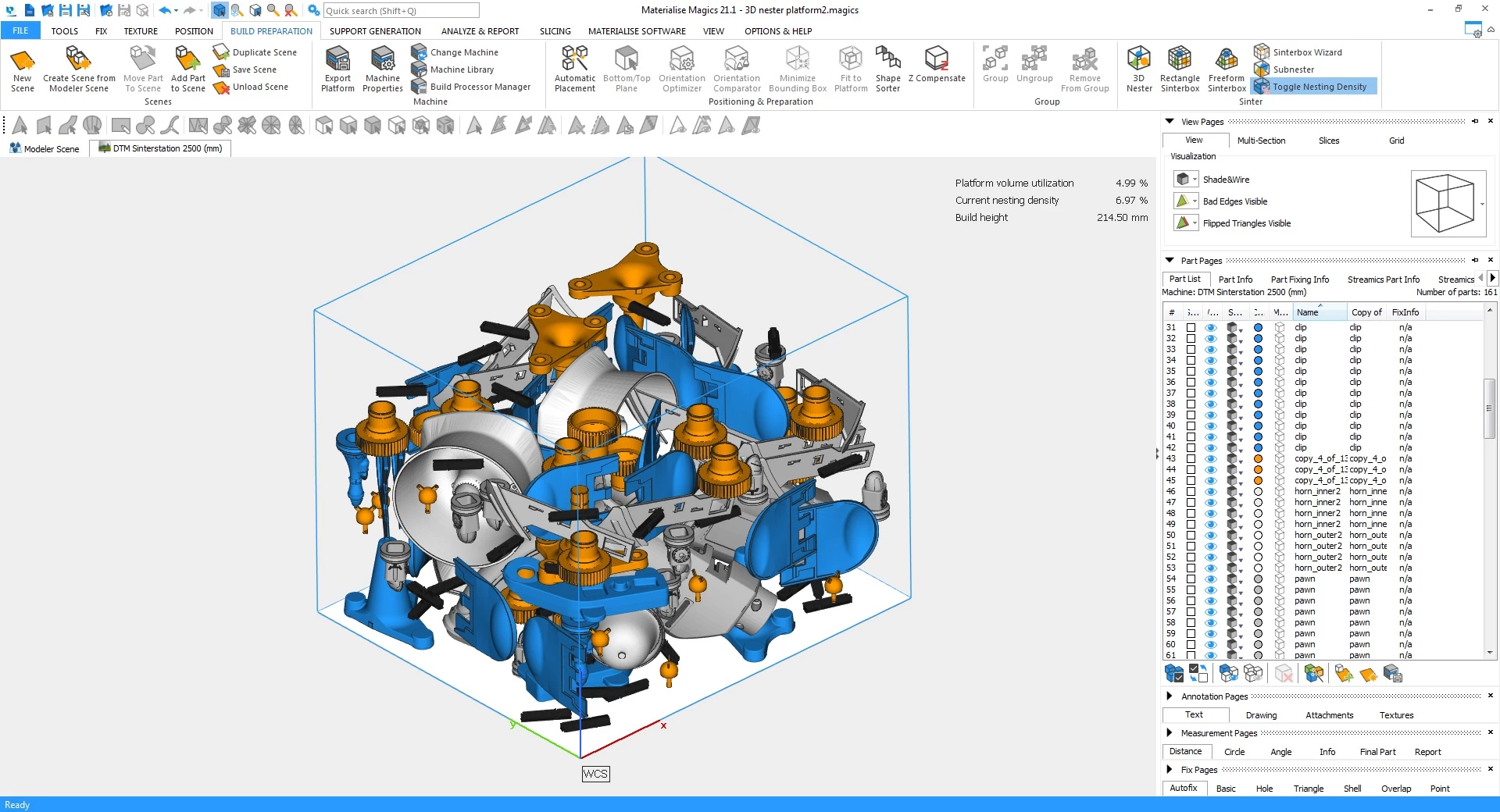
- High-Density Nesting: For powder-bed fusion technologies, maximizing the build volume is critical for cost efficiency. The Nester module relies on multi-core algorithms to automatically calculate the optimal placement and interlocking of multiple parts within the build chamber. This dense 3D packing minimizes wasted powder, protects fragile components with bounding boxes, and reduces the printer's overall occupancy time.
- Intelligent Support Generation: Producing complex overhangs in resin or metal requires specialized support structures. Utilizing modules like e-Stage for Resin or SG+ for metal, operators can automatically generate needle-shaped contact points or open diamond lattices. These structures prevent resin trapping, minimize material consumption, and drastically reduce the manual labor required during post-processing removal.
- Internal Lattice Structures: Solid parts consume excessive material and increase printing time. The Lattice module allows engineers to hollow out thick geometries and fill the internal voids with customizable, repeating lattice networks. This technique significantly reduces the final weight of the component while preserving its mechanical strength and thermal stability during the printing process.
- Broad CAD Format Import: Facilities often receive files from dozens of different clients using different proprietary design tools. The software directly imports native formats such as CATIA, NX, SolidWorks, Inventor, Parasolid, and STEP without requiring third-party conversion utilities. It translates these solid mathematical bodies into manageable mesh files while retaining critical native color data, texture mapping, and original assembly hierarchies.
- Direct Machine Communication: Exporting raw slices is only part of the manufacturing equation. The application connects directly to industrial hardware via vendor-specific Build Processors. This allows the software to generate and send precise, machine-specific toolpaths and laser scanning strategies directly to equipment from manufacturers like EOS and HP.
How to Install Materialise Magics on Windows
- Download the official Materialise Magics installer package directly from the Materialise customer portal after confirming your account credentials.
- Run the downloaded executable setup file with Windows administrator privileges to bypass local security restrictions during the core file extraction.
- Review the end-user license agreement and specify the local hard drive directory path where the application files and core libraries should reside.
- Select your preferred licensing method during the setup prompts, choosing either a node-locked installation tied to a single physical computer or a floating license configuration that queries a network server for access.
- Allow the installer to unpack the core application files, hardware profiles, default material databases, and any purchased add-on modules to your local storage drive.
- Launch the software from the newly created desktop shortcut or by navigating to the application via the Windows Start menu.
- Upon first launch, either enter your active subscription key manually or provide the IP address of your organization's license server to authenticate the software, verify your modules, and unlock the main graphical interface.
Materialise Magics Free vs. Paid
Materialise Magics operates exclusively as a premium, enterprise-grade commercial application and does not offer a free consumer tier. Due to the high-value nature of industrial additive manufacturing, the pricing model is structured around professional production environments where the software acts as a core manufacturing execution tool. As of May 15, 2024, the developer completely transitioned the software to an annual subscription model, officially discontinuing the sale of new perpetual licenses in favor of continuous software updates, direct technical support, and ongoing hardware compatibility. Older perpetual licenses remain functional for existing owners, but expanding a facility with new seats now strictly requires a subscription contract.
The financial structure is highly modular, meaning organizations do not pay a single flat rate for the entire software suite. Instead, customers purchase a core base subscription for the main repair and import features, and then add specific execution modules tailored to their hardware fleet. For example, a company running selective laser sintering machines will add the Sinter module for 3D nesting, while a direct metal laser sintering facility will add the SG+ module for advanced metal supports. Because of this custom configuration, exact prices are quoted directly by the sales team or authorized regional distributors, typically running into thousands of dollars per year depending on the selected modules, machine integrations, and total user count.
For academic environments, the developer offers an Educational Plan. This tier provides universities and training centers with heavily discounted multi-year floating licenses, allowing students to learn industrial data preparation without the enterprise price tag. However, individual students cannot claim a free personal license for home use; the software must be acquired and administered by the educational institution itself.
Materialise Magics vs. Autodesk Netfabb vs. Ultimaker Cura
Autodesk Netfabb serves as a direct industrial competitor that excels in additive manufacturing simulation and native integration within the broader Autodesk design ecosystem. Engineering teams frequently adopt Netfabb when their workflows are already heavily reliant on Fusion 360, or when they require complex thermal simulation to predict how thick metal parts will warp and deform during the cooling process. While both applications offer excellent mesh repair capabilities, Netfabb often presents a slightly more accessible entry price for mid-sized engineering firms. However, Magics is widely considered to have the superior mathematical algorithms for extreme high-density 3D nesting in powder-bed fusion workflows, allowing operators to pack more parts into a single print job.
Ultimaker Cura occupies an entirely different segment of the additive manufacturing market, functioning as the primary open-source slicing engine for desktop fused deposition modeling printers. Hobbyists, educators, and small businesses rely on Cura because it costs nothing to download, requires minimal technical training, and supports hundreds of consumer-grade extrusion machines out of the box. However, Cura is completely unsuitable for industrial metal or advanced resin production. It lacks the specialized lattice generation, automated metal support structures, and deep CAD-to-STL error-fixing capabilities that enterprise facilities require to run machines costing hundreds of thousands of dollars.
Materialise Magics is the strictly better fit for high-volume 3D printing service bureaus and industrial manufacturers managing multi-technology machine parks. When a single failed titanium print can cost significantly more than the software itself, the incredibly deep manual repair tools, advanced packing algorithms, and direct Build Processor communication justify the heavy enterprise subscription cost and steeper learning curve.
Common Issues and Fixes
- Intersecting triangles blocking the slicing process. When complex CAD assemblies convert to polygonal meshes, triangles can cross through one another and confuse the printer's internal toolpath calculation. To fix this, navigate to the Part Fixing Info tab, select the Triangle Fix tool, mark the overlapping geometries, and use the Move Part Points tool to manually separate the vertices until the collision error clears from the diagnostic screen.
- Massive file sizes slowing down viewport performance. Highly detailed native CAD imports can generate millions of polygons, causing the software interface to lag severely during orientation and support generation. Utilize the triangle reduction or mesh decimation tools to lower the overall polygon count, retaining the necessary dimensional accuracy while making the file manageable for the computer's system memory.
- Inverted normals causing incomplete prints. If a triangle's internal face points outward, the printer cannot mathematically distinguish the inside volume of the model from the outside empty space. Run the AutoFix command in the Fix ribbon, or manually orient the normals so that all internal geometries display as solid red and external faces point uniformly outward toward the build chamber.
- Wall thickness errors leading to fragile physical parts. Scaling down a model or hollowing it improperly can result in walls that are too thin for your specific printing technology to resolve without collapsing. Run the wall thickness analysis tool to detect weak structural areas and physically thicken the model's outer shell before sending the job to the Build Processor.
Version 29.1 — November 2025
- Added enhanced e-Stage 8.0 integration with adjustable parameters for customized support strategies
- Improved support point editing capabilities including Border, Interior, and Anchor point modifications
- Added platform-wide support generation functionality for increased workflow efficiency
- Improved handling and management of No-Support and No-Build Zones for better design control
- Added streamlined baseplate creation process with clearer error messaging
- Updated MatConvert to version 11.5 for improved CAD file compatibility
- Improved Siemens NX, Parasolid, Pro/Engineer, and STEP file import capabilities
- Fixed gLTF file format support (version 2.0) for enhanced geometry import options
- Improved overall precision and control when working with complex e-Stage projects