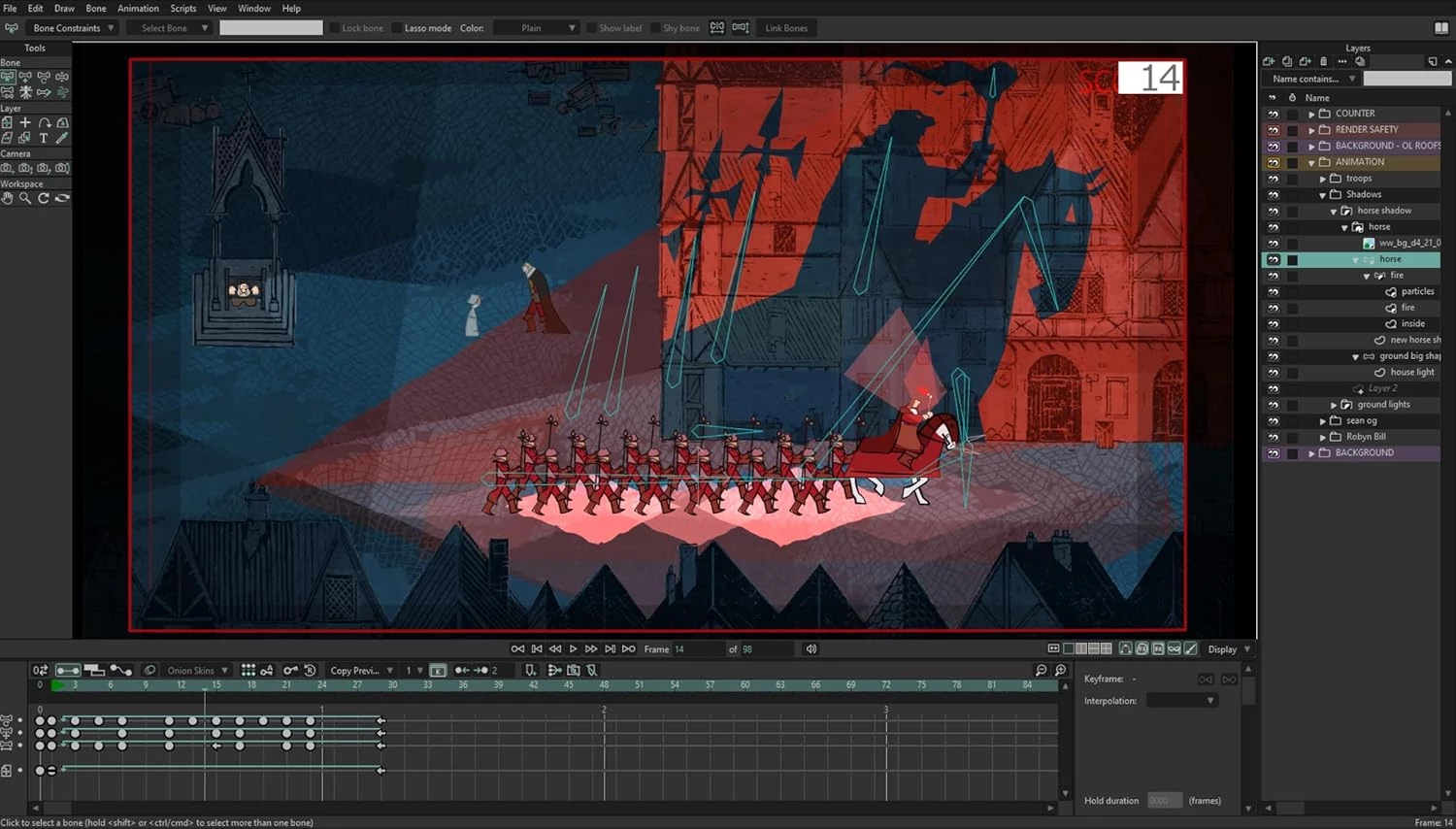
Moho Pro functions as a specialized 2D animation application tailored for professional animators, storyboard artists, and boutique studios prioritizing skeletal rigging over traditional drawing methods. Instead of forcing artists to redraw every frame by hand, the software uses a deeply integrated bone and vector system to manipulate two-dimensional assets as if they were physical puppets. Animators map skeletons to their characters, set up forward and inverse kinematics, and define how vector shapes should deform when the joints bend. This approach drastically reduces the total number of drawings required to produce full-motion sequences, handling everything from character conceptualization and rigging to lip-syncing, physics simulation, and final multiplane camera rendering.
Choosing a heavy, local desktop application for this specific job remains necessary because web-based or lightweight category tools cannot handle the hardware-intensive nature of calculating real-time physics, complex mesh deformations, and timeline caching. When a character rig includes multiple overlapping vectors, high-resolution bitmap textures, and dynamic particle emitters, the software must rely on dedicated desktop processor threads and local memory allocation. A browser tab simply lacks the memory ceiling and direct GPU access required to render overlapping depth-of-field effects or calculate wind dynamics across hundreds of individual hair strands in real time. Running locally on Windows ensures that animators have direct access to their hardware resources without network latency interrupting frame-by-frame playback.
The user interface centers around a hierarchical layer stack where vectors, bitmaps, audio tracks, and particle emitters all exist under parent bone folders. This grouping logic ensures that when the main skeletal root moves, every attached element follows the mathematical trajectory perfectly. Animators utilize the timeline to place keyframes on specific joint rotations, and the software automatically calculates the interpolated frames between point A and point B. By storing completed motions as reusable action clips, an animator builds a library of character performances that can be dropped into any future scene with a few clicks, drastically cutting down on production timelines.
Key Features
- Feature Name: Smart Bones: This rigging mechanic eliminates the ugly folding and distortion that normally occurs when vector joints bend by allowing animators to assign specific corrective actions to a joint's rotation. Beyond simple elbow or knee bends, artists utilize these control levers to create fully functional facial rigs where a single control dial makes a character blink, smile, or turn its head. This allows for complex emotional performances and precise vector point adjustments without managing dozens of separate timeline layers.
- Feature Name: Vitruvian Bones: Managing foreshortening and extreme perspective shifts requires switching between completely different drawings of the same body part, which this tool handles by grouping alternate limbs into a single joint structure. Instead of hiding and revealing layers manually in the timeline, the user taps the Alt-D or Alt-C keyboard shortcuts to cycle through different hand gestures or leg angles on the fly. The skeleton remains intact during this swap, meaning the character does not break its stance when transitioning from a side profile to a front-facing action.
- Feature Name: Curvers and Compressible Paths: Drawing dynamic elements like tails, tentacles, or flowing hair requires lines that bend fluidly, and this path manipulation tool allows the artist to rig vector lines with a custom skeleton that compresses naturally. The user can animate the line width directly in the timeline, making specific parts of the drawing thicker or thinner as the object moves closer to or further from the camera. This eliminates the need to manually adjust individual bezier handles for every frame of a whip-crack motion.
- Feature Name: Unified Graphics Engine and Liquid Shapes: The underlying rendering pipeline processes both mathematical vectors and rasterized bitmaps simultaneously, allowing artists to mix hand-drawn textures with rigid geometric designs in the same workspace. The application includes boolean operations for vectors, meaning overlapping shapes can automatically subtract, intersect, or blend into one another mathematically. When animating a drop of water falling into a puddle, the liquid shapes function merges the two separate vector objects the moment they touch, creating a natural surface tension effect without requiring frame-by-frame redrawing.
- Feature Name: 3D Camera and Depth Shifting: Animators construct scenes using a true multiplane environment with a Z-axis, allowing users to push background elements physically further away from the lens rather than stacking flat layers. By adjusting the depth of field settings, the camera can rack focus from a foreground character to a distant object, blurring the intervening layers based on calculated physical distance. The engine also accepts direct imports of OBJ or GLB files, meaning artists can place true three-dimensional props into their two-dimensional environments.
- Feature Name: Physics and Wind Dynamics: Keyframing secondary motion such as dangling jewelry, loose clothing, or falling leaves takes hours of manual adjustment, so the internal physics engine calculates gravity, collision, and wind resistance automatically. The user defines the weight, bounce, and friction of the vector layers, and the software generates the secondary motion mathematics across the timeline based on the primary character's movement. If an animator makes a rigged character jump, the physics engine calculates the exact moment the character's hair should whip upward and settle back down upon landing.
How to Install Moho Pro on Windows
- Download the main setup installer archive directly from our website to your local storage drive, saving it to a location you can easily find, such as the Windows desktop or Downloads directory.
- Right-click the downloaded ZIP file and select the extraction option to unpack the contents into a new, uncompressed folder, ensuring all necessary components are fully accessible.
- Open the readme.txt file located inside the extracted folder to review the specific pre-installation notes, local system configurations, or administrative requirements specific to your machine environment.
- Double-click the extracted executable setup file to launch the installation wizard, granting administrator permissions if prompted by the Windows User Account Control dialogue.
- Accept the end-user software agreement and confirm the default destination path for the application files, which typically routes to C:Program FilesLost MarbleMoho Pro unless you specify an alternate drive.
- Decide whether to install the optional content library and example project files when prompted by the wizard, keeping in mind that these assets require several extra gigabytes of local storage space.
- Allow the installer to unpack the core application files, write the necessary registry entries, and finish the setup process before clicking the final button to exit the wizard.
- Launch the program using the newly generated desktop shortcut, enter your purchased license credentials or select the trial mode option, and define the custom directory path where the application will save your user-generated brushes, rigs, and scripts.
Moho Pro Free vs. Paid
The financial model relies entirely on a perpetual, one-time purchase structure rather than a recurring monthly subscription. Users pay a single upfront fee of $399.99 for the primary professional application, which grants permanent offline access to the software without requiring regular server check-ins. This tier includes the complete feature set, encompassing advanced skeletal controls, the multiplane camera environment, custom mesh deformations, and the physics simulation engine. Minor updates and bug fixes within the main release cycle remain free for existing license holders, while subsequent major generational leaps require a paid upgrade path.
For hobbyists, students, or animators operating on a strict budget, the developer offers a secondary tier named Moho Debut, available for $59.99. This entry-level version strips away the more complex technical features required by broadcast studios. Debut limits the timeline length, caps the maximum render resolution, and entirely removes advanced mechanics such as the three-dimensional workspace, complex boolean vector blending, and the customizable control dials for character joints. It serves primarily as a foundational learning environment for the core bone system.
There is no permanent free tier available, nor is the software open-source. The developer does not rely on enterprise service contracts or microtransactions to sustain development. Instead, users who want to test the workflow before committing financially must utilize the time-limited trial version. The trial provides full access to the professional toolset for thirty days, allowing prospective buyers to test their specific hardware compatibility and evaluate the rigging interface before the export functions lock behind the paywall.
Moho Pro vs. Toon Boom Harmony vs. Adobe Animate
Toon Boom Harmony operates as the prevailing industry standard for massive television pipelines and feature films that require traditional, hand-drawn frame-by-frame animation. It offers a highly technical node-based compositing system that allows technical directors to route visual effects, lighting, and camera paths through a complex web of mathematical operations. However, this high ceiling comes with an extremely steep learning curve and a mandatory recurring subscription model, making it an expensive and dense proposition for solo animators who do not need enterprise-grade pipeline management.
Adobe Animate functions primarily as an interactive design tool, excelling at creating HTML5 canvas projects, web banners, and lightweight vector graphics for mobile games. It integrates closely with the broader Adobe ecosystem, allowing users to pass assets back and forth with illustration and layout tools easily. Despite these interactive strengths, its core animation philosophy relies on a symbol-based workflow rather than dedicated inverse kinematics. It lacks the deep, physics-driven rigging controls and multiplane camera depth needed for narrative character animation, making it less suitable for long-form storytelling.
Moho Pro sits directly between these two extremes, offering the best workflow for animators who want to build complex, reusable character puppets without drawing every single frame by hand. Its skeletal system and mesh deformation tools far exceed the capabilities of Adobe Animate, allowing for broadcast-quality character acting with significantly less manual labor. At the same time, its one-time purchase price makes it vastly more accessible than Toon Boom Harmony for independent creators and boutique studios who need professional narrative tools without the financial burden of a perpetual enterprise subscription.
Common Issues and Fixes
- Problem description. Application crashing on startup or during heavy timeline scrubbing. This behavior frequently occurs when the software attempts to process complex vector math using an underpowered integrated graphics chip. Open your Windows display settings or your specific graphics control panel, locate the application executable, and force the program to utilize your dedicated graphics card exclusively.
- Problem description. Exported FBX files locking to incorrect frame rates in game engines. When transferring rigged characters to external 3D environments like Unity, the target engine may default to thirty frames per second despite your original settings. Ensure your project timeline is explicitly set to the desired frame rate before initiating the export, and manually override the import settings inside the destination engine to match the source file precisely.
- Problem description. Rigged limbs distorting or flipping backward on older project files. Opening character files created in previous generational builds can cause legacy skeletal data to conflict with the updated mathematical engine. Select the malfunctioning joints using the bone tool, reset their target constraints in the properties panel, and rebind the vector layers to the updated skeleton to restore proper movement.
- Problem description. Audio playback lagging behind the visual timeline during lip-syncing. High-resolution canvas rendering forces the timeline to drop visual frames, causing the audio track to fall out of sync with the character's mouth movements. Lower the display quality in the viewport settings during playback by disabling anti-aliasing and masking previews, or perform a low-resolution proxy render to verify your dialogue timing accurately.
- Problem description. Vector strokes showing visual artifacts or jagged edges during camera pans. Rendering a multiplane scene with extreme depth of field can sometimes cause thin vector strokes to pixelate against transparent backgrounds. Navigate to the project render settings and enable the extra-smooth anti-aliasing option, or slightly increase the line width threshold in the layer properties to ensure the strokes remain solid during depth calculations.
Version 14.4 — November 2025
- Introduced glTF/GLB export functionality for seamless integration with game engines like Unity, Unreal, and Godot, as well as 3D applications such as Blender
- Added 360-degree Smart Bone feature enabling artists to precisely control artwork appearance at every rotation angle for full-turn character movements
- Enhanced particle system with curve-based source layer support, customizable interpolation intervals for timing control, and improved distribution patterns
- Implemented Create Style from Shape tool for quick modification of colors, line widths, and brushes across entire projects
- Improved freehand drawing stability with enhanced smoothing algorithms and optimized performance in complex layers
- Upgraded layer caching system to reduce redraw delays when working with vector layers influenced by bones or point animation
- Streamlined undo functionality by consolidating multiple edits from single UI controls into unified steps
- Enhanced Smart Bones conversion to Morph Targets during export, preserving facial expressions and complex deformations
- Added support for TourBox and Xencelabs Quick Keys device presets
- Refined timeline zoom persistence between sessions and improved layer selection behavior
- Fixed various issues related to particle rendering on macOS, PSD import compatibility, motion blur logic, and bone visibility in Vitruvian rigs