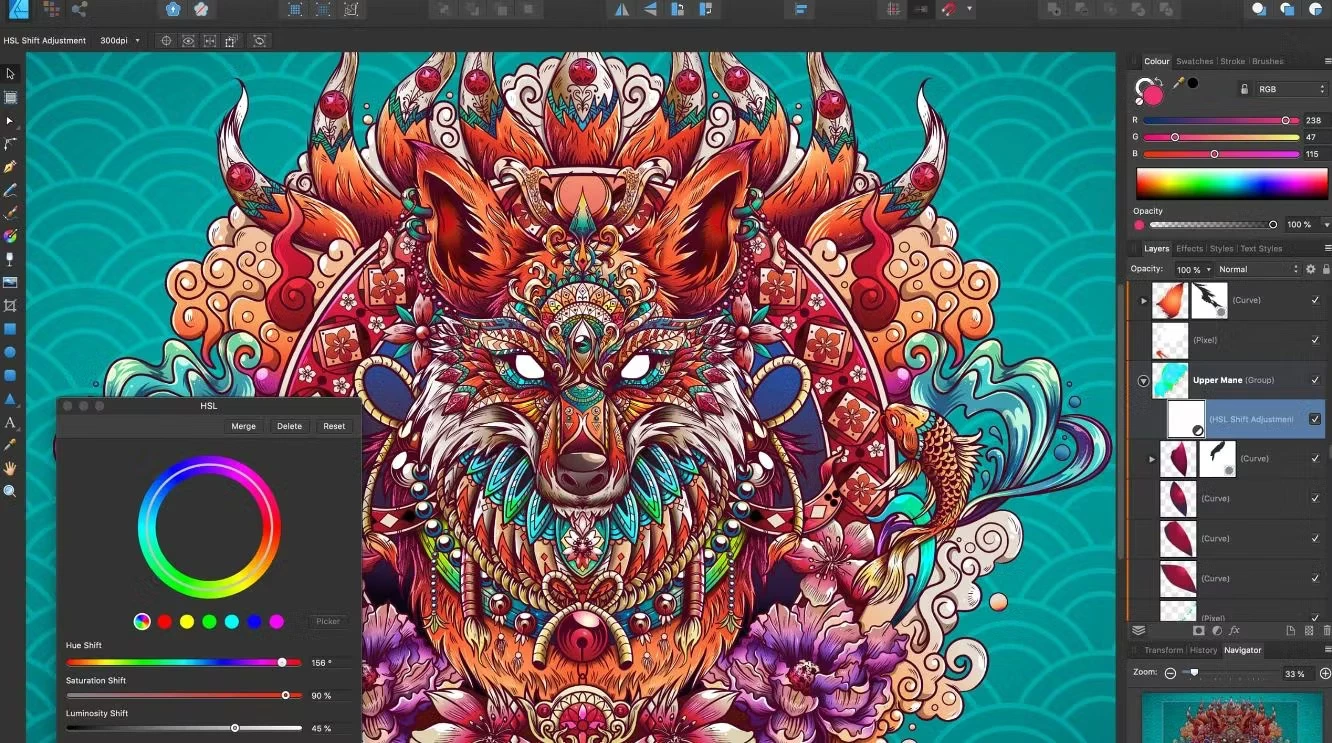
Affinity Designer is a desktop vector graphics editor built for creating concept art, logos, interface mockups, and print layouts. Instead of strictly separating mathematically drawn paths from raster images, the application allows illustrators to handle both formats within the same window. Users draw clean, scalable curves using pen tools, then immediately apply pixel-based textures or shading without exporting the file to a separate photo editor. This dual-environment approach solves the practical problem of maintaining a fluid drawing process when moving between the structural phase of a vector logo and the final textural details of a finished digital painting.
This desktop application appeals directly to UI designers, digital illustrators, and layout artists who need local hardware acceleration and advanced file format support. While browser-based design tools handle basic social media graphics, professional print and branding projects require precise control over CMYK color profiles, isometric grids, and complex typography. By utilizing the local computer's processor and graphics card, the software smoothly handles heavy documents containing thousands of individual nodes, embedded resources, and overlapping layers. The interface includes dedicated studios for color, stroke, layers, and typography, giving designers direct access to the exact mathematical properties of their selected objects.
Because the program runs locally on Windows, it bypasses the input lag often associated with web-based vector editors. Designers can utilize custom keyboard shortcuts, manage linked symbols across multiple artboards, and configure non-destructive boolean operations to build complex UI components. Interface elements can be grouped, nested, and tagged with specific colors to keep complex document hierarchies organized in the layers panel. By eliminating the friction of switching programs, the software provides a highly focused environment for drafting crisp technical illustrations, painting digital concept art, and preparing detailed marketing assets for final production.
Key Features
- Vector and Pixel Personas: The interface is divided into dedicated workspaces called Personas. Switch instantly between the vector illustration environment and the raster painting environment by clicking the icons in the top left toolbar. This allows designers to add pixel-based brush textures to vector paths, use dodge and burn tools, or apply raster masking without changing applications or exporting intermediate files.
- Non-Destructive Boolean Operations: Combine, subtract, intersect, or divide overlapping shapes to create complex icons and custom typography. Unlike destructive pathfinding tools that permanently merge geometry, these boolean groups remain editable in the Layers panel, allowing you to move, scale, or alter the original source curves long after the operation is applied.
- Advanced Grid and Snapping Controls: Set up isometric grids, column guides, and custom snapping parameters to align interface elements exactly to the pixel. The Snapping Manager allows users to force objects to snap to specific nodes, midpoints, baseline grids, or geometry bounds, ensuring mathematical accuracy for technical drawings and user interface mockups.
- Live Effects and Adjustments: Apply layer effects such as drop shadows, outer glows, gaussian blurs, and color corrections non-destructively. The application renders these visual changes in real time on the canvas as you move the adjustment sliders, preventing the need to wait for progress bars or complex rendering dialogs before seeing the final result.
- Professional Export Options: Output designs in industry-standard formats including EPS, SVG, PSD, and PDF for print. The dedicated Export Persona allows users to slice a single document into multiple distinct assets, assigning different resolutions, color profiles, and file formats to each individual slice for automated batch exporting.
- Shape Builder Tool: Drag a cursor across overlapping vector segments to visually add or subtract areas. This tool simplifies the creation of complex geometric elements by letting users intuitively merge segments without relying on manual path cutting, node deletion, or complex mental calculations for boolean geometry.
- Dynamic Symbol Linking: Create master symbols for repeating elements like buttons, headers, or icons across multiple artboards. When you edit the master symbol, all linked instances update instantly across the entire document. Designers can also detach specific attributes, such as text labels or fill colors, while keeping the core structural shape linked to the master.
How to Install Affinity Designer on Windows
- Navigate to the official vendor website and select the Windows installer package from the downloads section. The vendor recommends the MSIX container format for standard Windows 10 and Windows 11 desktop environments, as it supports clean uninstalls and isolated background updates.
- Download the installer file to your local drive. Because the package contains the full suite of vector and raster tools, ensure you have sufficient disk space before beginning the setup process.
- Launch the downloaded MSIX package to open the native system app installer window. This interface displays the app's publisher, version, and requested system capabilities without requiring a traditional wizard interface.
- Review the installation prompt and click the install button. The MSIX format automatically handles the destination path, registry entries, and file associations to keep the application cleanly isolated from other system files.
- Wait for the operating system to extract the container, register the application dependencies, and place a shortcut in your Start menu. The entire process typically completes in under a minute on modern solid-state drives.
- Open the software from the newly created Start menu shortcut. On the first run, the application presents a welcome screen requiring user authentication.
- Sign in with a free Canva account when prompted by the application window. This login step verifies your license status, authenticates the software, and unlocks the primary workspace for offline editing.
- If the default MSIX installer fails on older operating system builds or restricted corporate networks, download the alternative MSI/EXE installer from the vendor's help pages to bypass the container requirement and choose a custom directory manually.
Affinity Designer Free vs. Paid
Following its acquisition by Canva, the core desktop application is completely free for all users. There is no longer a mandatory one-time purchase, and the company does not charge a monthly subscription to access the standard vector, raster, and layout workspaces. Users can download the software, sign in with a free account, and utilize the full suite of pen tools, layers, stroke adjustments, and professional export formats without facing trial watermarks or file save limits.
This pricing model removes the financial barrier for independent designers, hobbyists, and students who need professional-grade CMYK output and non-destructive editing. The application receives regular software updates, bug fixes, and performance improvements under this free tier, ensuring the local tools remain compatible with modern hardware, new operating system updates, and evolving file standards.
The paid tier applies exclusively to cloud-based artificial intelligence features. If designers want to use generative fill, automated background removal, or other Canva AI Studio integrations directly within the desktop interface, they must link an active Canva Premium or Canva Pro subscription. These AI tools require external server processing and data center compute power, which forms the basis of the recurring subscription cost.
Without the premium subscription, the desktop app functions entirely offline for standard creative work after the initial account login. It relies on local CPU and GPU processing rather than cloud rendering, ensuring that traditional illustration, typography manipulation, and print layout tasks remain fully accessible at zero cost. Users never lose access to their locally saved files or core editing tools if they choose not to upgrade.
Affinity Designer vs. Adobe Illustrator vs. CorelDRAW
Adobe Illustrator remains the industry standard for vector design, featuring exclusive tools like the Blob Brush, Image Trace, and deep integration with the rest of the Creative Cloud ecosystem. Designers who collaborate heavily with animation studios using After Effects, or who rely on automated vectorization of scanned pencil sketches, generally stick with Illustrator despite its ongoing monthly subscription cost. Adobe also provides extensive cloud libraries that sync fonts, color palettes, and graphic assets instantly across global enterprise teams.
CorelDRAW appeals heavily to the print production, signage, and apparel industries due to its specialized cutting tools, multipage layout handling, and legacy file compatibility. Print shops managing large-scale physical media often prefer CorelDRAW's dedicated color management and physical output workflows over general-purpose graphic design software. Its interface caters directly to technicians preparing files for laser cutters, vinyl plotters, and CNC machines, offering specific plugins tailored to the manufacturing sector.
Affinity Designer is the better choice for illustrators and UI designers who want a free, locally installed tool that blends vector and raster workflows in a single window. Its ability to switch to a pixel workspace for texturing curves makes it highly practical for digital concept art, avoiding the need to bounce files back and forth between separate vector and photo editing programs. The lack of subscription fees for the core toolset makes it highly attractive for freelancers who need professional CMYK output and SVG generation without the recurring overhead of Adobe's ecosystem.
Common Issues and Fixes
- Hardware acceleration causes crashes on launch. On some Windows systems, the OpenCL compute acceleration conflicts with specific display drivers, causing the app to close immediately upon opening a file or creating a new document. To fix this, navigate to the Edit menu, click Settings, open the Performance tab, uncheck the Hardware Acceleration box, and restart the application to force standard CPU rendering.
- MSIX installer fails on older Windows builds. The default MSIX package requires specific Windows 10 or Windows 11 updates to run the application container and isolate the file system. If you receive an OS version error or an architecture mismatch during setup, download the alternative MSI/EXE installer from the official website or update your operating system to a newer build.
- Canvas lags when switching between the Move and Node tools. High undo limits and background auto-saving can cause temporary stuttering on large files containing complex vector nodes and pixel layers. Reduce the undo limit in the Performance settings from the default 1024 to a lower number like 100 to free up system memory and improve overall interface responsiveness.
- Unable to read legacy Adobe InDesign formats. The software cannot natively open proprietary INDD layout files, resulting in an import error when dragging these files onto the canvas. To import these layouts, the original author must open the file in InDesign and export the project as an IDML (InDesign Markup Language) file, which can then be successfully read and interpreted by the application.
- Checkerboard background does not appear for transparent documents. By default, new artboards display a solid white background instead of a standard transparency grid, which can confuse users trying to export PNG files. To fix this visual issue, click the Document Setup button in the top toolbar, navigate to the Color tab, and check the "Transparent Background" option to reveal the standard checkerboard pattern.
Version 2.6 — 2025
- Added new Pencil Tool enhancements, including a smoothness slider for real-time path simplification and configurable "Auto-Close" behavior (Near/Far) for better shape control.
- Added a Search Bar to the Brushes panel, allowing for quicker access to specific raster and vector brushes.
- Added Machine Learning Object Selection (Pixel Persona), enabling rapid isolation of subjects and objects within images.
- Improved the Color Picker Tool workflow; sampled colors are now applied immediately to the selection without requiring a secondary click.
- Improved performance of the Stroke Width Tool, offering more precise pressure profile adjustments directly on the canvas.
- Fixed an issue where the Pencil Tool would generate excessive nodes during fast strokes, ensuring cleaner vector paths.
- Fixed various stability issues related to variable font rendering and expanded canvas operations.