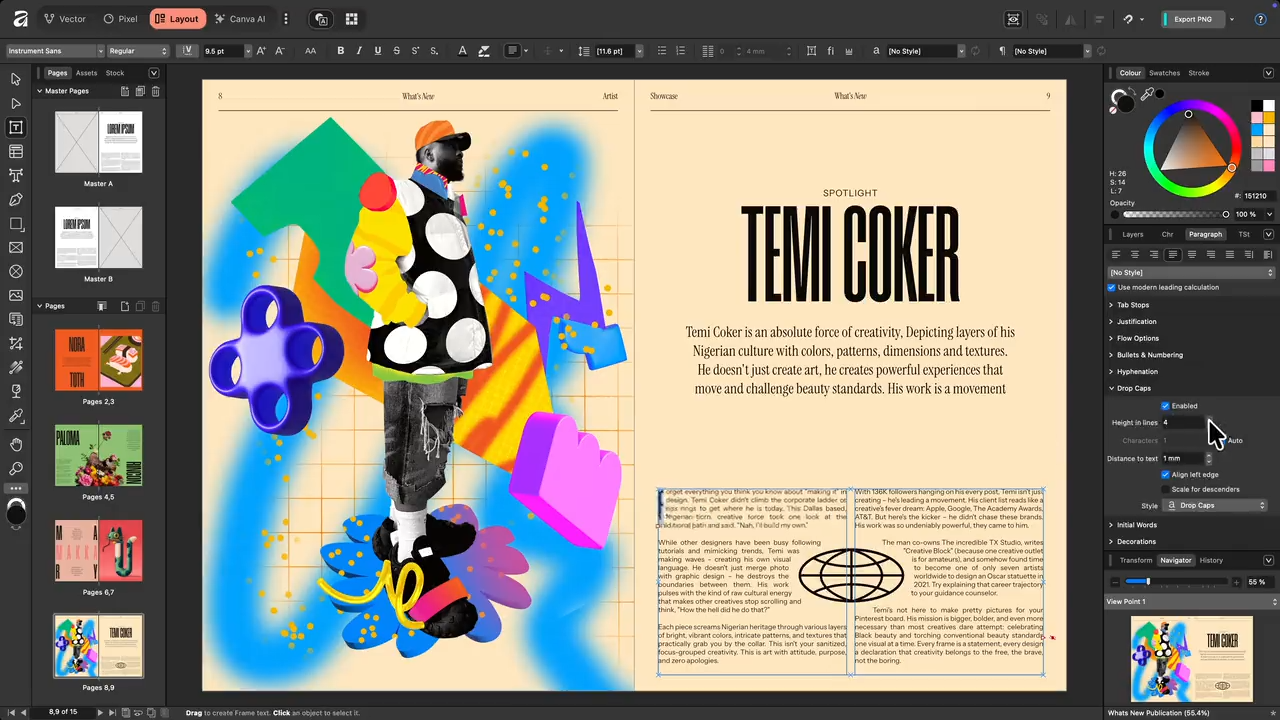
Affinity Publisher serves as a professional-grade desktop publishing application designed for layout creation, typography management, and document preparation. Book designers, magazine editors, and marketing teams use this application to construct highly structured, multi-page documents ranging from simple digital brochures to complex, print-ready coffee table books. Instead of relying on browser-based design editors that struggle with massive high-resolution image rendering and strict color management rules, creative professionals install this local desktop environment to handle heavy asset management, precise baseline grids, and CMYK color space output natively. Working locally ensures zero lag when zooming into multi-gigabyte files and keeps data processing dependent entirely on the computer's processor and graphics hardware rather than a network connection.
The core advantage of this page layout tool lies in its specific focus on structured document assembly and integration with external asset libraries. Users rely on it to establish master pages, define strict global text styles, and automate repetitive elements like page numbers, running headers, and dynamically updating tables of contents. It replaces scattered word processing documents and standalone vector files with a unified workspace built explicitly for commercial printing standards, enforcing bleed margins, crop marks, and color profiles necessary for professional production. By keeping the workflow inside a dedicated Windows application, designers avoid the memory restrictions and rendering bottlenecks frequently encountered in cloud-only layout tools.
Unlike basic text editors, this software treats text and images as strictly defined objects within rigid frames, allowing exact millimeter-level positioning on the page. Professionals use this object-based approach to control exactly how text wraps around irregularly shaped photographs, how ink coverage limits apply to specific graphic elements, and how multi-column text flows automatically from one page to another without manual adjustment.
Key Features
- StudioLink Asset Editing: This workspace connects directly to other Affinity applications installed on the same computer without requiring external program launches. By clicking the Photo or Designer persona icons in the top-left toolbar, the interface instantly swaps its layout panels for raster editing or vector drawing tools. This allows users to retouch placed images or adjust vector paths directly on the magazine page, preserving the layout context and avoiding destructive edits to the original source files.
- Preflight Checker: Before exporting a document for commercial printing, the application runs an automated diagnostic check through the Preflight panel. It flags critical production errors such as missing fonts, low-resolution placed images, overset text hidden outside frame boundaries, and incorrect color profiles. Clicking on any error in the Preflight list instantly jumps the viewport to the exact page and object causing the issue, allowing immediate correction before generating the final file.
- Master Pages and Baseline Grids: Structural layout consistency relies on repeatable page templates and strict alignment rules. Users can stack multiple master pages onto a single spread, automatically applying grids, headers, and folios across hundreds of pages simultaneously. The baseline grid manager locks paragraph text to invisible horizontal lines across the entire document, ensuring that text columns sitting side-by-side always align perfectly at the bottom edge regardless of font size changes above them.
- IDML Import Capability: Transitioning legacy projects from competing layout software requires reading external archive formats. The software opens Adobe InDesign Markup Language files directly from the File menu, translating text styles, master pages, and linked image frames into native Publisher objects. While some complex paragraph rules or custom scripts require manual adjustment after import, this function recovers the vast majority of structural formatting without forcing the user to rebuild documents from scratch.
- Data Merge and QR Code Generation: Automating personalized print runs is handled through the Data Merge Manager, which links external spreadsheet data to specific text frames. Users map columns from a CSV or JSON file to placeholder variables on the page, generating hundreds of unique business cards or event badges automatically. The tool also translates spreadsheet URLs directly into scannable QR codes placed on the layout, scaling them precisely without pixelation or loss of edge clarity.
- Advanced Typography Controls: Granular text styling goes beyond standard point sizes and line spacing parameters. The Paragraph panel offers dedicated controls for optical margin alignment, which pushes punctuation marks slightly outside the text frame to create visually straight vertical edges. Users can also configure multi-level drop caps, adjust glyph tracking, and define strict hyphenation dictionaries to control exactly how words break at the end of a line, preventing awkward visual gaps in fully justified text columns.
- Customizable PDF/X Export: Generating print-ready files requires strict adherence to commercial press standards that dictate ink limitations and bleed marks. The export dialog provides dedicated presets for PDF/X-1a, PDF/X-3, and PDF/X-4 formats, embedding color profiles and flattening transparency effects according to the specific requirements of the printing house. Users control exact downsampling limits for rasterized images, embed required subsets of typography, and optionally include printer marks directly from the export menu.
How to Install Affinity Publisher on Windows
- Navigate to the official developer website and download the Windows installer package, selecting either the standard EXE or the MSIX format depending on system configuration preferences.
- Double-click the downloaded setup file to initialize the installation wizard, which may prompt a Windows User Account Control dialogue requiring administrative permission to proceed.
- Review the end-user license agreement, specify the target directory path on the local hard drive, and confirm whether to create a desktop shortcut for immediate access.
- Click the install button and wait for the installer to write the application files, font rendering engines, and color management profiles to the disk.
- Once the file extraction finishes, close the installation wizard and launch the application directly from the Start menu or desktop shortcut.
- On the first launch, an activation window appears requiring the user to sign in with an official account to verify a purchased license or to initiate the time-limited trial period.
- After authentication, the software downloads any required initial content packs or dictionary files, then opens the main workspace and presents the New Document dialog box.
Affinity Publisher Free vs. Paid
Affinity Publisher does not operate on a subscription model, distinguishing its billing structure from many enterprise creative suites. Users download the application and evaluate it through a fully functional, time-limited trial, which typically lasts for 30 days. During this trial period, the software does not restrict file saving, limit page counts, or apply watermarks to exported PDF documents. The trial provides the exact same toolset, export dialogue, and color management engine as the paid version, ensuring professionals can test the application on real commercial projects before making a financial commitment.
Once the trial expires, the software locks the editing and export tools until the user purchases a perpetual license. A single-application desktop license costs a one-time fee of $69.99, granting permanent offline access to the application on Windows devices without any recurring monthly charges. This single purchase covers minor updates and security patches indefinitely for the current major software cycle.
For users who also require dedicated photo editing and vector illustration software, the developer offers a Universal License for approximately $165 to $205 depending on regional pricing. This bundled one-time purchase unlocks Publisher, Photo, and Designer across all compatible desktop and mobile tablet platforms. Because the StudioLink feature relies on detecting active licenses for the other two applications on the same machine, purchasing the Universal License is the only way to fully activate the multi-persona layout editing environment.
Affinity Publisher vs. Adobe InDesign vs. QuarkXPress
Adobe InDesign dominates the corporate publishing industry, offering deep integration with the Creative Cloud ecosystem, extensive scripting support via JavaScript, and highly advanced GREP styling for automated text formatting. Enterprise teams rely on InDesign because it supports native INDD file sharing, collaborative cloud workflows, and complex long-document syncing through its proprietary book file structure. However, InDesign requires an ongoing monthly subscription, and its background sync processes can consume significant system memory on older workstations.
QuarkXPress serves as the traditional layout standard of the desktop publishing world, favored by veteran production houses for its precise typographic engine and legacy document support. It excels in cross-media publishing, allowing designers to convert print layouts directly into HTML5 publications, interactive mobile applications, or fixed-layout ePubs without writing code. Despite these specialized conversion tools, QuarkXPress carries a high upfront cost, and its interface often feels dense and rigid to newer designers accustomed to modern, layer-based graphics applications.
Affinity Publisher stands out as the ideal choice for freelance designers, independent publishers, and budget-conscious agencies who need commercial-grade layout tools without recurring subscription fees or extreme upfront software costs. When an independent creator needs to layout a 300-page book, manage CMYK color profiles, and output a strict PDF/X file for a commercial printer, Affinity Publisher provides all the necessary preflight and typography tools for a single, flat payment. Its unique StudioLink integration also makes it vastly superior for users who frequently need to perform detailed photo retouching or vector adjustments directly on the layout page, saving hours of external application swapping.
Common Issues and Fixes
- IDML text wrapping fails on image masks. When importing Adobe markup files containing PSD images with transparent layer masks, the text often wraps around the rectangular bounding box instead of the transparent cutout. To resolve this, open the specific image within the layout, rasterize the layer mask into a flat pixel layer, and then nudge the image frame slightly to force the text wrap engine to recalculate the boundaries.
- Text frames appear empty after import. Documents brought in from external layout programs occasionally display blank text frames despite the layer panel confirming the text exists. This usually results from conflicting baseline grid settings or invisible text flow overrides; selecting the problematic frame and clicking the Reset Formatting button in the Text Styles panel forces the text to reappear using the default paragraph style.
- Fonts display incorrectly or trigger missing warnings. Because the software relies entirely on locally installed system fonts, moving a document from another workstation often triggers substitution warnings. Open the Font Manager from the Document menu to locate the exact missing typeface, download the correct OTF or TTF file from your foundry, install it directly into the Windows font directory, and restart the application to force a directory scan.
- Exported PDF files are excessively large. High-resolution placed images frequently inflate the final PDF size beyond email attachment limits. During the export process, click the More button in the PDF dialog box and manually set the Downsample Images threshold to 150 DPI for digital viewing, which aggressively compresses the embedded raster files while leaving vector text perfectly sharp.
Version Latest — 2025
- Added support for multi-page spreads, enabling the creation of complex layouts like gatefolds, trifolds, and accordion folds directly within the workspace.
- Introduced a new Reading Order panel to manually manage the sequence of content for screen readers and accessibility standards.
- Added new page reflow controls, allowing users to toggle "Reflow Pages" and "Reflow Through Spread" to better manage text flow when adding or removing pages.
- Improved the "Add Pages" functionality with options to insert pages specifically into the document flow, at the end of a spread, or as a new spread entirely.
- Added a dedicated QR Code tool that can generate codes from data merge fields for automated document personalization.
- Improved vector editing with new Node Tool behaviors, allowing users to cycle through node types or remove handles by double-clicking.
- Improved DOCX import handling for better retention of field data, styling, and column breaks.
- Fixed issues with history truncation when opening documents from previous versions containing complex page manipulations.
- Fixed various bugs related to PDF export stability, particularly involving tagged PDFs and hyperlinks on anchored objects.