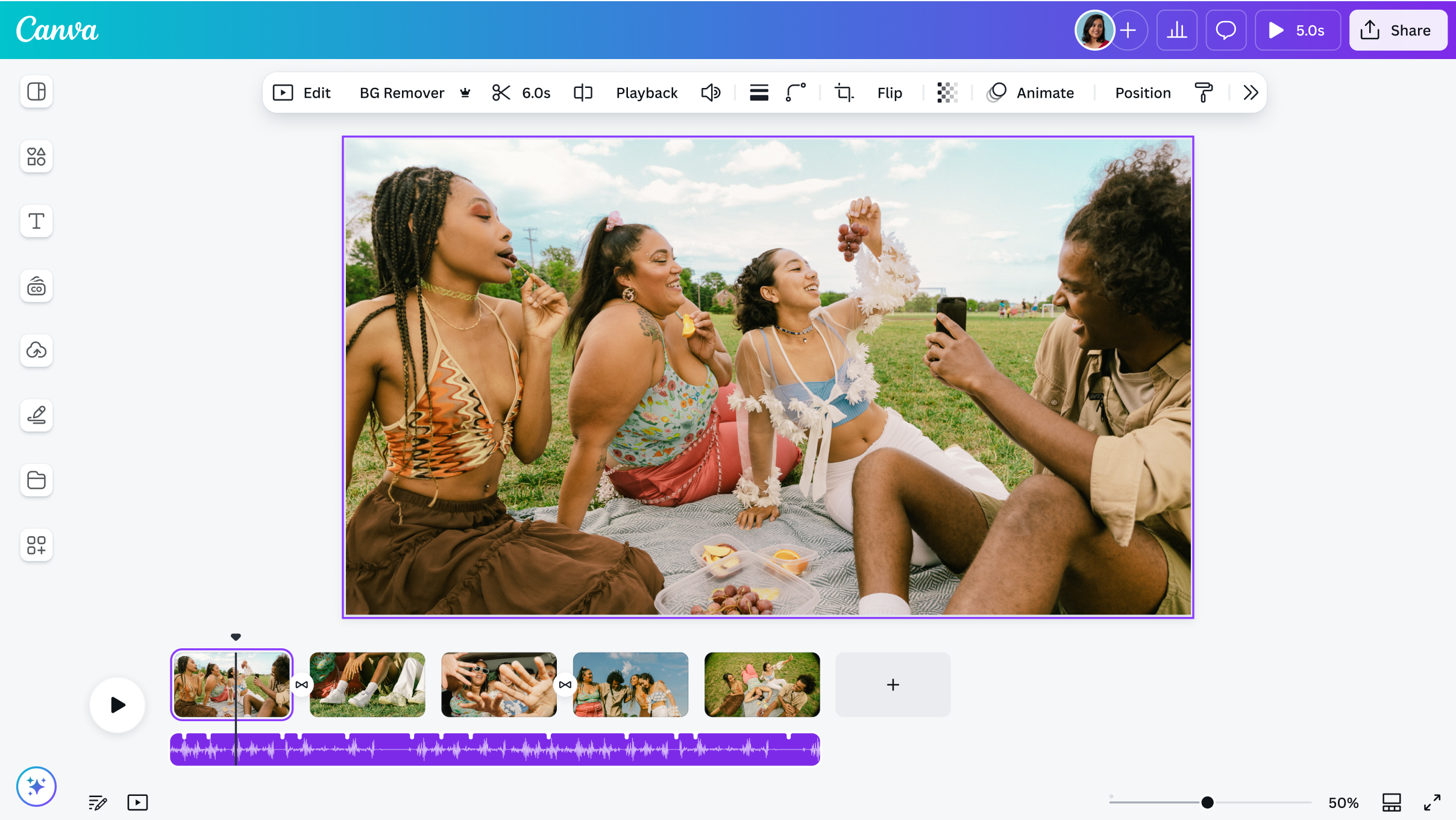
Canva Desktop functions as a dedicated Windows application designed for visual content creation, layout design, and video editing. By bringing the familiar browser-based graphic design platform into a standalone window, this application removes the clutter of managing multiple browser tabs. Users can isolate their creative workflows in a focused environment, utilizing native operating system features like taskbar pinning, local window management, and direct integration with Windows notifications. The software targets marketing teams, freelance designers, educators, and social media managers who need to produce high volumes of visual assets without relying on heavy, traditional desktop publishing software.
The platform handles a wide variety of practical layout tasks. Users frequently rely on the application to design multi-page slide decks, export print-ready flyers with exact crop marks and bleeds, edit short-form social media videos with multi-track audio, and assemble transparent PNG graphics for web use. Because the editor operates through direct cloud synchronization, all changes made within the Windows application instantly reflect across any other device logged into the same account. This real-time saving mechanism ensures that progress is never lost due to a local hardware failure, provided the computer maintains an active internet connection.
Instead of requiring a steep learning curve and extensive manual configuration, the interface focuses on a drag-and-drop methodology. Users select pre-configured templates or blank canvases, pull assets from the left-hand sidebar, and arrange them using smart snapping guides. While it handles complex outputs like CMYK-profiled print PDFs and 1080p MP4 exports, the application abstracts the technical complexities of file rendering. This makes it a highly practical tool for users who need to execute concrete design jobs quickly without navigating the dense menus associated with legacy vector or raster editing suites.
Key Features
- Dedicated Windows Workspace: Operating outside the web browser prevents accidental tab closures during complex editing sessions. The application features its own internal tab system, allowing users to open multiple project documents side-by-side. You can pin the application to the Windows taskbar for direct access and rely on native OS window controls to manage your screen layout effectively.
- Advanced Export Formats: The Share menu provides highly specific file rendering options tailored for different distribution methods. Users can export standard JPG and PNG images, enable transparent backgrounds for logos, or select the PDF Print option to generate high-resolution documents complete with RGB or CMYK color profiles, crop marks, and bleed margins. Video editors can export timelines as MP4 files or looping GIFs.
- Magic Studio AI Integration: The left-hand toolbar includes direct access to a suite of cloud-processed artificial intelligence tools. The Background Remover instantly isolates subjects from their surroundings, while the Magic Expand tool generates extra background pixels to extend the borders of cropped images. The Magic Switch feature automatically reformats a horizontal layout into a vertical mobile aspect ratio, adjusting text and image scaling automatically.
- Keyboard Shortcut Execution: Running the software as a standalone application prevents conflicts with standard web browser hotkeys. The editor supports extensive keyboard controls to speed up layout tasks. Pressing 'T' instantly drops a new text box onto the canvas, 'R' generates a rectangle, and 'C' creates a circle. Users can also utilize Ctrl+Shift+K to toggle uppercase text or bracket keys to shift layer arrangements forward and backward.
- Centralized Brand Kit Management: The homepage interface includes a dedicated section for maintaining consistent visual identities across projects. Users can upload custom TTF or OTF font files, define exact HEX code color palettes, and store vector SVG logos. Once configured, these specific assets automatically populate the style menus inside the editor, ensuring that every exported graphic adheres to the correct company branding guidelines.
- Proactive Memory Saver: Handling large video timelines or multi-page documents can consume significant system RAM. The application includes a specific performance management tool located in the settings menu under the gear icon. By toggling the Proactive Memory Saver, the application optimizes how it caches assets and limits background resource consumption, preventing the interface from freezing during intensive rendering tasks.
How to Install Canva Desktop on Windows
- Open your web browser and navigate to the official Canva website, then locate the specific download page for the Windows desktop application.
- Click the primary download button to obtain the official installer package, which downloads as an executable file to your local drive.
- Open your default Windows Downloads folder and double-click the setup executable to launch the installation engine.
- Wait while the setup wizard extracts the necessary files and configures the application directory on your computer. The installation process runs automatically in the background and does not prompt you to select custom file paths or install bundled toolbars.
- Launch the application by clicking the new shortcut on your desktop or searching for it within the Windows Start menu.
- Click the sign-in button on the initial welcome screen, which will automatically trigger a redirect and open a new tab in your default web browser.
- Enter your email, Google, Microsoft, or Facebook credentials in the browser prompt to securely authenticate your session.
- Confirm the login popup in your browser to pass the authentication token back to the desktop application, which will then synchronize your cloud account and load your recent project files.
Canva Desktop Free vs. Paid
The software operates on a freemium model, offering a highly capable free tier alongside paid subscription options that unlock advanced processing tools and larger asset libraries. The desktop application itself is entirely free to download, install, and use; the available features automatically adjust based on the specific account credentials you use to log in.
The Free plan costs nothing and provides access to the standard drag-and-drop editor, over 250,000 free templates, and thousands of basic stock photos and graphics. Free users receive 5GB of cloud storage and can export files in standard formats like JPG, PNG, and PDF. This tier covers the basic layout needs for individuals creating casual social media graphics or standard presentation decks, though it lacks access to advanced formatting and certain export controls.
The Canva Pro subscription, designed for individual freelancers and heavy content creators, costs approximately $15 per month or $120 per year. This tier unlocks over 100 million premium stock assets, 1TB of cloud storage, and the ability to export PNG files with transparent backgrounds or save vector designs as SVG files. Pro users also gain full access to the Magic Studio suite, including the Background Remover and the Magic Switch automatic resizing tool. Premium elements inside the editor are easily identified by a small crown icon.
For collaborative environments, Canva for Teams requires a minimum of three users and starts at around $10 per user per month. This tier builds upon the Pro features by adding administrative controls designed for businesses. It includes centralized Brand Kits that lock specific fonts and colors for all employees, shared team folders, and mandatory design approval workflows that prevent unapproved graphics from being exported or published.
Canva Desktop vs. Adobe Express vs. Microsoft Designer
Adobe Express operates primarily as a web application and focuses heavily on integration with the broader Creative Cloud ecosystem. It connects directly with Adobe Fonts and allows users to import complex, layered files from Photoshop and Illustrator. Adobe Express is the better choice for professionals who already design heavy assets in traditional Adobe software and need a quick, accessible layout engine to assemble those specific elements for social media.
Microsoft Designer integrates deeply into the Microsoft 365 ecosystem and relies heavily on AI generation tools powered by Copilot. Instead of forcing users to scroll through thousands of manual templates, Designer focuses on text-to-image generation and prompt-based layout creation. This makes Microsoft Designer a strong option for users who strictly work within Word or PowerPoint and want to generate quick, one-off AI graphics without maintaining a massive library of manual design assets.
Canva Desktop stands out by providing a superior dedicated desktop application experience, whereas both Express and Designer are primarily accessed through a browser. When you need a massive library of manual, highly customizable templates, extensive video editing timelines, and complex print-on-demand export options like CMYK PDFs with crop marks, Canva provides a more complete layout environment. Its standalone nature and highly developed team approval workflows make it the stronger choice for users managing high-volume, multi-format design pipelines.
Common Issues and Fixes
- White loading screen on startup. The application launches but displays a blank white window instead of the homepage interface. This typically occurs when the local application cache becomes corrupted. Fix this by navigating to Windows Settings, selecting Apps & Features, finding the application in the list, clicking Advanced Options, and selecting Reset.
- "Saving Paused" offline error. The editor locks the canvas and displays a "Saving Paused" banner. Because the software requires a constant internet connection to push changes to the cloud servers, check your Wi-Fi or Ethernet hardware. If the network drops, press Ctrl+A to select all canvas elements and Ctrl+C to copy them, then paste them into a new document once connectivity returns.
- Lagging interface during video edits. The timeline stutters or the interface freezes when handling multi-track MP4 files. Fix this by optimizing hardware resource usage. Click the gear icon in the top right corner to open Settings, navigate to the App Performance tab, and enable the "Proactive Memory Saver" toggle to manage background RAM consumption.
- Downloads stuck at 99 percent. The export progress bar freezes when rendering a high-resolution PDF or complex video file. Fix this by checking your local Windows Downloads folder, as the file often finishes rendering in the background despite the frozen interface. If the file is missing, lower the export setting from HD to "MP4 Video (Low Quality)" or reduce the total page count.
- Missing premium elements and watermarks. A user pays for a Pro subscription but continues to see watermarks over specific graphics. Fix this by verifying that the desktop app is logged into the correct workspace. Click the profile picture in the top right corner and ensure the active profile matches the paid subscription tier rather than a secondary free team account.
Version 1.119.0 — November 2025
- Added a new auto-navigation menu feature for Canva websites to improve site structure and user experience.
- Introduced additional template sets designed specifically for YouTube channels and LinkedIn banners.
- Fixed an issue where certain video files would fail to open or load correctly within the editor.
- Improved overall app stability and performance for smoother design workflows.