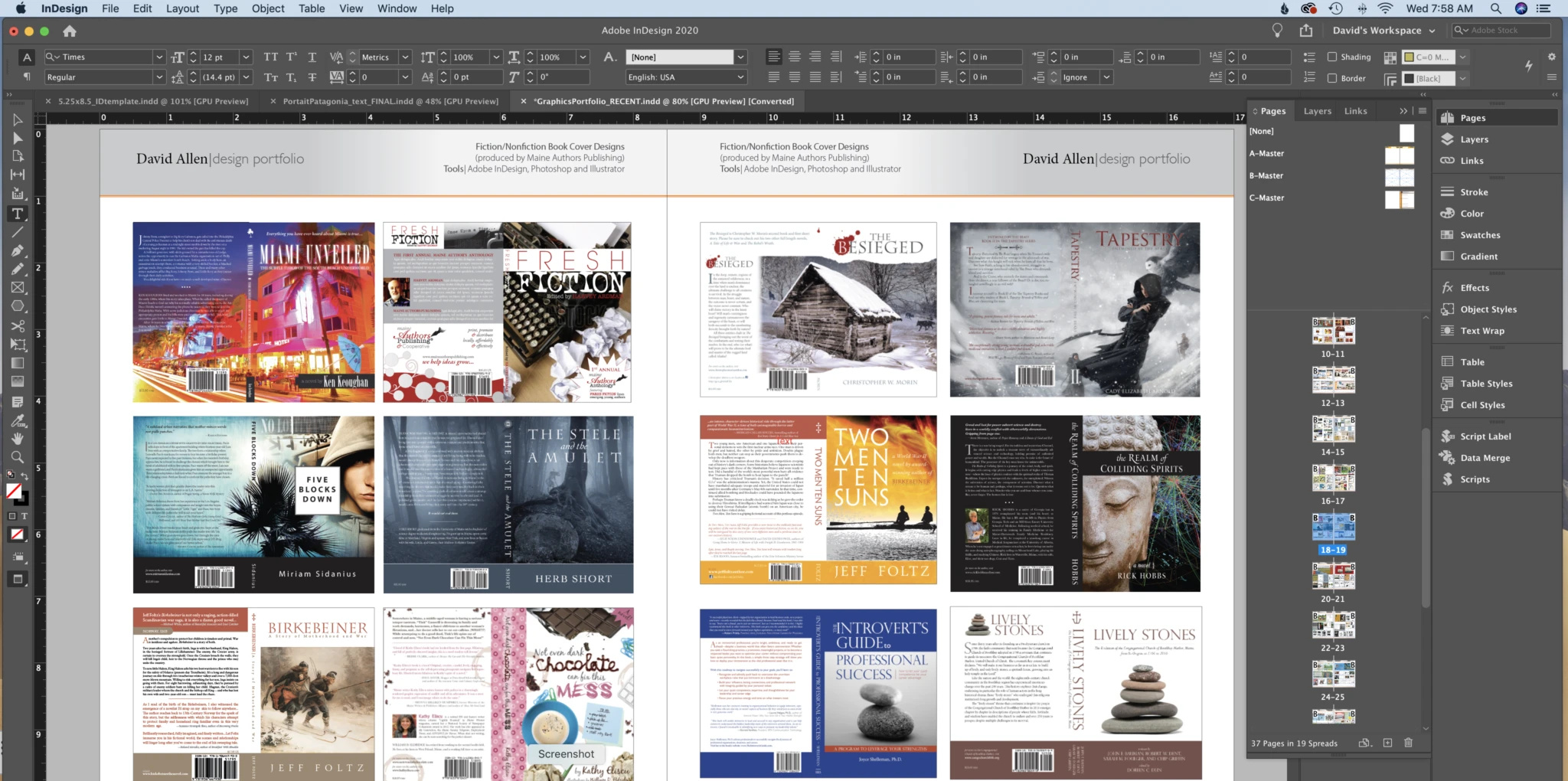
Adobe InDesign serves as the industry-standard desktop publishing application for structuring complex page layouts, handling everything from traditional multi-page print publications to highly interactive digital documents. By bridging the gap between visual graphic design and dense text formatting, this authoring tool gives content creators strict control over typography, high-resolution imagery, and intricate structural grids. Unlike standard word processors that struggle with floating images or complex pagination, this software is specifically engineered for professional typesetting, editorial design, and pre-press document preparation. It allows layout artists to define precise document bleeds, manage spot color separations, and ensure that commercial printing guidelines are met long before a file reaches a physical press.
Operating as a locally installed desktop application is essential for this level of document assembly. Browser-based design tools typically force users to upload all media assets to remote servers, causing severe latency and browser memory crashes when handling heavy academic textbooks or high-resolution TIFF images. The software functions differently by utilizing a linked asset architecture. Rather than bloating a single project file with gigabytes of embedded photographs and vector illustrations, the layout document builds a lightweight framework that references media files stored locally on a Windows 10 or Windows 11 machine. This referencing system keeps core file sizes manageable and allows editorial teams to update linked graphics externally. As soon as a linked graphic is modified in an external raster or vector editor, the layout updates automatically to reflect the newest iteration.
Beyond physical print, the toolsets support digital publishing workflows, enabling the creation of fixed-layout EPUB files, interactive PDFs with embedded media, and online documents that include hyperlinks, form fields, and page transition animations. The application handles long-form documents through the use of structural components like parent pages, character styles, and paragraph styles. These elements ensure strict consistency across hundreds of pages, allowing a single typography adjustment to cascade globally without manual reformatting. Content creators rely on these automation features to produce magazines, corporate reports, data-heavy catalogs, and marketing collateral with absolute layout precision.
Key Features
- Feature Name: Parent Pages. Users can define repeating layout elements such as page numbers, running headers, and structural grid lines on a master template. Applying a parent page to any document page automatically populates these background elements, ensuring strict visual consistency and saving time during lengthy editorial projects.
- Feature Name: Paragraph and Character Styles. The formatting engine isolates typographic rules into saved styles, separating structural design from the raw text. Adjusting a paragraph style immediately updates all linked text across the entire document, preventing manual tracking errors and maintaining uniform line spacing, tracking, and kerning.
- Feature Name: Live Preflight Panel. An active background monitor continuously scans the document for commercial printing errors, such as missing fonts, low-resolution raster images, or RGB graphics placed in a CMYK workspace. The panel alerts the user with a red error light and generates a detailed list of non-compliant objects before the document goes to export.
- Feature Name: Text Threading. Layout artists can link independent text frames across non-consecutive pages to manage continuous copy. If an editor adds or removes words in an early paragraph, the remaining text flows automatically through the threaded frames, bypassing graphic intrusions and wrapping perfectly around specified object boundaries.
- Feature Name: GREP Formatting Automation. Advanced users can build custom search formulas using Regular Expressions to identify specific text patterns, such as phone numbers, dates, or currency symbols. The engine can then automatically apply dedicated character styles to those exact patterns throughout a massive document without manual highlighting.
- Feature Name: Data Merge. The application automates repetitive layouts, such as business cards, mailing labels, or product catalogs, by importing structured data from a CSV file. Users map the spreadsheet columns to text variables and image frames, prompting the software to generate hundreds of populated pages instantly.
- Feature Name: Liquid Layout Rules. Designers can establish specific anchor and resizing rules for individual page objects. When the document is adapted for alternate sizes or screen orientations, these rules dictate how images and text frames scale, pin to margins, or reposition themselves, drastically reducing the labor required for multi-format publishing.
How to Install Adobe InDesign on Windows
- Navigate to the official vendor website to acquire the Creative Cloud Desktop application installer for Windows.
- Execute the downloaded package and authenticate the session using an active vendor ID, which is mandatory to download and manage any desktop application within the software ecosystem.
- Open the "All apps" directory within the interface and scroll down to locate the desktop publishing application.
- Click the "Install" button to initiate the deployment. The client automatically routes the application files to the default C:Program FilesAdobe directory while handling necessary dependencies.
- Allow the background process to download required Visual C++ redistributables and localized language packs as defined in the client preference menu.
- Launch the application either through the management client window or the newly created Windows Start menu shortcut.
- On the first run, review the workspace setup prompts and grant any requested Windows Defender Firewall permissions to allow the software to sync typography libraries and verify subscription entitlement.
Adobe InDesign Free vs. Paid
The application operates entirely on a subscription-based pricing model and does not offer a free tier or a permanent perpetual license. Users must purchase a license through the Creative Cloud ecosystem, either by selecting the Single App plan or opting for the All Apps plan, which includes the broader suite of visual design tools. Billing structures include a monthly commitment, an annual plan billed monthly, or an annual plan paid upfront. Continuous access requires an active internet connection for periodic entitlement verification.
A fully functional 7-day trial is available for new users. During this window, the software operates without watermarks, page limits, or export restrictions, allowing full evaluation of the toolset. However, initiating the trial requires entering a valid payment method, and the system will automatically convert the trial into a paid subscription if the user does not manually cancel before the seven days expire.
Because the software relies on a subscription framework, allowing the payment plan to lapse disables access to the application completely. While all proprietary layout files remain safely stored on the user's local hard drive, opening, editing, or exporting those files becomes impossible until the subscription is reactivated or the files are processed by a third-party tool capable of reading the vendor's markup language. Users on an annual plan billed monthly are also subject to early termination fees if they cancel before the end of the twelve-month contract.
Adobe InDesign vs. Affinity Publisher vs. QuarkXPress
Affinity Publisher appeals heavily to independent designers, freelancers, and smaller agencies by utilizing a one-time perpetual purchase model rather than a recurring subscription. Its defining characteristic is StudioLink, which allows users to switch directly into vector illustration or raster photo editing modes without leaving the primary layout interface. While it handles standard publishing tasks exceptionally well, it currently lacks the deep scripting capabilities, advanced GREP automation, and strict enterprise-level file exchange compatibility required by massive commercial operations.
QuarkXPress stands as the historical pioneer of digital typesetting and remains a fixture in legacy publishing environments. It offers a mix of perpetual licensing combined with annual maintenance plans, prioritizing exacting typographic control and robust legacy file conversions. QuarkXPress handles color management and large-scale print production with extreme reliability, but its interface and workflow logic differ significantly from modern software ecosystems, resulting in a steeper learning curve for recent graduates trained exclusively on competing tools.
Adobe InDesign is the better fit when cross-agency compatibility and absolute industry standardization are required. Most commercial print houses expect packaged files formatted by this specific software, and its native integration with standard raster and vector editing tools removes friction during complex design phases. For technical layout artists dealing with intensive XML data merging, complex cross-referencing, and multi-format EPUB generation, the application provides a deeper set of specialized tools that independent alternatives have not yet fully replicated.
Common Issues and Fixes
- Problem description. Overset text warnings blocking export. A red plus icon appearing at the bottom right corner of a text frame indicates that hidden words exist beyond the visible boundary. Fix this by clicking the red plus icon to load the cursor, then threading the hidden copy into a newly drawn text frame, or by physically expanding the original frame's dimensions to accommodate the remaining copy.
- Problem description. Pixelated or missing image links. Opening a layout displays low-resolution proxy images or empty boxes because the external files were moved or deleted from the local disk. Open the Links panel, select the problematic entries flagged with a red stop sign or a yellow triangle, click the Relink button, and navigate to the correct folder path on the Windows file system to restore the connections.
- Problem description. Missing typography profiles on file opening. The document displays pink highlighted text, indicating that the original typefaces are not installed on the local machine. Use the Find/Replace Font dialog menu to swap the missing typeface with an available local alternative, or ensure the required typography is actively synced through the vendor's cloud font service.
- Problem description. Interface rendering lag on large documents. The application stutters or delays inputs when scrolling through heavily illustrated layouts containing multiple high-resolution assets. Navigate to the View menu, select Display Performance, and change the setting from High Quality Display to Typical Display to render lightweight proxy versions of the graphics without affecting the final high-resolution export.
- Problem description. Corrupted user preferences preventing launch. The software crashes during the splash screen, or internal panels refuse to dock and display correctly due to a damaged configuration file. Hold down Control + Alt + Shift immediately upon launching the application, which prompts a dialog box asking to delete and reset the preference files to their default factory state.
Version 21.2 — January 2026
- Added a new AI-driven tool that automatically generates descriptive alt text for placed images, which can be easily edited or regenerated to streamline document accessibility workflows.
- Implemented comprehensive ARIA role and label support for reflowable EPUB formats, allowing users to assign screen-reader tags directly to objects, hyperlinks, cross-references, and Object Styles.
- Upgraded Object Styles capabilities to support size and positioning values larger than 1440 pt, alongside better retention of negative coordinates when round-tripping through Snippets, CC Libraries, and IDML files.
- Fixed critical Windows-specific interface bugs where typed text would suddenly disappear during editing and the undo history would clear out without warning.
- Resolved multiple software crashes related to navigating the Layers and Pages panels, generating hyperlinks via certain third-party plugins, and opening IDML files featuring custom bullet characters.