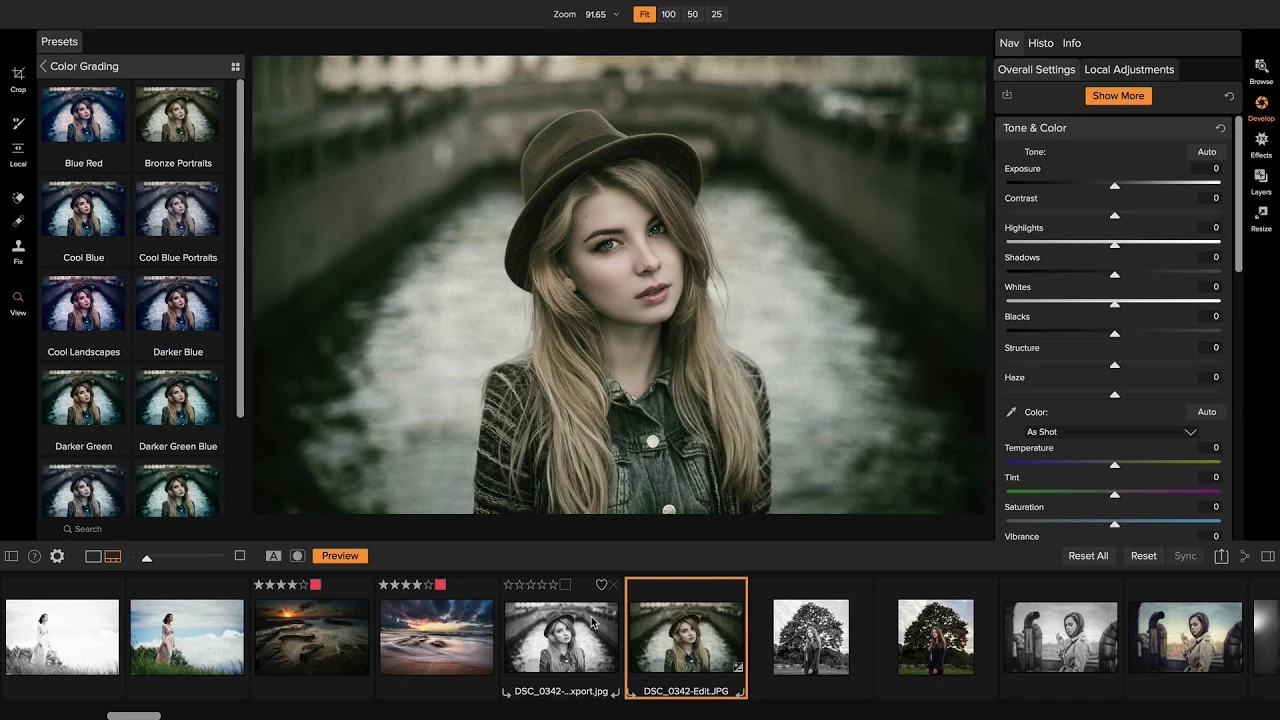
ON1 Photo RAW operates as a complete digital darkroom and layered editing environment tailored for photographers who need precise control over their image files. Instead of forcing users to manage separate applications for file cataloging, primary raw processing, and complex pixel retouching, this desktop application handles the entire photographic workflow within a single interface. The primary objective is to take raw sensor data directly from a camera and provide the exact adjustments necessary to produce a final, print-ready image or digital export.
Working professionals and serious photography enthusiasts typically adopt this application to avoid the restrictive nature of cloud-dependent ecosystems and mandatory database imports. By functioning as a true local desktop application, it allows users to browse direct directories on their hard drives or external solid-state drives. This local approach ensures that managing terabytes of high-resolution image data remains fast and entirely under the user's physical control, bypassing the bandwidth bottlenecks associated with browser-based editors.
In a practical editing scenario, the software solves the friction of moving between a raw developer and a pixel editor. When a photographer needs to blend multiple exposures, swap a background, or apply complex localized masking, they can complete these tasks using native layers without exporting a huge intermediate TIFF file. This non-destructive methodology ensures that every slider adjustment, brush stroke, and layer mask remains editable from the initial import to the final batch export.
Key Features
- Instant Folder Browsing: The Browse module points directly to existing folders on your hard drive, skipping the time-consuming catalog import step required by competing database-driven editors. Users can immediately begin culling, applying star ratings, assigning color labels, and flagging rejects directly from the local disk. This direct-read approach prevents delays when returning from a shoot with thousands of uncompressed files.
- Advanced Raw Development: The Develop module provides deep color grading, tone curve adjustments, and optical corrections natively. These adjustments are strictly non-destructive, preserving the original sensor data while allowing photographers to recover blown highlights or manipulate white balance. The underlying processing engine reads the raw data specifically mapped to hundreds of supported camera bodies and lenses.
- Integrated Layered Workflow: This application includes a dedicated Layers pane alongside its standard raw processing tools. Photographers can combine multiple images, blend bracketed exposures, create composites, and apply text or graphic watermarks without bouncing the file to an external pixel editor. Each layer retains its own independent opacity controls and blending modes.
- AI-Assisted Masking: The Super Select AI tool allows users to hover over a specific scene element—such as a sky, a person, or foliage—and click to generate an accurate boundary mask. This eliminates tedious manual brushwork when applying local exposure or color adjustments to isolated objects. The resulting masks remain editable so users can refine the edges manually if the algorithmic selection misses a subtle detail.
- Built-in Noise Reduction: The NoNoise AI engine attacks luminance and color noise before the demosaicing phase of the raw pipeline. By processing the raw data early, it recovers fine structural details in high-ISO shots taken in low light, such as concert or wildlife photography. The interface provides specific sliders to dictate exactly how much noise reduction is applied to avoid an unnatural, plastic look.
- Smart Image Resizing: The Resize AI module enlarges photographs for physical printing by generating missing pixels rather than simply stretching the existing image data. It handles significant upscaling requirements for gallery prints or large canvas wraps while maintaining sharp structural edges and surface textures. The module includes specific presets for popular print lab dimensions and gallery wrap margin types.
How to Install ON1 Photo RAW on Windows
- Download the official Windows installer package directly from the vendor's website to ensure you receive the unmodified setup file.
- Locate the downloaded executable file in your Downloads folder and double-click it to launch the setup wizard, granting administrator privileges if prompted by Windows User Account Control.
- Review and accept the End User License Agreement to proceed to the destination folder selection, which defaults to C:Program FilesON1.
- If you use external host applications such as Adobe Lightroom Classic, check the appropriate boxes during setup to install the corresponding migration and editing plugins.
- Click "Install" and wait for the wizard to unpack the core application files, rendering engines, and machine learning models to your local drive.
- Click "Finish" to exit the installer, then launch the application from the newly created Start menu or desktop shortcut.
- Upon the first launch, sign in with your existing vendor account credentials to activate a purchased license, or select the option to begin the fully functional 30-day trial.
ON1 Photo RAW Free vs. Paid
ON1 Photo RAW does not offer a permanently free tier, but the vendor does provide a fully functional 30-day free trial that allows users to test the raw processing and export capabilities without watermarks. During the 30-day window, users have unrestricted access to all native tools, local adjustments, and export formats. Once the trial expires, users must choose between a perpetual license or a recurring subscription model to continue saving and exporting their work. This dual-model approach appeals specifically to users seeking an exit from mandatory software rentals.
The standard perpetual license provides lifetime access to the specific version purchased and typically retails around $99.99, though it frequently drops lower during promotional sales. A single purchase allows installation on up to two computers. Perpetual license owners do not receive major annual version upgrades for free; they must pay a discounted upgrade fee if they wish to access the following year's new toolsets. The vendor also offers a MAX edition of the perpetual license for an increased price. The MAX tier expands the installation limit to three computers and includes the necessary plugins to run the software's tools directly inside host applications like Photoshop and Capture One.
For those who prefer a recurring model, the subscription tier costs approximately $79.99 per year. This active subscription grants access to all future major software updates, unlocks premium features in the mobile companion app, and includes 200 GB of proprietary cloud storage for synchronizing edits and presets across multiple devices. Upgrading to higher storage tiers increases the annual cost accordingly.
ON1 Photo RAW vs. Lightroom Classic vs. Luminar Neo
Lightroom Classic operates on a strict database-driven catalog system, meaning every single photograph must be imported before it can be edited. It excels in cloud synchronization, mobile workflow integration, and ecosystem tethering, making it the industry standard for high-volume studio shooters. It also features deep metadata management and a large third-party preset market. However, it completely lacks traditional layer blending, forcing users to export files to Photoshop for composites, and it strictly requires an active monthly subscription.
Luminar Neo targets a different demographic, focusing heavily on automated, single-click machine learning filters like automatic sky replacement and artificial relighting. It relies on a simplistic, module-based interface rather than deep raw color science and manual tonal control. It does not handle large-scale tethered shooting or detailed IPTC metadata editing, making it less viable for working event photographers. While it is excellent for casual users who want quick, dramatic results, it falls short for professionals who need rigorous file management and precise batch exporting.
ON1 Photo RAW serves as the bridge between these two extremes, catering to photographers who want the deep organizational tools of a cataloging application and the pixel-level layering of a composite editor in one place. It is the better choice for users who demand direct folder browsing without import dialogs, prefer to buy their software outright with a perpetual license, and want advanced masking without being forced into an Adobe ecosystem. It provides a rare combination of raw data protection and pixel-pushing flexibility, ensuring that photographers can finish their entire workflow on a single local machine.
Common Issues and Fixes
- The system's primary storage drive fills up quickly due to large cache file generation. To fix this, open the Preferences menu, navigate to the System tab, and change the location of the PerfectBrowseCache to a secondary internal or external drive with more storage space. You can also manually clear this cache to immediately free up gigabytes of room.
- Batch exporting large raw files takes an unusually long time to complete. High-intensity modules like Brilliance AI and NoNoise AI drastically slow down processing times if applied universally to every image in a batch. To fix this, set an ISO limit for the noise reduction in the preferences so it bypasses clean, low-ISO shots, and verify that GPU rendering is actively enabled.
- The interface lags or stutters significantly when scrubbing through image folders in the Browse module. This typically happens when the graphics card struggles to render high-resolution thumbnails on the fly. To fix this, update your dedicated GPU drivers to the latest version and clear the existing Browse Cache to force the software to generate fresh, properly optimized previews.
- Raw files from a newly released camera model display with distorted colors or fail to load entirely. The underlying raw engine requires explicit optical and color profiles manually mapped to every specific camera sensor. To fix this, you must wait for a scheduled software update that includes the official raw profile for your specific camera body, or temporarily convert the files to DNG format using an external converter.
Version 2026.2 — December 2025
- Enhanced Face Restoration AI: The Face Restoration model within Resize AI has been upgraded to deliver superior clarity and accuracy, particularly for teeth, eyeglasses, and faces positioned in the distance or appearing small in the frame.
- New Module Tips: Added an onboarding guidance system featuring helpful dialogs to assist new users in navigating modules and discovering key tools more quickly.
- Optimized Export Performance: Significantly improved the speed and responsiveness of the export engine, especially when processing large batch jobs or high-resolution raw files.
- Streamlined Export Presets: Redesigned the workflow for creating, organizing, and applying export presets to make saving settings and delivering consistent results more efficient.
- Expanded Camera Support: Added raw file support for new camera models, including the Leica M EV1 and Sony FX 30.
- New Lens Profiles: Introduced optical corrections for a variety of lenses, such as the Canon RF 10–20mm f/4L IS STM and Fujifilm XF 16–50mm F2.8–4.8 R LM WR.
- Bug Fixes & Stability: Resolved an issue where the "move" option for the browse cache and scratch folder would fail, along with general stability enhancements for macOS and Windows.