CyberLink PhotoDirector bridges the gap between traditional photography workflows and modern AI-driven creativity. It provides a hybrid workspace that combines raw photo processing with layer-based compositing. Photographers, graphic designers, and content creators use it to organize large libraries of images, correct lighting, and manipulate compositions without needing to switch between different desktop applications. The application handles the entire image pipeline, from the initial memory card import to the final high-resolution export for print or digital distribution.
Instead of relying on web-based editors that struggle with high-resolution raw files, users benefit from a native desktop environment. The software utilizes local hardware acceleration to render complex adjustments while connecting to cloud services for generative AI tasks. This setup allows for fast batch processing of entire photo shoots alongside targeted, pixel-level retouching. Operating locally means users can manage massive local hard drive archives of raw files from camera manufacturers like Canon, Nikon, and Sony without waiting for gigabytes of data to upload to a web browser. The desktop architecture also ensures that standard adjustment sliders remain responsive even when working with massive multi-megapixel files.
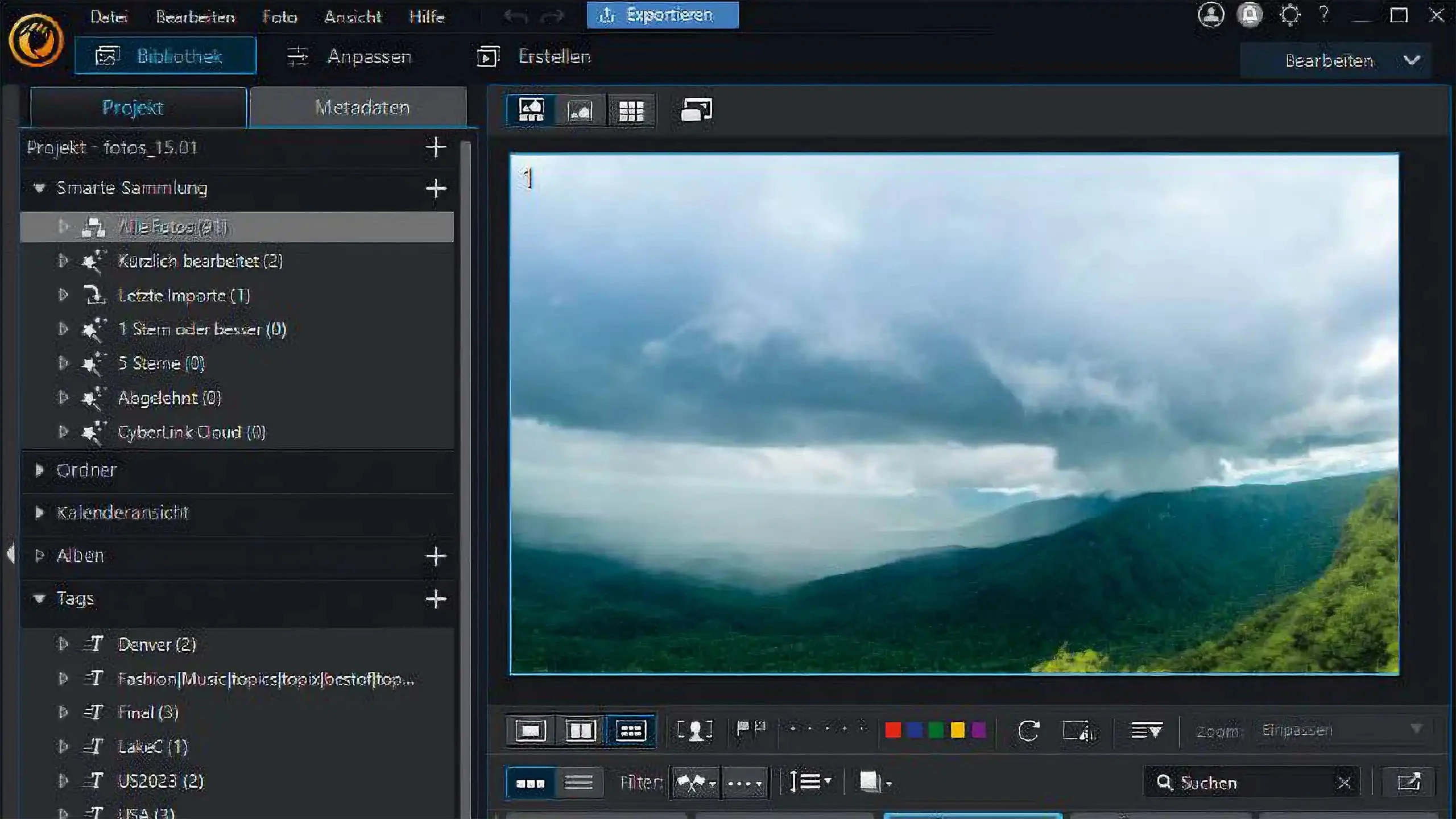
The interface caters to different skill levels by separating tools into dedicated modules such as Library, Adjust, Guided, and Edit. Beginners can rely on the Guided module to apply automatic corrections, remove backgrounds, or run the People Beautifier tools with simple sliders. Meanwhile, experienced editors can move into the Edit module to work with layer masks, clipping paths, blending modes, and manual color grading. Whether the goal is restoring an old family portrait, removing a distracting object from a landscape, or building a promotional graphic with custom typography, the application delivers a highly organized set of practical editing controls. Users maintain strict control over their file structures, utilizing internal keyword tagging, star ratings, and color labels to keep extensive catalogs fully searchable.
Key Features
- Generative AI Workspaces: The application integrates an AI Model Lab and generative tools directly into the editing interface. Users can utilize text prompts for AI Replace to swap out specific objects, or use AI Image Extender to generate new background scenery beyond the original borders of the photograph.
- Layer-Based Compositing: The dedicated Edit module operates similarly to traditional graphic design applications by utilizing a non-destructive layer stack. Editors can combine multiple image files, apply clipping masks, adjust layer opacity, and use blending modes like Multiply or Screen to create complex visual layouts and marketing materials.
- Raw File Processing: Inside the Adjust tab, users find precise manual controls for correcting exposure, contrast, highlights, and shadows. The software decodes raw image data from major digital cameras and applies specific lens profile corrections to automatically fix optical distortion, chromatic aberration, and corner vignetting.
- Facial Recognition and Retouching: The Library module includes a Tag Faces feature that scans imported directories and groups photos by recognized individuals. For portrait editing, the People Beautifier toolset provides specific sliders to smooth skin textures, remove blemishes, whiten teeth, and run AI Face Deblur to correct slightly out-of-focus subjects.
- Guided Edit Wizards: To help users bypass manual masking, the Guided module provides step-by-step interfaces for complex manipulations. It includes specific tools for automatic sky replacement, background removal, and color replacement, allowing editors to drastically alter the mood of a scene using automated edge detection.
- Tethered Shooting Support: Studio photographers can connect their compatible cameras directly to the computer via USB to bypass standard memory card imports. The software instantly displays captured images on the monitor, enabling live quality control, immediate exposure checking, and fast client review during an active photo session.
- Batch Processing and Export: Editors can copy adjustments from a single image and synchronize those edits across hundreds of photos simultaneously. The export dialogue allows for custom renaming conventions, resizing rules, watermark application, and format conversion to JPEG or TIFF, streamlining the delivery process for large event shoots.
How to Install CyberLink PhotoDirector on Windows
- Navigate to the official vendor website to download the CyberLink Application Manager, which handles the secure delivery and updating of the editing software.
- Execute the downloaded installer package and follow the on-screen prompts to place the Application Manager on your local Windows storage drive.
- Launch the Application Manager from the system tray or Start menu and log in using your registered CyberLink account credentials.
- Locate the specific photo editing application within the manager's list of purchased products or available trial downloads.
- Click the install button next to the application name and review the End User License Agreement before proceeding with the download.
- Allow the manager to download the core application files and place them in the default installation directory on your system drive.
- Wait for the initial installation to complete, noting that the manager may also download additional background files for the AI Model Lab.
- Open the application for the first time while maintaining an active internet connection to ensure the software authenticates the license and synchronizes the latest generative AI modules.
CyberLink PhotoDirector Free vs. Paid
CyberLink offers a flexible approach to licensing, starting with a trial tier known as PhotoDirector Essential. This free version allows prospective buyers to test the complete set of premium tools, layer functions, and export capabilities for a 30-day period. Once the initial trial window expires, the software reverts to a restricted state. In this restricted mode, users can still organize their catalogs and make basic adjustments, but applying any premium effects or AI generations will enforce a prominent visual watermark on the exported image files.
For ongoing usage without watermarks, the developer provides a perpetual license option typically branded as the Ultra edition. This one-time purchase grants the buyer permanent access to the core editing modules, raw processing engines, and layer tools available at the time of purchase. However, the perpetual license model does not include access to the ongoing releases of cloud-based generative AI tools, nor does it provide recurring stock media library integrations or bundled cloud storage space.
The alternative is the 365 subscription model, which requires a monthly or annual recurring payment. Subscribing unlocks the entire software environment, guaranteeing immediate access to the latest feature updates and AI models as they are deployed. Because many of the advanced generative features rely on external server processing rather than local hardware, the subscription incorporates a credit system. Users receive a set number of AI credits each month, and generating new backgrounds or running complex text-to-image replacements deducts from this balance. Editors who frequently rely on cloud rendering may need to purchase additional credit packs if they exceed their monthly allotment.
CyberLink PhotoDirector vs. Adobe Lightroom vs. Skylum Luminar Neo
Adobe Lightroom remains the industry standard for professional raw processing and large-scale catalog management. Photographers who shoot thousands of images per event and require exacting color science, reliable tethering, and advanced batch export presets typically prefer Lightroom. However, Lightroom focuses almost entirely on lighting and color correction; it lacks a native layer-based compositing system, meaning users must export their work to a separate application like Photoshop to combine multiple images, mask specific graphic elements, or add complex text formatting.
Skylum Luminar Neo focuses on simplifying the editing process through slider-based artificial intelligence enhancements. It excels at quick, single-click adjustments for replacing skies, relighting scenes, and cleaning up portraits, making it highly appealing to beginners and social media content creators who want immediate results. Yet, Luminar Neo has a much lighter approach to file management and completely lacks the traditional graphic design capabilities, deep manual layer controls, and granular text formatting found in more traditional desktop editors.
CyberLink PhotoDirector operates as a functional middle ground between these two extremes. It offers a cataloging system and raw processing engine similar to Lightroom, while simultaneously incorporating the layer masks, text tools, and compositing features of a full graphic design application. Users should choose this software when they want to manage large photo libraries, apply advanced raw corrections, and build complex multi-layered graphics within a single, unified workspace without paying for two separate programs.
Common Issues and Fixes
- Problem description: Generative AI features fail to process or display an error regarding limits. These specific tools require server-side rendering and operate on a credit system rather than local hardware. Verify that your computer has an active internet connection and check your account dashboard to confirm you have remaining AI credits for the current billing cycle.
- Problem description: Exported photographs contain a large, intrusive watermark. This occurs when you apply premium adjustments or filters within the free Essential version after the 30-day trial period has ended. You must either undo the premium adjustments in the edit history or upgrade to a paid license to export a clean image file.
- Problem description: The interface lags heavily when applying complex layer edits. Layer compositing and local AI processing demand significant hardware resources, particularly from the graphics card. Verify that your system meets the minimum 8GB RAM requirement for AI tasks and update your display drivers to ensure hardware acceleration functions correctly.
- Problem description: Manual layer controls and blending modes are missing from the interface. The software separates its toolsets into different user modes to simplify the workspace for beginners. If you cannot find masks and layer stacks, you are currently in the Guided workspace; switch to the Edit tab at the top of the screen to reveal the traditional layer interface.
- Problem description: The facial recognition scanner misses specific subjects in a crowded scene. Automated scanning can struggle with heavy shadows, profile angles, or blurry faces. Navigate to the Tag Faces window in the Library module to manually select the unrecognized faces and assign them to a named profile in your database.
Version 2026 (Build 17.1203.0) — September 2025
- Enhanced AI Image-to-Video: Introduced a new "Master Mode" for cinematic results with realistic lighting and motion, plus a "Character Motion Swap" feature to animate static portraits using reference clips.
- Quick Actions Update: Added an "Auto Enhance" button that instantly applies three distinct aesthetic styles—optimized for portraits, food photography, or landscapes—with a single click.
- Generative AI Improvements: Expanded generative capabilities with new "Face Swap" functionality and "Image Generation with Layout Control" for more precise content creation.
- Batch Editing Upgrade: Streamlined workflow with new Auto Tone and Auto Color tools, allowing users to apply consistent lighting and color corrections across multiple photos simultaneously.
- Smart Removal Tools: Implemented an automated "Wire Detection & Removal" feature to quickly erase power lines and cables from images.
- New Creative Assets: Added 10 new title templates and a "Hanabi" filter pack offering a range of moods from soft, dreamy tones to dramatic deep blues.