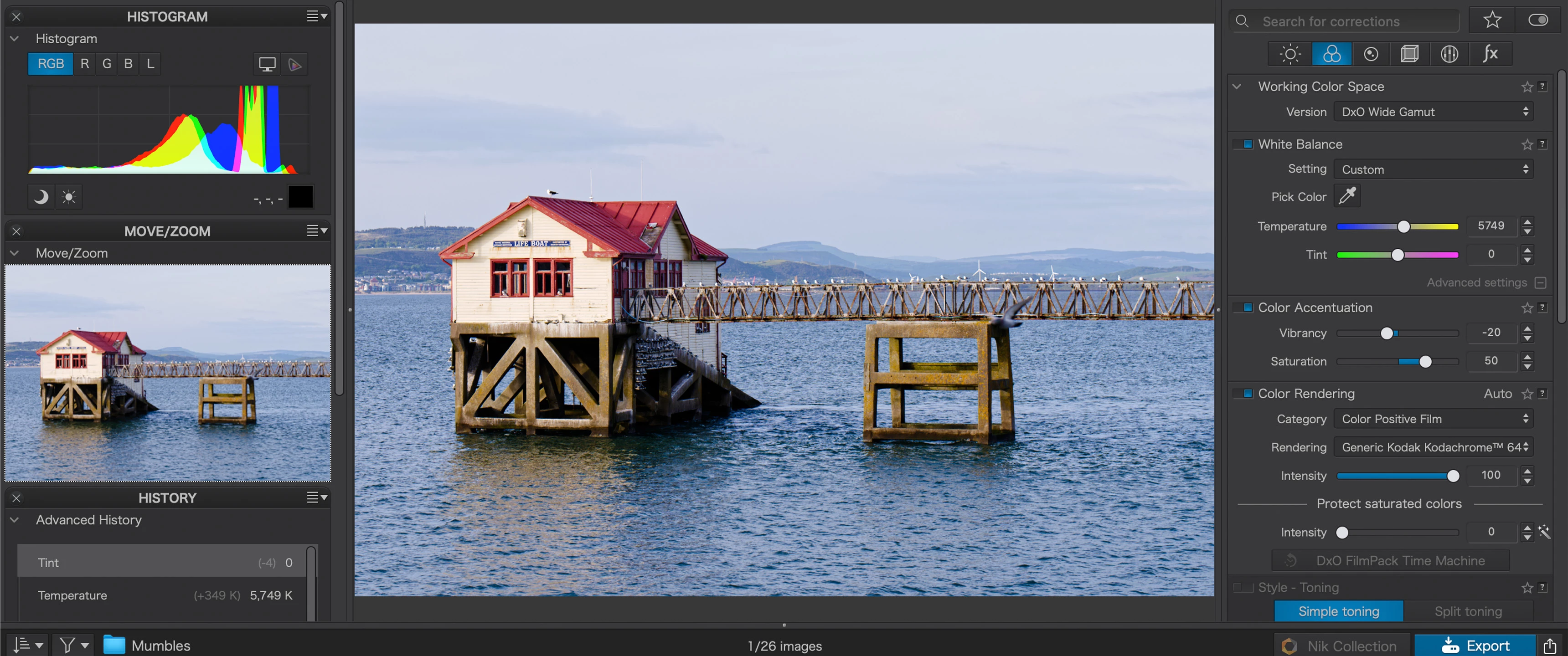
DxO PhotoLab operates as a specialized desktop raw processor and image editor engineered for photographers who need to extract the maximum possible detail from their digital camera sensors. Rather than functioning as a basic filter application or a cloud-dependent browser tool, this software runs locally on Windows 10 and Windows 11 systems, utilizing local processor and graphics hardware to decode heavy, uncompressed image files. When a digital camera captures a raw photograph, it records raw sensor data rather than a finished picture. This application translates that raw data into a visible image using highly specific mathematical profiles, automatically correcting physical lens defects like barrel distortion, chromatic aberration, and edge softness before the user even begins making manual tonal adjustments.
Photographers typically transition to this environment to solve the fundamental problem of digital noise introduced at the moment of capture, particularly when shooting fast action, wildlife, or low-light events at high ISO sensitivities. The software bypasses standard demosaicing algorithms in favor of a machine-learning-driven engine that simultaneously removes noise and reconstructs fine textures—such as fur, foliage, and architectural lines—that traditional editors often smudge or destroy. Because these computations require significant graphical processing resources, operating as a local desktop installation ensures the software can handle batch processing tasks efficiently without the latency of uploading massive files to a remote server.
Beyond its core rendering engine, the application provides a complete asset management and editing workspace divided into a PhotoLibrary module and a Customize module. Users navigate their existing hard drive folders directly, applying localized exposure adjustments, managing metadata, and exporting finished files to standardized formats like JPEG, TIFF, or linear DNG. By keeping the entire workflow on the local machine and avoiding forced catalog imports, the tool caters to professionals and hobbyists who prefer strict control over their file organization and who actively avoid software ecosystems that lock them into mandatory recurring subscriptions.
Key Features
- DeepPRIME Noise Reduction: This processing engine utilizes machine learning algorithms to perform raw demosaicing and denoising in a single computational step. It effectively eliminates color grain and luminance noise from high-ISO photographs while recovering microscopic details. Users inspect the impact of the algorithm via a dedicated live preview magnifier before committing to the resource-heavy final file export.
- Optical Correction Modules: The software references a proprietary laboratory database containing thousands of specific camera and lens combinations. Upon detecting the EXIF data of an imported image, it automatically downloads the exact correction profile to fix vignetting, eliminate geometric distortion, and selectively sharpen the corners of the frame where optical elements are typically softest.
- U Point Local Adjustments: For localized editing without complex manual brushwork, users click directly on a target area to place a control point. The engine analyzes the luminance and chrominance of the selected pixels, generating an intelligent mask that allows users to adjust exposure, contrast, micro-contrast, or saturation strictly on the targeted object.
- AI Subject Masking: This object-based selection tool accelerates the isolation of specific elements within a scene. By hovering the cursor or drawing a rough bounding box, the system automatically detects and masks predefined subjects such as skies, faces, bodies, or hair. Users can invert these masks, subtract from them, or copy and paste the targeted edits across multiple images in a batch.
- PhotoLibrary Asset Management: Instead of forcing users to import files into a massive centralized database, the software utilizes a direct folder-tree browser. Photographers can browse their local hard drives, build virtual Projects, stack visually similar images, assign keywords, and synchronize EXIF and IPTC metadata directly within the filesystem hierarchy.
- DxO Wide Gamut Color Space: The internal working color space is engineered to preserve extreme color saturation and highlight retention throughout the editing pipeline. It features a Soft Proofing mode that simulates specific ink and paper ICC profiles, ensuring colors remain highly accurate from the initial raw import all the way to final physical printing.
- High-Fidelity DNG Compression: During the export phase, photographers can generate linearly demosaiced DNG files that retain full dynamic range for secondary edits in other applications. The built-in compression algorithm dramatically reduces the final file size of these DNGs compared to uncompressed raw files, saving local disk space without discarding visual data.
How to Install DxO PhotoLab on Windows
- Navigate to the official vendor website and download the executable Windows installer package to your local drive.
- Launch the setup wizard, grant the necessary Windows User Account Control permissions, and accept the end-user license agreement to proceed.
- Select your preferred installation directory. Leaving the destination set to the default path on your primary Windows disk is recommended for optimal read and write performance.
- Wait for the installer to extract the core application files, install necessary background dependencies, and create a desktop shortcut.
- Finish the setup process and launch the application directly from the Windows Start menu or your desktop shortcut.
- Upon the first launch, enter your purchased license code or select the option to initiate the 30-day unrestricted trial, which requires entering an email address to proceed.
- Navigate to the PhotoLibrary tab and open a folder containing your raw files. Approve the prompt that appears on screen to automatically download the specific Optics Modules matching your detected camera and lens combinations.
DxO PhotoLab Free vs. Paid
The application operates entirely on a paid perpetual license model, meaning users pay a single upfront fee to own the current generation of the software rather than committing to a recurring monthly subscription. The core license grants permanent access to all raw editing panels, the direct folder browsing system, and the heavy-duty DeepPRIME noise reduction engine. Minor maintenance updates are provided at no extra cost, while upgrading to a future major generation requires an optional, discounted upgrade fee.
For users who wish to test the workflow and raw processing quality before purchasing, the vendor offers a fully functional 30-day trial. During this trial period, the software imposes no export limitations, applies no visual watermarks to saved images, and allows unrestricted access to batch processing and metadata management. Initiating the trial demands an active internet connection and an email address registration, but it does not require entering any credit card details, entirely eliminating the risk of unexpected auto-renewal charges.
While the primary application serves as a complete raw converter and editor, the developer also sells supplementary editing tools that dock directly into the main interface. Add-on software packages like ViewPoint, which handles advanced perspective geometry and volume deformation, and FilmPack, which provides historically accurate analog film simulations, are sold as separate perpetual licenses. If a user does not purchase these extra modules, the respective tool palettes simply remain hidden or locked within the customize workspace.
DxO PhotoLab vs. Adobe Lightroom Classic vs. Capture One Pro
Adobe Lightroom Classic remains the default choice for photographers heavily invested in the broader Adobe ecosystem and those who rely on strict, centralized catalog management. Because it forces users to import every file into a proprietary database before editing, it excels at organizing massive, multi-year archives across different external drives. Lightroom also includes access to cloud synchronization and highly advanced generative AI removal tools. However, it requires an ongoing monthly subscription, and its default raw demosaicing often struggles to extract the same level of micro-detail from high-ISO files without relying on slower, cloud-assisted enhancements.
Capture One Pro is engineered specifically for high-end commercial studio environments, dominating the market for photographers who shoot tethered directly from their camera into a computer during live client sessions. It features an incredibly customizable interface, highly specialized color grading wheels optimized for skin tones, and a session-based file structure that keeps individual client jobs isolated. Despite these studio-grade tools, its perpetual license is notoriously expensive, and its internal noise reduction capabilities fall behind dedicated machine-learning engines when handling severely underexposed or high-ISO event photography.
DxO PhotoLab is the better fit for photographers who prioritize extracting the absolute maximum optical sharpness and lowest possible noise from their raw files at the very beginning of the editing pipeline. By utilizing the DeepPRIME engine and laboratory-tested lens profiles, it routinely rescues noisy, high-ISO wildlife or concert photos that other editors render muddy. Furthermore, users who despise waiting for long catalog imports highly prefer its direct folder-browsing approach, allowing them to navigate to a directory in Windows, immediately apply targeted adjustments, and export finished files without paying a monthly subscription.
Common Issues and Fixes
- Application crashes immediately upon startup. This failure typically occurs when the primary Windows system drive lacks sufficient free disk space to allocate virtual memory for the pagefile. Run the Windows Disk Cleanup utility, empty the recycle bin, and ensure you have plenty of gigabytes free on your C: drive to accommodate heavy processing swap files.
- Interface performance is extremely slow when browsing folders. The software might be attempting to apply heavy default adjustments and generate sidecar files for every thumbnail simultaneously. Open the Preferences menu and verify that your default raw processing preset is not unnecessarily triggering intensive machine learning operations just for gallery navigation.
- DeepPRIME noise reduction exports take far too long or fail entirely. The noise reduction engine heavily utilizes the graphics processing unit to calculate file exports. Verify that your NVIDIA or AMD graphics drivers are updated to their latest versions, and check the application's advanced preferences to ensure GPU acceleration is manually selected rather than left on an unoptimized automatic setting.
- Exported DNG files do not immediately appear in secondary cataloging software. When sending a processed file back to an external organizer, the destination software often fails to refresh the folder view automatically. Right-click the specific folder within your secondary catalog application and select the synchronize option to force the program to detect the newly generated images.
- Automatic lens corrections are missing on newly imported images. The program requires exact Optics Modules to apply geometric and sharpness fixes correctly. Ensure you have an active internet connection, select the affected images, and click the interface prompt to download the specific laboratory profiles for your newly acquired camera and lens combinations.
Version 9.2 — November 2025
- Added new filtering options in the PhotoLibrary to quickly sort images by Unedited, Edited, or Local Corrections status.
- Added new mask management capabilities, allowing for the duplication of masks and submasks with preserved naming, as well as drag-and-drop reorganization.
- Improved AI Masking precision with enhanced matting and edge sensitivity, delivering cleaner selections for complex subjects like hair and fur.
- Improved the History panel for Windows users to retain edit steps across sessions, ensuring workflow continuity similar to the macOS version.
- Fixed various minor bugs and optimized overall stability for smoother performance.