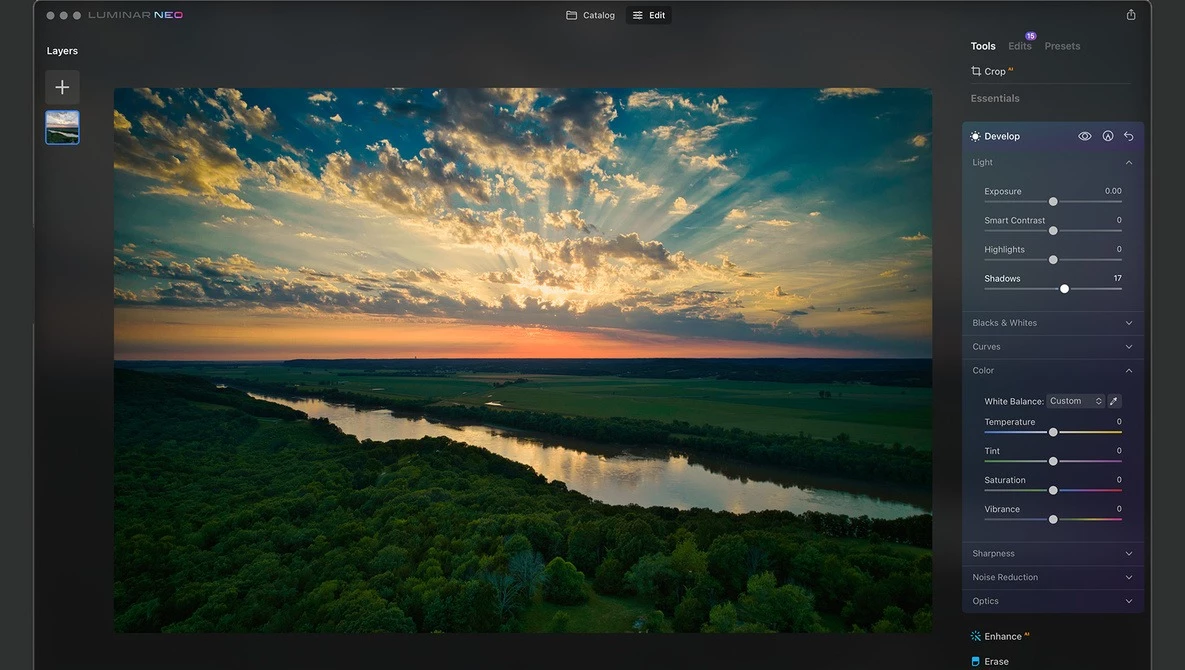
Luminar Neo is an artificial intelligence-driven photo editing application built to reduce the manual labor typically associated with complex image manipulation tasks. It targets both hobbyist photographers and working professionals who need to execute advanced compositing, lighting adjustments, and background replacement without spending hours brushing masks or managing multiple adjustment layers. Instead of relying entirely on traditional slider-based adjustments, the software interprets the contents of a photograph, identifies subjects, skies, and depth, and applies localized edits automatically. This approach shortens post-processing workflows for landscape, portrait, and real estate photographers looking to finalize their images quickly.
Operating as a dedicated local desktop client ensures that the computational demands of processing high-resolution raw files remain stable. While browser-based photo editors often struggle with large uncompressed sensor data, running this editor locally allows for immediate visual feedback when dragging sliders or applying generative edits. The application utilizes your local graphics processing unit to map depth and apply lighting models in real time. The software reads your existing file structure directly, referencing folders and albums without forcing you to duplicate large image libraries into a proprietary container.
In recent updates, the application has evolved into a connected ecosystem, syncing edits across mobile devices while expanding its local processing toolset. Photographers use it not just as a standalone raw developer, but also as an integrated plugin for other industry-standard editing environments. By focusing on intent-based tools rather than purely manual pixel manipulation, the program makes high-end photo retouching accessible and efficient. It records every change non-destructively in its internal Edits list, allowing users to toggle, reorder, or completely roll back individual adjustments at any stage of the editing process.
Key Features
- Accent AI: This intelligent adjustment tool replaces the need to manually balance shadows, highlights, contrast, and saturation. By analyzing the specific composition of a photograph, a single slider applies selective enhancements only where needed, preventing the global overexposure or unnatural color shifts that often occur when adjusting standard exposure sliders.
- Sky AI Replacement: This tool detects the horizon and complex foreground elements like trees or buildings to automatically swap out flat or blown-out skies with high-resolution sky textures. It recalculates the lighting of the entire scene to match the new sky's color temperature and direction, ensuring realistic reflections on water and accurate edge blending without manual masking.
- Light Depth and Relighting: By generating a depth map of a two-dimensional image, this tool allows you to adjust the lighting of the foreground and background independently. Photographers can introduce atmospheric haze, darken distracting backgrounds, or add simulated studio lighting to a portrait subject without painting complex luminosity masks.
- GenErase and Generative Expand: These AI-assisted compositional tools allow users to remove large, complex distractions from a frame or extend the physical borders of an image. When highlighting an unwanted object with the Select Brush, the software replaces it with content-aware pixels that match the surrounding textures, while the expand function generates new contextual scenery to change the aspect ratio of a tight crop.
- Universal Background Removal: Designed to isolate subjects quickly, this feature automatically detects up to nine different types of elements within a frame, including people, vehicles, and animals. With a single click, it strips away the background, allowing you to export a transparent PNG or drop in a completely new environment, complete with edge refinement brushes for tricky areas like hair or fur.
- AI Assistant and Edit Suggestions: This interactive chat-based interface analyzes your current image and suggests specific enhancement directions, such as color boosting or perspective correction. While it does not automatically apply changes without permission, it guides users to the correct tools within the Edit tab, significantly reducing the time spent navigating menus or searching for the right adjustment panel.
- Non-Destructive Edits List: Rather than forcing users to manage a complex stack of raster layers, the software tracks every adjustment in a sequential history panel. You can return to a specific color grade, masking choice, or exposure adjustment made hours earlier, modify its numeric parameters, and watch the software recalculate all subsequent edits without degrading the original raw file.
How to Install Luminar Neo on Windows
- Download the official compressed Windows setup archive to your local storage drive, typically landing in your default Downloads directory.
- Right-click the downloaded .zip setup file and select Extract All to unpack the installer contents into a temporary directory on your drive.
- Double-click the extracted executable file to launch the setup wizard and accept the end-user license agreement when prompted on the initial screen.
- Review the optional plugin integration screen; if you utilize Adobe Photoshop or Adobe Lightroom Classic on your Windows system, check the corresponding boxes to install the communication plugins automatically.
- Choose your preferred local installation directory or leave the default path intact, then click Install to begin writing the core application files and local machine learning models to your system.
- Wait for the progress bar to complete, ensuring your antivirus software does not interrupt the writing process, then click the Launch button to start the application for the first time.
- Sign in using your vendor account credentials when the login window appears; this step authenticates your purchase over the internet and securely activates the software locally without requiring a separate manual code entry.
Luminar Neo Free vs. Paid
Luminar Neo does not offer a free tier, watermarked trial, or ad-supported version for long-term use. It is a strictly premium, paid application designed for professional and enthusiast photo editing. Users can typically explore the application through a brief money-back guarantee window, normally lasting 14 to 30 days depending on promotional periods, but accessing the core interface requires an upfront purchase. The business model previously relied heavily on single perpetual licenses, but has since expanded to include hybrid subscription passes for cloud-based generative features and cross-device syncing.
For those preferring a one-time payment, the vendor offers a Desktop Perpetual License, which standardly costs $119. This tier grants lifetime access to the core editing software on a Windows machine, including all standard AI enhancement tools, local rendering capabilities, and raw processing. However, generative tools such as GenErase or GenSwap require active server-side processing, and perpetual license holders usually receive limited-time access to these specific cloud features—often one year from the purchase date—before requiring an additional ecosystem pass to maintain cloud generation capabilities.
Higher tiers, such as the Cross-Device Perpetual License at $159 and the Max License at $179, scale up in functionality. These licenses unlock syncing with mobile devices and grant access to an expanded creative library containing additional presets, overlays, and LUTs. Photographers who already own a base license can purchase an Upgrade Pass (around $49) or Ecosystem Pass (around $69) to bridge the gap and unlock the newest features without buying the entire software package again. This modular structure ensures desktop users only pay for cloud-based AI generation or mobile syncing if their specific editing workflow demands it.
Luminar Neo vs. Adobe Lightroom Classic vs. DxO PhotoLab
Adobe Lightroom Classic remains the industry standard for high-volume catalog management, batch processing, and extensive metadata organization. It excels when a working photographer needs to ingest thousands of raw files from an event, apply synchronized color corrections, and export them rapidly. However, its compositing tools and object removal features are somewhat basic compared to dedicated manipulation software. It does not natively support complex sky replacements or heavy generative pixel manipulation without forcing the user to export the file into a separate raster editor, adding friction to the process.
DxO PhotoLab distinguishes itself through exceptional local raw conversion, highly accurate optical correction profiles, and industry-leading noise reduction algorithms. It is the ideal choice for photographers who demand absolute pixel purity, especially those shooting in low light at high ISOs. While its optical corrections and noise removal are superior, DxO PhotoLab lacks the creative compositing, relighting, and automatic subject-masking flexibility found in competing applications. Its interface caters strictly to traditional photography adjustments rather than major creative alterations.
Luminar Neo is the better fit for photographers who want to achieve complex, highly manipulated visual results quickly without learning advanced masking or layer management. If your goal is to replace a dull sky, artificially relight a foreground subject, or remove large distracting objects from a landscape in under a minute, this application provides a much faster path to the final image. It bridges the gap between basic raw development and heavy raster compositing, making it highly efficient for creative single-image edits, whereas Lightroom is better for high-volume cataloging and DxO PhotoLab is best for extreme optical perfection.
Common Issues and Fixes
- Missing catalog tools or disabled adjustment panels. The most common reason tools disappear from the standard Edit tab is that they were accidentally added to the Favorites section. Expand the Favorites panel at the very top of the right-side interface menu to locate your missing tools and remove them from that list to restore them to their default categories.
- Generative AI tools displaying server connection errors. Features like GenErase and GenExpand rely on cloud servers to render changes and require a stable internet connection. Verify that your local network is active, check that your internet service provides sufficient upload speeds for large image data, and ensure your firewall is not blocking outbound traffic from the application.
- Folder paths showing an orange triangle with an exclamation point. This warning indicates that the software can no longer locate the original source images referenced in your catalog. If your photos are stored on an external storage drive, ensure the drive is plugged in; if you manually renamed or moved the folders through the operating system, right-click the folder within the application and select Locate Folder to re-establish the connection.
- Plugin fails to open from within Adobe Photoshop. Sometimes the communication bridge between the host application and the editor breaks, preventing the plugin from launching. To fix this, close the host application, run the standalone editor as an administrator, navigate to the File menu, choose Install Plugins, click Uninstall next to Photoshop, reboot your computer, and repeat the process to install a fresh copy of the plugin.
- Antivirus software blocking application startup or login. Strict security software can mistake the application's background processes or licensing checks for malicious activity, causing crashes at the login screen. Open your security software settings and add the application's executable file—typically located in the default Program Files directory—to your exclusion or exception list to allow it to run properly.
Version 1.26.0 — December 2025
- New AI Assistant: introduced a smart editing companion in both the Edit and Presets tabs that uses text prompts to offer tailored suggestions, including "Action prompts" for immediate enhancements and "How-to prompts" for step-by-step tool guidance.
- Expanded Camera Support: added compatibility for new camera models, including the Canon EOS R6 Mark III, Canon EOS C50, Fujifilm X-T30 III, Leica M EV1, Leica Q3 Monochrom, and Sony DSC-RX100 VIIA.
- Improved Performance: boosted export speeds for images with multiple edits, achieving up to 20% faster processing on Windows and 15% on macOS.
- Enhanced Stability: resolved memory leaks during DNG batch exports and fixed crashes associated with opening damaged images in the Color Transfer tool.
- Bug Fixes: corrected issues with photo positioning and export behavior in Spaces, ensured proper synchronization of deleted photos from the mobile app, and fixed alignment errors in Light Depth map previews.