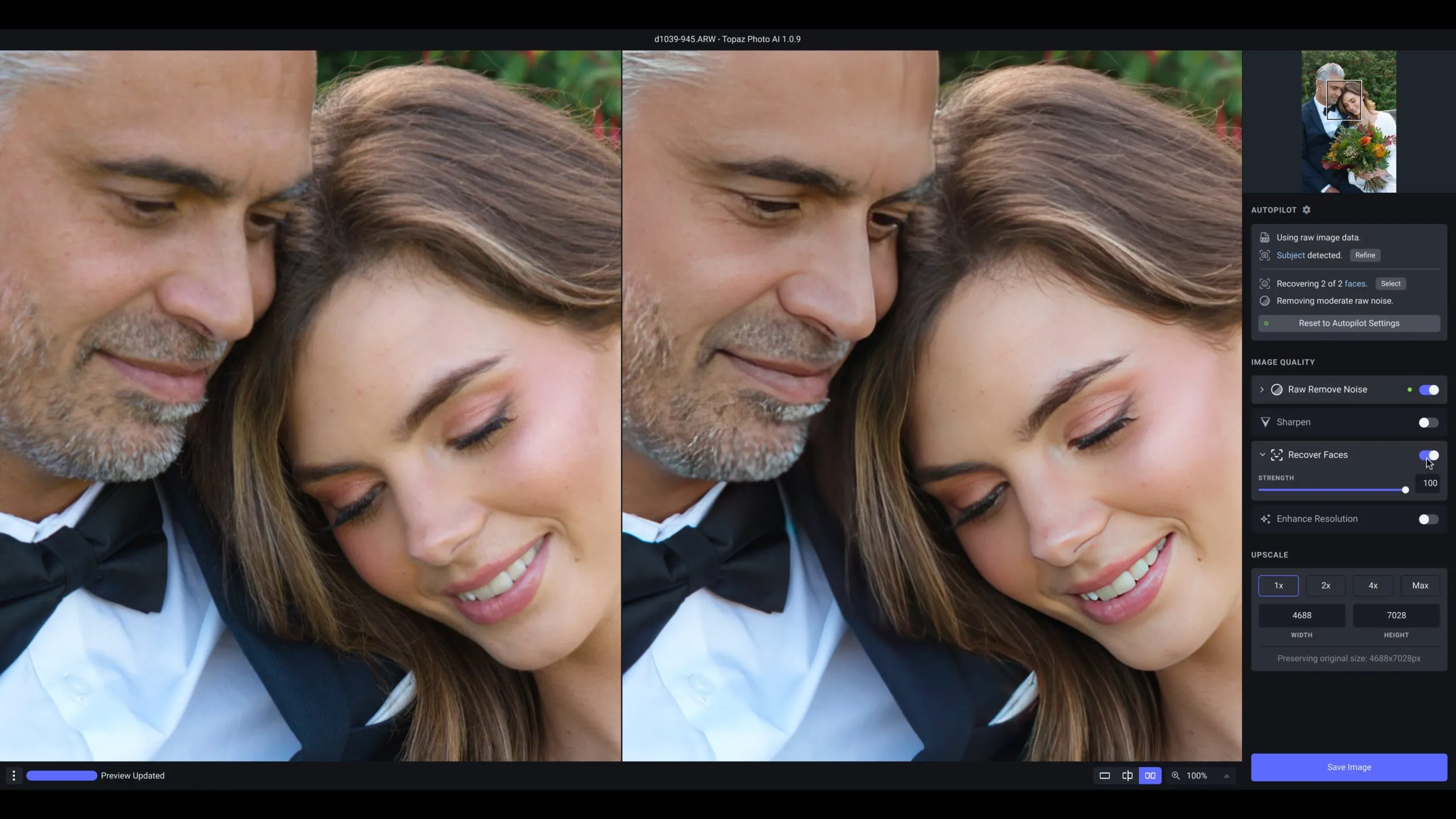
Topaz Photo AI functions as a dedicated image enhancement utility designed to repair specific visual defects that standard editing software cannot salvage. Built for photographers, digital archivists, and retouchers, the application focuses entirely on noise reduction, sharpening, and resolution upscaling. Instead of managing a large library or applying creative color grades, it isolates the technical flaws in a photograph—such as missed focus, motion blur, high-ISO grain, or low pixel counts—and reconstructs the missing data.
The software operates either as a standalone desktop application or as a direct plugin for host programs like Adobe Photoshop and Lightroom Classic. By moving these heavy processing tasks to a specialized utility, users avoid bogging down their primary editors with complex local rendering tasks. The desktop architecture is necessary because the underlying neural network models require significant local hardware resources, particularly dedicated VRAM, to calculate pixel replacements across large raw files. While browser-based tools exist for basic adjustments, this application relies heavily on local processing power to handle large batches of raw formats without forcing the user to upload gigabytes of data to a remote server.
Users load an image, and the software immediately begins scanning the file to identify subjects, detect human faces, and measure noise levels. From there, it applies a recommended stack of corrections. Because the interface prioritizes stacked enhancements, editors can isolate different areas of the same photograph. For example, a user can instruct the software to denoise a dark, grainy background while simultaneously applying a sharpening model to the primary subject. This targeted approach reduces the need to manually paint complex masks in a traditional layer-based editor, allowing editors to process demanding restoration jobs faster.
Key Features
- Autopilot Image Analysis: Upon loading a file, the application scans the image to identify technical flaws such as luminance noise, structural blur, and human faces. Based on this scan, it automatically enables the relevant correction modules and sets initial slider values based on millions of learned image patterns. Users can customize this behavior in the Preferences menu, instructing the software to ignore faces to speed up processing, or configuring it to only trigger noise reduction when it detects severe grain in high-ISO shots.
- AI Noise Reduction: The denoise engine targets both color blotchiness and luminance grain without destroying fine textures like hair or fabric. The software includes specific models calibrated for raw files and standard formats. By adjusting the strength sliders, editors can eliminate the noise generated by shooting at extreme ISO settings in low-light environments, keeping the edges of the subject intact rather than smudging the entire frame.
- Detail Upscaling and Resolution Enhancement: For heavily cropped photos or low-resolution legacy files, the upscaling module adds physical pixels to the image using specialized local algorithms such as the Standard MAX or Wonder models. The software interpolates the existing data and generates new textures to fill in the gaps without simply blurring the edges. This allows users to take a small web-resolution file and increase its dimensions to a size suitable for large-format physical printing, recovering finer details that were never captured by the original camera sensor.
- Targeted Subject Sharpening: Instead of applying a global sharpening filter that introduces artifacts to out-of-focus areas, the application allows users to restrict sharpening strictly to the detected subject. The sharpening module addresses both lens softness and motion blur, reconstructing sharp edges where the camera failed to capture them. Users can modify the automatic subject mask using a brush tool to include or exclude specific elements in the scene.
- Face Recovery: When dealing with out-of-focus portraits or low-resolution crowd shots, the face recovery toggle isolates human faces and rebuilds their features. It attempts to restore the geometry of eyes, noses, and mouths that have been lost to blur or pixelation. This tool operates independently from the main sharpening module, allowing editors to dial in the exact opacity of the facial reconstruction to avoid an artificial appearance.
- Stacked Enhancement Workflow: The interface relies on a modular system where users add specific tools to an enhancement list in any order they choose. An editor can stack multiple instances of the same tool, applying different settings to different parts of the image. For example, a user can add one module restricted to the foreground, and a second module applied to the background, running them simultaneously before exporting the final file.
How to Install Topaz Photo AI on Windows
- Download the official Windows installer package from the vendor's website and save it to your local drive.
- Launch the setup wizard, review the end-user license agreement, and click next to proceed with the installation.
- Choose the target destination folder on your local drive; leaving it on the default system drive is recommended for performance, but the installation path can be customized.
- Allow the installer to connect to the internet and download the necessary AI models, ensuring your firewall, proxy, or VPN does not block this connection, as these local model files are required for the software to function correctly.
- Review the plugin installation prompts, which will automatically attempt to link the software with detected host applications like Adobe Photoshop or Lightroom Classic.
- Click Finish to close the setup wizard and launch the application for the first time.
- Sign in with your Topaz Labs account credentials on the initial launch screen to authenticate your subscription and activate the software.
Topaz Photo AI Free vs. Paid
The vendor discontinued its perpetual licensing model, meaning new users can no longer purchase the software for a one-time fee to own it indefinitely. Topaz Photo AI is now distributed exclusively under a subscription model as part of the Topaz Studio collection. Users must pay an ongoing fee to access the application, which costs approximately $199 per year when billed annually. There are also monthly billing options available, though these carry a significantly higher total cost over a twelve-month period.
The subscription grants access to the desktop application, plugin integrations, and ongoing updates to the local rendering models. It primarily relies on local processing using your computer's hardware, but the vendor also offers cloud rendering options for users with weaker machines. These cloud enhancements require cloud credits, which are either included as a limited allowance within the base subscription or sold as an additional monthly add-on depending on the user's processing volume.
There is no fully free version of the software. However, the developer provides a restricted demo mode that anyone can download. This trial allows users to load their own images, run the Autopilot analysis, and preview the noise reduction and sharpening results directly in the interface. The limitation is that the export and save functions are completely disabled. To generate a final JPEG, TIFF, or DNG file, the user must purchase a subscription and sign in to unlock the export button.
Topaz Photo AI vs. DxO PureRAW vs. Adobe Lightroom Classic
DxO PureRAW operates strictly as a preliminary raw processor, focusing entirely on denoising and optical lens corrections before the file ever reaches a primary editor. It relies on exact, lab-measured profiles to correct distortion, vignetting, and chromatic aberration, which Topaz does not offer. However, DxO PureRAW does not include upscaling tools, facial reconstruction, or localized masking, making it a strict raw pre-processor rather than a general-purpose image repair utility.
Adobe Lightroom Classic functions as a complete digital asset manager and non-destructive raw editor, handling everything from file organization to complex color grading. It includes its own effective AI Denoise feature that operates directly on raw files, and it is available for a lower monthly cost through standard photography plans. While Lightroom can reduce severe noise and sharpen basic edges natively, it lacks dedicated upscaling models to physically enlarge small files and does not offer the same targeted facial reconstruction algorithms found in dedicated repair tools.
Topaz Photo AI is the better fit for users who regularly need to salvage heavily cropped files, missed-focus portraits, or low-resolution legacy images. While DxO and Lightroom excel at managing standard raw files and applying baseline noise reduction, Topaz provides the specialized algorithms necessary to interpolate missing pixels and rebuild facial geometry, making it the stronger choice for extreme image recovery.
Common Issues and Fixes
- Problem description. The application attempts to download models every single time it launches, preventing offline use and slowing down the workflow. This occurs when a firewall, VPN, or Windows Defender restricts the installer from caching the models locally during the initial setup. To resolve this, temporarily disable your security software, clear the application's previous preference files, and run the installer again to ensure all required models save permanently to the local drive.
- Problem description. Processed faces appear artificial, overly smooth, or geometrically distorted after export. This happens when the Face Recovery module applies too much strength to a subject, resulting in a plastic look. To fix this, manually select the Face Recovery panel in the right-hand menu and lower the strength slider, or disable the tool entirely if the native facial details are already sufficient.
- Problem description. The Capture One plugin integration fails to export DNG files back to the host catalog, either hanging or returning a corrupted image with vertical color bars. The round-trip DNG compatibility occasionally breaks depending on the specific raw format being processed. The immediate workaround is to change the plugin export settings to save the returning file as a TIFF, which maintains image quality, preserves the bit depth, and completely bypasses the DNG translation error.
- Problem description. Preview updates and final exports take an unusually long time to process, causing the application interface to lag. This utility is heavily dependent on VRAM and dedicated graphics processing. Navigate to the application preferences and ensure the AI Processor setting is explicitly forced to use your dedicated graphics card rather than relying on the CPU or automatic selection.
Version Latest — 2025
- Added compatibility features to support the transition to the new Topaz Photo application ecosystem.
- Improved stability of batch processing workflows to prevent freezes and crashes on Windows and macOS.
- Fixed issues with the Capture One plugin where images failed to roundtrip correctly and resolved Denoise preview artifacts.