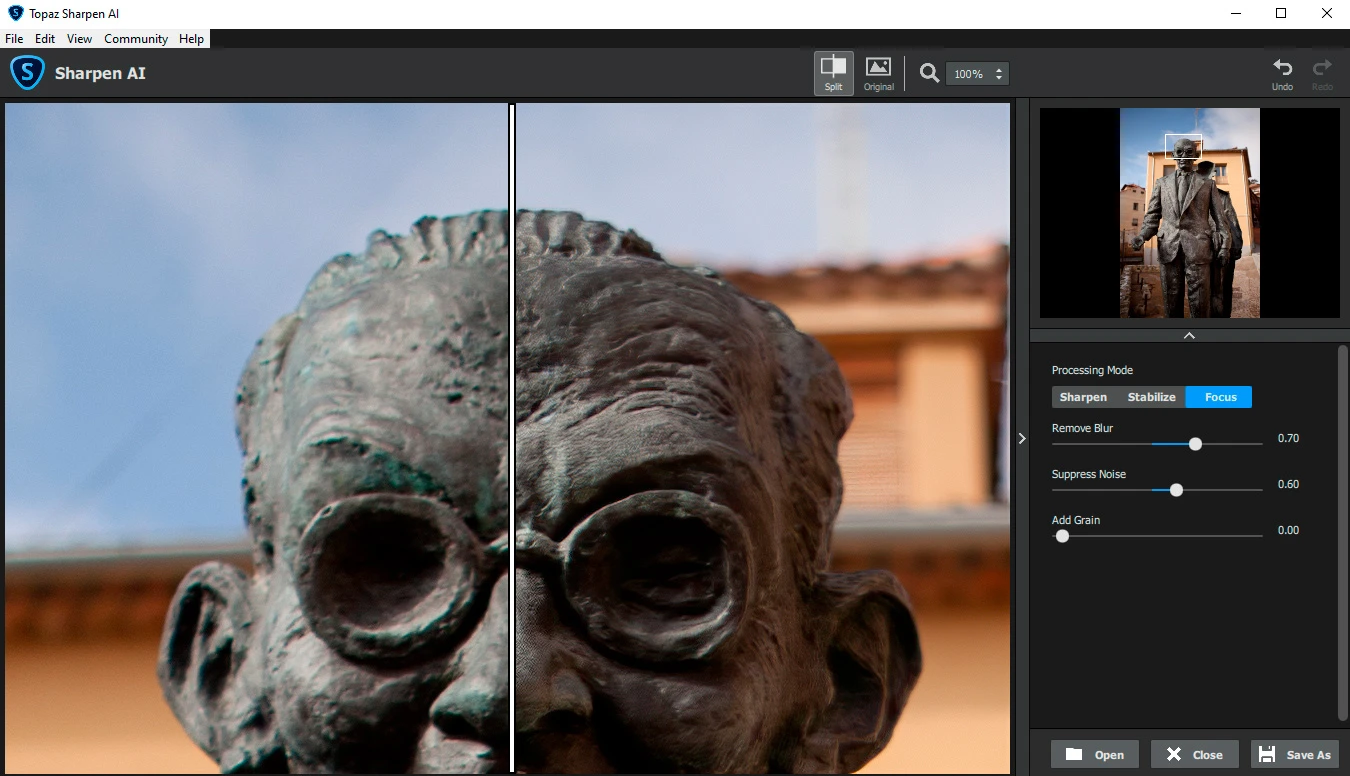
Topaz Sharpen AI is a dedicated desktop image correction application engineered to rescue soft, blurry, or misfocused photographs using trained machine learning algorithms. Unlike traditional edge-contrast sharpening filters that merely brighten pixels along hard lines to create an optical illusion of clarity, this utility analyzes the actual structural contents of a photograph to mathematically reverse physical camera shake and missed focal points. Photographers rely on it to salvage ruined wildlife shots, sports captures, and shallow depth-of-field portraits that would otherwise go straight to the digital trash bin due to unrecoverable softness.
While lightweight browser utilities handle basic image adjustments, rescuing severe motion blur requires heavy local processing and deep neural networks. Topaz Sharpen AI utilizes a Windows 10 or Windows 11 computer's dedicated graphics hardware to render structural details, rebuild missing edges, and suppress the artifacting that usually accompanies aggressive sharpening. By processing the raw pixel data through specific models trained on thousands of blurry and sharp image pairs, the software reconstructs textual details like fur, feathers, and text without adding destructive digital noise or unnatural glowing halos.
The application functions either as a standalone editing workspace for isolated photo rescue or as a direct external editor for host applications like Adobe Lightroom Classic and Photoshop. This flexibility makes it practical for high-volume editing workflows where pristine optical sharpness is required for large-format printing or demanding commercial client deliveries. Because the processing demands are high, the software leans heavily on the local machine's video memory and processor capabilities rather than offloading the task to a remote server, ensuring data privacy and allowing offline use once the required rendering models are fully downloaded to the local drive.
Key Features
- Feature Name: AI Sharpening Models The software includes dedicated processing models named Standard, Motion Blur, Out of Focus, and Too Soft. Each model applies a different neural network to address specific lens or handling failures, rather than relying on a basic overall filter, ensuring that a panning error in a sports photo is treated differently than a static missed focus shot.
- Feature Name: Selective Masking Brush Users can paint custom adjustment masks directly over the primary subject while leaving the background completely untouched. This prevents the sharpening engine from accidentally enhancing natural lens bokeh or background noise, keeping the intended depth of field authentic and visually pleasing.
- Feature Name: Auto Mode Detection The interface features a suggested mode that analyzes the imported photograph and automatically selects the most appropriate correction model based on detected blur severity. It immediately adjusts the Remove Blur and Suppress Noise sliders, removing the initial guesswork and providing a strong baseline for manual fine-tuning.
- Feature Name: Multi-Model Comparison View The workspace provides side-by-side, split-screen, and four-panel comparison layouts for strict visual evaluation. Photographers can view three different sharpening algorithms rendering the exact same crop simultaneously to immediately see which engine produces the cleanest textures on delicate details.
- Feature Name: Batch Processing Configuration Editors can load entire directories of soft raw files or JPEGs and apply customized or automated sharpening rules to the entire queue. The desktop engine uses bulk rendering to export all repaired files sequentially to a designated output folder while the user steps away from the machine.
- Feature Name: Host Application Integration The installer configures direct plugin support for standard industry editors, including Photoshop and Lightroom Classic. Editors can send a raw conversion directly from the Lightroom filmstrip to the sharpening engine, process the blur removal, and receive the corrected TIFF file back in their catalog without manually managing separate file exports.
How to Install Topaz Sharpen AI on Windows
- Download the official Windows installer executable package from your Topaz account dashboard to a local drive.
- Launch the setup application and approve the standard Windows security prompt to grant the installer the necessary administrative privileges.
- Review the end-user license agreement and select your desired installation path, leaving the default Program Files directory unless you maintain a separate drive for applications.
- Check the optional boxes allowing the installer to automatically configure plugins for any detected host programs located in your Adobe directories.
- Complete the base setup wizard, close the installer, and launch the application using the new desktop shortcut for the initial first-run configuration.
- Sign in using your Topaz Labs account credentials when prompted by the web browser pop-up to authorize the local machine and validate your active license token.
- Open a test image so the software can benchmark your system graphics hardware and download any missing specialized neural network model files required for offline rendering.
Topaz Sharpen AI Free vs. Paid
Topaz Sharpen AI originally operated on a straightforward perpetual license model, allowing photographers to purchase the software for a flat fee and own that exact iteration forever. Users who purchased a license during the application's active development cycle still retain full access to the desktop application and can authorize it on their current Windows machines without paying recurring monthly subscription fees.
However, the standalone application is officially categorized as a legacy product and is no longer sold directly to new customers. The developer merged these dedicated sharpening models, along with noise reduction and upscaling tools, into an all-in-one suite named Topaz Photo AI. New users looking to acquire these specific deblurring tools must purchase a license for the current Topaz Photo suite, which requires a higher upfront cost of roughly $199 and operates on a model where users pay for twelve months of active updates, retaining the exact software iteration they downloaded when their update period expires.
For those wanting to test the processing capabilities before committing to the full suite, the vendor offers an unlimited-time free trial. The trial allows users to import their own photographs, run the auto-detection, and experiment with all the blur-reduction models to evaluate the true rendering quality. However, the trial strictly disables the ability to save or export the final corrected image. To unlock file exports and integrate the tool into a real workflow, the user must buy the full license and enter their authorization credentials.
Topaz Sharpen AI vs. Adobe Photoshop Unsharp Mask vs. DxO PureRAW
Adobe Photoshop relies on traditional Unsharp Mask and Smart Sharpen filters, which work entirely by detecting edge contrast and mathematically making light pixels lighter and dark pixels darker to simulate clarity. You should choose Photoshop for standard, mild output sharpening on an image that is already perfectly in focus, as the filters run instantly without requiring heavy hardware rendering. However, when an image suffers from actual camera shake or missed focus, Photoshop’s traditional filters fail to reconstruct the subject and only amplify the blur while introducing severe noise halos.
DxO PureRAW approaches image clarity from the very beginning of the raw conversion pipeline before demosaicing occurs. It excels at specific optical lens corrections and heavy noise reduction using DeepPRIME technology, making it the better choice if you want to fix high-ISO raw files from older cameras before they ever reach an external editor. While PureRAW improves baseline lens softness beautifully, it does not possess dedicated generative tools for reversing severe motion blur or rebuilding lost facial features on missed-focus action shots.
Topaz Sharpen AI remains the stronger option for rescuing images that are physically flawed by user error, severe camera shake, or missed focal planes. While DxO handles clean raw processing and Photoshop handles artistic finishing, Topaz specializes exclusively in algorithmic blur reversal. It is the better fit when you have a photograph that is otherwise unusable due to motion blur, and you need a dedicated neural network to mathematically reconstruct the missing structural data.
Common Issues and Fixes
- Application crashes during rendering or preview generation. This error typically occurs when the computer's graphics card driver is outdated or the GPU lacks the necessary video memory to handle the heavy machine learning workload. To fix this, download the latest studio drivers for your display adapter, or go into the application preferences and switch the AI Processor setting from your graphics card to your CPU.
- The masking brush causes the software to freeze or close instantly. Many users experience application freezing when attempting to paint a custom depth-of-field mask over a subject using the brush tool. Disable the Edge Aware toggle in the brush settings toolbar, or turn off the auto-update preview function while masking to stop the continuous background processing from crashing the interface.
- Lightroom does not show the plugin after successful installation. The installer sometimes fails to link the external editor properly if Adobe Lightroom Classic was running during setup. Open the standalone Topaz application, navigate to the Help menu, and select the option to install the Photoshop and Lightroom plugins, or manually add the executable as an external editor in the Lightroom preferences menu.
- The software hangs indefinitely while downloading models. On the first run, the application must fetch specific neural network files from the server, which can time out or loop indefinitely on restricted connections. Check your Windows firewall to ensure the application is allowed outbound internet access, or locate the required model files manually via Topaz support and place them directly into the local ProgramData folder.
Version 4.1.0 — April 2022
- Introduced highly improved "Select" models for more accurate auto-subject masking.
- Updated Photoshop integration so that "Select" settings (excluding custom ones) are correctly preserved when using Smart Objects, Actions, or the Last Filter.
- Enabled the standard model and individual blur types to independently remember their manually adjusted parameters.
- Modified the manual model selector to display models requiring a download in italicized text.
- Added a new prompt during startup or when switching the AI Processor to efficiently batch download required model files.
- Optimized external editor functionality so that multiple instances merge together automatically.
- Adjusted the JPEG export quality slider to use a precise 1 to 100 scale rather than the previous 1 to 10 mapping.
- Improved masking controls by allowing a right-click to instantly toggle the opposite action (adding versus subtracting from the mask).
- Fixed a continuous processing loop error triggered when the auto-update preview was active within comparison view.
- Fixed a bug that caused the manual update preview button to become disabled while operating in mask mode.
- Fixed an issue where the plugin version would incorrectly prompt users to install plugin files upon launch.
- Fixed unresponsiveness when trying to scroll through and change masking parameters.
- Fixed comparison view glitches that occasionally resulted in frames not having an active model selected.
- Fixed a missing warning notification in the external editor when attempting to load unsupported formats like PSD files.