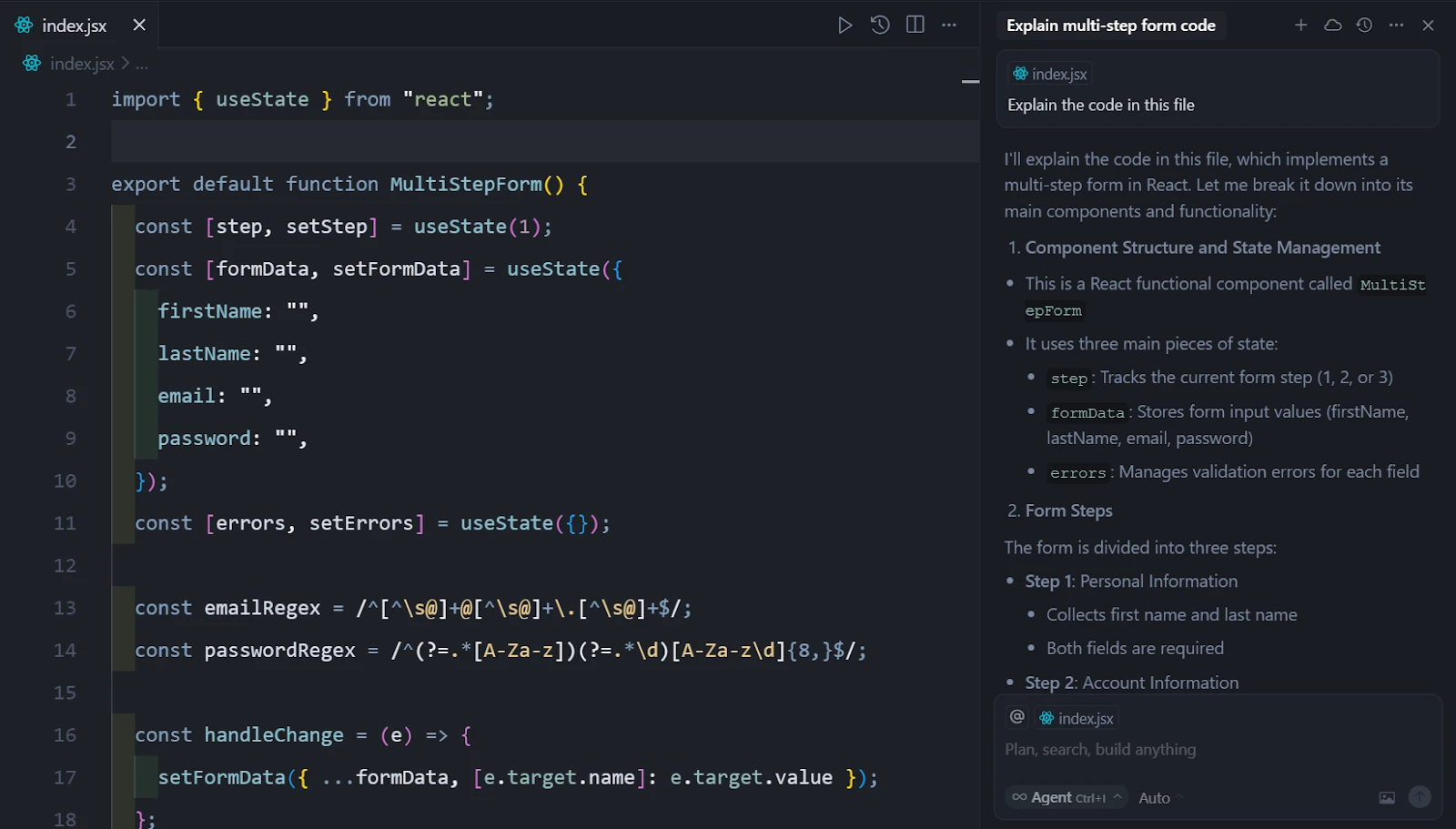
Cursor is an AI-native desktop code editor designed to handle multi-file coding tasks, architectural refactoring, and automated debugging directly within the local development environment. Built as a fork of Visual Studio Code, it provides a familiar interface while stripping away the limitations of standard third-party plugins. Developers use this environment to index entire project directories, allowing the underlying language models to read the codebase, understand local dependencies, and write contextually accurate logic across multiple files simultaneously.
The software targets software engineers, frontend developers, and backend architects who need more than basic single-line autocomplete. By running as a dedicated local desktop application on Windows, it gains direct access to the filesystem, the integrated terminal, and local build tools. This direct filesystem access allows the integrated agents to run tests, read error logs, and immediately draft fixes without requiring the user to copy and paste text into a separate browser window. Rather than treating the language model as an isolated chat widget, the interface centers around autonomous file modifications.
Programmers can highlight blocks of text, press keyboard shortcuts to summon inline editing prompts, and instruct the application to restructure entire functions. Because it operates locally but connects to remote cloud inference models like Claude or GPT-4, it balances the speed of local text editing with the computational scale needed for complex logic generation. The application parses local code paths, reads active terminal outputs, and builds a shadow workspace to test changes before pushing them to the primary files. This creates a practical environment for executing wide-scale codebase migrations, tracking down persistent syntax errors, and scaffolding new routing structures from scratch.
For teams handling large codebases, the application introduces a persistent background indexing system that maintains an active map of all functions, classes, and exported modules. This mapping runs independently of the active coding session, ensuring that when a developer queries the AI about a specific database connection or an unfamiliar utility function, the editor retrieves the exact source file instantly. Unlike generic web-based text generators that require users to manually explain their project structure in every prompt, this local integration retains full contextual awareness. The result is a specialized workspace that reduces the cognitive load of navigating directories, allowing programmers to focus entirely on architectural design and logic implementation.
Key Features
- Agent Mode and Composer: By pressing Ctrl+I or utilizing the Composer panel, developers can instruct the editor to build entire features from scratch. The agent operates autonomously to create new files, modify existing routing structures, and update dependencies across the project, rather than just printing a block of text for the user to copy manually.
- Contextual Codebase Indexing: Typing @Codebase within the chat or inline prompt forces the editor to run a semantic search across the entire open directory. This ensures the language model understands custom types, API endpoints, and database schemas before it attempts to generate new logic, reducing hallucinated variables.
- Multi-Line Tab Completions: Moving beyond standard IntelliSense, the predictive engine analyzes recent edits and suggests entire blocks of logic, structural updates, or boilerplate closures. Users accept these multi-line predictions simply by pressing the Tab key, saving keystrokes on repetitive patterns.
- Inline Chat and Smart Rewrites: Using the Ctrl+K shortcut opens an inline floating prompt directly over the active cursor position. Developers can type a natural language command to modify the highlighted function, and the editor will present a side-by-side diff view of the proposed changes for immediate review and acceptance.
- Integrated Terminal Commands: The editor monitors terminal outputs and automatically detects build errors or failed test suites. When a stack trace appears, users can click a single button to feed the error directly into the language model, which then investigates the broken files and suggests a fix in the chat panel.
- Direct Web Context Integration: Using the @Web command inside a prompt forces the engine to scrape the internet for the most current API documentation or library syntax. This prevents outdated syntax suggestions when working with recently updated frameworks that might not be present in the underlying model's base training data.
- Visual Studio Code Compatibility: Because the application shares a foundation with the standard Microsoft editor, it supports the Open VSX registry. Developers can install their preferred themes, linters, formatting tools, and debugging extensions without losing their established workspace configurations.
How to Install Cursor AI on Windows
- Download the Windows executable installer package from the official vendor website.
- Launch the downloaded setup file. The installer will first ask whether to install the application for the current user only or across the entire system, which dictates the default directory path.
- Review the initial setup wizard, which prompts you to customize the keyboard shortcut layout. You can choose to maintain standard Visual Studio Code bindings or adopt the editor's native keybindings tailored for inline generation.
- Select the option to import your existing extensions, themes, and settings. If you already have a local Visual Studio Code environment, the installer will automatically detect your configuration and mirror it into the new workspace.
- Configure your privacy settings. The setup screen provides a toggle to enable or disable Privacy Mode, which determines whether your local telemetry and text interactions are stored by the vendor for model training.
- Complete the first-run sign-in process. A browser window will open requiring you to authenticate using a GitHub, Google, or standard email account to activate the language model connections.
- Finish the setup by optionally installing the command-line utility. Checking this box adds the editor to your system PATH, allowing you to open folders directly from the Windows command prompt or PowerShell by typing the executable name followed by a dot.
Cursor AI Free vs. Paid
The billing structure revolves around a credit-based system tied to the computational cost of different language models. The Hobby tier is completely free and requires no payment method to start. It includes a short trial of the premium features, after which it drops to a strict monthly limit of 2,000 basic code completions and 50 slow requests. This free tier works well for evaluating the interface, but regular developers usually hit the usage ceiling during normal daily work.
The standard Pro tier costs $20 per month, or $16 per month if billed annually. This subscription grants unlimited multi-line tab completions, unlimited usage of the standard auto mode, and a $20 monthly usage credit pool specifically allocated for frontier models like Claude Sonnet or GPT-4o. When you manually select these heavy models for complex architectural tasks, it deducts from this credit pool. Once depleted, users can either fall back to the standard models or enable pay-as-you-go overage billing. The credit depletion rate depends entirely on the specific model requested by the user. Lighter, faster models consume fewer credits, while dense architectural queries sent to frontier models burn through the allocation much faster. To mitigate accidental spending, the interface provides a clear toggle between standard models and premium usage, ensuring developers always know when they are drawing from their paid balance.
For heavier demands, the Pro+ tier costs $60 per month and triples the usage credits, making it suitable for developers running continuous background agents that consume high volumes of tokens. An Ultra tier is available for $200 per month, applying a substantial multiplier for heavy users executing large-scale codebase migrations. Finally, engineering teams can opt for the Business plan at $40 per user per month, which adds centralized administrative billing, shared organizational rules, single sign-on integration, and strict privacy guarantees that prevent code from being used in future model training. Enterprise clients who require SOC2 compliance and strict data residency controls must negotiate custom agreements directly with the vendor, as the standard public tiers do not cover specialized corporate compliance requirements.
Cursor AI vs. GitHub Copilot vs. Windsurf
GitHub Copilot operates primarily as an extension that plugs into your existing editor, making it adaptable and cheaper at $10 per month. It excels at fast, context-aware line completions and basic chat panel queries. However, because it remains confined within the standard extension API limits, it struggles to autonomously execute multi-file changes, install dependencies via the terminal, or fully rewrite project architectures without manual user intervention.
Windsurf, developed by Codeium, is another standalone AI-native IDE built on the same foundation, entering the market as a direct competitor at a slightly lower $15 per month price point. Windsurf uses a proprietary workflow called Flows, focusing heavily on real-time awareness where the AI constantly watches your keystrokes to predict actions. While Windsurf provides an excellent middle ground for developers who prefer an uninterrupted background prediction engine without needing to manually tag files or manage context windows, its automated approach can sometimes feel unpredictable for users who prefer strict guardrails and explicitly declaring which files the AI should read.
Cursor AI is the better choice for developers who require deep, autonomous file manipulation and exact context controls like the @Codebase tagging system. It justifies its higher price tag through the Composer panel, which handles complex cross-file refactoring far better than a standard plugin. If you prioritize writing natural language to build multi-component features and want the AI to handle the mundane file creation and terminal testing, this editor provides the most specialized environment for that exact workflow.
Common Issues and Fixes
- Chat history causes severe IDE lag. After dozens of interaction rounds in a single session, the interface may freeze or typing may become visibly slow. To fix this, periodically clear your chat history or open a fresh chat thread, which resets the context window and restores standard editor performance.
- The background agent deletes files instead of editing them. Occasionally, the autonomous agent will attempt a rewrite by entirely clearing a file and failing to paste the new logic. Always run a Git commit before launching a large agent task, and simply run a checkout command to restore the file if the agent breaks the structure.
- Codebase search fails to find relevant context. The semantic RAG search might miss specific variables if you use vague terms like "auth" when the project actually uses "session_manager." Use exact variable names in your prompt, or manually force the editor to read the exact script by typing @Files followed by the exact file path.
- High RAM usage and constant fan noise. The shadow workspace continuously indexes files in the background, which can consume significant memory on large projects. Navigate to the editor settings, disable background indexing, and manually add heavy build folders to your ignore file to lower resource consumption.
- Visual Studio Code extensions fail to sync correctly. During the initial import, some proprietary extensions may not load due to registry differences. Open the internal extension manager and manually install the missing tools directly from the Open VSX registry, or install them via their direct URL format.
Version Latest — March 2026
- Improved startup behavior and stability in common desktop scenarios.
- Updated workflow components for better performance during extended sessions.
- Resolved minor compatibility and usability issues reported by users.