EdrawMind is an intelligent mind mapping and brainstorming application designed to help project managers, researchers, and creative teams organize complex information visually. Instead of relying on static lists or scattered notes, users map out ideas on an infinite canvas, establishing distinct relationships between primary concepts, secondary tasks, and external reference documents. The software bridges the gap between chaotic brainstorming sessions and structured project planning, offering a dedicated workspace where raw ideas can be refined into actionable outlines or formal presentations. For professionals handling large volumes of data, visual categorization prevents critical details from being lost in dense paragraphs.
For example, a marketing team can start with a central node representing a new product launch. From there, they can branch out into social media strategy, budget allocation, and content schedules. Because the software supports rich text formatting and file attachments, each node can hold draft copy, reference images, and exact budget figures. Instead of jumping between a word processor, a spreadsheet, and a folder of images, the team keeps all relevant context anchored to a single visual map. Similarly, academic researchers can use the application to map out complex thesis structures, linking specific arguments to localized PDF documents for instant retrieval.
While web-based mapping tools exist, the desktop environment provides critical performance advantages for intensive workflows. Rendering hundreds of interconnected nodes, attaching high-resolution local images, and switching fluidly between mapping layouts and Gantt chart views requires hardware resources that browser-based alternatives often struggle to manage. By installing the desktop application on a local machine, users gain faster file processing, direct access to the local file system for attachments, and reliable offline capabilities for standard diagramming tasks. Operating locally also secures sensitive data. While the application offers cloud synchronization for collaboration, users working on confidential corporate strategies or unannounced product designs can choose to save their files strictly to their local hard drives. This offline functionality ensures that proprietary data does not sit on an external server unless explicitly uploaded. Furthermore, the desktop architecture ensures that large map exports, such as high-definition vector graphics or multi-page documents, generate quickly without relying on external server queues.
Key Features
- Outline Mode: Switch instantly between a visual web of nodes and a traditional hierarchical text list. Editing text in the outline view automatically updates the corresponding mind map, making it highly efficient to draft long documents, reports, or meeting agendas without manually dragging bubbles around the screen.
- Automated Text Generation: Input a basic text prompt and allow the built-in artificial intelligence engine to generate a starting map with relevant subtopics. This feature consumes token credits but significantly reduces the time spent staring at a blank canvas by instantly providing a structured framework that you can edit and refine.
- Presentation Conversion: Convert completed diagrams into sequential slide decks without opening an external presentation application. The software automatically assigns main branches to individual slides, applies layout formatting, and allows you to export the finished deck directly to standard presentation formats.
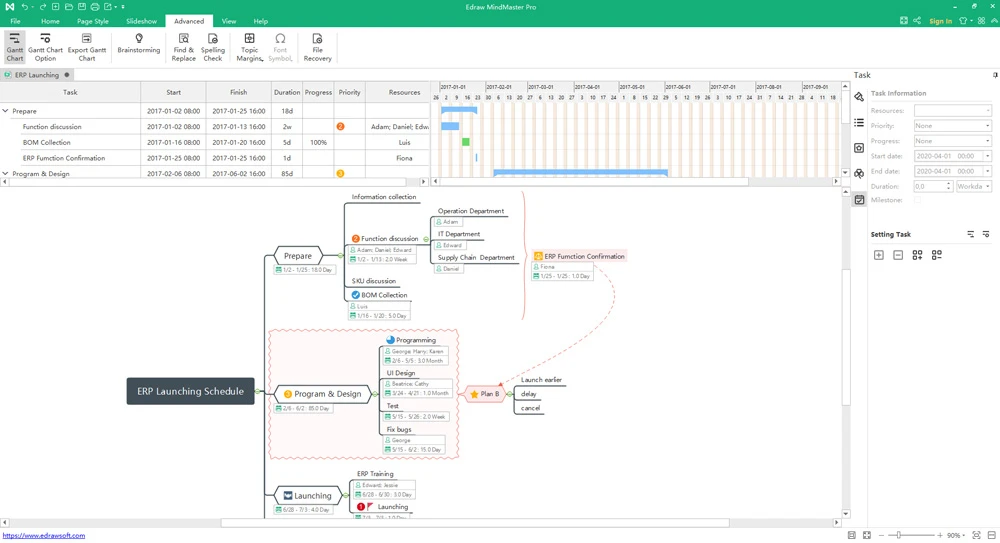
- Gantt Chart Integration: Toggle the workspace into a project management timeline. Users can assign specific due dates, allocate team resources, and track completion percentages directly from the nodes they originally created during the brainstorming phase, turning abstract ideas into scheduled tasks.
- Document Summarization: Upload lengthy text files or PDFs and command the software to extract the core arguments automatically. The resulting data is mapped out visually as connected nodes, serving as a highly readable quick reference guide for academic research, legal documentation, or lengthy business reports.
- Multi-Format Exporting: Save finished maps as PDF documents, HTML web pages, scalable vector graphics, or Microsoft Word files. The application also supports importing and exporting formats from competing mind map applications, ensuring that teams can share files regardless of the specific software the recipient uses.
- Customizable Layouts and Themes: Choose from multiple distinct structural layouts, including fishbone diagrams, organizational charts, sunburst charts, and Kanban boards. Combined with predefined color themes and customizable line weights, users can strictly format their maps to match corporate branding guidelines or specific presentation requirements.
How to Install EdrawMind on Windows
- Download the Windows installer package directly from the official vendor website to ensure you receive the unmodified application.
- Locate the downloaded executable file in your default downloads directory and double-click it to launch the setup wizard.
- Click Yes if the Windows User Account Control prompt requests administrative privileges to make changes to your device.
- Read and accept the End User License Agreement to proceed with the installation workflow.
- Select your preferred installation directory, or leave the default path pointing to your primary program files folder on the system drive.
- Click the install button and wait for the unpacker to write the required application files, graphical assets, and templates to your local disk.
- Launch the application using the newly created desktop shortcut or by searching for it in the Start menu.
- Sign in using a registered vendor account to synchronize your cloud files, authenticate your license tier, and access any allocated artificial intelligence generation tokens before starting your first project.
EdrawMind Free vs. Paid
The software operates on a freemium model, providing a basic tier for casual users alongside premium options for professionals. The free tier allows users to build foundational mind maps, utilize a selection of standard templates, and explore the core interface without a time limit. However, this version restricts the number of pages you can create per document and applies a visible, permanent watermark to all exported files or printed pages. Free users also receive a strictly limited initial allocation of generation tokens—often around 500—which are quickly consumed when testing the automated summarization tools.
Upgrading to a paid plan removes the export watermarks and lifts the restrictions on document length and node counts. The official website offers both an annual subscription and a perpetual license for the desktop software. The subscription generally provides continuous feature updates, cross-device cloud synchronization, and a monthly refresh of artificial intelligence tokens—typically around 10,000 tokens per month for the standard individual tier. This ongoing token allocation is critical for users who rely heavily on automated document summarization or assisted drafting.
The perpetual license involves a single upfront payment, granting indefinite access to the specific software build available at the time of purchase. While this avoids recurring billing and appeals to budget-conscious freelancers, major future upgrades may require an additional fee, and cloud-based token refills might incur separate costs. For organizations, the Team and Enterprise tiers provide centralized billing and administrative dashboards. IT managers can provision or revoke access to specific users, track team operation logs, and enforce multi-user controls to ensure proper data governance across the company.
EdrawMind vs. XMind vs. MindManager
XMind appeals heavily to users who prioritize a minimalist interface and strict adherence to pure visual mind mapping. It features an excellent day and night mode, a highly refined design aesthetic, and strong offline functionality without the distraction of heavy corporate productivity modules. XMind also includes specialized structures like logic charts and tree tables that cater strictly to visual thinkers. However, because it lacks integrated task management and advanced collaborative timelines, it is less suitable for users who need to turn a brainstorm into an actionable, trackable production schedule.
MindManager targets the corporate enterprise sector with deep Microsoft Office integration, advanced data analytics visualization, and heavy project management capabilities. It handles massive, data-driven brainstorming sessions and complex business intelligence data exceptionally well, allowing users to pull live data from external business applications into their maps. However, it carries a significantly higher price tag and demands a steeper learning curve, which often alienates students, independent contractors, or small teams who just need straightforward diagramming capabilities.
EdrawMind sits between these two extremes, combining the visual flexibility of XMind with the functional project planning tools of MindManager at a lower cost. It is the better choice for users who want built-in artificial intelligence text generation, presentation slide conversions, and Gantt charts without paying premium enterprise software rates. However, users who just want the absolute simplest, distraction-free drawing canvas might find the interface slightly more crowded than XMind's pure aesthetic approach, as the inclusion of artificial intelligence sidebars and productivity tabs adds visual density.
Common Issues and Fixes
- Exported documents contain a watermark. This occurs because the software is currently running in the unregistered free tier. Upgrading to a paid license and ensuring you are actively logged into your authenticated account removes the branding from all future PDF and image exports.
- Artificial intelligence features stop responding or generate usage errors. This usually means the associated account has depleted its monthly allocation of generation tokens. Check your account dashboard to verify your balance, as heavy text generation, language translation, and PDF summarization drain token reserves rapidly.
- Installation fails with write permission alerts. If the setup wizard cannot write files to the default system drive, close the installer window, right-click the downloaded executable file, and select "Run as administrator" to grant the necessary directory permissions for local installation.
- Interface text appears in an incorrect language after an update. Occasionally, software updates reset local localization files to default settings. Navigate to the application settings menu, locate the language preferences, and manually switch the interface back to your preferred language.
- Cloud synchronization fails to update across devices. When switching between the desktop client and the web editor, changes might not reflect immediately if the local application loses network connectivity. Manually clicking the sync button in the upper toolbar and verifying your internet connection forces the local cache to update the remote server.
Version 13.0.3 — February 2026
- Introduced a split-screen node note-taking feature, allowing users to map out structures on the left while writing detailed node contents on the right.
- Added the ability to run multiple EdrawMind instances simultaneously on the same machine.
- Included a brand-new quick entry option to streamline the creation of new mind maps.
- Enabled keyboard navigation for pop-up dialogs, allowing users to toggle and confirm selections using the Tab and Enter keys.
- Enhanced the overall experience for editing and exporting map outlines.
- Streamlined the internal software upgrade process for a smoother transition between versions.
- Fixed a graphical glitch that caused display issues when opening notes under specific conditions.
- Resolved interface adaptation problems that occurred when connecting the application to an external monitor.
- Fixed a formatting error where frames and outlines did not display correctly when printing specific map branches.
- Addressed various underlying bugs and prevented several known application crashes to improve overall stability.