For UX professionals, business analysts, and product designers seeking to bridge the gap between static wireframes and functional application concepts, Axure RP stands out as a premier prototyping tool. This software enables teams to build rich, interactive diagrams and detailed prototypes that behave exactly like the final product, all without writing a single line of code. Instead of relying on simple click-through mockups where static images are merely chained together, designers use this environment to build interfaces with real working forms, dynamic sorting, and conditional rules. The primary audience includes individuals who need to validate complex structural logic and gather accurate user feedback before committing expensive engineering resources to final development.
In enterprise and data-driven environments, simple interface mockups often fail to communicate how an application handles varied user inputs, error states, or multi-step calculations. The application solves this specific friction by introducing logic-based design elements directly onto the canvas. Users can drag standard UI components like text fields, dropdown menus, and checkboxes into their workspace, then assign specific mathematical functions or variable states to those widgets. When a usability testing participant interacts with the resulting prototype, they experience an authentic application flow. If a user types the wrong password, the prototype can display a contextual error message. If they add an item to a functional shopping cart, the subtotal updates automatically based on the specific numerical values of the items selected.
Operating as an installed desktop application ensures that heavy project files, custom widget libraries, and sensitive corporate data remain secure on local hardware. While the software integrates with modern cloud workflows for sharing links and gathering stakeholder feedback, the core authoring experience happens natively on Windows. This local execution provides the processing headroom necessary to handle files containing hundreds of interactive pages, vast datasets mapped to repeater widgets, and intricate mathematical expressions. By keeping the design logic contained within a desktop application, teams maintain strict control over their intellectual property while utilizing the full hardware resources of their local workstations to compile complex HTML exports.
Key Features
- Dynamic Panels: Create containers with multiple states to build interactive components like carousels, sticky headers, and tabbed interfaces. Users can define swipe and drag interactions directly on the panel, and the web browser preview translates these gestures into functional interface movements. This eliminates the need to create duplicate pages just to show a menu opening, a tab switching, or a modal window appearing over the main content.
- Repeater Widgets: Display data-driven grids and lists without duplicating visual elements manually across the canvas. Designers can import a standard CSV file to dynamically populate product catalogs, contact tables, or functional shopping carts. The widget allows users to apply specific sorting and filtering rules, so usability testers can search through the grid exactly as they would in a live database environment.
- Variables and Conditional Logic: Store user input and pass specific data between different pages of a single prototype file. This function allows creators to build functional multi-step forms, persistent login states, and dynamic calculations based on user choices. For instance, a text input on the first page of a checkout flow can change the greeting text or shipping options presented on the final confirmation page.
- Working Forms and Inputs: Drag and drop native text fields, dropdown lists, radio buttons, and checkboxes that behave exactly like real HTML components. Testers can type real text into these fields during a usability session, and the software captures that input for further logic processing. You can assign specific style effects, such as a red border for an error state, based on validation rules you define in the editor.
- Adaptive Views: Design for multiple screen sizes and device constraints within a single project file. Breakpoints automatically switch the layout from a wide desktop view to a narrow mobile configuration when the browser window resizes. You maintain a single set of interaction rules and variables while adjusting the visual positioning and scaling for different target hardware formats.
- Developer Specification Export: Automatically generate detailed documentation directly from the design canvas to streamline the engineering handoff. Teams can export a Word document containing annotated screenshots, exact pixel measurements, and written interaction notes. This output provides software engineers with a concrete blueprint of how the application must function, reducing miscommunication and guesswork during the coding phase.
How to Install Axure RP on Windows
- Download the official Windows installer package from the vendor's primary web domain to ensure you receive the unmodified application files.
- Double-click the downloaded executable file to launch the setup wizard, granting administrator permissions if prompted by the Windows User Account Control dialog.
- Read and accept the software license agreement required to proceed with the local installation process.
- Select the destination folder on your hard drive. The wizard defaults to the standard Program Files directory, which works well for most local environments and ensures proper registry configuration.
- Choose whether to create a desktop shortcut, then click Next to begin the file transfer.
- Wait for the installer to extract the core application files, default widget libraries, and local execution scripts to your designated disk location.
- Click the Finish button to close the setup wizard. You can leave the option checked to launch the application immediately upon closing the window.
- On the first run, log in with your account credentials to activate your subscription, or begin the standard trial period if you do not yet have a paid account.
Axure RP Free vs. Paid
Axure RP operates entirely on a commercial subscription model, though the vendor offers a fully functional 30-day trial for new users evaluating the software. There is no permanent free tier available for ongoing commercial design work. Once the trial period concludes, users must purchase a license to continue saving files, exporting documentation, and publishing interactive prototypes to the cloud environment.
The standard Pro tier targets individual UX designers, researchers, and freelance analysts, typically priced at $29 per user per month when billed annually. This tier includes unlimited prototyping, full access to all dynamic panels, and complete utilization of the logic tools. It also grants the ability to publish interactive projects directly to the cloud for stakeholder review. It covers all the core authoring features necessary for designing complex interface logic.
For collaborative environments, the Team tier costs $49 per user per month and introduces specific features tailored for multi-designer workflows. This tier adds co-authoring capabilities, allowing multiple users to work on the exact same project file simultaneously, along with detailed revision history tracking and team project hosting. Larger organizations can contact the vendor for Enterprise plans, which introduce single sign-on (SSO) integrations, advanced user management controls, and the specific option to host projects on private on-premise servers instead of relying on the public cloud infrastructure.
Axure RP vs. Figma vs. Balsamiq
Figma excels at collaborative visual interface design and offers a low barrier to entry due to its browser-based architecture and real-time multiplayer editing capabilities. It is the industry standard for creating vector layouts, establishing design systems, and generating static mockups. However, when a project requires functional form fields, dynamic data sorting, and complex conditional logic, Figma users must fake these interactions with massive webs of linked static screens. Axure handles actual variables and data inputs, making it far more capable for deep usability testing where the user must input real text or navigate multi-step mathematical workflows without hitting a dead end.
Balsamiq serves an entirely different phase of the product development lifecycle, focusing strictly on low-fidelity, rapid wireframing. It intentionally limits interaction and visual styling to keep stakeholders focused on core layout and structure, rather than the intricate behavior of the final application. Balsamiq is excellent for a quick brainstorming session or a preliminary structural meeting where rapid iteration is more important than functionality. Once the team agrees on the basic layout and needs to test how a complex checkout process actually feels to a user, they must move the concept into a more detailed logic tool.
Axure RP proves to be the better fit when teams need realistic, testable prototypes that behave exactly like a coded application. If the design team must prove that a complex financial dashboard or a conditional enterprise software wizard works before engineers start writing code, this software provides the necessary structural depth. It requires a steeper learning curve than simple screen-linking tools, but it ultimately saves development time by exposing logical errors early in the design phase and generating accurate technical documentation.
Common Issues and Fixes
- Blank white screen on launch. This behavior typically occurs on Windows machines due to hardware acceleration conflicts or specific display driver issues. Disabling 3D acceleration in your virtualization software or updating your local graphics drivers usually restores the interface rendering and prevents the application window from blanking out.
- Local browser preview blocks interactions. Modern web browsers often restrict local JavaScript execution when opening HTML prototypes directly from a hard drive, which breaks dynamic panels and variables. To bypass these local security restrictions, install the official vendor browser extension or publish the project to the cloud environment for web-based testing.
- Severe lag with large repeater datasets. Loading thousands of rows of data into a single repeater widget can drastically slow down the canvas performance and the final published prototype. To improve processing efficiency, implement pagination controls and limit the initial number of visible rows loaded by the browser on the first page load.
- Conditional logic fails to trigger. This frequently happens when overlapping invisible widgets or grouped elements block the intended mouse click events from reaching the target button. Open the browser console, enable the trace tool, and monitor the event log to see exactly which background element is intercepting the user action.
- Widgets misalign on different screens. Adaptive view breakpoints can sometimes cause elements to float off-screen if they are not pinned correctly to the canvas edges. Check the specific adaptive view settings in the style pane to ensure the widget has distinct coordinate values and constraints for both desktop and mobile layouts.
Version 11.0.0.4134 — October 2024
Added:
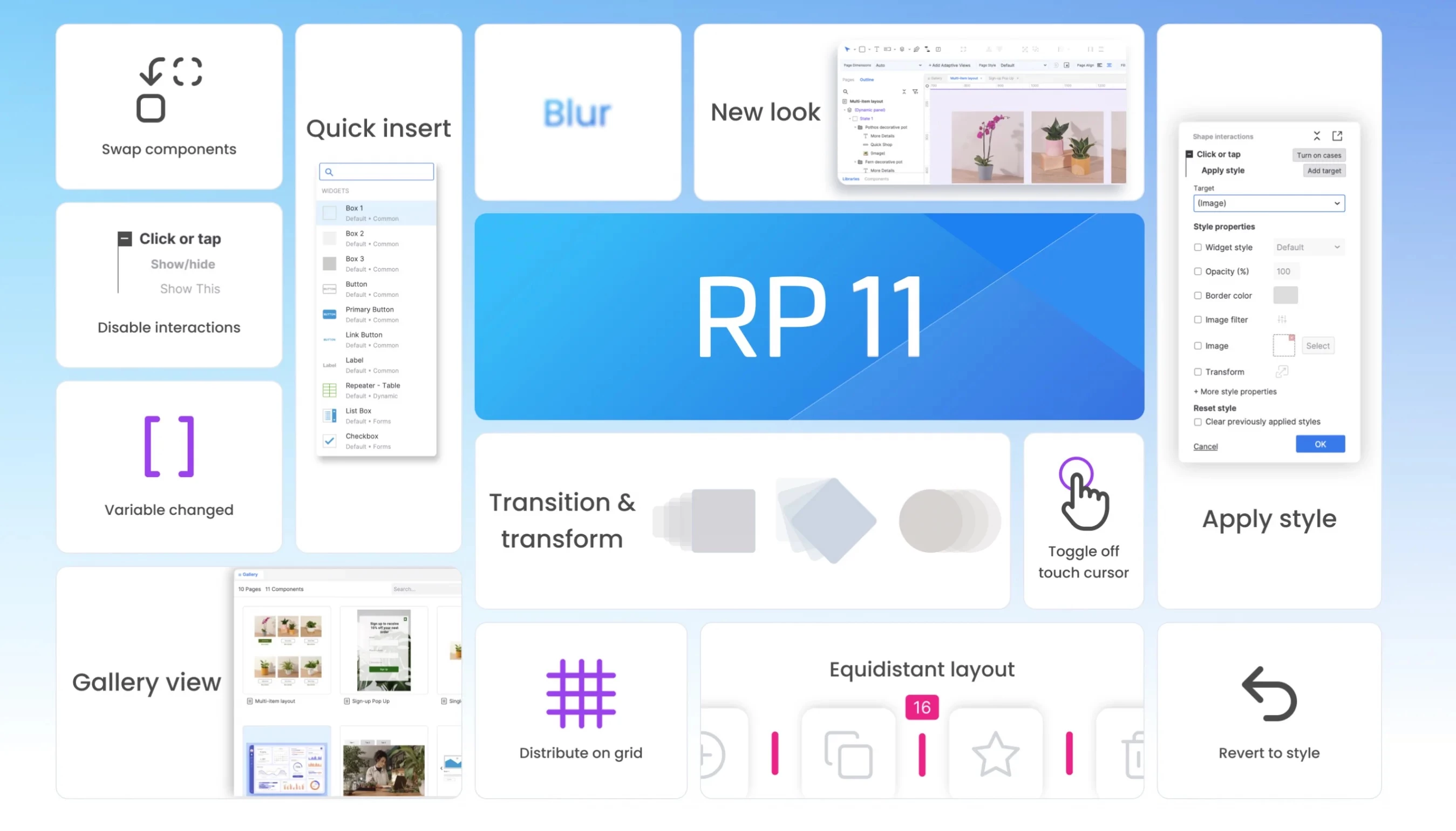
- Quick Actions for keyboard-driven widget insertion and navigation
- Gallery View for visual overview of all pages and components
- Apply Style action for dynamic color and font changes
- Ready for Dev status marking for clearer development handoff
Improved:
- Whiteboard scrolling and panning performance optimization
- Organization sidebar display with single organization focus
- Right-click context menu accessibility in left pane
- Prototype embedding with update link functionality
Fixed:
- SVG shape rendering issues in preview mode
- Component targeting in interactions
- Line height inconsistencies when pasting between RP and whiteboards