Typing Master operates as a dedicated local touch-typing tutor designed to analyze and correct keyboarding habits directly on a desktop environment. Instead of relying on isolated web exercises that only measure performance in a controlled browser window, this application monitors daily computer usage to construct a realistic profile of an individual's keystroke accuracy. It serves professionals who draft long documents, data entry clerks, and students aiming to increase their baseline words per minute without constantly glancing down at their hands. By tracking speed, hesitations, and backspace frequency during normal operation, the software creates a continuous feedback loop that highlights specific physical mechanics requiring correction.
Choosing a locally installed tutor over a lightweight web alternative directly impacts how progress is measured and achieved. Browser-based tools cannot observe what happens in a local word processor, a dedicated email client, or a complex desktop spreadsheet. This desktop application bridges that gap by running a background tracking module that records real-world mistakes as they happen. If a user constantly miskeys a specific letter combination while drafting real emails, the software detects the pattern and dynamically generates targeted practice drills. This methodology ensures that practice time focuses on fixing actual weaknesses rather than repeating generic alphabetical sequences that the user has already mastered.
The interface is structured around guided courses that start with baseline finger placement and progress to complex typing scenarios involving special characters and numbers. Users navigate through visual keyboard drills, timed tests, and gamified challenges designed to develop automatic muscle memory. Because the application processes data locally, it provides immediate, uninterrupted feedback regardless of internet connectivity status. The focus remains strictly on mechanical improvement, utilizing color-coded visual aids and rigid progress tracking to transition users from hunt-and-peck typing to rapid, accurate touch typing.
Key Features
- Background Typing Meter: This optional widget runs silently in the system tray to monitor keystrokes across all desktop applications. It records baseline typing speed, measures the duration of pauses, and logs frequently mistyped key combinations during regular computer usage. The collected data translates into daily and weekly statistics graphs, allowing users to track real-world performance outside of the formal lesson environment.
- Customized Review Drills: Instead of forcing users to repeat standard lessons, the software relies on tracking data to generate personalized exercises. When the system identifies a recurring physical struggle, such as reaching for the letter P or mixing up C and V, it creates a short, targeted practice session. This dynamic curriculum generation prevents wasted time on already mastered keys and accelerates overall speed improvement.
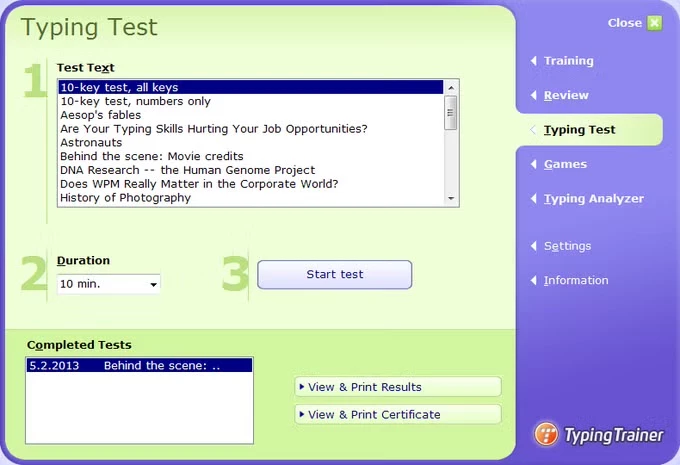
- Timed Skill Tests and Diplomas: The application provides a dedicated testing module where users can evaluate their exact words per minute and net accuracy. The tests use various text lengths and difficulties, simulating realistic transcription tasks. Upon passing an exam, the program generates a printable diploma detailing the final score, which serves as a concrete proof of proficiency for job applications or school requirements.
- Visual On-Screen Keyboard: To prevent users from looking down at their physical hardware, the interface features a color-coded on-screen keyboard. This visual aid maps specific fingers to distinct key zones, reinforcing proper resting positions on the home row. It supports multiple regional layouts, including QWERTY, QWERTZ, and AZERTY, ensuring the visual feedback matches the physical device on the desk.
- Interactive Skill Games: The software includes gamified training modules like Bubbles, WordTris, and Clouds to reduce the monotony of repetitive drilling. These modules require users to strike the correct key before a target disappears from the screen, forcing rapid visual recognition and immediate physical reaction. The games automatically adjust their difficulty based on current typing metrics to maintain a challenging but achievable pace.
- Custom Text Import: For users who need to practice vocabulary specific to their industry, the testing module allows the importation of plain text files. Medical transcribers, legal clerks, or programmers can load their own unformatted documents into the engine. The software will then calculate speed and accuracy based on the specialized terminology, making the practice session highly relevant to daily occupational tasks.
- Detailed Performance Reporting: Every keystroke pressed during a formal lesson is logged into a central user profile. The program generates detailed reports showing error rates per finger, highlighting whether the left pinky or right index finger is causing a speed bottleneck. These granular metrics allow learners to understand their mechanical flaws rather than just seeing a generic percentage score at the end of a session.
How to Install Typing Master on Windows
- Navigate to the official vendor website and download the standalone executable installer package for the Windows operating system. Save the file to a known local directory, such as the standard Downloads folder, to ensure easy access.
- Locate the downloaded executable file and double-click it to initiate the setup wizard. Windows User Account Control will present a security prompt asking if you want to allow the application to make changes to your device; click Yes to proceed.
- Read the end-user license agreement presented on the first screen of the installer. You must select the radio button to accept the terms of this agreement before the wizard will unlock the Next button for further configuration.
- Choose the destination folder where the core application files will reside. The wizard defaults to the standard Program Files directory, which is optimal for a standard setup, but you can use the Browse button to select a secondary storage drive if necessary.
- Review the prompt regarding the QuickPhrase feature, a supplemental tool designed to insert frequently used text snippets. Select whether you want this shortcut utility enabled or disabled based on whether you already use a dedicated text expander application.
- Confirm your start menu folder preferences and click the Install button. The setup routine will extract the necessary course files, graphical assets, and tracking components, writing them to your local disk in a process that usually takes less than a minute.
- Leave the option to launch the application checked and click the Finish button to close the wizard. Upon the first launch, the program will prompt you to enter a user name, which creates a dedicated local profile to track your ongoing progress and statistics.
Typing Master Free vs. Paid
Typing Master operates on a freemium distribution model that encourages users to test the core mechanics before committing to a purchase. The initial download functions as a fully featured trial that lasts for one week. During this introductory seven-day period, users receive unrestricted access to all touch-typing courses, interactive games, skill tests, and the background tracking widget. This allows individuals to evaluate whether the application correctly monitors their specific physical keyboard layout and integrates well with their daily desktop usage.
Once the trial period expires, the software automatically restricts access to the premium features while remaining functional for basic practice. In the limited free state, users can only access a handful of preliminary lessons and face strict time constraints on the typing tests. The background tracking capabilities are disabled, and custom text imports for specialized practice are locked. The core functionality remains present, but the progression path is intentionally halted to encourage an upgrade to the commercial tier.
To unlock the complete curriculum permanently, users must purchase a Premium license through the official vendor portal. The developer offers single-user licenses designed for personal desktop use, as well as volume licensing packages tailored for schools, corporate training departments, and large administrative offices. Volume licenses include network installation capabilities and a centralized teacher dashboard for managing multiple student profiles. Purchasing a license provides a specific digital credential that removes all trial limitations without requiring a secondary download.
For individuals who only need a quick refresher on home row basics, the free limited tier may suffice after the trial ends. However, users who require continuous background monitoring, detailed error analytics over several months, or the ability to print certified speed diplomas will find the Premium tier necessary. The application does not force a mandatory subscription model for individual users, opting instead for a traditional perpetual license tied to the current software generation.
Typing Master vs. KeyBlaze vs. Ratatype
KeyBlaze functions as a direct desktop alternative that focuses heavily on dictation and administrative transcription workflows. It includes specialized audio lessons where users type along with spoken tracks, simulating the real-world demands placed on medical and legal transcriptionists. It also places a strong emphasis on mastering the numeric pad for accounting purposes. Users should choose KeyBlaze if their primary goal involves transcribing audio files or inputting heavy volumes of financial data, whereas Typing Master is better suited for individuals focused on improving standard alphabetical document drafting and email correspondence.
Ratatype operates entirely as a web-based educational platform that emphasizes social interaction and group-based learning dynamics. Because it runs strictly within a web browser, it requires no local installation and bypasses local administrative privileges, making it highly accessible for public computers or strict school environments. It relies on shared leaderboards to foster competition among friends or classmates. Ratatype is the optimal choice for teachers looking for a zero-friction deployment in a classroom, but it completely lacks the ability to monitor local application usage, which is the primary technical advantage of a dedicated desktop installation.
Typing Master remains the superior choice for users who demand concrete, data-driven analysis of their actual daily computer habits. Because it utilizes a system-level background widget, it tracks keystroke errors inside external word processors, coding environments, and web browsers, creating practice drills based on real-world mistakes rather than isolated exercises. It provides an uninterrupted, offline learning environment that constructs a precise mechanical profile of the user. When the priority is correcting deep-rooted physical habits across all desktop tasks, this dedicated local tracker outperforms both browser-based alternatives and specialized transcription tools.
Common Issues and Fixes
- Widget fails to track keystrokes in specific applications. Certain password managers, secure banking interfaces, or isolated web browsers actively block background keystroke monitoring to prevent malicious keylogging. This is expected security behavior. To ensure the widget registers your typing speed, practice your general typing in standard desktop applications like Microsoft Word, Notepad, or your default email client.
- Custom test documents fail to load or display formatting errors. The testing module relies on raw unformatted text to calculate speed and accuracy metrics and cannot interpret complex document layouts. If a custom document fails to import, open the file in a basic text editor, remove all bolding, italics, and embedded tables, and save the file strictly with a .txt extension before attempting the import again.
- Progress is not saving between practice sessions. If the application is installed in a restricted system directory without the proper write permissions, it may fail to update the local profile database. To fix this, right-click the application shortcut and run it as an administrator, or ensure the software was installed for the current user rather than requiring elevated permissions for every session.
- Antivirus flags the tracking executable file during launch. The program relies on a specific background tracker to monitor keystrokes, which can occasionally trigger a false positive in aggressive security software due to its monitoring nature. If the application refuses to launch, check your antivirus quarantine vault, restore the necessary executable, and add the program directory to your security exclusion list.
- Premium activation credentials are rejected. The software maintains different credential formats for different product generations, often issuing a License ID rather than a traditional Registration Key. Verify that you are copying the exact credentials provided in your purchase receipt and ensure you are pasting them into the correct activation menu located under the primary settings or About tab.
Version 12.00 — November 2025
Added:
- Dark Mode with improved contrast for comfortable night practice.
- New 'Cloud Race' and 'Pipe Master' games for speed and accuracy training.
- Universal Keyboard Import (.KLC format) for custom and regional layouts.
- Bigram Analytics and Heat Map to visualize key transition speeds.
- Support for Unicode usernames (e.g., Hindi, Tamil scripts).
Improved:
- TypingMeter widget performance now measures speeds up to 200 WPM.
- Scoring logic and gameplay smoothness for all typing games.
- Installer reliability and upgrade process from version 11.
- Visual keyboard hint appearance speed is now adjustable.
Fixed:
- Resolved issue where the widget would not minimize correctly on some systems.
- Fixed specific UI bugs related to multi-monitor setups.
- Corrected 'Tricky Bigrams' detection logic.