TinyTake by MangoApps operates as a streamlined screen capture and video recording utility designed to simplify visual communication for Windows users. Rather than overwhelming you with complex timeline editors, this application focuses on the speed of capturing content, adding context through annotations, and sharing it instantly via the cloud.
In a fast-paced office environment or remote workspace, explaining a software glitch, a design change, or a document revision using text alone often leads to confusion. This utility solves that exact problem by letting you visually demonstrate the issue. Whether you are a customer support agent showing a user how to navigate a menu, a quality assurance tester documenting a visual bug, or an educator creating a quick tutorial, capturing the exact state of your monitor removes the guesswork. You can highlight a specific button, record your cursor movements, and narrate the steps, reducing a long email chain down to a single visual asset.
While many modern workflows rely on browser-based extensions for taking screenshots, those lightweight tools are strictly limited to the contents of a web page. A dedicated desktop application runs in the background, anchoring itself to your system tray and responding instantly to global keyboard shortcuts. This deep system integration means you can capture desktop software, system settings dialogs, file explorer windows, and multi-monitor setups without being restricted by a browser window. Once the capture is complete, the software pulls the media into a local preview window where you can refine it before deciding whether to save it locally or push it to an online gallery.
Key Features
- Region and Window Capture: Triggering the capture process allows you to select exactly what part of your monitor to record or photograph. You can click and drag a crosshair to define a custom rectangular region, select an active application window, or capture the entire desktop display. The tool also supports multi-monitor setups, ensuring that extended workspaces are fully accessible.
- Video and Audio Recording: Beyond static images, the application captures full-motion video up to 60 frames per second, making it suitable for software tutorials and presentations. It records your desktop activity while simultaneously pulling audio from your selected microphone and capturing your face via an attached webcam. This combination is highly effective for narrated walk-throughs where a personal touch is required.
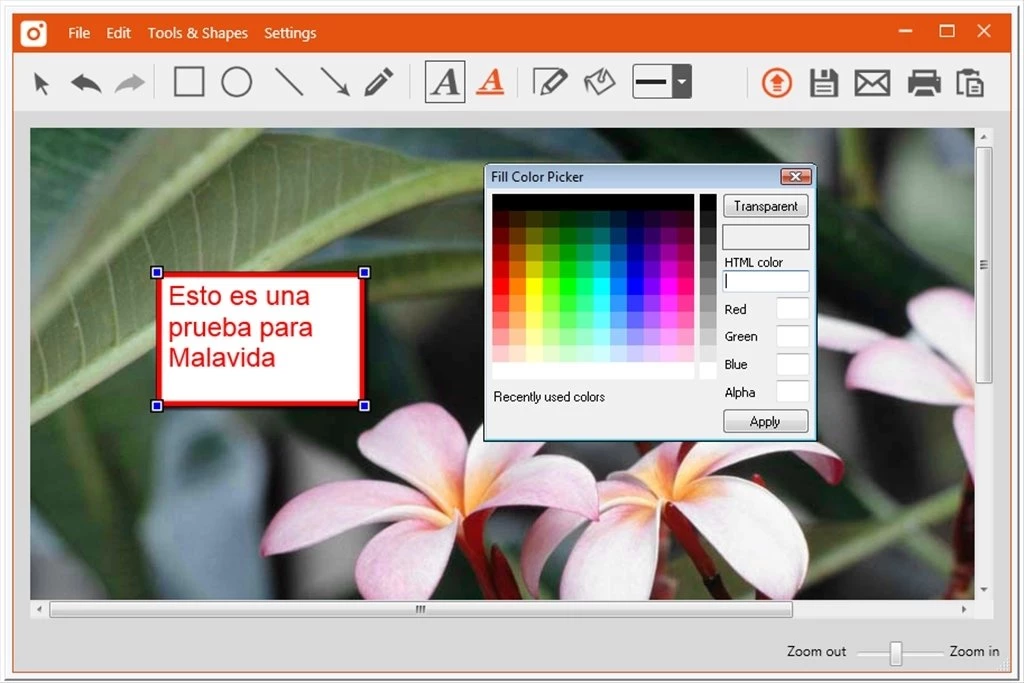
- Integrated Annotation Workspace: Immediately after capturing a screenshot, the image opens in a lightweight local editor equipped with essential markup tools. You can draw attention to specific interface elements using arrows, text boxes, and highlighter pens, or obscure sensitive information like passwords using the pixelation blur tool. These markups are applied directly over the image, allowing you to quickly add context before exporting.
- Cloud Gallery and Instant Sharing: Instead of forcing you to manually attach files to emails, the application can upload your finished media directly to a custom subdomain hosted by MangoApps. Once the upload completes, the utility automatically copies a secure, direct web link to your clipboard. You can paste this link into a chat application or ticketing system, allowing recipients to view the content in their browser without downloading a file.
- Local File Management: If your company policy restricts cloud uploads or you simply prefer local storage, the software provides standard local export options. You can save screenshots to your hard drive in standard image formats, send them directly to your system clipboard for pasting into a document, or send them to a local printer. The interface ensures that saving locally requires only a single click or keyboard shortcut.
- Direct YouTube Publishing: For users who prefer to use established video hosting platforms rather than the default cloud gallery, the software includes a direct export path to YouTube. By connecting your Google account within the application settings, you can push your recorded MP4 files straight to your channel. This bypasses the need to render the video locally, open a browser, and manually navigate the YouTube upload dashboard.
How to Install TinyTake on Windows
- Download the executable Windows installer package from the official MangoApps website or a verified software directory.
- Launch the setup file to open the installation wizard, which will prompt you to accept the standard end-user license agreement and confirm the default destination folder on your hard drive.
- Allow the wizard to extract the necessary application files; if your operating system lacks the required .NET Framework dependencies, the installer will attempt to download and configure them automatically.
- Once the installation completes, launch the application from the Start menu, which will place a persistent icon in your system tray for quick access.
- Upon the first launch, you will be required to sign in with an existing MangoApps account or register for a new one, as the software relies on this account to provision your custom cloud storage gallery.
- After authenticating, open the settings panel by right-clicking the system tray icon, and navigate to the Audio Devices tab to ensure your preferred microphone is selected for video recordings.
- Review the Hot-Keys tab to memorize or remap the default keyboard shortcuts, such as the command to capture a custom region, ensuring the workflow fits your daily habits.
TinyTake Free vs. Paid
The application operates on a freemium model, offering a capable free tier designed strictly for personal, non-commercial use. Free users gain access to the core screen capture and annotation tools, along with an online gallery that provides 2 GB of cloud storage. However, the free tier imposes a strict five-minute time limit on video recordings, making it suitable for quick visual explanations but inadequate for recording long webinars or extensive training sessions. Additionally, free users may encounter subtle branding or prompts to upgrade when utilizing the cloud sharing features.
For professional environments, business communication, and heavier usage, the developer offers several paid subscription tiers. These premium subscriptions range from roughly $30 to $100 per year per user. Upgrading removes the commercial use restrictions and significantly expands the technical limits of the software. Depending on the chosen tier, the video recording limit increases to 60 or 120 minutes, which accommodates lengthy product demonstrations and meetings.
The premium tiers also unlock advanced workflow features that are disabled in the free version. Paid users receive vastly increased cloud storage capacity, often up to 1 TB, allowing for the long-term archiving of training materials. Furthermore, direct integration with YouTube for immediate video publishing is restricted to the paid plans. For large enterprise environments, this utility is often accessed not as a standalone purchase, but as a bundled module within the broader MangoApps digital workplace platform, where it is managed centrally by an IT administrator.
TinyTake vs. Snagit vs. ShareX
Snagit targets technical writers, corporate trainers, and documentation specialists who require deep image manipulation and advanced editing tools. It offers features like optical character recognition (OCR) to extract text from images, complex timeline video trimming, step-by-step documentation templates, and scrolling window captures. However, Snagit is a premium, paid-only application with a relatively high upfront cost, making it overkill for users who simply need to point an arrow at a button and share a link.
ShareX caters to developers and power users who demand maximum control without paying for a license. As an open-source utility, it allows you to configure dozens of custom upload destinations, automate post-capture scripts, and capture obscure screen elements. While it is incredibly flexible, ShareX suffers from a dense, highly technical interface that can easily overwhelm casual office workers who do not want to spend hours configuring API keys and upload routing rules just to share a quick screenshot.
TinyTake occupies the middle ground by prioritizing speed and simplicity over complex configurations and heavy editing suites. It is the better choice for customer support agents, sales representatives, and remote office workers who need to capture a visual bug, obscure a password, and generate a cloud link in under ten seconds. The interface requires almost no learning curve compared to open-source alternatives, and the basic free tier handles quick daily communication tasks without demanding the premium budget of heavier enterprise capture tools.
Common Issues and Fixes
- Problem description. Black screen during image or video capture. This typically happens if a third-party antivirus program, such as AVG, actively blocks the screen recording module to prevent spyware, or if you are attempting to capture a game running in exclusive full-screen mode. To fix this, manually add the application executable to your antivirus exception list, or switch the full-screen application to a windowed or borderless windowed mode before pressing the capture hotkey.
- Problem description. "Video conversion in progress" message when viewing a shared link. After finishing a recording and uploading it to the cloud gallery, recipients might see this warning instead of the video player. This is normal behavior, as the server requires a few minutes to transcode the raw capture data into an optimized MP4 format for web playback; simply wait a short period and refresh the browser page.
- Problem description. No audio recorded in the final video file. The application may be pulling audio from an inactive microphone, a disconnected webcam, or the wrong virtual audio cable. Open the software settings, navigate to the Devices tab, and manually select your primary headset or active microphone from the audio drop-down menu rather than relying on the Windows default selection.
- Problem description. Cannot log in or upload files to the gallery. Because the utility relies on cloud authentication to manage your custom subdomain, a strict corporate firewall or a VPN might block its connection to the MangoApps servers. Ensure that your firewall rules permit the application executable to communicate over standard HTTP and HTTPS ports, and verify that your network allows access to the vendor domains.
Version 18.2 — August 2025
Added:
- Community Management Tools: New modules for managing B2B customer communities directly within the platform.
- Collaboration Features: Enhanced tools for team interaction and content feedback.
- Customer Engagement Features: Tools designed to improve client retention and education.
Improved:
- Unified Platform: Deeper integration with the MangoApps suite for seamless workflow across tools.
- Content Sharing & Hosting: Upgraded backend for faster upload and retrieval of shared assets.