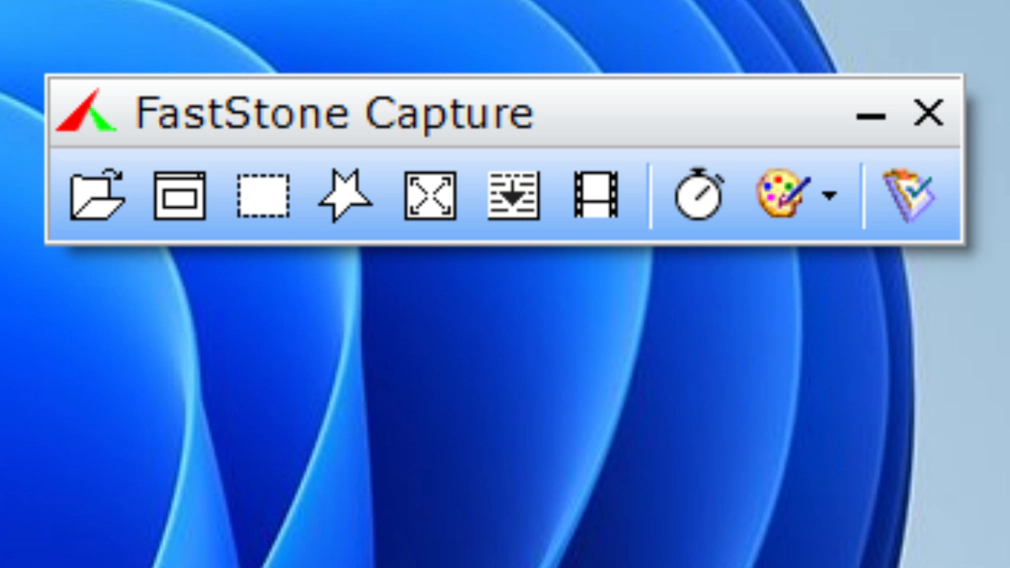
FastStone Capture is a dedicated desktop utility designed to grab, annotate, and record on-screen activity without dragging down system performance. Built specifically for technical writers, software testers, and office workers who need to document visual steps, this application bypasses the heavy resource demands of large editing suites. Instead of requiring users to open a massive application just to crop a screenshot, the tool stays docked in the system tray or floats as a tiny capture panel on the desktop, waiting for a hotkey trigger.
Unlike browser extensions that can only take pictures of web pages, a native desktop executable operates at the operating system level to capture application interfaces, multi-level dropdown menus, and custom software dialogues. This native integration ensures that users can record scrolling active windows across multiple monitors, grab specific screen coordinates, or record system audio alongside a microphone track for training videos. The resulting files can be sent directly to the clipboard, saved to a local drive, or routed into an active Microsoft Word document without relying on an internet connection or a cloud rendering queue.
People who create user manuals, file bug reports, or build presentation slides choose this utility because it combines the capture action and the markup phase into a single uninterrupted workflow. As soon as a user defines a capture region, the built-in image editor opens instantly, providing immediate access to edge effects, watermarks, text boxes, and directional arrows. Because the application processes everything on the local machine hardware, it avoids the privacy concerns, upload delays, and mandatory account sign-ins associated with modern web-based design platforms.
Key Features
- Floating Capture Panel: The application relies on a compact, draggable toolbar that sits above other active windows, providing instant mouse access to various capture modes without cluttering the screen. Users can click dedicated icons to grab the active window, select a freehand region, or start a screen recording, which minimizes the need to memorize keyboard shortcuts for every specific function.
- Scrolling Window Capture: Taking a picture of a long web page or a multi-page document is automated through a specialized scrolling mode that stitches the visual data together. Once activated, the software automatically scrolls the target window downward, captures the hidden content, and combines the segments into a single continuous image file without requiring manual alignment in a third-party editor.
- Built-in Image Editor: Immediately after taking a screenshot, the tool routes the image into an integrated editing interface where users can apply practical annotations. The editor includes tools for drawing precise arrows, boxing elements in bright colors, blurring sensitive data, cropping out unnecessary borders, and adding text captions, which removes the need to open external graphic design applications.
- Screen Video Recorder: Beyond static images, the software captures live desktop activity, rendering the output as standard compressed MP4 or WMV video files. The recording module can capture specific regions or full screens while simultaneously recording system audio and microphone input, making it practical for demonstrating software bugs or recording quick tutorial videos.
- Flexible Output Routing: Captures do not have to be saved manually to a folder; the utility offers a destination dropdown menu to control where the image goes after the trigger is pressed. Users can configure the software to send the screenshot directly to the system clipboard, an active printer, an email client, or directly into an open Microsoft Office document to speed up repetitive documentation tasks.
- Customizable Global Hotkeys: Users can bind specific capture actions to exact keyboard combinations, ensuring the tool is always ready even when the user is navigating complex software menus. By configuring custom shortcuts in the settings tab, individuals can bypass the graphical interface entirely, grabbing rectangular regions or active windows instantly while keeping both hands on the keyboard.
How to Install FastStone Capture on Windows
- Navigate to the official vendor repository and download the standard Windows installer package executable to your local storage drive.
- Locate the downloaded executable file in your default downloads folder and double-click it to launch the setup wizard.
- Review and accept the end-user license agreement presented on the first screen of the installation prompt to proceed.
- Choose the installation directory; the wizard defaults to the standard Program Files folder, which is generally recommended for optimal system integration, but you can assign a custom local path if required.
- Select the additional shortcut options, such as placing a shortcut icon on the desktop or adding the executable to the start menu for faster access.
- Click the install button to copy the local files to the drive; the process takes only a few seconds due to the small footprint of the application.
- Check the box to launch the software immediately upon exiting the wizard, which will place the application icon in the system tray and display the floating capture panel on your desktop.
- If this is your first time using the trial, a prompt will appear counting down your available trial days, requiring you to either enter an existing license code or click the button to continue evaluating the software.
FastStone Capture Free vs. Paid
FastStone Capture operates on a traditional shareware model rather than offering a permanently free tier or requiring a recurring monthly subscription. Users can download the fully functional application and evaluate it during a 30-day trial period, which includes unrestricted access to the scrolling capture modes, the internal editor, and the screen recording module. During this initial month, the software does not place artificial watermarks on exported images or limit the length of saved video files, allowing users to test the utility in real production environments.
Once the 30-day evaluation period expires, the software requires the purchase of a perpetual lifetime license to continue legal operation. A single-user lifetime license costs $19.95, which involves a one-time payment that covers the installed software build as well as all future updates released by the developer. This pricing structure appeals strongly to office managers and independent contractors who want predictable software expenses without dealing with the administrative overhead of annual renewals.
For households with multiple desktop computers, the developer offers a family license priced at $49.95, which legally permits the installation and activation of the utility on up to five computers within the same household. Enterprise environments and larger corporate teams can also utilize volume discount pricing tiers, lowering the cost per user when buying in bulk. Because the software validates the license locally and does not rely on a cloud authentication server to function, offline corporate networks can deploy the tool without worrying about connectivity checks.
FastStone Capture vs. ShareX vs. Snagit
ShareX is an open-source, strictly free utility that excels in automated workflows and complex post-capture uploading. It provides a vast array of destination routing options, allowing technical users to instantly upload a screenshot to an image hosting server, copy the resulting URL to the clipboard, and trigger a custom script in milliseconds. However, ShareX carries a steep learning curve with an interface that can overwhelm casual users, whereas FastStone Capture presents a much simpler visual toolbar and a more intuitive built-in editor that does not require scripting knowledge to operate effectively.
Snagit, developed by TechSmith, serves as an enterprise documentation tool, offering an extensive library of templates, advanced text-extraction features, and a polished video recording environment. It handles complex visual tasks like rearranging interface elements in a captured image and creating step-by-step instructional guides from predefined layouts, but it also carries a significantly higher initial cost or ongoing subscription fee. Furthermore, Snagit consumes more system memory and storage space, making it a heavier installation on older hardware.
Users should choose FastStone Capture when they need a reliable, low-cost middle ground between the extreme technical complexity of ShareX and the heavy enterprise pricing of Snagit. It delivers the essential markup tools, reliable scrolling page capture, and basic video recording in a lightweight package that launches instantly. For individuals who primarily need to draw arrows on screenshots, blur sensitive data, and save files locally without navigating a maze of menus or paying a premium, this tool provides the most direct and practical workflow.
Common Issues and Fixes
- Scrolling capture misses lines or stops prematurely. This occurs when the target application or web browser renders content slower than the capture tool scrolls down the page. To fix this, open the application settings, navigate to the Capture tab, and increase the "Auto-Scroll interval" value (in milliseconds) to give the page more time to load before the software takes the next snapshot.
- Global hotkeys fail to trigger a capture. When pressing a keyboard shortcut does nothing, the assigned key combination is likely conflicting with another background application that claimed the shortcut first. Resolve this by accessing the Hotkeys section in the settings menu and changing the default trigger to a less common combination, such as adding the Shift key to the current input.
- Screen recording produces video with no sound. The recording module might be pointing to the wrong default audio device or the operating system is blocking microphone access for desktop apps. Click the audio input dropdown on the Screen Recorder interface to explicitly select your active microphone, and verify in your Windows privacy settings that desktop applications have permission to access the audio hardware.
- The capture area appears artificially zoomed in on high-resolution displays. This visual mismatch happens when Windows display scaling is set to a high percentage and the capture utility misinterprets the screen coordinates. You can often correct this by right-clicking the application executable, opening Properties, navigating to the Compatibility tab, and overriding the high DPI scaling behavior to be controlled by the application.
Version 11.2 — November 2025
Added:
- Border style option to the Caption tool.
- Option to allow very small captures (5x5 pixels or smaller) in Settings.
- Shortcut 'Ctrl + 0' to reset image zoom to 100% in the editor.
- Support for up to 3 digits (0-999) in the Step tool.
Improved:
- Updated Open and Save dialogs with a modern design.
- Enhanced native skin appearance for the editor on Windows 10 and 11.
- Improved Email support for handling Unicode file names.
Fixed:
- Resolved a bug in Draw mode where using the Eraser or drawing lines could create unwanted pixel noise.
- Fixed various minor bugs and stability issues.