K-Multimedia Player stands as a dedicated desktop media application built to handle high-fidelity video without requiring external codec configurations or complicated filter setups. While browser-based streaming dictates most casual viewing habits today, a dedicated local desktop application remains strictly necessary for users managing high-bitrate files, raw video captures, and offline media archives. It solves the technical friction of playing obscure or highly demanding formats, such as HEVC-encoded 4K and 8K files, directly out of the box. Users who maintain large local storage drives rely on it to decode heavy files locally without depending on fluctuating internet connections or web-based compression algorithms. The application bridges the gap between raw file execution and granular playback control, giving users a focused environment to watch content exactly as the creators encoded it without arbitrary quality downgrades.
Targeting video enthusiasts, media hoarders, and users who require precise control over their viewing environment, this software offloads heavy video decoding directly to the system graphics processing unit. By taking advantage of hardware acceleration, the application keeps central processor usage exceptionally low, allowing older or multitasking Windows machines to output sixty frames per second video without stuttering or audio desynchronization. The 64-bit desktop application specifically caters to modern hardware environments, allocating sufficient memory to handle large MKV files packed with multiple audio tracks and dense subtitle data. This architectural optimization prevents crashes when skimming through massive multi-gigabyte files, ensuring that the interface remains highly responsive during heavy timeline scrubbing operations.
Beyond simple playback, the application acts as a heavy-duty media management tool for detail-oriented users who want more than a basic play button. It includes granular settings for audio synchronization, subtitle placement, and video rotation, providing total control over how media displays on the screen. Unlike minimal players that hide their settings behind confusing command-line arguments, this tool exposes a deep context menu for fixing aspect ratios, applying noise reduction filters, and normalizing audio tracks. This level of control ensures that poorly encoded files, ripped media, or out-of-sync audio recordings can be manually adjusted and viewed properly without requiring a secondary video editing program or a trip to an external converter.
Key Features
- Internal Codec Integration: The application natively supports modern, high-efficiency video formats including HEVC, H.264, and VP9 right after installation. Users do not need to hunt for third-party codec packs or install secondary decoding tools to watch high-resolution MKV or MP4 files. This integrated library ensures that obscure or heavily compressed files open instantly without triggering format playback errors or demanding additional downloads.
- GPU Hardware Acceleration: By routing video decoding tasks through the computer graphics card, the player significantly reduces central processor load. This offloading process guarantees smooth playback for demanding 4K and 8K videos, utilizing the graphics card hardware to handle the heavy lifting. Users can run other demanding applications in the background without causing the video to drop frames or stall during intense action sequences.
- Advanced Subtitle Control: The player processes multiple subtitle formats such as PGS, SRT, and ASS with deep customization options that exceed basic text rendering. Users can manually synchronize text delays to fix out-of-sync dialogue, adjust font sizes, change text colors, and alter screen positioning directly through the right-click menu. This ensures dialogue remains readable regardless of the background brightness or unusual video aspect ratios.
- Native GIF Capture: An internal extraction tool allows users to select specific video segments and export them directly as animated GIFs without leaving the player. This internal utility removes the need to import large video files into external editing software just to create a short moving image for social sharing. Users define the exact start and end points directly on the playback timeline, saving time and storage space.
- Direct URL Streaming: Viewers can paste video URLs from external hosting sites directly into the application interface for local playback instead of using a web browser. The desktop player intercepts the network video stream and applies the local audio and video enhancement settings directly to the web content. This keeps all video viewing confined to a single desktop window, bypassing browser distractions and interface clutter.
- Granular Video Rendering: The software provides extensive post-processing tools to manipulate the visual output in real time as the video plays. Users can rotate the video frame, crop out black bars, and apply noise reduction filters via the video renderer settings to enhance picture quality. These adjustments rescue poorly captured media or vertical smartphone videos that display incorrectly on standard landscape desktop monitors.
How to Install KMPlayer on Windows
- Download the official Windows installer executable directly from the vendor website, ensuring you select the 64-bit architecture tailored for modern desktop hardware.
- Double-click the downloaded setup file to launch the installation wizard. Windows User Account Control will prompt you to grant administrative privileges to proceed with the necessary system modifications.
- Select your preferred interface language from the initial dropdown menu and click OK to move to the main setup screen.
- Read and accept the end-user license agreement to continue. The wizard will then ask you to select the software components you wish to install.
- Choose the Full Install option from the dropdown menu to ensure all internal codecs, default skins, and required video renderers are included in the local installation process.
- Review the default installation path, typically located within your primary program files directory. If you manage applications on a secondary storage drive, click Browse to assign a new destination folder.
- Click Install and allow the wizard to extract the necessary application files. Once finished, launch the player from the Start menu and use the preferences panel to set your default media file associations.
KMPlayer Free vs. Paid
On desktop systems, the application operates entirely as freeware without any restricted playback functions. The developers do not charge users for core video playback, hardware acceleration, or subtitle management tools. For the 64-bit Windows software specifically, the experience focuses on an ad-free desktop interface, allowing users to watch high-resolution content without banner interruptions, forced video commercials, or mandatory subscription pop-ups disrupting the viewing experience. The desktop application is sustained primarily by its massive user base and separate mobile monetization strategies.
While the desktop application remains entirely free to install and use, the developer monetizes the product ecosystem through its mobile applications and legacy installation flows. On smartphones and tablets, the company offers a VIP premium tier that removes mobile advertisements and unlocks specific utilities like torrent client playback, audio cropping, and direct MP3 extraction from video files. These mobile-specific paid features do not restrict the desktop client in any way, as the desktop version retains full functionality without a VIP account.
Desktop users do not face trial limits, format restrictions, or export watermarks when playing or capturing media locally on their computers. The core PC software requires no account registration, activation checks, or perpetual license purchases to function correctly. Users can build, manage, and watch their entire local video library indefinitely without hitting a paywall, making it a highly accessible choice for offline media consumption and archiving.
KMPlayer vs. VLC Media Player vs. PotPlayer
VLC Media Player operates as the open-source standard for media playback, favored for its absolute minimalism and cross-platform consistency across almost all hardware. Users choose VLC when they want a strict, no-nonsense utility that opens virtually every format known to computers with zero interface clutter or extra features. However, VLC features a distinctly dated interface, and its hardware acceleration for extreme resolutions, such as 8K 60FPS content, sometimes requires manual tweaking in the advanced preferences menu to run without dropping frames or artifacting.
PotPlayer shares a closely related development history, originally created by the same developer before branching into a completely separate project maintained by a different corporate entity. PotPlayer receives high praise for its incredibly lightweight footprint, exhaustive customization options, and superior handling of high dynamic range video files on high-end hardware. Power users frequently prefer PotPlayer for its deeply complex settings menu, which grants extreme granular control over DirectShow filters, audio processing routines, and rendering pipelines.
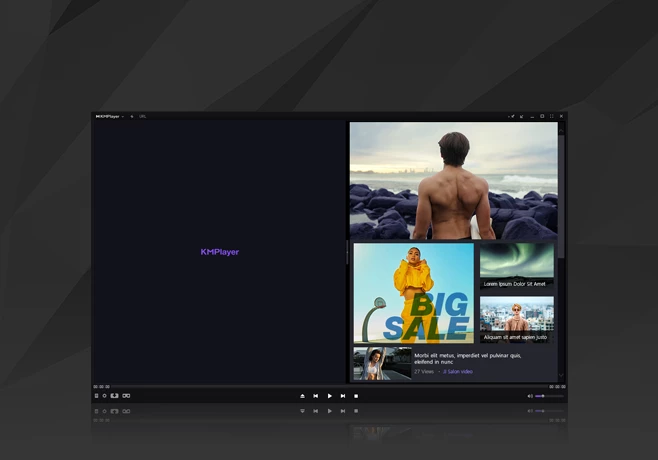
KMPlayer serves as the better fit for users who desire the high-end format compatibility of PotPlayer but prefer a slightly more visual, out-of-the-box experience that requires less manual configuration. It bridges the gap by offering built-in tools like GIF capture and URL streaming directly accessible on the main interface rather than buried in text-heavy menus. If you need an application that handles heavy video files smoothly without requiring you to study complex codec configurations, this software provides a highly capable and visually accessible middle ground.
Common Issues and Fixes
- Black screen during video playback. This typically happens when the default video renderer fails to initialize properly with your specific graphics card drivers. To fix this, right-click the playback window, navigate to the Video Advanced menu, and change the Video Renderer setting to Enhanced Video Renderer or MadVR, which often resolves hardware handshaking conflicts.
- Embedded subtitles cannot be moved or resized. Hardcoded or rigidly embedded subtitles inside MKV files occasionally ignore the application shortcut commands for repositioning on the screen. To regain control, extract the subtitle track using an external muxing tool and load it manually as an SRT or ASS file through the subtitle menu, allowing full customization.
- Stuttering playback on 4K or 60FPS files. High-resolution files can easily overwhelm your central processor if hardware acceleration remains disabled in the settings. Right-click the interface, open Preferences, navigate to the Internal Video Decoder section, and check the Hardware Acceleration box to route decoding through the graphics card instead of the CPU.
- Screen-recorded videos show wavy horizontal lines. Raw screen captures or older broadcast files often display interlacing artifacts during high-motion scenes, making the image look distorted. Open the Video Processing menu, locate the Deinterlacing filter, and activate it to blend the separate frames and smooth out the visual output for clearer viewing.
Version 2025.12.22.13 — December 2025
- Updated internal codecs to enhance compatibility with the latest high-resolution video formats, including improved support for 8K and 60FPS content.
- Optimized the video rendering engine to ensure smoother playback performance on various hardware configurations.
- Fixed minor bugs and stability issues reported in previous versions to prevent crashes during extended playback sessions.
- Improved the YouTube download function to handle recent changes in streaming protocols for better reliability.