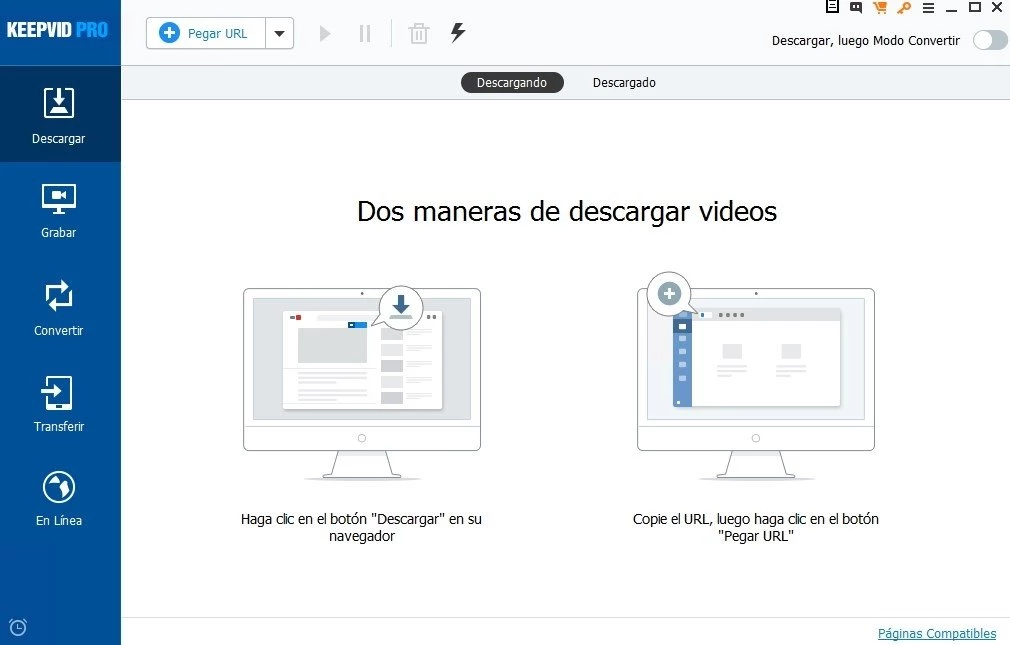
KeepVid Pro operates as a dedicated desktop multimedia application engineered for users who need to archive, transcode, and manage online video and audio content locally. By shifting the processing workload away from lightweight browser plugins and unstable web-based Java applets, this application secures a stable environment for handling large media files. The utility answers the concrete demands of video editors sourcing reference footage, educators compiling offline lecture materials, and media archivists preserving digital history before it disappears from hosting platforms. By running directly on Windows 10 and Windows 11, it bypasses the strict background tab throttling and memory limitations that often crash standard web browsers during gigabyte-sized file transfers.
Rather than just fetching a single data stream, the software acts as a centralized media ingestion hub. It addresses the common friction points of digital video collection: navigating aggressive webpage advertisements, waiting for slow server responses, and dealing with incompatible proprietary file formats. Users rely on the localized interface to directly parse media links, bypassing the visual clutter of the source site entirely. The application reads the underlying media manifest files, exposes the available resolution tiers, and allows the user to specify exactly which audio and video streams should be written to the local disk. This structured approach eliminates the guesswork of whether a web page will actually deliver the requested high-definition file.
Furthermore, the integration of format transcoding directly within the retrieval workflow saves significant time. Instead of downloading a raw WebM or FLV file and then importing it into a separate video conversion tool, the user configures the final output requirements upfront. The application retrieves the raw data, holds it in a temporary local cache, and immediately processes it through its internal rendering engine. The resulting file is written to the destination folder as a standard MP4 or MP3, fully optimized for immediate playback on external hardware, mobile devices, or non-linear editing timelines.
Key Features
- Batch Playlist and Channel Archiving: Users can paste a single channel or playlist URL directly into the application to retrieve dozens of media files simultaneously. The software parses the source index, populates a checklist of all available media tracks, and allows custom selection of individual items, automatically placing the approved selections into the active queue for unattended background processing.
- High-Resolution Video Retrieval: The application supports reading and fetching media manifests up to 4K resolution, depending strictly on the source material provided by the host. It preserves the original encoding quality, frame rate, and dynamic range, writing large high-definition files directly to the local disk without forcing secondary compression or introducing unnecessary visual artifacts.
- Native Format Conversion: Downloaded media can be transcoded directly within the application workspace into over 150 distinct media formats, including common standards like MP4, AVI, MKV, and MP3. The built-in converter utilizes local CPU resources to process files, adjusting bitrates, audio channels, and aspect ratios to match specific playback hardware profiles defined by the user.
- Turbo Mode Processing: A dedicated toggle switch located in the main interface activates a multi-threaded connection manager that splits the target file into smaller, parallel data chunks. This networking approach maximizes the utilization of the available local bandwidth, significantly reducing the total waiting time required to transfer large ultra-high-definition media files over standard residential connections.
- Audio Extraction and Transcoding: For users only needing the sound, the utility can separate audio tracks from video streams without retaining the heavy visual data. It exports these isolated tracks as high-bitrate MP3 or M4A files, which proves particularly useful for extracting lecture audio, long-form podcast discussions, or background music for offline mobile listening.
- Built-in Browser Integration: An integrated web navigation panel lets users search for and load video pages directly inside the main application window. This specialized view eliminates the need to constantly switch between a standard desktop browser and the application, centralizing the entire media location, playback, and retrieval workflow into one contiguous interface.
- Desktop Screen Recording: When direct file retrieval is blocked by specific site protocols or digital rights management restrictions, the software provides a localized screen capture tool. This module records the active desktop display area and routes the system audio in real-time, outputting the captured result as a standard local MP4 file for immediate offline playback.
How to Install KeepVid Pro on Windows
- Download the official Windows installer package from the authenticated vendor repository to your local storage drive.
- Double-click the downloaded executable file to initiate the setup wizard, granting the necessary User Account Control permissions when Windows prompts you to allow the application to make system changes.
- Review and accept the end-user license agreement presented on the first screen, then click the next button to advance to the directory configuration step.
- Select the destination folder on your local drive where the core application files will reside, or leave the default Program Files directory path intact for standard deployment.
- Choose whether to generate desktop shortcuts and add Start Menu folder entries for quick access to the program workspace upon completion.
- Click the install button to begin extracting the compiled application files, media processing libraries, and necessary network background services to the designated system directory.
- Wait for the local extraction process to complete, which typically requires a few moments depending on the write speeds of your primary storage drive.
- Click finish to close the installation wizard, and launch the application from the desktop shortcut to initialize the local workspace and complete any required first-run configuration prompts.
KeepVid Pro Free vs. Paid
The software offers a restricted trial tier designed to let users test the basic functionality of the interface and verify compatibility with their hardware. Under this free evaluation mode, the application imposes strict limits on both the number of simultaneous active tasks and the maximum duration of the processed media files. Output length for converted videos and desktop screen recordings is heavily truncated, preventing the processing of long-form content such as full university lectures, extended podcasts, or full-length public domain films. Furthermore, the trial restricts the utilization of the high-speed multi-threaded connection feature and heavily limits the ability to process bulk playlist items.
To remove these workflow restrictions, users must acquire a premium license, historically structured as either a one-year subscription for approximately $29 or a perpetual lifetime license for $39. Purchasing the pro tier unlocks the engine's ability to process media files at resolutions up to 4K and enables unrestricted batch queuing for entire channels and multi-part playlists. The premium license also lifts all artificial duration caps on the built-in screen recording module and fully unlocks the local format conversion tools for files of any size.
Activating the paid tier provides an ad-free workspace and grants full access to all supported output formats without artificial bitrate throttling or watermarks. Users who manage extensive video archives or require daily media transcoding generally rely on the unrestricted lifetime license, as the trial limits are strictly calibrated for brief technical evaluation rather than sustained, high-volume production work.
KeepVid Pro vs. 4K Video Downloader vs. Internet Download Manager
4K Video Downloader focuses almost exclusively on parsing major media platforms using a strictly minimalist interface. It excels at extracting metadata, subtitle tracks, and high-definition video files with almost zero user intervention, maintaining a strong reputation since KeepVid transitioned away from its web-based applet origins. However, 4K Video Downloader lacks a built-in screen recording module and does not feature a multi-tabbed internal web browser, requiring users to constantly copy and paste URLs from an external browser rather than locating content natively.
Internet Download Manager (IDM) operates as a system-wide network interceptor that accelerates file transfers for nearly any file type encountered across the entire operating system. While IDM captures media streams effectively via its browser integration panel, it requires users to manually load the exact media page and does not parse playlist URLs to batch-queue entire channels automatically. Furthermore, IDM lacks native video transcoding or audio extraction tools, functioning purely as a raw data transfer utility that saves the media stream exactly as the host server transmits it.
KeepVid Pro fits best for users who require an all-in-one localized media workspace rather than a strict network utility or a single-purpose extraction script. It bridges the gap by offering the playlist parsing capabilities of 4K Video Downloader alongside dedicated tools for screen recording, format conversion, and internal web navigation. When a user needs to search for content, batch-queue an entire channel, and immediately transcode the resulting files into MP3 format without opening three separate applications, KeepVid Pro provides the most efficient unified workflow.
Common Issues and Fixes
- Application fails to parse the provided URL. This usually happens when the target website updates its media delivery structure or backend API. To fix this, open the software settings and check for an internal parsing engine update, or temporarily use the built-in screen recording module to capture the media manually until a software update is released.
- Multi-threaded Turbo Mode causes network timeouts. Splitting a single file into too many concurrent TCP connections can overwhelm older local routers or trigger server-side bandwidth throttling. Navigate to the preferences panel and reduce the maximum number of simultaneous connections allowed per task to stabilize the transfer rate.
- Converted audio tracks sound distorted or metallic. This occurs when the transcoding engine is forced to upsample a low-quality source file to an unnecessarily high bitrate. Select an output preset that closely matches the original source quality, such as 128kbps for standard web audio streams, to prevent the introduction of artificial compression artifacts.
- Screen recording module captures video but no audio. The application might be attempting to record from the wrong virtual audio device or a disconnected microphone. Go into the recording configuration menu and explicitly select your active sound card or primary desktop speakers instead of leaving the audio input on the default system communication device.
Version Latest — 2025
Based on the most recent available update information for the current iterations of KeepVid (desktop and mobile variants) in 2025:
Version Latest — 2025
- Added support for downloading high-definition videos from TikTok and Instagram Reels without watermarks.
- Improved video conversion engine to support faster processing of 4K and 8K resolution files.
- Fixed intermittent download failures occurring with certain YouTube playlist URLs.
- Enhanced batch downloading stability when processing multiple files simultaneously.
- Updated user interface for better navigation and quicker access to the "Convert to MP3" tool.
- Resolved an issue where audio-video synchronization was slightly off in converted AVI files.