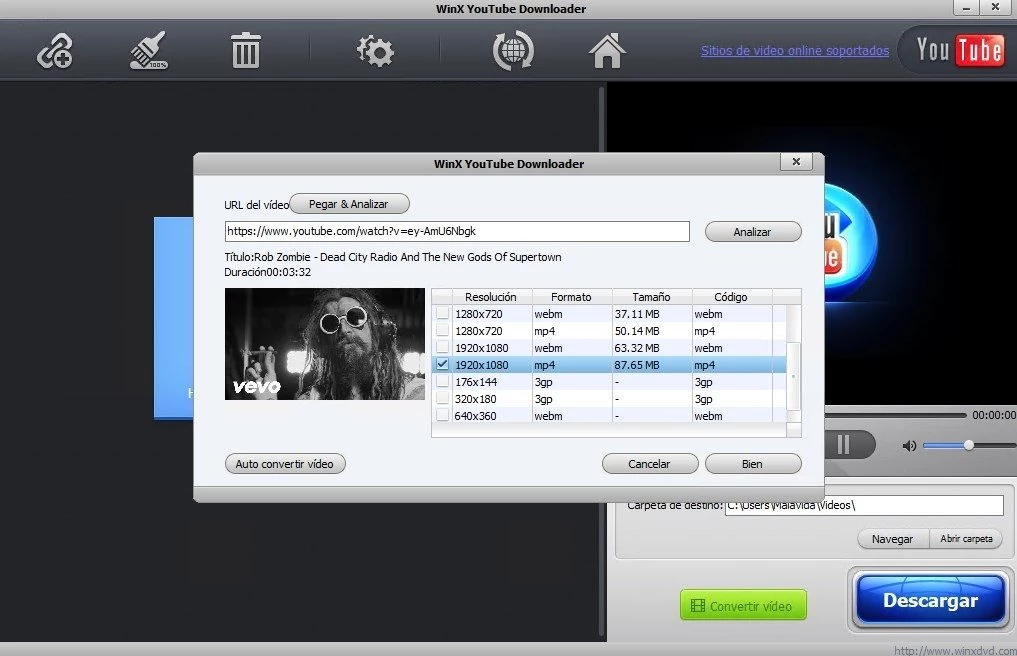
WinX YouTube Downloader is a dedicated desktop application engineered to archive streaming video and audio directly to local Windows storage. Instead of relying on browser extensions that frequently break or web-based converters that restrict file sizes, this tool processes links locally to secure offline access. It natively parses URLs from hundreds of streaming platforms, including YouTube, Vimeo, Facebook, and Dailymotion, allowing users to save tutorials, music tracks, independent films, and archival footage without worrying about buffering or sudden content takedowns.
By handling the parsing and conversion processes directly on the desktop hardware, the software avoids the aggressive compression often applied by online download portals. Users feed a valid URL into the interface, and the engine analyzes the source video to extract available streams, presenting a choice of resolutions, frame rates, and container formats. This offline-first approach makes the application highly practical for video editors who need raw source material for nonlinear editing, educators compiling offline lesson plans for classrooms with poor network connectivity, or data hoarders backing up entire channels.
Operating as a standalone Windows client provides distinct advantages over cloud-based alternatives. Web interfaces are frequently saturated with intrusive advertisements, deceptive interface buttons, and severe bandwidth limits that cap output at 1080p or reject long-form content entirely. Operating a local Windows application easily manages batch operations, enabling users to queue up multiple videos or fetch entire playlists without browser timeouts disrupting the connection. Because it operates independently of web browsers, it also sidesteps the heavy memory usage of modern browser tabs, making background tasks viable even on older desktop configurations.
Key Features
- Multi-Platform URL Parsing: The software includes an analysis engine capable of reading links from over 300 different media hosting sites. When a user pastes a link into the top URL bar and clicks the analyze button, the engine scans the page's source code to locate the direct media file, bypassing the web player wrapper. The interface then returns a detailed list of all available quality tiers hosted on the server.
- Variable Resolution and Format Selection: Once the analysis is complete, the application presents a detailed dropdown menu displaying the available streams. Users can select resolutions ranging from standard definition 480p up to high definition 1080p, and occasionally 4K depending on the host platform's specific delivery method. The interface clearly displays the estimated file size, the video codec, and the container format.
- Dedicated Audio Extraction: For users who only need the sound from a video, the software provides a dedicated audio extraction workflow. During the format selection phase, users can bypass the video tracks entirely and choose to save the file as a standalone MP3 or M4A audio track. This is highly useful for archiving podcasts, building local music libraries, or saving speech audio for transcription without wasting disk space on video data.
- Batch Processing and Playlist Support: Instead of forcing users to process videos one at a time, the application accepts entire playlist URLs or allows users to queue multiple individual links simultaneously. Clicking the primary download button initiates concurrent network connections, processing the entire batch queue in the background. The main window displays a progress bar for each active item, allowing users to pause, resume, or cancel specific files.
- Built-In Preview and Screenshot Extraction: The right side of the main interface features a minimalist media player that lets users scrub through the analyzed video before committing to a download. This player includes a dedicated camera icon button that captures the exact current frame and saves it as a high-quality PNG image directly to the local pictures folder. This tool is particularly helpful for content creators who need to pull custom thumbnails from existing videos.
- Low Resource Consumption: The downloading engine is specifically optimized to run quietly in the background without monopolizing processor cycles or memory bandwidth. Unlike running multiple high-resolution streams in a web browser, this desktop client maintains a minimal footprint on system resources. Users can comfortably leave large playlists downloading while continuing to work on demanding desktop tasks or playing PC games without noticeable performance degradation.
How to Install WinX YouTube Downloader on Windows
- Navigate to the official developer website or a trusted software directory to download the official Windows installer executable.
- Locate the downloaded installation file within your default Windows Downloads folder and double-click the executable to launch the setup wizard.
- When prompted by the Windows User Account Control dialog, click "Yes" to grant the installer the necessary permissions to write files to your local drive.
- Review the end-user license agreement presented on the initial setup screen, then click "Accept" to proceed to the configuration options.
- Select the destination folder where the application will be installed; the default path is standard, but you can click "Browse" to assign a different storage partition if your primary drive is full.
- Choose whether to create a desktop shortcut and a Start Menu folder, then click "Install" to begin extracting the core application files.
- Wait for the progress bar to complete the file extraction.
- Click "Finish" to close the setup wizard and launch the application, then immediately navigate to the settings menu to configure your preferred default output folder for downloaded media.
WinX YouTube Downloader Free vs. Paid
WinX YouTube Downloader operates entirely as freeware, meaning the core downloading application is completely free to install, use, and keep indefinitely. Unlike many competing tools in this category, it does not impose artificial trial timers, restrict the number of videos you can download per day, or stamp obtrusive watermarks onto your saved media files. Users can access the entire feature set, including batch downloading and 4K parsing where available, without creating an account, registering a license key, or providing payment details.
The developer sustains the continued maintenance of this free software by utilizing a soft-upsell business model. Within the application interface, users will occasionally see promotional banners or prompts suggesting an upgrade to the company's premium multimedia suite, such as WinX HD Video Converter Deluxe or Winxvideo AI. These premium, paid applications handle highly demanding tasks like hardware-accelerated video transcoding, DVD ripping, and AI-based image upscaling, which require a paid commercial license.
If your sole requirement is to extract videos from supported web platforms in their native MP4 or WebM formats, the free downloader remains fully functional and will not force an upgrade. The software relies on these optional promotional banners rather than locking critical downloading features behind a paywall, ensuring the basic archival workflow remains unhindered and permanently free.
WinX YouTube Downloader vs. 4K Video Downloader vs. JDownloader
4K Video Downloader is widely recognized for its high reliability and highly polished user interface. It maintains an aggressive update schedule to quickly counter any backend changes made by streaming platforms, ensuring fewer parsing errors. It handles complex tasks like downloading entire channel subscriptions, 3D videos, and embedded subtitles exceptionally well. However, it operates on a strict freemium model; free users are heavily limited in their daily download counts and the number of videos they can pull from a single playlist. It is the best choice for users who are willing to pay for a premium, heavily maintained application that consistently delivers the highest available video quality without friction.
JDownloader caters to technical power users, data hoarders, and archivists who require absolute control over their network traffic. As a highly advanced, open-source download manager, it requires Java to run and features a densely packed, utilitarian interface that can intimidate casual users. Its primary strength lies in its Linkgrabber module, which can automatically intercept almost any media file, document, or compressed archive from any website simply by copying the link to the clipboard. It is the correct choice for advanced Windows users who want to build massive, highly automated download queues, manage premium file-hosting accounts, and bypass captchas.
WinX YouTube Downloader occupies a highly practical middle ground between these two extremes. It offers a completely free, unlimited video downloading experience that avoids the strict daily paywalls of 4K Video Downloader, while remaining vastly easier to navigate than the complex menus of JDownloader. While its parsing engine may occasionally lag a few days behind streaming backend updates compared to its premium rivals, it remains an excellent, straightforward choice for users who simply want to archive standard MP4 videos and standard playlists without spending money or reading technical documentation.
Common Issues and Fixes
- Analysis Failed error during link parsing. This typically occurs when a streaming platform updates its backend video delivery method, or when attempting to parse an age-restricted or private video. To fix this, open the application settings and click "Check for Update" to ensure you are running the newest engine update, or verify that the video is publicly accessible without requiring an account login.
- Downloads stuck at zero percent or moving very slowly. Network throttling by the host site or a stalled routing connection can freeze the download progress. Pause and resume the specific download in the queue, verify your internet connection, and temporarily disable any active VPNs or proxies that might be causing regional routing conflicts.
- Downloaded video contains no audio track. Many high-resolution streams use DASH formatting, which separates the video and audio tracks, and the software may occasionally fail to mux them back together. Delete the silent output file, paste the link again, and explicitly select a pre-combined format like standard 1080p MP4 rather than a raw WebM or a higher-resolution track.
- Application crashes upon clicking the download button. Corrupted temporary cache files or overly aggressive security software can force the application to terminate unexpectedly. Add the application executable to your Windows Defender or third-party antivirus whitelist, and ensure that the software's designated output folder is located in a directory where your Windows user account has full read and write permissions.
Version 8.0 — October 2025
- Added enhanced stability for batch downloading, specifically improving the reliability of 4K and UHD video queues.
- Improved overall performance and resource management for smoother operation on Windows 10 and Windows 11 systems.
- Fixed minor bugs that occasionally caused interruptions during the video analysis and download process.