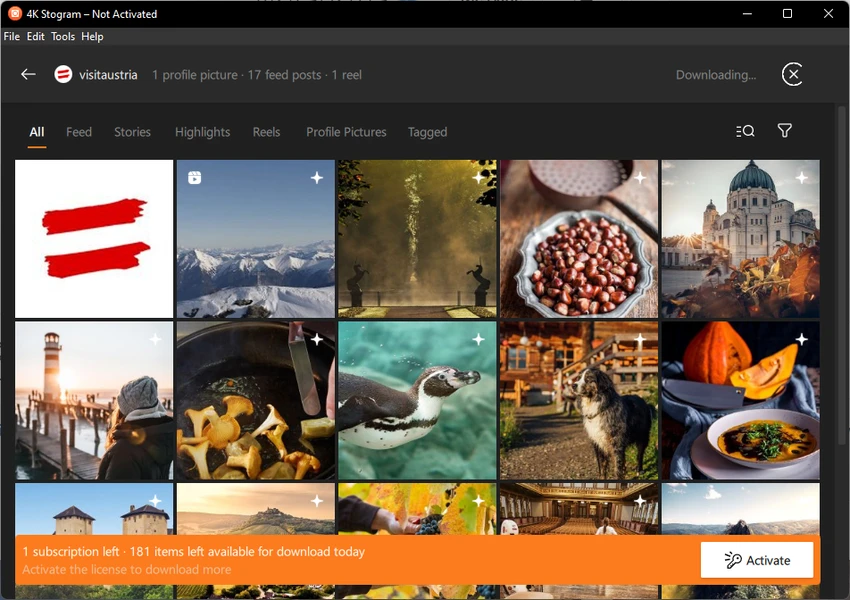
4K Stogram Professional functions as a dedicated desktop client designed to retrieve, view, and back up Instagram media directly to a local Windows hard drive. While the native Instagram interface restricts users from saving high-resolution photos or archiving video feeds, this utility bypasses those limitations by fetching the raw media files through automated subscriptions. Users input an Instagram username, a specific hashtag, or a geographic location into the main search bar, and the software builds a localized database of the targeted content. This local directory structure organizes all incoming files into clear, user-readable folders instead of requiring manual sorting or complex scripting.
For social media managers compiling competitor research, digital archivists backing up portfolios, or standard users securing their own account histories against unexpected bans, a local application provides significant stability. Web-based scrapers typically require pasting individual URLs for single posts, making them impractical for bulk archiving. By contrast, a local client runs quietly in the Windows background, periodically polling the targeted accounts for new grid posts, Reels, or temporary Stories, and appending the new files to the existing desktop directory without manual intervention.
Relying on a desktop application rather than browser extensions also shifts the workload away from the browser, preventing memory leaks during massive batch downloads. The software stores a local SQLite database of subscriptions, meaning users can close the application, restart their computer, and resume the exact queue without losing track of what has already been downloaded. This local-first approach guarantees that once a file lands on the local disk, it remains accessible offline, protecting users from sudden account deletions or missing posts.
Key Features
- Automated Account Subscriptions: Entering an Instagram username and clicking the subscribe button prompts the software to download the entire available feed history. Once the initial archive finishes, the application continues to monitor the account during subsequent launches, pulling down any new media published since the last check.
- Stories and Highlights Archiving: Beyond standard grid posts, the software saves temporary 24-hour video stories and curated profile highlights. It even downloads the highlight cover images and stores them in separate, labeled subfolders on the local storage drive.
- Private Account Access: By logging into a valid Instagram profile within the application's preferences, users can download media from private accounts they already follow. The client authenticates the session to access and save the restricted photos and videos locally, functioning exactly as if the user were viewing them on a mobile device.
- Original Caption and Metadata Retention: Media files are not scraped as bare, unnamed assets. The software grabs the original text captions, including hashtags and emojis, saving them alongside the images. This provides necessary context for archiving, allowing users to reference exactly what was written when the post went live.
- Date Range Filtering: Instead of downloading thousands of posts from an old account, users can open the in-app calendar interface to set specific start and end dates. This restricts the download queue to only the media published during that targeted timeframe, saving disk space and bandwidth.
- Anonymous Story Viewing: Because the software fetches the raw media files directly to the Windows machine, users can watch video stories locally without triggering Instagram's read receipts. The account owner will not see the user's name in their viewers list, as the viewing happens entirely outside the official application.
- Export and Import Subscriptions: Users migrating to a new machine can back up their entire list of tracked accounts using the internal export tool. This generates a small database file that can be imported into a fresh installation, ensuring that no tracked hashtags or profile links are lost during a hardware transfer.
How to Install 4K Stogram Professional on Windows
- Navigate to the official 4K Download website and retrieve the Windows installer executable for the desktop application.
- Locate the downloaded file in your local directories and double-click the package to launch the setup wizard.
- Review and accept the End User License Agreement to proceed with the installation process.
- Select the destination directory on your primary drive, or choose an external volume if you plan to store massive media archives. Because high-resolution videos consume space rapidly, configuring a secondary drive as the default output path is highly recommended.
- Click the install button and allow Windows to write the necessary files and create the required Start menu shortcuts.
- Launch the application from your desktop and allow it to initialize its local database folders on the first run.
- Open the Tools menu, navigate to Preferences, and log in with a dedicated secondary Instagram account to authenticate the session for private downloads.
4K Stogram Professional Free vs. Paid
The software operates on a freemium model, offering a restricted Starter tier alongside paid perpetual licenses. The free version allows users to test the core downloading engine but strictly limits activity to a single subscription and caps the output at 200 media downloads per day. This tier also restricts access to temporary content, meaning free users cannot save active Stories or Profile Highlights.
Users who require more capacity can purchase the Personal license, which costs approximately $15 as a one-time fee. This entry-level paid tier removes the daily download restrictions, allowing for unlimited archiving of public accounts, and increases the subscription limit to ten active targets. It also removes all in-app advertisements from the interface, creating a cleaner workspace.
For heavy archival work, the Pro license is available for a one-time fee of around $45. This tier unlocks the software's full capabilities, granting unlimited subscriptions and enabling the retrieval of Stories, Reels, and profile Highlights. Furthermore, the Pro tier provides the necessary functionality to export original captions and enables the login tools required to download media from private accounts.
All paid licenses are perpetual, meaning users pay once for the current major build and can activate the application on up to three separate Windows computers. The developer does not enforce a recurring monthly billing cycle, though major future upgrades outside the current build timeline might require a separate upgrade fee depending on vendor policies.
4K Stogram Professional vs. Qoob Stories vs. SnapInsta
Qoob Stories operates as a direct desktop competitor, offering a nearly identical workflow for subscribing to profiles and downloading bulk media to a local disk. It shares similar user interface mechanics, making it easy to browse saved images and view temporary posts anonymously. However, 4K Stogram Professional benefits from being part of a larger, longer-established multimedia suite, often receiving quicker updates to its scraping engine when Instagram alters its backend data structure. Users who want a proven, long-term archival tool generally lean toward the 4K ecosystem.
SnapInsta takes a completely different approach, functioning strictly as a web-based downloader accessed through a standard internet browser. It requires zero installation and bypasses the need to log into an account for public posts, making it ideal for grabbing a single photo or video on the fly. The drawback is its complete lack of automation; users must manually copy and paste every individual URL, making it entirely impractical for archiving a feed with thousands of posts, a task the desktop client handles natively.
When deciding between these options, 4K Stogram Professional remains the superior choice for users who need automated, ongoing backups of entire profiles or hashtag collections. While web scrapers like SnapInsta work for isolated, single-file retrieval, the desktop client's ability to sync new posts automatically, organize files into local folders, and pull temporary content before it expires makes it necessary for serious data hoarding or professional media archiving.
Common Issues and Fixes
- Connected Instagram accounts get suspended or flagged. Because the application aggressively requests media files, Instagram often flags the activity as automated bot behavior and suspends the connected account. To prevent losing a personal profile, users should create a dedicated throwaway account solely for logging into the desktop application, and restrict the number of active subscriptions to avoid triggering rate limits.
- API login errors or endless verification loops. The application may suddenly halt downloads and display an authentication error if Instagram demands a security check. Fix this by opening a standard web browser, logging into the throwaway account, passing the SMS or email verification prompt, and then re-authenticating the session within the desktop application's preference menu.
- Downloads stuck at the 200-item limit. Users attempting to archive large profiles may find the progress bar freezes after saving 200 files. This happens because the free Starter tier enforces a strict daily quota; the queue will automatically resume 24 hours later, or the user must apply a Personal or Pro license key to lift the restriction entirely.
- Missing new posts from private accounts. If the application successfully downloads public profiles but ignores private accounts you follow, the internal authentication token has likely expired. Navigate to the top menu, select Tools, choose Preferences, log out of the current session, and log back in to refresh the connection and restore access to private media feeds.
Version Latest — 2025
- Added a new "Interaction Intensity" control feature, allowing users to manually adjust the frequency of subscription updates to help prevent account restrictions.
- Improved the authorization device management system, providing a clearer list of devices used for logging in to enhance account security awareness.
- Fixed a critical "Internal API" error that previously caused login failures for certain users during the authorization process.
- Improved overall application stability and implemented minor user interface adjustments for a smoother navigation experience.