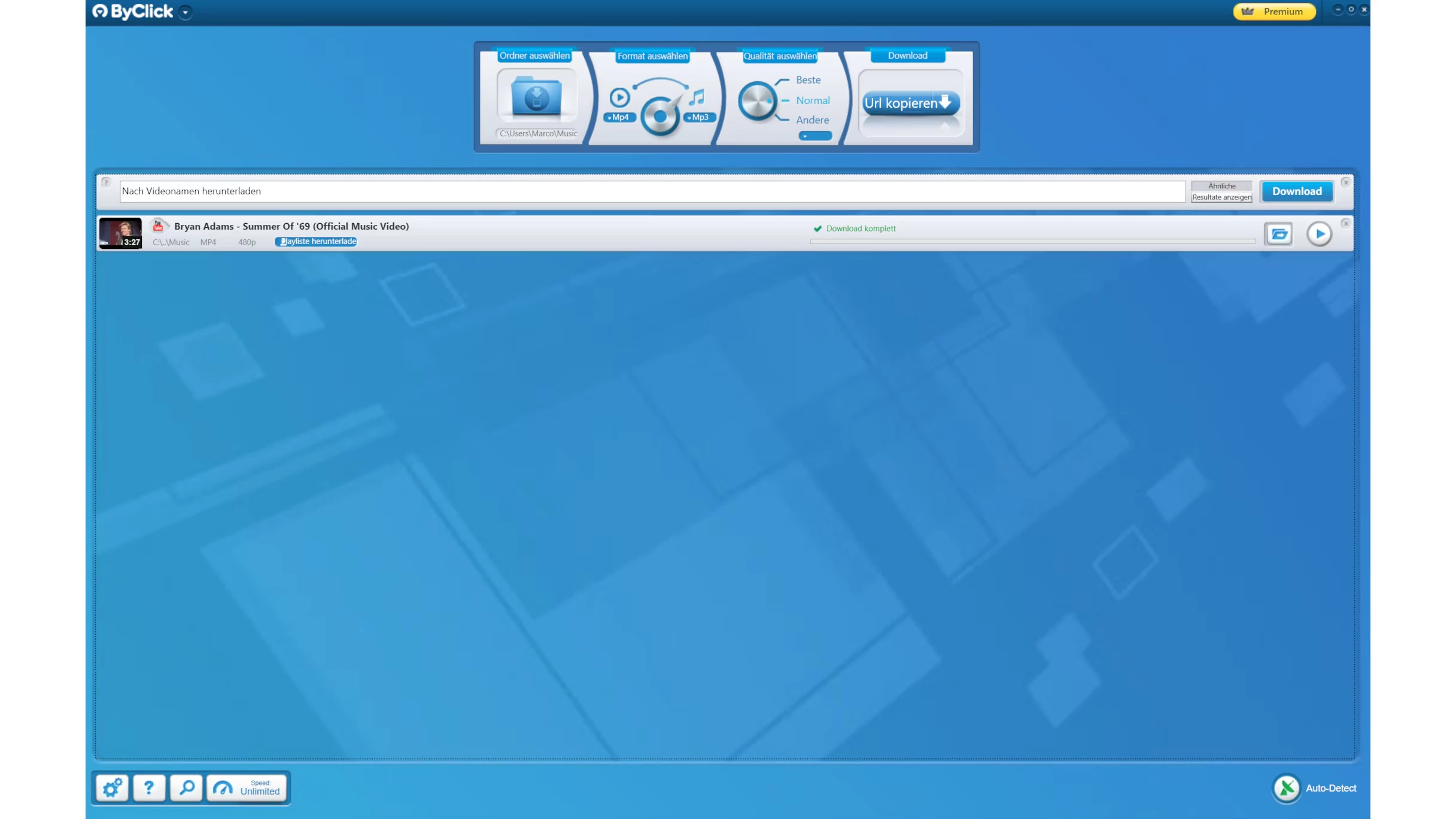
ByClick Downloader operates as a dedicated desktop utility designed for users who need a reliable, hardware-based method to archive video and audio content from various web platforms directly to their local storage drives. While web-based conversion sites and browser extensions frequently break due to script changes on host websites, this standalone Windows application provides a highly stable architecture for capturing streaming media. It is engineered specifically for digital archivists, video editors, educators, and content creators who require offline copies of online media for reference, remixing, or secure long-term storage. Instead of forcing the user to manually configure complex download parameters every single time, the application actively monitors the Windows system clipboard for recognized media links and automates the initial extraction steps.
When a user copies a URL from a supported site like YouTube, Vimeo, Facebook, or Dailymotion, the software immediately reads the clipboard data and prompts the user to save the target file as either a video container or a dedicated audio track. This workflow eliminates the repetitive need to open a separate software interface or paste links manually into a blank text field. Users can specify their preferred visual resolution, ranging from standard definition all the way up to 4K or 8K, and select the exact file container required for their project, such as MP4, MKV, AVI, or WEBM. For larger archiving tasks, the application natively handles entire playlists and creator channels, allowing the user to queue dozens or even hundreds of files simultaneously and pull them down in the background while they continue working on other tasks.
Relying on a local desktop application provides significant technical advantages over cloud-based alternatives that frequently restrict file sizes, throttle bandwidth, or bombard users with pop-up advertisements. A local installation utilizes the host machine's processing power and internet connection directly, ensuring that large 4K video files or massive, multi-hour audio playlists are processed without intermediary server caps or sudden timeouts. Furthermore, the local software environment allows for secure authentication protocols. Users can log into their social media accounts within the application's built-in browser window to archive private videos, subscriber-only streams, or age-gated content that generic, unauthenticated web scrapers simply cannot reach.
Key Features
- Clipboard Auto-Detection: The software runs quietly in the Windows system tray and actively monitors copied text for recognizable media URLs. When a valid link is detected, a small dialogue box appears in the corner of the screen, offering immediate one-click options to save the content as a video or audio track.
- Playlist and Channel Archiving: Instead of processing links one by one, users can paste a single URL corresponding to a public playlist or an entire creator channel. The application parses the list, displays all available tracks in a checklist grid, and allows the user to download the entire collection in one batch operation.
- High-Resolution Video Support: The extraction engine captures the highest available quality from the source server, fully supporting 720p, 1080p, 4K, and 8K resolutions at up to 60 frames per second. Users can define default quality parameters in the main settings menu so that every captured file automatically matches their target display capabilities.
- Direct Audio Extraction: For users who only require sound, the tool strips the audio stream directly from the video container without requiring a secondary rendering pass. It supports exporting to MP3, WAV, AAC, and M4A formats, allowing users to configure the target bitrate for optimal audio fidelity or smaller storage footprints.
- Private Content Authentication: The application includes a secure login module for platforms that require user authentication to view restricted media. By entering account credentials directly into the software interface, users can capture private videos or age-gated content that standard scrapers block.
- Automatic Metadata Tagging: When downloading music tracks, the software automatically retrieves ID3 tags, including the artist name, track title, and album artwork, applying them directly to the output file. This ensures that the downloaded audio files display correctly when imported into local media players or DJ software.
- In-App Content Search: ByClick Downloader includes a built-in search bar that allows users to query content directly within the application window. Instead of opening a web browser to find media, users type a specific keyword, and the software returns a list of matching media ready for immediate extraction.
How to Install ByClick Downloader on Windows
- Download the official Windows installer package from the primary developer website to ensure you receive the verified, unaltered setup file.
- Locate the downloaded executable file in your default downloads directory and double-click it to initiate the setup wizard.
- When the Windows User Account Control prompt appears on your screen, click yes to grant the application permission to install on your local machine.
- Review and accept the End User License Agreement, then select the specific destination folder on your primary local drive or a secondary storage disk.
- Choose your preferred startup options, such as creating a desktop shortcut and deciding whether the application should launch automatically when Windows boots.
- Click the install button to begin extracting the core application files and the background services required for clipboard monitoring.
- Once the progress bar completes, close the setup wizard and launch the application to configure your default download directory and preferred output formats before copying your first link.
ByClick Downloader Free vs. Paid
ByClick Downloader operates on a freemium model, offering a basic tier that allows users to test the core downloading engine without spending money. The free tier restricts users to standard definition or 720p resolutions and disables several of the more advanced batch-processing tools. Users on the free tier can successfully capture individual video and audio files, but they cannot download entire playlists, save high-resolution 4K media, or utilize the automatic ID3 metadata tagging for music files.
To unlock the software's full potential, the developer offers a Premium upgrade, typically sold as a lifetime perpetual license for around $19.99, though promotional pricing sometimes lowers this cost. Purchasing the Premium tier removes all resolution restrictions, allowing for full 4K and 8K video archiving. It also enables the playlist and channel scraping features, which are strictly blocked in the unpaid tier.
The Premium license also unlocks the private video download capability, allowing users to authenticate their accounts to archive restricted media. Furthermore, paid users receive priority technical support and an ad-free interface. The transition from free to paid is handled entirely within the application via a license code interface, meaning users do not need to download a separate premium installer to activate the upgraded features.
ByClick Downloader vs. 4K Video Downloader vs. SnapDownloader
4K Video Downloader is a highly recognized tool in the media archiving space, known for its clean, straightforward interface and proxy integration that helps bypass geographic restrictions. It handles massive 3D and 360-degree video files exceptionally well and offers a smart mode that applies pre-selected settings to every download automatically. Users should choose 4K Video Downloader if they frequently work with virtual reality content or require advanced proxy routing to access region-locked media servers.
SnapDownloader provides an incredibly broad compatibility list, supporting nearly a thousand different websites, and includes a built-in video trimmer that allows users to cut specific portions of a video before the download even begins. This saves local storage space and reduces the need for secondary video editing software. SnapDownloader is the preferred option for users who need to scrape media from obscure websites or those who want to download very specific timestamped segments of a long broadcast.
ByClick Downloader claims the advantage when it comes to speed and interface automation. Its clipboard auto-detection feature is highly aggressive and accurate, meaning users rarely have to interact with the main software window; they simply copy a link in their browser and click the popup to save the file. For users who prioritize a frictionless, background-archiving workflow and frequently pull media from mainstream platforms like YouTube and Facebook, this application requires the least manual intervention.
Common Issues and Fixes
- Downloaded MP4 files show an unsupported format error in video editors. This occurs when the downloaded video container has a broken header or uses a codec that the specific editing software does not recognize. The quickest fix is to run the file through a local converter to rebuild the index, or to download the video again using a different container format like MKV or AVI.
- The auto-detect popup stops appearing when links are copied. The clipboard monitoring service may have stalled or been disabled by accident. Right-click the application icon in the Windows system tray and ensure the "Auto Detect" toggle is checked, or restart the application entirely to refresh the background monitoring service.
- Downloads abruptly fail or stall at 99 percent. Network interruptions or server-side throttling by the host website often cause temporary connection drops. Pause the transfer in the main queue interface, wait a few moments, and resume the task to force the application to reconnect to the media server.
- Age-restricted videos refuse to download. The software cannot access content that requires account verification without proper login credentials. Open the settings menu, navigate to the accounts section, and securely log into the target platform using the built-in browser to grant the application the necessary access tokens.
- Security software flags the installer during setup. Because download managers often use aggressive background monitoring or bundled advertising in their free tiers, Windows Defender may flag the executable as a potentially unwanted program. Ensure you have downloaded the installer from the official developer site, and temporarily add an exclusion rule in your security software to allow the installation to proceed.
Version 2.4.27 — October 2025
- Updated the YouTube extraction algorithm to resolve compatibility issues with recent site changes.
- Enhanced download stability and success rates for content from Instagram and TikTok.
- Optimized the batch processing engine for significantly faster downloads of full playlists and channels.
- Refined the user interface with adjustments to improve accessibility and navigation.
- Added official support and compatibility for the Windows 11 24H2 update.