AmoyShare AnyVid acts as a dedicated desktop client for capturing and converting streaming media from over a thousand different hosting sites. Instead of relying on browser extensions that frequently break during site updates or struggling with ad-heavy web converters, Windows users can paste URLs directly into this standalone application to retrieve local media files. The software targets content creators, researchers, and offline viewers who need to archive high-definition clips, entire channel uploads, or music tracks without navigating through pop-ups. By moving the extraction process away from the web browser, the application isolates the user from malicious redirects and tracking scripts commonly found on web-based conversion portals.
The value of a native desktop application in this category comes from its hardware utilization and batch processing capabilities. Web-based alternatives often struggle with large playlists or throttle bandwidth during peak hours, forcing users to wait in server queues before a file is even ready to save. In contrast, this software utilizes local system resources and multi-threaded downloading to pull multiple files simultaneously directly to the user's local storage. This approach ensures that downloaded media is immediately available for editing in external software or archiving on an external drive without secondary transfers. Furthermore, operating locally means the application can parse large 4K files without encountering the strict file size limits imposed by cloud-based processing tools.
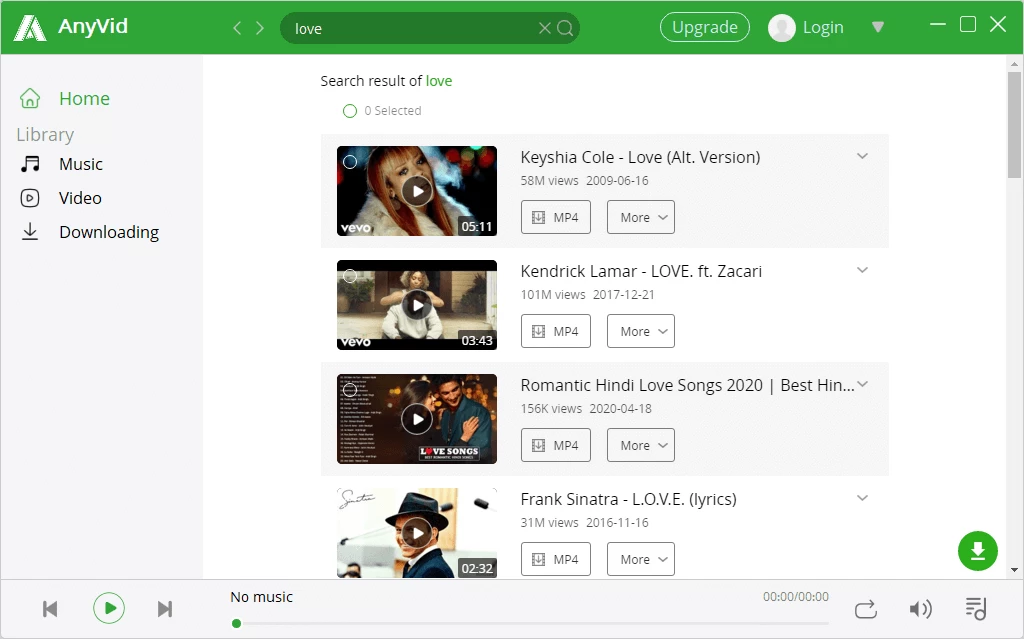
Beyond simple URL fetching, the application includes an integrated search browser, allowing users to find specific topics or user accounts without ever opening a standard web browser. This workflow minimizes distractions and simplifies the process of extracting audio from video files, as users can select MP3 or M4A output formats directly from the search results screen. Whether backing up corporate training materials from Vimeo or saving reference footage from social media platforms, the interface reduces the friction between finding content online and having a local file ready for playback. For individuals managing extensive media libraries, the software provides a centralized hub to handle discovery, format conversion, and final file storage.
Key Features
- Multi-Platform Media Extraction: The application supports video retrieval from over 1,000 distinct domains, ranging from mainstream social networks to specialized educational portals. Users can capture content from Facebook, Instagram, TikTok, Twitter, and Vimeo by pasting the direct link into the main search bar. The internal parser immediately identifies the source and provides a list of available quality tiers.
- Integrated Search Browser: Rather than forcing users to toggle between an external browser and the downloader, the software includes a built-in search engine. Typing keywords into the primary interface generates a list of relevant videos directly within the application window. Clicking the download icon next to a search result bypasses the need to handle raw URLs entirely.
- Batch Playlist Processing: Users who need to archive entire channels or multi-part lecture series can paste a single playlist URL to queue hundreds of videos simultaneously. The interface displays a bulk selection menu where users can uncheck specific items before initiating the transfer. The multi-threaded engine then processes these files concurrently to reduce total waiting time.
- Resolution and Format Selection: Before initiating a transfer, the application displays a dropdown menu listing available resolutions from 240p up to 4K, depending on the source material. Users can optimize for storage space on mobile devices or prioritize visual fidelity for desktop editing. The output can be saved as standard MP4 or WebM containers.
- Direct Audio Extraction: Instead of downloading a large video file and using secondary software to strip the audio track, the application handles extraction internally. Users can choose MP3 or M4A formats from the quality selection menu. The software supports audio bitrates up to 320kbps, ensuring high fidelity for music or podcast preservation.
- Smart Subtitle Downloading: When parsing supported media links that include closed captions, the software detects the associated text tracks. Users can configure the application to save these subtitles as separate SRT files alongside the primary video file. This function assists editors who need to re-encode hardcoded text or viewers who require offline accessibility.
- Built-In Library Management: Completed transfers automatically populate the Library tab located on the left side of the navigation menu. From this screen, users can open the destination folder in Windows Explorer, play the media using the integrated viewer, or clear old entries to maintain an organized workspace. The library prevents users from losing track of where their files were saved.
How to Install AmoyShare AnyVid on Windows
- Navigate to the official vendor website and download the Windows installer executable for the application to your local storage drive.
- Locate the downloaded executable file in your default system Downloads folder and double-click it to launch the setup wizard.
- Review the End User License Agreement displayed on the initial setup screen and click the acceptance button to proceed with the installation workflow.
- Select the destination folder on your primary local drive, or choose an alternative storage partition if you prefer to keep third-party applications off your root operating system directory.
- Check the optional configuration boxes to create a desktop shortcut or pin the application to your taskbar for faster access, then click the final Install button.
- Wait for the setup wizard to extract the necessary application files, user interface assets, and multi-threaded downloading engine components to your selected directory.
- Launch the application from the setup completion screen and click the user profile icon located in the top right corner of the navigation bar to log in with your active account credentials.
- Open the application settings menu via the gear icon to define your preferred default download path, as the software will otherwise save all converted media directly to your standard user directory.
AmoyShare AnyVid Free vs. Paid
AmoyShare AnyVid operates on a freemium model that allows users to test the core interface before committing to a purchase. The 14-day free trial places strict limitations on daily usage, restricting users to processing a maximum of 10 video links per day. Additionally, the trial limits audio extraction, allowing only five video-to-audio conversions within a 24-hour period. These restrictions reset daily, giving users an ongoing but highly constrained environment to evaluate the parsing engine across different websites. The trial also locks certain high-definition resolution options, pushing users toward the paid tiers if they require archival-quality media.
To remove these daily caps, users must upgrade to a paid Personal License. The vendor offers a monthly subscription at approximately $10, which provides unrestricted access to batch processing, high-resolution 4K downloads, and unlimited audio conversions. For long-term users, an annual billing option is available for roughly $40, alongside a perpetual lifetime license that removes recurring billing entirely. All paid tiers include customer support access and regular updates to the underlying parsing engine, which is critical as streaming sites frequently change their backend code to block external media capture.
Upgrading from the free tier to the paid tier requires creating an account on the developer's website. After purchasing a plan, users do not enter a traditional text string into the software. Instead, they must click the profile icon within the desktop client and log in using the email address associated with their purchase. This account-based authorization immediately lifts the daily limits and unlocks the premium resolution options. If a user installs the application on a new Windows machine, they simply log in again to restore their premium access, preventing the need to manage complex authorization codes.
AmoyShare AnyVid vs. 4K Video Downloader vs. Internet Download Manager
4K Video Downloader focuses heavily on parsing YouTube playlists, channels, and subtitle extraction with a highly stripped-down interface. It relies entirely on the user bringing URLs from an external web browser, lacking any internal search capabilities. Its free tier is generally more generous for casual users who only need a few videos a week, but it frequently prompts users to upgrade when dealing with large channels. Users who strictly want to back up YouTube content and prefer a minimalist interface without built-in web browsing often gravitate toward 4K Video Downloader. However, it requires constant toggling between the desktop client and an external browser to copy and paste links.
Internet Download Manager (IDM) takes a completely different approach by integrating directly into Windows web browsers via extensions, placing a download button over almost any media player on the web. It does not parse playlists or offer built-in format conversion, focusing entirely on accelerating raw file transfers by splitting connections. IDM requires users to navigate to the actual video page in their browser to trigger the download prompt. Power users who want to capture embedded media from obscure streaming sites often rely on IDM's aggressive browser integration. The downside is that IDM cannot extract audio on the fly or download a hundred videos from a single playlist link.
AmoyShare AnyVid sits between these two extremes by offering a self-contained desktop environment. It provides the playlist parsing capabilities of 4K Video Downloader while adding an integrated web browser and search bar, eliminating the need to toggle between windows. Furthermore, its immediate audio extraction tools handle the conversion tasks that IDM entirely ignores. Users who want an all-in-one application where they can search for keywords, preview content, and batch convert files to MP3 without dealing with browser extensions will find AmoyShare AnyVid to be the more practical daily tool.
Common Issues and Fixes
- URL parsing failure. The application may display an error stating it cannot find media when a supported site changes its backend code. To resolve this, restart the software to trigger an automatic background update of the parser, or manually check for updates in the settings menu.
- Account activation confusion. Users who purchase a license often expect an email containing an authorization code and remain stuck in trial mode. The software relies on account-based authentication, so you must click the profile icon in the top right corner and log in with your purchase email to unlock pro features.
- Age-restricted content blocked. Attempting to paste a link for a mature or private video will result in a failed transfer because the software's external parser lacks authorization. Use the application's built-in browser to navigate to the site, log into your personal account, and trigger the download from within the internal window.
- Audio conversion stalls at 99 percent. Background conversions to MP3 or M4A can occasionally freeze if the temporary folder lacks sufficient write permissions. Navigate to the software's settings, change the default temp directory to a folder on your primary desktop, and restart the extraction process.
- Playlist download stops halfway. Batch processing a large playlist can fail if your network connection drops briefly, causing the multi-threaded engine to timeout. Cancel the stalled items in the Library tab, copy the URL of the specific failed video, and process it individually rather than restarting the entire queue.
Version 10.9.5 — November 2025
- Added smart clipboard monitoring to automatically detect and suggest video URLs for download.
- Integrated new Live streaming portals directly into the Browse tab for easier access.
- Expanded the Home screen interface to display a broader range of supported streaming sites.
- Fixed a parsing error that caused some Instagram links to return empty results.
- Improved overall application stability and performance with minor bug fixes.