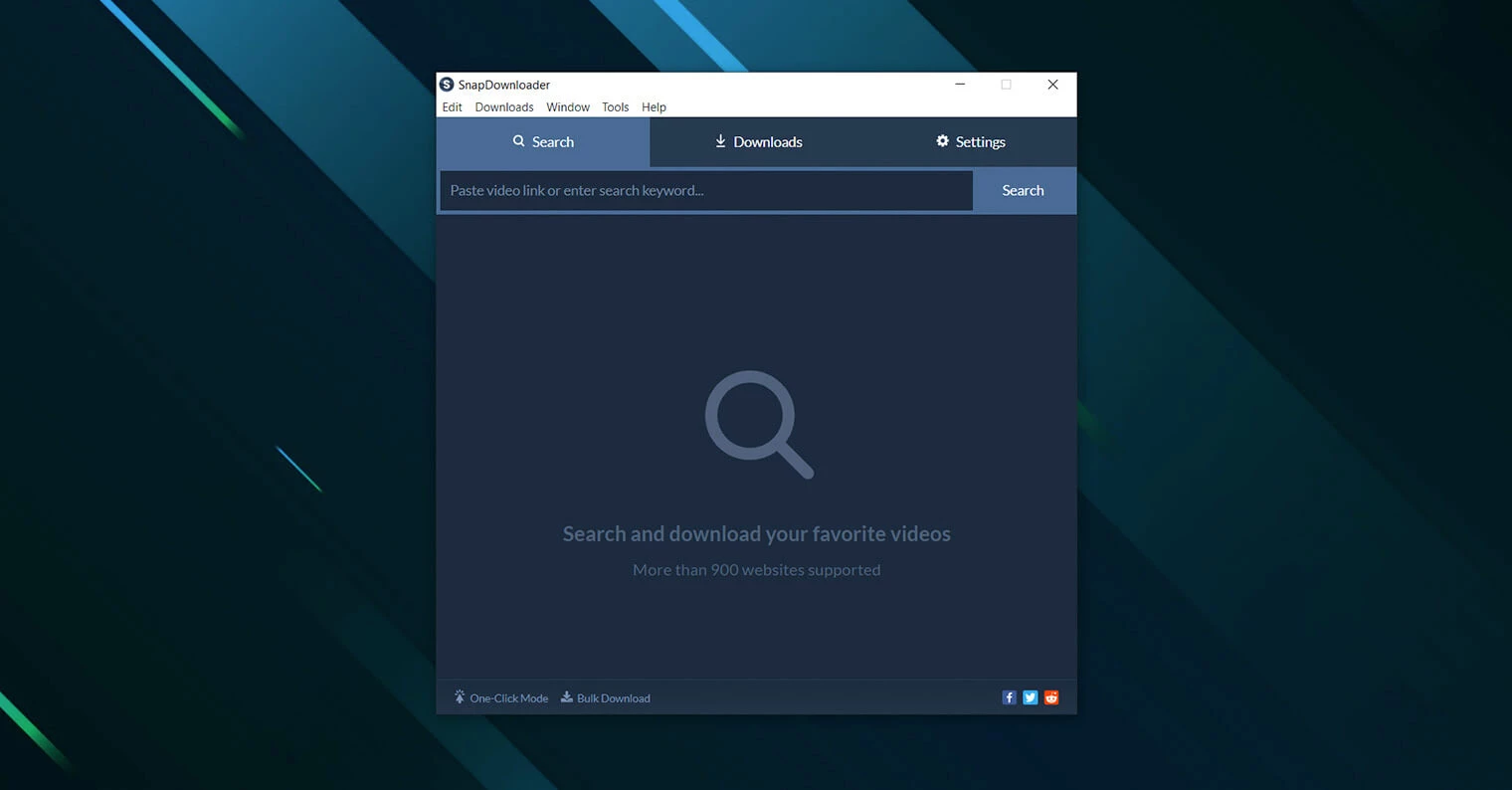
SnapDownloader is a highly specialized desktop utility designed to extract, encode, and save video and audio from over 1,100 hosting websites directly to a local hard drive. Instead of relying on unreliable web-based converters that are often filled with deceptive advertisements or artificial speed limits, users install this local application to handle heavy-duty archiving tasks. It supports fetching media in its original resolution, scaling from standard 720p definition all the way up to ultra-high-definition 8K, provided the source server hosts those files. Once the initial data is pulled, the software converts those raw files into playable offline formats, including MP4, MP3, FLAC, M4A, and WAV, allowing for maximum compatibility with local media players and hardware.
This utility is built for video editors archiving stock footage, independent content creators backing up their own channels, researchers preserving disappearing media, and digital hoarders building expansive local libraries. The software deliberately bypasses the limitations of basic browser extensions by handling massive bulk queues. Users paste a plain text list of URLs into the main dashboard, configure the target resolution and container format, and let the background process fetch the data without forcing the user to keep a browser tab open. By shifting the workload away from the browser, the desktop environment remains stable even when processing dozens of gigabytes of media.
Relying on a dedicated desktop application matters immensely when dealing with complex media structures. Browser-based tools frequently fail when attempting to grab large playlists, extract high-bitrate audio, or parse age-restricted media that requires account authentication. A standalone local environment provides the raw processing capacity to run up to 100 links simultaneously, utilize multi-threading for faster data transfers, and utilize an internal proxy manager to navigate regional network blocks. This strict separation prevents the host browser from crashing under heavy memory loads and keeps the downloaded media entirely under the user's local control, completely independent of cloud storage fees or future internet outages.
Key Features
- Ultra-High Definition and Audio Extraction: SnapDownloader grabs video files at 1080p, QHD, 4K, and 8K resolutions without compressing the source material during the transfer. Users can also strip the video track entirely, encoding the remaining audio into formats including MP3, M4A, AAC, WAV, AIFF, FLAC, and WMA. This specific audio handling ensures high-fidelity playback for music archives, podcasts, or sound effect libraries without relying on secondary conversion tools.
- Bulk Processing and Playlist Parsing: Instead of pasting links one by one, users can insert up to 100 URLs at once directly into the application's main interface. The software reads the text block, identifies the valid media streams, and automatically lines them up in the download queue. It natively parses entire channel pages and user-curated playlists, effectively turning hours of manual clicking into a single uninterrupted batch operation.
- Built-In Video Trimmer: Saving disk space is critical when dealing with uncompressed 4K media files. The application includes a visual trimmer where users drag sliders to set specific start and end timecodes before the download actually begins. The software then requests only that exact segment from the hosting server, skipping the need to download a massive ten-hour file only to cut it later in an external timeline editor.
- Private Content Authentication: Many social platforms block anonymous network access to user feeds, restricting content to verified accounts. SnapDownloader includes a built-in web browser pane that allows users to sign into their personal accounts securely. Once authenticated via this internal browser, the software can pull media from private posts, locked groups, and subscriber-only feeds that standard URL scrapers are entirely unable to read.
- Integrated Proxy Management: Regional network blocks frequently prevent users from archiving international news broadcasts or foreign documentaries. The Settings menu features a dedicated Proxy tab where users manually enter their proxy IP address, port number, and login credentials. The software intentionally routes its extraction requests through that specific IP, tricking the hosting server and successfully bypassing the geographic restrictions applied to the original video link.
- Subtitle and Metadata Capture: Archiving media properly requires keeping the original context intact alongside the video file. The software automatically detects auto-generated or manually uploaded closed captions from supported web players, allowing users to export these captions as standalone SRT files in over 50 languages. Additionally, a preferences toggle allows the software to embed the original title, description, and thumbnail image directly into the output file's metadata tags.
- Chapter Detection and Splitting: Long-form lectures, music compilations, and podcast episodes often include timestamped chapters within the host player. The application detects these structural markers during the initial parsing phase. Users can then choose to split the host video based on these specific timestamps, saving each named chapter as an individual local file rather than dealing with one massive, undivided media block.
How to Install SnapDownloader on Windows
- Navigate to the official vendor website and download the primary Windows installer package directly to your local storage drive.
- Double-click the downloaded executable file to launch the setup wizard, and authorize the standard Windows User Account Control prompt when it appears on screen.
- Review the End User License Agreement displayed on the initial installation screen and click the Accept button to proceed to the directory configuration.
- Select the destination folder for the application files. The setup defaults to the standard C:Program FilesSnapDownloader directory, but you can assign a custom hard drive path if your primary partition lacks sufficient free space.
- Choose whether to create a desktop shortcut and a Start menu folder to ensure easier access to the application once the installation finishes.
- Click the Install button to begin copying the core application executable, required media libraries, and background encoding utilities to your local machine.
- Click Finish to close the installer and launch the software for the first time. Upon launch, you must either enter a purchased license code or click the button to begin the 48-hour free trial, which requires a brief internet connection to communicate with the authorization server.
SnapDownloader Free vs. Paid
SnapDownloader operates on a commercial model, but it provides a strict 48-hour free trial for new desktop installations. During this two-day window, users have unrestricted access to the complete toolset, allowing them to test the interface, maximize download speeds, and run complex format conversions without paying any money upfront. Because the trial is strictly time-based, it gives a highly realistic picture of the application's rendering performance without injecting artificial watermarks onto the video or throttling the download bandwidth.
Once the 48-hour trial expires, users must purchase a license to continue using the software, as there is no perpetual free tier. The vendor offers several subscription options designed for a single personal computer. The rolling monthly plan costs $7.99, a three-month plan is available for $16.99, and an annual subscription drops the effective rate significantly by billing $29.99 for the entire year. These active subscriptions include continuous software updates and ongoing compatibility patches, which are critical since media hosting sites frequently change their backend code to block scraping tools.
For users who prefer to avoid recurring billing cycles, SnapDownloader provides perpetual lifetime licenses. A lifetime license for one personal computer costs $39.99 as a one-time payment. Households or small production teams can purchase a family lifetime license for $69.99, which provides concurrent access for up to three separate Windows machines. All paid tiers unlock the exact same feature set, including 8K resolutions, bulk downloading, and proxy support, meaning the pricing difference strictly dictates the billing frequency and device count rather than placing hard limits on technical functionality.
SnapDownloader vs. 4K Video Downloader Plus vs. Wondershare UniConverter
4K Video Downloader Plus focuses on a distinct Smart Mode that automatically applies preset quality, format, and folder destination settings to every new link pasted into the software. It also offers a permanent free tier, unlike SnapDownloader's 48-hour trial, making it highly appealing for casual users who only need to grab a few short clips occasionally. However, the free tier of 4K Video Downloader Plus strictly limits the number of playlist items and channel downloads allowed per day, and its bulk downloading process tends to struggle under heavy queues compared to other premium desktop options.
Wondershare UniConverter takes a completely different software approach, acting as an expansive multimedia suite rather than just a dedicated extraction utility. In addition to pulling files from online sources, it includes heavy-duty post-production tools, optical disc burning capabilities, and complex file compression algorithms. Because of this massive feature set, Wondershare UniConverter demands a significantly higher financial investment and consumes far more system memory, which often feels excessive for someone who strictly wants to archive web media without learning a new editing interface.
SnapDownloader is the superior choice when your primary goal is raw, high-volume extraction with granular control over the download queue. It handles bulk lists of 100 URLs much more efficiently than 4K Video Downloader Plus, and the integrated pre-download trimmer saves massive amounts of local bandwidth by cutting files before they even hit your hard drive. By skipping the bloated post-production tools found in Wondershare UniConverter, SnapDownloader keeps its interface clean, responsive, and highly focused on successfully pulling media at the highest possible bitrate without complicating the user experience.
Common Issues and Fixes
- Problem: The application returns a video not found or parsing error when a link is pasted into the search bar. This typically happens when the target site updates its backend structure to block scraping, or if the content is geographically restricted. Ensure the software is updated to the latest release to receive the newest parsing algorithms, and check if the video requires signing into a user account through the application's built-in browser tab.
- Problem: The free trial or license code fails to authenticate upon initial startup. The software must communicate with the vendor's central authentication server to verify the current billing status. Check your local network connection and ensure that Windows Defender or third-party firewall applications are not actively blocking the software's outbound internet traffic.
- Problem: Downloads crash randomly, pause indefinitely, or freeze in the middle of the transfer process. This is almost always caused by insufficient storage space on the target hard drive or an active antivirus program aggressively scanning the incoming temporary files. Free up space on your primary drive, change the default save directory to a secondary drive with more capacity, and temporarily whitelist the download folder in your security software.
- Problem: High-resolution 8K or 4K files play with visual stuttering, skipped frames, or out-of-sync audio. The downloaded file itself is likely fully intact, but the default Windows media player often lacks the proper internal codecs to render massive file sizes smoothly. Open the exported media file using a dedicated third-party playback application like VLC Media Player, which handles high-bitrate media and varied audio containers much more efficiently without dropping frames.
Version 3.0.21 — November 2025
Based on the release notes for **Snapper** (the directory snapshot and comparison utility) version 3.0.21, here is the rewritten changelog:
Version 3.0.21 — November 2025
- Added new filtering options to ignore specific file attributes and time differences during snapshot comparisons.
- Improved performance of directory scanning on large volumes containing tens of thousands of entries.
- Fixed issue with exporting comparison results where custom batch script generation would occasionally fail.