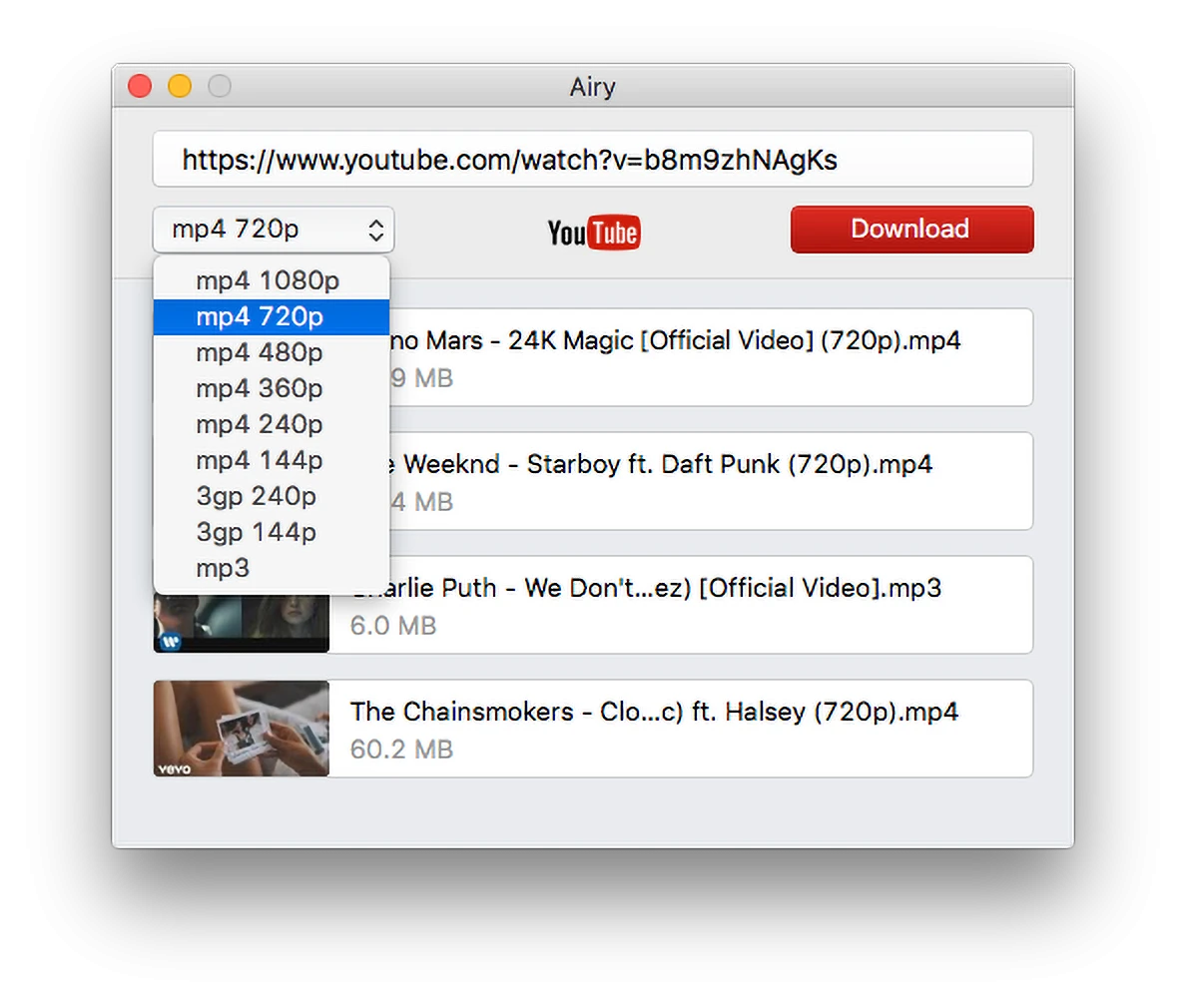
Airy is a dedicated desktop utility designed to extract and save videos directly from the web to your local hard drive. Instead of relying on web-based conversion services that frequently disappear, flood the screen with advertisements, or throttle download speeds, this software handles the entire extraction process natively on your Windows machine. Users simply copy a media URL from their browser, paste it into the application interface, select their desired format and resolution from a straightforward dropdown menu, and let the software handle the file transfer. This direct approach ensures that archived media remains permanently accessible for offline viewing, research, or reference, regardless of whether the original publisher eventually deletes the content or changes its public visibility settings.
For many users, a desktop application provides a more dependable workflow than temporary browser extensions, which are frequently broken by streaming site backend updates or removed from extension stores entirely without warning. Running locally on a desktop operating system, the software manages its own network connections, allows for organized directory routing so files go exactly where you want them, and supports stable background processing. It specifically targets professionals, educators, and archivists who need to build offline reference libraries, pull specific clips for offline editing workflows, or maintain local copies of instructional materials without worrying about buffering, sudden resolution drops, or unpredictable internet connectivity during playback.
While web platforms heavily push users toward continuous online streaming and subscription-based offline viewing walled inside proprietary mobile applications, Airy provides standard, unencrypted media files that you actually own and control. By delivering standard MP4 video or MP3 audio files to your local storage directory, it ensures the resulting media plays flawlessly in any standard third-party media player. These downloaded files mount correctly in non-linear video editing timelines, can be transferred manually to external hard drives, and run beautifully on offline presentation hardware without requiring ongoing DRM authentication checks.
Key Features
- Format and Resolution Selection: The primary interface features a dedicated dropdown menu that populates with all available quality tiers the moment a valid URL is pasted. Users choose between MP4, FLV, and 3GP wrappers, scaling from standard 360p or 480p up to full 4K and 8K high-definition files when the host server provides them.
- Batch Playlist Downloading: Instead of forcing users to copy and paste dozens of individual links, the application accepts single URLs that point to entire playlists or curated channels. Once pasted, the software parses the entire list, populates a queue, and processes the files sequentially to save massive amounts of manual data entry.
- Direct Audio Extraction: For users who only need the soundtrack, podcast audio, or lecture dialogue, the software includes a dedicated MP3 extraction mode. Selecting this option ignores the video stream entirely, downloading only the audio track and converting it to a 256 Kbps MP3 file, which drastically reduces bandwidth usage and local storage requirements.
- Browser Integration Bookmarklet: To speed up the capture process, the software provides an integration tool for major web browsers like Chrome, Firefox, and Opera. By dragging a custom bookmarklet to the browser toolbar, users simply click the button while watching a video online, which instantly sends the URL to the running desktop application without manual copying.
- Age-Restricted Content Authentication: Many desktop downloaders fail when encountering content flagged for mature audiences because the server demands an active user session. Airy solves this by including a native login interface in the main menu, allowing you to authenticate with your credentials and securely bypass age-gate blocks directly within the application.
- Download Pause and Resume: Large 4K video files take time to transfer, and network drops can ruin progress in basic web-based tools. The application natively tracks file transfer progress, allowing users to manually pause heavy downloads when bandwidth is needed elsewhere and resume them later without starting the transfer from scratch.
How to Install Airy on Windows
- Download the Windows installer package from the official vendor website to your local drive.
- Double-click the downloaded executable file to launch the setup wizard and initialize the installer.
- Review the end-user license agreement presented on the screen and click next to accept the terms and proceed.
- Select the destination path for the program files, keeping the default program files directory unless you specifically require installation on a secondary or external drive.
- Choose whether to create a desktop shortcut and a start menu folder for quicker access to the application later.
- Click install and wait a few moments for the setup wizard to extract the core application files, network modules, and interface assets to your hard drive.
- Finish the setup process and check the box to launch the application immediately.
- Upon the first launch, the software displays a prompt asking you to specify a default download directory where all future video and audio files will be automatically saved.
Airy Free vs. Paid
Airy operates under a strict freemium model that heavily restricts the trial version, pushing regular users toward the paid tier. The free tier acts exclusively as a limited technical demonstration to verify that the software functions on your system, allowing users to perform a maximum of two video downloads in total. It does not limit the resolution, speed, or format of these two test files, but it strictly caps the total number of uses permanently. Additionally, it prevents users from grabbing entire playlists or channels by limiting any submitted batch link to just the first two items on the list.
To unlock unrestricted usage, users must purchase a paid license, which typically costs $19.95 for a standard personal tier. Registering the software with a valid license code removes the two-download hard cap entirely, opening up unlimited individual file saves, full playlist processing, and deep channel archiving. The paid tier also officially enables the batch queuing system, letting you queue up dozens of URLs simultaneously and walk away while the software processes them sequentially in the background.
The licensing model relies on a one-time payment for the current major build, rather than forcing users into a recurring monthly subscription. However, because video hosting platforms frequently change their underlying delivery networks and code structure to deter scraping, the developer must actively update the parsing engine to maintain software compatibility. Minor updates are typically included, but major architectural overhauls to the software may eventually require a paid upgrade. For the active lifecycle of the product version purchased, the base payment secures unrestricted local processing.
Airy vs. yt-dlp vs. 4K Video Downloader
yt-dlp is a free, open-source command-line utility that supports thousands of different websites, offering far more technical flexibility than almost any GUI-based alternative. Advanced users prefer it because it handles custom scripting, metadata embedding, complex format merging through FFmpeg, and bypasses regional restrictions with advanced proxy routing. However, yt-dlp lacks a graphical interface entirely, requiring users to operate it by typing specific text arguments via the Windows Command Prompt or PowerShell, which presents a steep learning curve for those who just want to paste a URL and click a button.
4K Video Downloader provides a graphical interface similar to Airy but includes native support for a much wider array of platforms beyond just a single site, including popular social media networks and alternative video hosts. It also offers a much more generous free tier, allowing users up to 30 individual downloads per day rather than a strict lifetime cap of two files. This makes it widely adopted for users who need a daily driver without immediate upfront costs, though its interface is slightly more cluttered with subscription prompts and premium feature locks.
Airy remains the better choice for users who want the absolute simplest, most minimal interface dedicated entirely to one primary video platform. Its tiny footprint, direct browser bookmarklet integration, and straightforward menu design remove all the visual noise associated with multi-platform bulk downloaders. If you are willing to pay the upfront license fee to avoid complex terminal commands and cluttered daily-limit software, this tool offers a strictly focused, distraction-free archiving workflow that gets straight to the point.
Common Issues and Fixes
- Age-restricted videos fail to parse and download. Web hosts block unauthenticated scrapers from accessing content flagged for mature audiences. To fix this, open the main menu in the application, select the login option, and securely authenticate with your account so the software can verify your age and bypass the block.
- Downloads freeze completely or suspend at 0%. Security tools sometimes block background network packet sniffing, halting the connection. Open the Windows Defender Firewall settings and manually add the application executable to the allowed applications list to grant it unrestricted network access.
- Pasted playlists only grab the first two videos. This is the hardcoded limit of the free trial version, not a parsing error. You must purchase and insert an active license code into the application menu to unlock unlimited queue processing for full playlists.
- Missing 4K or 8K resolution options in the dropdown menu. High-tier resolutions are restricted to specific codecs by the host server, or the original video simply does not support them. Check if the original video actually offers these resolutions in a web browser, and ensure you have selected MP4 or WebM from the software dropdown.
- The browser bookmarklet does not send the link to the app. Browser updates or cleared caches can sometimes sever the local port connection. Delete the current bookmark from your browser toolbar, open the desktop application, and recreate the integration link via the main menu to ensure the local communication port is correctly mapped.
Version 2.16.339 — April 2024
- Added support for the latest YouTube algorithm updates to ensure compatibility.
- Improved video parsing mechanisms for better link detection and stability.
- Fixed an issue that prevented videos from downloading successfully from YouTube.