AVG Secure VPN provides a straightforward method for encrypting your internet connection on Windows computers, effectively masking your online identity from advertisers, internet service providers, and local network administrators. By routing your web traffic through an encrypted tunnel using AES-256 standards, this application ensures that your IP address remains hidden, allowing you to browse the web with a reduced digital footprint. It targets mainstream Windows users who frequently connect to unsecured public networks, such as airport Wi-Fi or hotel networks, and need immediate defense against local data interception.
Unlike a browser-based proxy extension that only secures web traffic within a single browser window, a dedicated desktop application routes the entire operating system's network activity through the secure tunnel. This means that email clients, PC games, background sync tools, and standalone messaging applications all receive the same encryption benefits as your web browser. Without a dedicated tunnel, your internet service provider can monitor and log the domain names of every website you visit, potentially selling this demographic data or handing it over to authorities. By establishing a direct link to a remote server, the application turns your web traffic into unreadable ciphertext. Your ISP only sees a continuous stream of encrypted data flowing to one IP address, blinding them to your actual browsing habits, search queries, and media consumption.
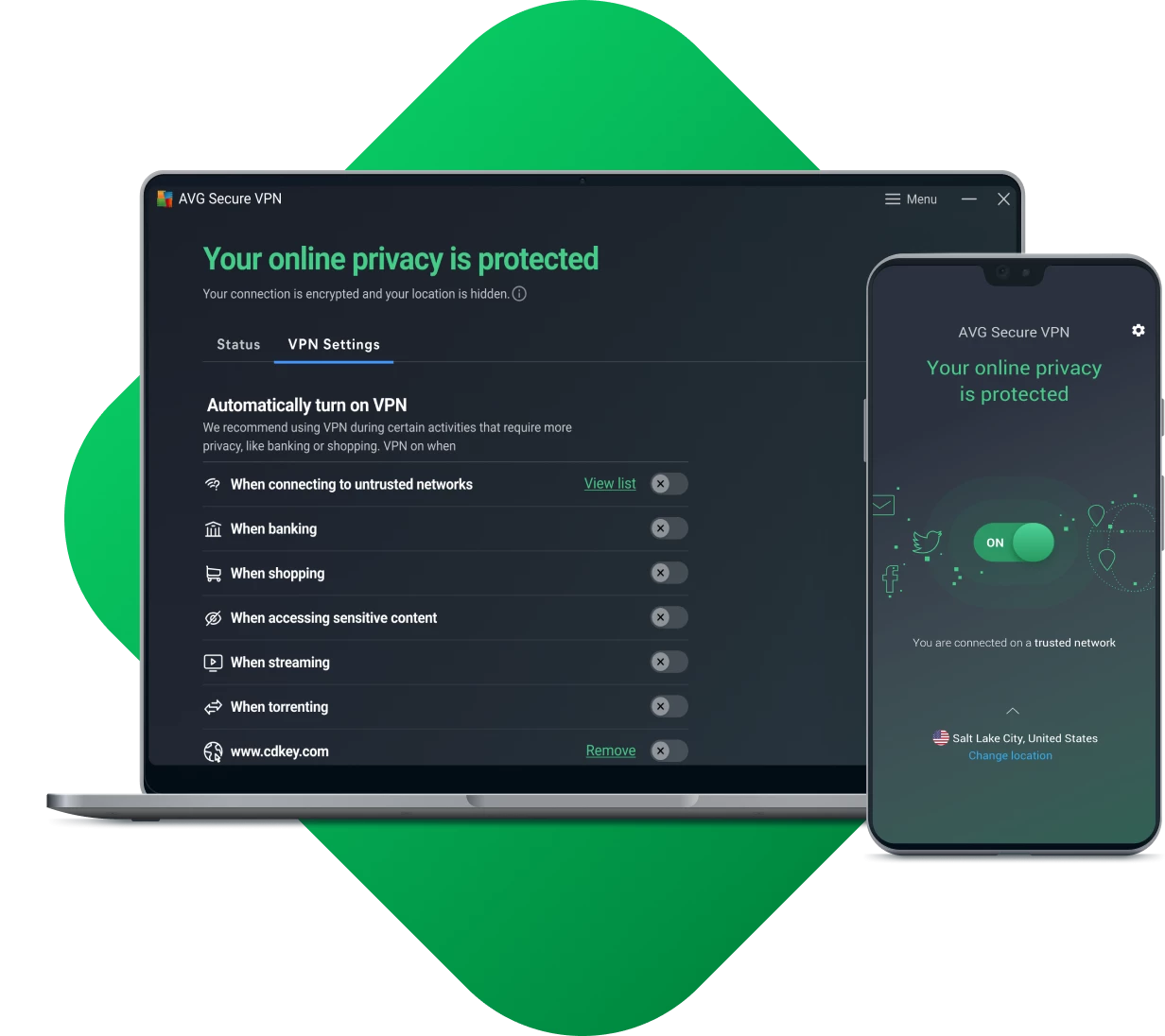
For users heavily invested in the developer's ecosystem, this application fits neatly alongside other system optimization tools, sharing a similar interface design. It intentionally avoids the complex technical configurations found in enthusiast-grade networking clients. Instead of presenting users with manual port forwarding options or custom routing tables, the software relies on a single main toggle switch and a curated list of server locations, making the task of encrypting a network connection entirely accessible to people without IT backgrounds.
Key Features
- Protocol Selection: The application allows users to choose the underlying technology that drives the secure connection. On Windows, you can select WireGuard for faster download rates and lower ping, or rely on the industry-standard OpenVPN protocol for established security. If you leave the setting on automatic, the application will attempt to connect via the fastest available protocol, but will fail over to a backup method if the initial handshake times out.
- Proprietary Mimic Protocol: If standard protocols face firewall restrictions on restrictive corporate or educational networks, the software provides a proprietary Mimic protocol. This setting is specifically designed to obfuscate the connection, disguising the encrypted tunnel as standard web traffic so that local administrators cannot easily block the application.
- System-Wide Kill Switch: If the connection to the server drops unexpectedly, the built-in kill switch immediately halts all internet access on your Windows machine. This prevents your operating system from reverting to your default, unencrypted internet service provider connection, ensuring that your real IP address and background DNS requests never leak into the open network while the application attempts to reconnect.
- Optimized Streaming Servers: Finding a server that successfully bypasses regional restrictions can be difficult, so the interface includes a dedicated tab for streaming-optimized locations. These specific servers are regularly updated to maintain access to popular video platforms, taking the guesswork out of finding an unblocked IP address for media consumption.
- Auto-Connect Rules: You can configure the application to automatically initiate a secure tunnel whenever it detects a connection to an untrusted network. By whitelisting your home or office network in the preferences menu, the app knows to stay dormant on trusted connections but instantly activates when you open your laptop at a public cafe.
- Local Network Access: Standard virtual private networks often isolate your computer entirely, breaking connections to local devices. The software includes a specific toggle in the network settings that instructs the app to ignore local LAN traffic. This allows you to continue using wireless network printers, smart home devices, and local file servers without disabling the main encryption tunnel.
- Multi-Device Licensing: A single subscription supports up to ten simultaneous connections across different hardware. This allows a single household to secure multiple Windows desktops and laptops under one billing account without experiencing forced logouts or device limits during daily operation.
How to Install AVG Secure VPN on Windows
- Download the official Windows installer package from the vendor's site and save it to your local disk.
- Right-click the downloaded executable file and select "Run as administrator" from the context menu to begin the setup sequence.
- Click "Yes" when the Windows User Account Control dialog prompts you to authorize the application to make system changes.
- Select your preferred interface language from the drop-down menu in the top-right corner of the setup window, then click the "Install" button.
- Wait for the installer to extract the application files and install the necessary virtual network adapter drivers required for tunneling traffic.
- Once the installation completes, the application will launch automatically, displaying the main dashboard with a red disconnected slider.
- Click "Start free trial" to begin the evaluation period, or click "Already purchased?" to sign in with your account credentials and verify your subscription status.
AVG Secure VPN Free vs. Paid
AVG Secure VPN does not offer a permanent free tier. Instead, it operates strictly on a premium subscription model, requiring an annual billing commitment. The vendor currently offers a 60-day free trial for Windows desktop users, which is unusually long for the networking industry. This trial allows full access to all server locations, the WireGuard protocol, and streaming-optimized servers without imposing artificial bandwidth caps or speed throttling during the evaluation window.
Once the trial expires, users must purchase a subscription to maintain the service. The pricing structure strictly avoids month-to-month billing. You must pay upfront for a one-year, two-year, or three-year plan. The standard one-year plan typically costs around $53.88 for the first term, which breaks down mathematically to roughly $4.49 per month. Renewals often occur at a higher standard rate, so users should review the auto-renewal terms in their account dashboard. All paid subscription tiers are backed by a standard 30-day money-back guarantee, providing a financial safety net if the selected servers fail to perform as expected in your specific geographical location.
For individuals already using other products from the developer, the service is frequently bundled into the larger Ultimate package. This bundle includes their antivirus software, system optimization tools, and the network encryption tool under a single annual fee. The vendor accepts major credit cards and PayPal, but does not support anonymous payment methods like cash or cryptocurrency, which may deter users prioritizing strict financial anonymity.
AVG Secure VPN vs. CyberGhost vs. ProtonVPN
CyberGhost operates a massive network with thousands of servers globally, dwarfing the roughly 700 servers offered by AVG. It includes highly specialized server profiles categorized specifically for gaming, torrenting, and dozens of individual regional streaming services. Users who require granular control over their connection types, need access to obscure geographical regions, or want dedicated servers physically managed by the provider will find CyberGhost to be the superior choice.
ProtonVPN differentiates itself with a permanent free tier and an extreme focus on user privacy, backed by Swiss jurisdiction and strict open-source auditing. Its paid tiers feature secure core routing, which bounces traffic through privacy-friendly countries before reaching the final destination to thwart network surveillance. Individuals with elevated threat models, journalists, or those who want a fully audited strict zero-logs policy and cryptocurrency payment options should select ProtonVPN.
AVG Secure VPN makes sense for mainstream Windows users who prioritize interface simplicity and ecosystem integration over massive server counts or extreme privacy features. If you are already managing a subscription from this developer and want to handle your security billing in one place, its straightforward toggle design and unique Mimic obfuscation protocol provide a highly accessible, low-maintenance approach to daily network encryption.
Common Issues and Fixes
- Internet access drops entirely when the application is closed. This occurs when the system-wide kill switch remains active but the secure tunnel drops or the background service stops. Open the application, navigate to the Connection Settings menu, and either reconnect the tunnel or temporarily toggle the Kill Switch off to restore your default internet routing.
- Local network printers and shared drives become invisible. Because the application routes all traffic through the external server by default, local hardware is blocked for security. Go to the application preferences, navigate to the network behavior tab, and check the box labeled "Enable local device access" to allow your computer to communicate with other devices on your local area network.
- The connection is blocked on a restricted network. Network administrators frequently block the standard connection ports to prevent circumvention of local firewalls. Open the VPN Protocols settings and change the connection type from automatic to the Mimic protocol, which is specifically designed to disguise your encrypted traffic as normal web browsing data.
- Video streams constantly buffer or fail to load. Standard servers often face heavy load or are blacklisted by media providers. Open the location selection menu, navigate to the dedicated Streaming tab, and manually select a server explicitly marked for your desired region, or switch your protocol setting to WireGuard to improve overall download speeds.
Version 25.11.12091.15778 — December 2025
Added:
- New server locations in select regions for better global coverage.
Improved:
- Enhanced connectivity stability for Windows 11 users.
- Optimized auto-connect speed when joining public Wi-Fi networks.
- Refined server selection algorithm to faster identify low-latency nodes.
Fixed:
- Resolved an issue where the VPN interface would occasionally freeze on startup.
- Fixed minor bugs related to subscription status synchronization.
- Addressed sporadic connection drops during high-bandwidth streaming.
Security:
- Updated OpenVPN protocols to the latest security standards.
- Security patches for internal libraries to prevent potential vulnerabilities.