4K Video Downloader Plus serves as a specialized utility for users who need to archive media locally from online hosting platforms. Rather than relying on browser extensions that frequently break or web-based rippers choked with advertisements, this application runs independently on the desktop to handle heavy workloads. Archivists, video editors, educators, and offline viewers use it to extract high-bitrate video and audio files from websites like YouTube, Vimeo, Facebook, and Bilibili. Retrieving a local copy ensures that the content remains accessible even if the original uploader deletes the source or if the platform introduces sudden regional blocks. The architecture of the program focuses entirely on reducing the friction of mass-downloading, turning a tedious URL-gathering chore into an automated batch process that safely deposits organized files directly onto a local hard drive.
Unlike older media retrieval tools that require constant switching between a web browser and the application interface, this software integrates an internal browser directly into its main window. Users can search for media, navigate channels, read comments, and queue files without ever leaving the workspace. This integration solves a major technical hurdle: accessing authenticated or age-restricted content. By logging into an account inside the application, the software utilizes the user's active session cookies to pull private videos, personal playlists, and premium subscription content that external link-parsers simply cannot reach. This approach secures direct access to the raw media streams, bypassing the artificial compression applied by standard web player interfaces and avoiding the hassle of exporting browser cookies manually.
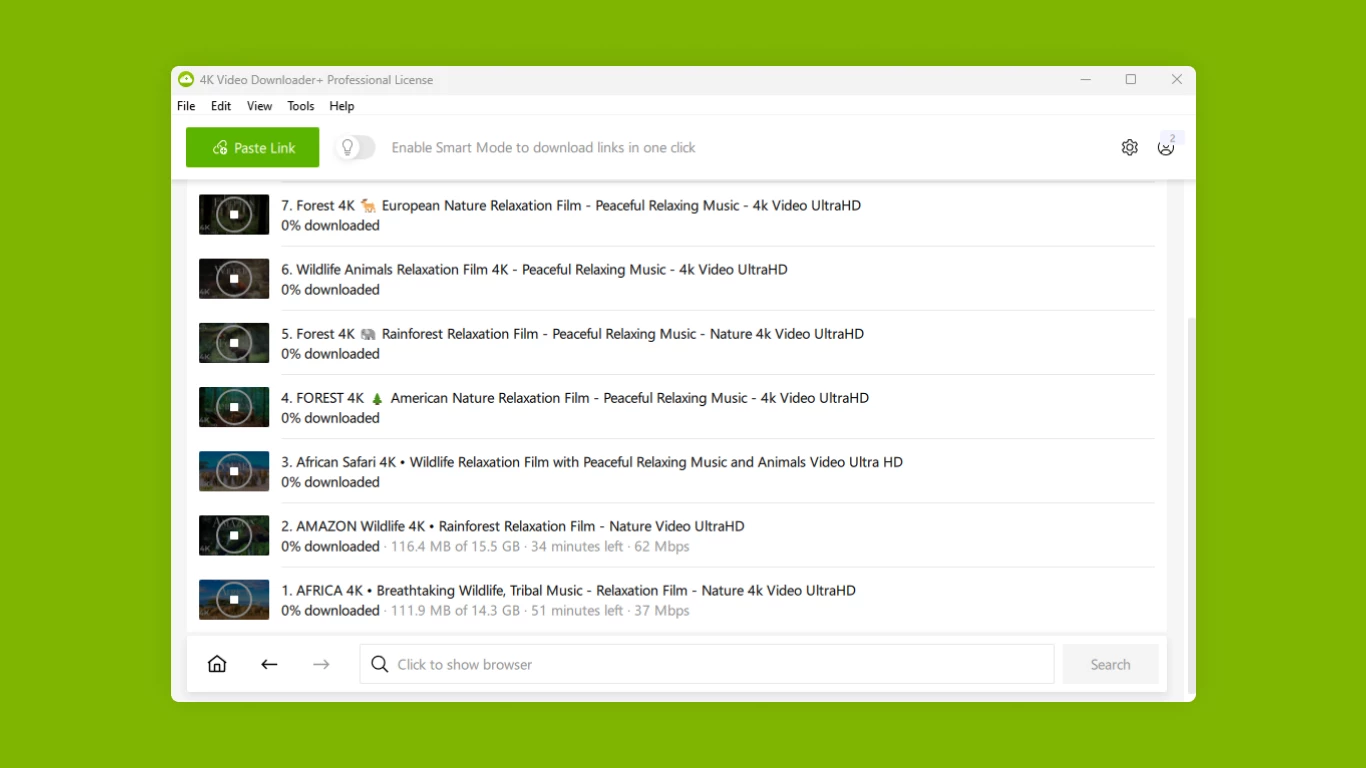
For large-scale offline storage, the application handles complex folder hierarchies and metadata preservation with minimal configuration. When a user pastes a link to a massive playlist or an entire channel, the software parses the data structure, retrieves the highest available resolution—scaling up to 8K where supported—and packages it into standard containers like MP4 or MKV. It also pulls associated data such as multi-language audio tracks, video descriptions, and closed captions. By moving the workload to a dedicated desktop environment, it can allocate multiple network threads to fetch separate files concurrently, avoiding the bottleneck of sequential processing. This makes it a highly practical tool for anyone who needs to build a reliable local media library, prepare footage for offline editing timelines, or avoid endless buffering caused by poor internet connectivity.
Key Features
- Integrated Web Browser: The interface includes a fully functional browser tab that allows users to navigate media platforms, perform searches, and play videos directly within the application. This eliminates the need to manually copy and paste URLs from an external window. It also allows users to sign into their accounts safely, granting the software the necessary access tokens to retrieve private videos, age-restricted clips, and personalized lists that remain hidden from unauthenticated scraper tools.
- Smart Mode Configuration: Users can define their preferred output settings once and apply them automatically to every future task. By selecting a target format, a desired resolution, and a specific local destination folder in the Smart Mode menu, the software bypasses the repetitive prompt screens usually required for individual files. This drastically accelerates the workflow for users handling large volumes of individual links.
- Concurrent Multi-Threaded Processing: Instead of fetching items one by one in a slow sequential queue, the engine opens multiple network connections simultaneously. Depending on the active tier, it can allocate up to seven concurrent threads to process massive playlists or complete channel archives in a fraction of the time. This parallel execution maximizes available bandwidth and minimizes the wait for bulk archiving jobs.
- Subtitle and Annotation Extraction: The software retrieves embedded or auto-generated text tracks directly from the host video player. It saves these text files in the universally recognized SRT format right alongside the primary media file, keeping the naming convention identical for immediate playback synchronization. Users can select from over 50 specific language tracks, extracting them for individual clips or entire playlist directories.
- Local AI Audio Processing: The application incorporates built-in artificial intelligence models specifically tuned for audio manipulation. Editors can instruct the tool to extract isolated vocal tracks, remove persistent background noise, or erase room echo from the downloaded media file. Because this processing happens entirely within the desktop environment, it saves users from routing their files through secondary audio correction software.
- Automated Channel Subscriptions: Instead of manually checking for new uploads, users can subscribe to their favorite creators directly inside the utility. The engine operates in the background, periodically checking the target channels for new content. When a new video is published, the application automatically fetches it at the pre-defined resolution and saves it to the designated local drive without requiring any user intervention.
How to Install 4K Video Downloader Plus on Windows
- Download the official offline Windows installer executable from the developer's website to ensure you receive the unmodified application package.
- Double-click the downloaded setup file to initiate the installation wizard, granting administrator privileges when prompted by the Windows User Account Control dialog.
- Review the end-user license agreement, click to accept the terms, and specify your desired installation directory. The default path typically routes to the standard Program Files directory.
- Proceed through the wizard to extract the core application files, install necessary background services, and create start menu shortcuts on your system.
- Launch the program from the desktop shortcut and navigate to the Preferences menu by clicking the gear icon in the top right corner of the interface.
- Set your default output folder to a secondary drive with ample storage capacity, as retrieving uncompressed high-resolution video files will quickly consume available hard drive space.
- Open the integrated browser tab to sign into your required platform accounts if your workflow involves retrieving private, age-restricted, or subscription-locked media right away.
4K Video Downloader Plus Free vs. Paid
The application operates on a freemium model, offering a permanently free tier alongside several paid licenses. The free version restricts users to 30 single item downloads per day and caps playlist processing at 10 items per playlist or channel. It also limits concurrent processing to a single network thread and restricts access to private or authenticated content. This tier is strictly designed for casual users who only need to save a few public clips occasionally.
For regular users, the Lite tier costs $15 per year and covers a single device. It removes the daily limits, allows unlimited playlist and channel retrieval, removes interface advertisements, and increases simultaneous processing to three concurrent threads. It also unlocks the ability to grab private content through the integrated browser. The Personal tier offers the exact same technical capabilities as the Lite tier but is sold as a $25 perpetual license that covers up to three devices forever, eliminating recurring subscription fees.
Power users and commercial editors rely on the Pro tier, which requires a one-time $45 payment for a perpetual license covering three devices. This tier increases the simultaneous processing limit to seven concurrent threads, maximizing bandwidth for massive archiving tasks. It also unlocks the advanced AI audio processing tools, the automated in-app subscription monitor, URL import and export functionality, and explicit permission for commercial use within professional environments.
4K Video Downloader Plus vs. SnapDownloader vs. yt-dlp
SnapDownloader is a paid desktop alternative that emphasizes exceptionally broad platform compatibility, claiming support for over 1,000 distinct websites. It also includes a built-in trimming tool that lets users slice a specific portion of a video before saving it to the disk. Users who frequently pull clips from obscure social media networks or who need to perform basic edits without opening a separate non-linear editor might prefer this approach.
yt-dlp is an open-source, command-line utility that serves as the backend engine for many graphical alternatives. It is completely free and supports highly complex scripting, allowing advanced users to write custom batch files for precise media extraction, format merging, and metadata tagging. System administrators, developers, and users comfortable working entirely within the Windows Command Prompt or PowerShell often choose yt-dlp for its unparalleled granular control and zero-cost model.
4K Video Downloader Plus provides the better fit for users who want the power of a dedicated extraction engine without the steep learning curve of a command-line interface. The inclusion of the built-in browser makes handling authenticated and private content significantly easier than managing cookies manually in yt-dlp or other competitors. Furthermore, its specialized Smart Mode and AI audio processing features offer an optimized, visual workflow for editors and archivists who prioritize speed and convenience over manual script configuration.
Common Issues and Fixes
- The application hangs indefinitely on "Retrieving video info" or displays a "Can't parse this link" error. This happens when the host platform updates its backend algorithm or JavaScript player, breaking the extraction parser. Open the Tools menu and click Check for Updates to install the latest software revision, which usually contains the necessary code adjustments to restore compatibility.
- Downloads for private or age-restricted videos fail even when providing a valid URL. The extraction engine lacks the necessary session cookies to authorize the request for restricted media. Open the built-in browser tab, navigate to the target website, log into your user account, and try initiating the task again so the application can use your active session tokens.
- Download speeds suddenly drop to zero or the application triggers a CAPTCHA request. The media hosting server has likely rate-limited your connection due to an excessive number of automated requests originating from your IP address. Pause your current queue, connect to a different server using a Virtual Private Network (VPN), and resume the task to bypass the temporary IP block.
- Exported media files have missing audio tracks or report abnormally large file sizes. The auto-parser may have selected an incompatible container or raw stream format during the extraction phase. Click the Smart Mode toggle and manually force the output format to MP4 and the codec to H.264, ensuring maximum playback compatibility across standard desktop media players.
Version 25.4.3 — December 2025
- Resolved slow parsing and potential freezing issues when processing YouTube links.
- Fixed download and parsing errors for TikTok videos, BiliBili festival links, and Twitch thumbnails.
- Improved handling of large SoundCloud playlists and various Vimeo links.
- Enhanced interface behavior so the parsing window remains open when clicking outside if Smart Mode is disabled.
- Corrected screen-reader focus issues within the parsing window for better accessibility.
- Implemented general stability improvements and minor bug fixes.