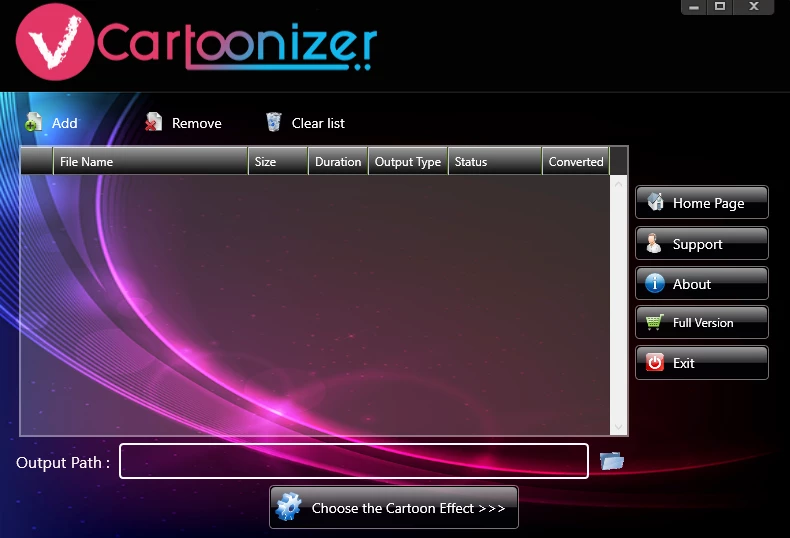
Video Cartoonizer is a specialized desktop application designed to transform standard video footage into stylized animations and cartoons. Built specifically for Windows 10 and Windows 11 environments, this standalone software applies artistic filters frame-by-frame directly on the user's local hardware. Instead of requiring complex animation skills, keyframe tracking, or timeline manipulation, the program automates the styling process. Users simply load a standard video file into the main interface, select an artistic preset from the right-hand panel, and let the software render the modified frames into a new animated clip. The workflow is designed for immediate visual transformation rather than detailed compositional editing.
The tool appeals primarily to content creators, educators, and hobbyists who want to produce engaging visual content without relying on subscription-based cloud platforms. Because it processes media locally, it provides a private workflow for sensitive, proprietary, or unreleased footage. This local approach also bypasses the strict file size limits, upload wait times, and bandwidth requirements often imposed by browser-based video editors. Users working with large raw files from digital cameras or smartphones can convert their media immediately without waiting for server-side processing queues.
Choosing a dedicated desktop application over generic video editing suites allows for a more focused, task-specific workflow. The interface prioritizes the cartoon conversion process, making it accessible to those who need quick results rather than a sprawling multi-track timeline editor. By rendering entirely offline, it ensures that users retain full control over their media assets from import to final export. It fills a distinct gap for users who need batch processing and predictable output formats without navigating through the menus of standard post-production software.
Key Features
- Local Video Processing: The application processes all media directly on the local Windows machine without requiring an internet connection. This architecture ensures privacy for personal files, prevents server-side compression, and avoids the upload limits associated with web-based converters.
- Multiple Cartoon Effects: Users can choose from over 15 distinct built-in artistic filters to define the exact visual style of their output. These presets range from simple pencil sketch styling and charcoal outlines to vibrant, comic-book-inspired shading, giving creators flexibility depending on the mood of the footage.
- Custom Frame Rate Controls: The software includes a dedicated menu to specify the frames per second (FPS) for the exported video. Lowering the frame rate can simulate traditional hand-drawn, stop-motion animation styles, while maintaining a higher frame rate keeps the original fluidity of the source recording.
- Batch Conversion Support: For projects involving multiple clips or episodic content, the program allows users to load several files into the processing queue. The software will process them sequentially with the selected cartoon effect, allowing users to step away from the computer during heavy rendering tasks.
- Format Compatibility: The tool accepts common video input formats such as AVI, FLV, MP4, and MOV straight from cameras or capture cards. Once the rendering process finishes, the stylized video is exported back into standard formats, ensuring immediate compatibility with standard media players, editing timelines, and social platforms.
- Adjustable Output Resolution: Before initiating the rendering process, users can define the exact dimensions of their final cartoon video. Options range from lower resolutions like 480p up to higher definition formats, allowing users to balance rendering time against final visual fidelity based on their local hardware capabilities.
How to Install Video Cartoonizer on Windows
- Download the official Windows installer package directly from the vendor's website to ensure you receive the unmodified application.
- Locate the downloaded archive or executable setup file in your system's default downloads folder.
- If the file is packaged as a ZIP archive, right-click the file, choose the extraction tool, and extract its contents to an accessible local directory.
- Double-click the extracted executable setup file to launch the installation wizard.
- Review the end-user license agreement and select your preferred installation path on the local drive, noting that installing on an SSD will improve application load times.
- Review the available shortcut options and proceed through the setup prompts, allowing the installer to write the necessary program files to the disk.
- Click finish to close the wizard and launch the Video Cartoonizer application from the newly created desktop or start menu shortcut.
- Upon the first run, the software will present an activation prompt; either select the trial mode to test the application or enter your purchased product key to unlock unrestricted exports and remove the vendor watermark.
Video Cartoonizer Free vs. Paid
Video Cartoonizer operates on a perpetual licensing model, meaning users pay a one-time flat fee rather than committing to a recurring monthly subscription. The official vendor page offers a downloadable trial version of the software, which allows users to test the interface, import their own media, and preview the cartoon effects locally. This trial serves as a practical way to gauge rendering speeds on the user's specific CPU and ensure the built-in filters meet project requirements before any money changes hands.
The free trial comes with strict, hardcoded limitations on the final output to encourage purchasing. Videos exported using the unactivated version will carry a prominent software watermark across the frame, and the trial restricts the maximum allowed duration of the rendered file. To remove these restrictions, users must purchase a license key, which historically ranges between $19.95 and $29.95 during standard promotional periods on the developer's website.
Once the purchased license key is entered into the desktop client, the software immediately removes the watermark and unlocks the ability to export unlimited videos at the maximum supported resolution. Because it is a standalone desktop application, the paid tier does not rely on a cloud-based token or credit system. This makes the one-time purchase cost-effective for users who plan to render a high volume of media, as they will never face ongoing charges per conversion or run out of processing credits.
Video Cartoonizer vs. Wondershare AI Lab vs. VEED.io
Wondershare AI Lab provides an advanced, cloud-driven approach to turning videos into cartoons. It uses sophisticated deep-learning models to map faces, backgrounds, and lighting, often resulting in refined, modern animation styles with strong temporal consistency. However, it requires uploading media to a remote server and typically operates on a subscription pricing model or a strict credit system. Users who need to process gigabytes of raw footage locally or want to avoid recurring costs will find Video Cartoonizer's offline, one-time-purchase model more practical, even if the artistic filters are less AI-driven.
VEED.io offers a broad, browser-based video editing suite that includes a dedicated video cartoonizer feature alongside standard timeline tools. It is convenient for users who want to add text overlays, background music, and cartoon filters in a single web interface without installing desktop software. The main downside is that VEED.io relies heavily on a paid monthly subscription and limits the size and length of video uploads. Video Cartoonizer is the better choice for individuals dealing with large file sizes, as it uses the computer's own processing hardware and imposes zero online upload limits or cloud storage caps.
Ultimately, Video Cartoonizer remains the most straightforward option for users who prioritize data privacy, strict offline capability, and a transparent flat fee. While Wondershare and VEED.io offer more nuanced AI generation and extra post-production tools, they demand continuous internet access and ongoing monthly payments. Video Cartoonizer provides a dedicated, localized utility for applying artistic renders without watching a credit balance.
Common Issues and Fixes
- Slow rendering times on large files. Applying complex artistic filters to high-definition video frame-by-frame is a hardware-dependent process that relies heavily on the local CPU. To reduce processing time, navigate to the export settings and lower the output resolution or reduce the frames per second before starting the conversion.
- Application crashes during batch processing. Loading too many large video files into the conversion queue simultaneously can exhaust system memory, especially on machines with limited RAM. Process large files one at a time or in smaller batches, and ensure no other heavy desktop applications are running in the background.
- Watermark on exported videos. The software permanently stamps a logo on all processed files when operating in the free trial mode. You must purchase a full license and input the product key into the application's activation window to export clean, unmarked videos.
- Unnatural color distortion in the final clip. Certain lighting conditions or low-contrast scenes in the original video may clash with specific cartoon presets, causing over-saturation or dark artifacts. Try selecting a different filter from the built-in effects menu, as each preset reacts differently to the contrast and brightness of the source file.
- Unsupported input format errors. Attempting to load specialized formats like MKV or WebM may trigger an import error if the software cannot read the codec. Convert the original file to a standard MP4 or AVI format using a basic media converter before importing it into the cartoonizing software.
Version 4.1.6 — October 2025
- Added a broader selection of high-quality cartoon effects and filters to the library.
- Improved rendering engine speed for faster processing of 4K and high-resolution videos.
- Fixed minor stability issues during batch conversion and frame rate adjustments.