HitFilm Express is a desktop-based non-linear video editing application that natively integrates layer-based visual effects compositing into a single workflow. Developed originally by FXhome before being acquired and eventually sunset by Artlist in early 2025, the software maintains a dedicated user base among independent filmmakers, content creators, and visual effects students. Instead of forcing users to split their workflow across two completely different applications—one for cutting video and another for building visual effects—this editor provides a timeline where standard cuts and complex multi-layer composite shots exist side by side. It handles practical jobs such as removing green screens, adding motion tracking to handheld footage, placing 3D text into live-action scenes, and mixing multiple audio tracks.
The primary audience for this software consists of video creators who need advanced post-production capabilities without committing to monthly subscription fees. While web-based video editors have gained popularity for short-form social media clips, they lack the local processing capacity required for hardware-accelerated rendering and heavy 3D compositing tasks. By utilizing a local desktop architecture, the software relies on the host machine's dedicated graphics processing unit to handle raw footage, particle physics, and complex color grading in real time. Editors working with large MP4 files or multi-gigabyte project folders benefit from immediate timeline playback, avoiding the frustrating upload and download times associated with cloud-only alternatives.
Even though active development concluded, the application remains highly relevant because it solves a specific structural problem in post-production. Many traditional editing environments require users to render out a clip, import it into a specialized compositing tool, apply an effect, render it again, and bring it back into the main timeline. This application bypasses that friction entirely. Users can simply select a clip on the main timeline, convert it into a composite shot, build out their visual effects using keyframes and masks, and see the results instantly updated in the main project. This localized, integrated approach saves massive amounts of time during revisions, making it a highly practical choice for deadline-driven video production.
Key Features
- Unified Editing and Compositing Timeline: Users can edit standard clips on the main timeline and instantly switch to a dedicated composite shot tab for complex visual effects work. Any adjustments made inside the composite shot, such as masking or particle generation, automatically update on the main editor timeline. This eliminates the need to export and re-import files between different software packages.
- Advanced Tracking and Keying: The application includes professional-grade 2D motion tracking and luminance keying tools to manipulate specific elements within a frame. Editors can select the eyedropper tool to isolate a green screen background, adjust the spill suppression to remove green halos, and track the motion of a subject to attach text or graphics to their movement.
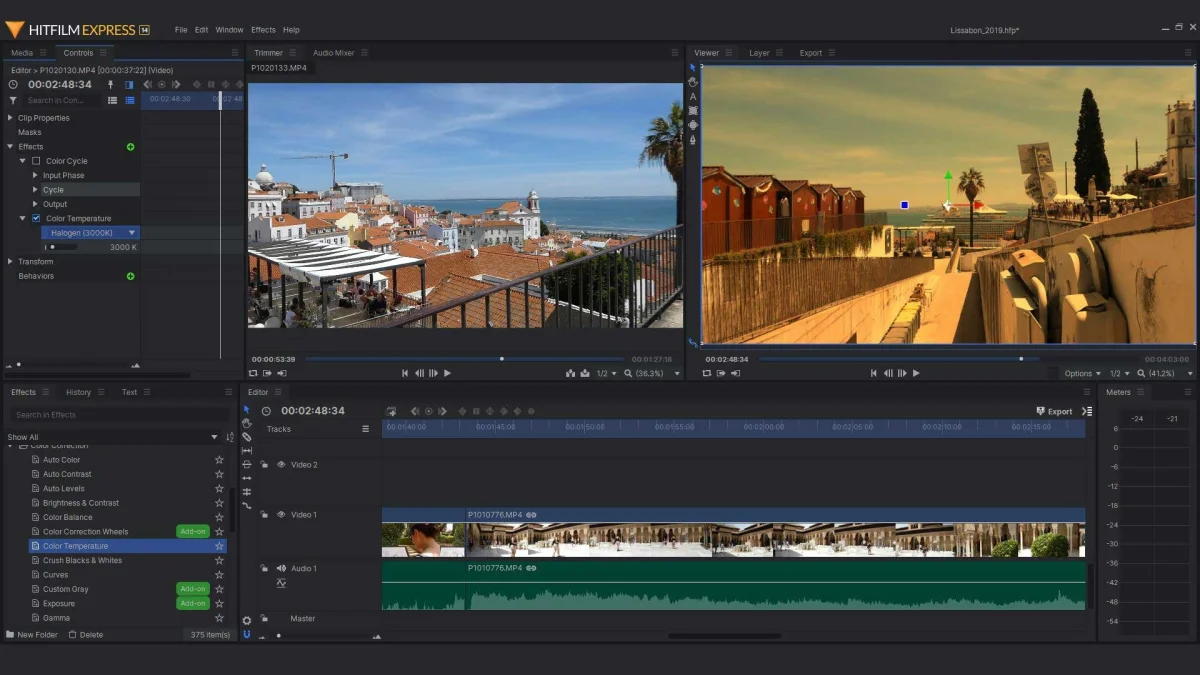
- Customizable Interface Workspaces: The interface allows editors to drag, drop, and resize individual panels to fit their specific monitor setup and task. By navigating to the Window menu and selecting Workspaces, users can switch between default layouts optimized for color grading, audio mixing, or vertical video editing, which instantly repositions the viewer and timeline panels.
- Extensive Visual Effects Library: Located in the Effects panel, the software includes hundreds of drag-and-drop effects ranging from basic color correction to complex distortions and motion trails. Editors can apply a White Balance tool to correct lighting temperatures by picking a neutral white point directly from the viewer, or add realistic lens flares that react to the movement of light sources in the footage.
- Audio Mixing and Leveling: Beyond video manipulation, the software provides a dedicated audio mixer for balancing dialogue, sound effects, and background music. Users can adjust decibel levels using keyframes directly on the audio tracks, apply equalization filters to enhance voice clarity, and drop crossfade transitions between clips to prevent harsh audio pops.
- Project Export Queue: The export system allows editors to queue up multiple timelines or composite shots for rendering while they step away from the computer. Users can define custom export presets by specifying the resolution, target bitrate, and frame rate, ensuring the final MP4 output meets the exact compression standards required by platforms like YouTube or Vimeo.
- 3D Workspace and Camera Controls: Editors can convert 2D layers into 3D space within a composite shot, allowing them to construct detailed environments. The software provides virtual camera controls to adjust focal length, depth of field, and aperture, enabling creators to fly a digital camera through multiple layers of text and video to simulate physical camera movements.
How to Install HitFilm Express on Windows
- Locate and download the official Windows installer package from a verified software archive or legacy backup, since the original FXhome distribution website ceased operations in early 2025.
- Navigate to your download folder and double-click the setup file (typically an MSI package) to launch the installation wizard.
- Read the End-User License Agreement presented on the screen and check the box labeled "I accept the terms in the License Agreement" to proceed.
- Select the "Typical" setup option when prompted, which installs required program files to the default system drive directory without requiring manual configuration.
- Click the "Install" button to initiate the extraction process, allowing the setup wizard to copy the necessary video rendering engines and effect libraries to your computer.
- Wait for the progress bar to complete, and then check the box to start the application immediately.
- Click "Finish" to close the installer and wait for the software to launch to the home screen.
- Upon the first launch, a login prompt will appear; enter your existing legacy account credentials to activate the perpetual license and unlock the timeline for offline editing.
HitFilm Express Free vs. Paid
Before the acquisition and eventual product sunset, the application utilized a unique freemium business model. The core video editing application, along with a vast selection of 2D and 3D visual effects, was available entirely for free. When downloading the software, users were presented with a slider where they could choose to pay zero dollars or contribute a custom amount. Contributing higher amounts unlocked optional add-on packs, which provided specific premium effects, extra color grading tools, or advanced audio filters without requiring a move to the professional tier. This modular structure meant editors only paid for the specific visual effects they actually needed, keeping the entry cost extremely low.
For users needing professional broadcast capabilities, the company offered HitFilm Creator and HitFilm Pro. These paid tiers operated on a subscription basis in later years, granting access to premium third-party plugins like Boris 3D Objects, Mocha motion tracking, higher resolution export limits, and advanced tools such as Super Glow and professional video scopes. Applying any of these premium features inside the free tier would trigger a persistent watermark across the viewer and the final exported video, signaling an upgrade was required to render a clean file.
Following the closure of the official website and the end of active development in 2025, the subscription model was dismantled. Users who previously paid for subscriptions or outright licenses had their accounts transitioned to a perpetual status, allowing them to retain access to the software indefinitely. Since new official account registrations are no longer possible, the free functionality is strictly limited to existing users or those deploying legacy installers who can bypass the central activation server requirements for offline work.
HitFilm Express vs. DaVinci Resolve vs. Adobe Premiere Pro
DaVinci Resolve is widely recognized for its highly regarded color grading capabilities and node-based compositing environment called Fusion. While DaVinci Resolve offers a free tier with extensive non-linear editing tools, its node-based approach to visual effects requires a steep learning curve for editors accustomed to stacking visual layers. Nodes require users to build a flowchart of inputs and outputs, which is highly logical for advanced compositors but can confuse beginners. Additionally, Resolve demands significant hardware resources, specifically high-end graphics cards, to function correctly.
Adobe Premiere Pro remains the standard non-linear editor in professional broadcast environments, offering deep integration with other Adobe applications. However, Premiere Pro strictly requires a recurring Creative Cloud subscription and relies entirely on a separate application, Adobe After Effects, for complex 3D compositing and motion graphics. This forces users into a dynamic link round-trip workflow between two heavy programs, which can strain system memory, cause playback lag, and slow down the editing process.
HitFilm Express proves to be the better fit for independent creators, students, and hobbyists who specifically want a layer-based visual effects compositor built directly into their editing timeline. By combining the timeline logic of Premiere Pro with the layer stacking logic of After Effects inside a single interface, it removes the friction of round-tripping files. Furthermore, its legacy perpetual nature ensures that creators can manage complex 3D tracking and masking tasks without being locked into the expensive monthly fees required by Adobe.
Common Issues and Fixes
- Timeline lag and interface freezing. Over time, the application can suffer from decreased playback performance and freezing when scrubbing the timeline. To fix this, navigate to the top menu, select File, open Options, go to the Cache tab, and click "Delete Media Cache" to clear out old pre-rendered files. Additionally, clearing out all completed export tasks from the Export window has been shown to drastically reduce GPU usage and restore smooth playback.
- Media file displaying an exclamation point. When you import a video clip and it shows an exclamation mark instead of a thumbnail, the software cannot read the file's codec or format. This frequently occurs with HEVC (H.265) files or footage recorded with Variable Frame Rate (VFR) from a smartphone. The fix is to use an external tool like Handbrake to transcode the video into a standard H.264 MP4 file with a Constant Frame Rate before importing it back into the media bin.
- Application crashing during video export. Exporting a project places a heavy load on the processor and graphics card, which can cause the software or the entire computer to crash if the hardware overheats or drivers fail. Ensure your laptop or desktop has adequate cooling during the export process, and update your NVIDIA, AMD, or Intel display drivers directly from the manufacturer's website rather than relying on Windows Update, which often installs older, unstable driver versions.
- Watermark appearing on final exported MP4. If a large watermark covers your exported video, it means you have applied an effect or tool that belongs to a premium add-on pack or the Pro tier. To fix this, open your timeline, go to the Controls panel, and look for any applied effect that says "Upgrade" next to it. Delete that specific effect from the clip or composite shot, and the watermark will disappear from your next export.
Version 2023.4 — July 2023
- Improved system stability on machines using Intel Iris Xe graphics, specifically addressing crashes upon exiting the application.
- Enhanced performance for Mac users, with faster plugin loading times after the initial installation.
- Optimized export speeds for projects containing text and 2D effects on Apple Silicon (M1) devices.
- Refined compatibility with third-party OFX plugins, ensuring smoother operation with Sapphire and Red Giant transitions.
- Fixed rendering issues where 3D models (GLTF) with multiple groups and different illumination models would not display correctly.
- Corrected behaviors in the Effects panel to prevent deleted effects from reappearing in the "Recents" category and to stop duplicate entries.
- Resolved an issue where project templates with a framerate of 59.94 were erroneously marked as invalid.
- Adjusted the default "Grain Frequency" setting in the Super Glow effect to 1.0 for better initial results.