TikTok LIVE Studio is a native desktop broadcasting application built specifically for creators who want to transition their video streams from a smartphone to a full Windows computer setup. For a long time, content creators looking to broadcast PC gameplay, detailed digital art tutorials, or clear camera feeds had to rely on complex third-party tools and hard-to-acquire platform stream keys. This official software bridges that gap by providing a direct pipeline to the platform's massive audience without requiring complex encoder configurations. By running natively on desktop systems, the application allows broadcasters to utilize multiple monitors, dedicated microphones, and hardware-accelerated graphics cards to produce high-definition, multi-layered video feeds directly connected to native chat and monetization features.
The software is aimed squarely at established creators who have already built a following and want to elevate their production value. Instead of awkwardly balancing a mobile device on a tripod to capture a computer monitor, streamers can use direct screen capture and overlay their webcam feed in a clean, professional vertical format. This solves the core problem of formatting traditional widescreen computer content for a mobile-first viewing audience. The interface is tailored to the specific quirks of the platform ecosystem, meaning users do not need to spend hours configuring canvas dimensions, bitrates, or third-party chat widgets just to get started. It strips away the friction of setting up a broadcast, making it a practical download for anyone serious about growing their digital presence through direct interaction, gaming broadcasts, or extended Q&A sessions.
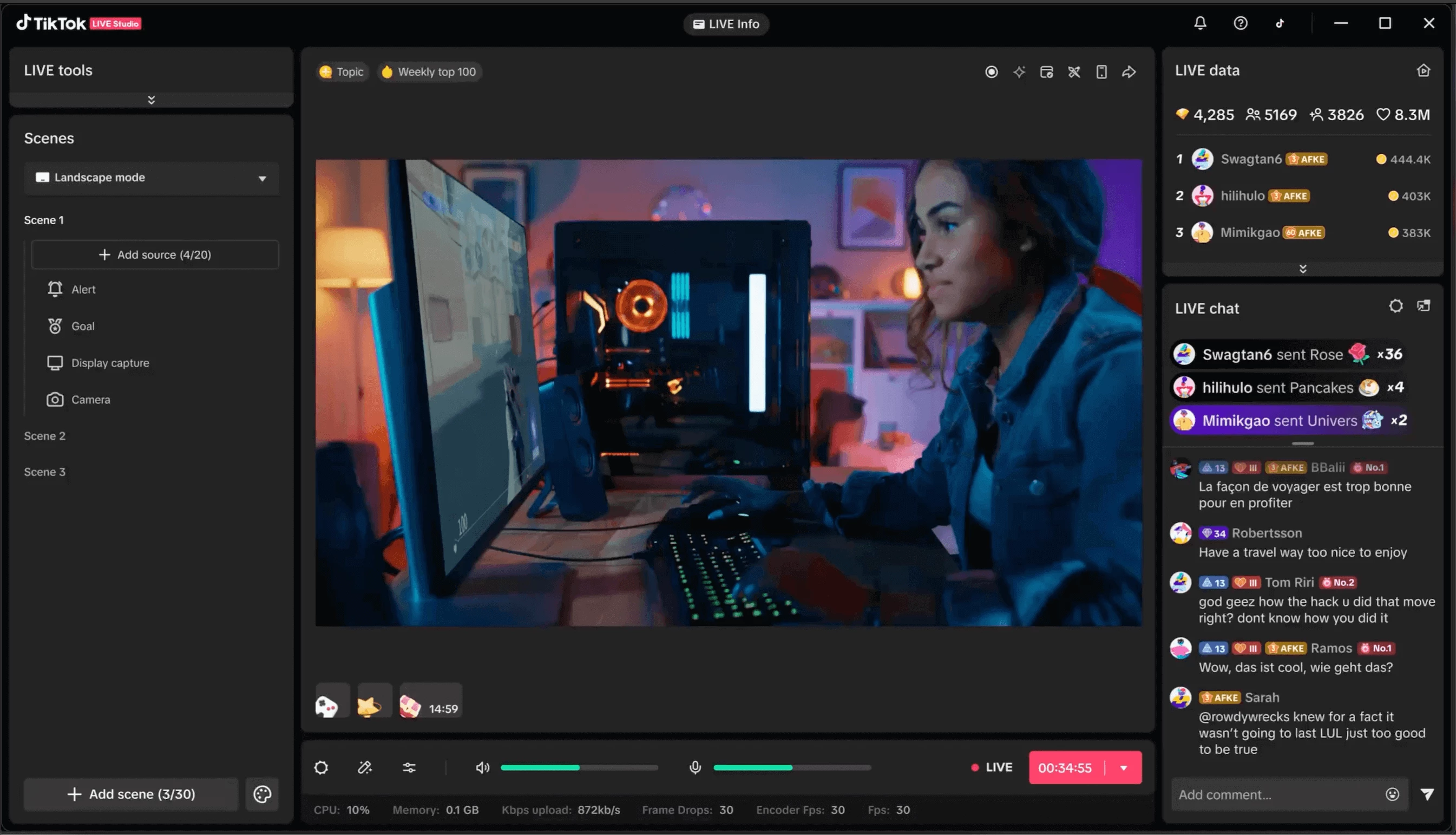
Operating the software simplifies the content delivery pipeline. Rather than keeping multiple windows open to monitor stream health and read chat, the client consolidates these metrics into a single unified dashboard. This minimizes visual clutter, allowing the broadcaster to remain engaged with viewers. For creators whose primary focus is building a community, this centralized approach removes the technical barriers traditionally associated with PC broadcasting.
Key Features
- Native Chat and Gift Integration: The application provides direct, real-time access to viewer comments, subscriber badges, and animated virtual gift notifications within the main control interface. Streamers can read chat without needing a secondary device or relying on external browser sources, and can configure on-screen alert widgets to trigger automatically when viewers send specific items.
- Portrait Layout Optimization: The default workspace canvas is locked to a vertical aspect ratio, ensuring that the final video feed is perfectly optimized for mobile viewing screens. Users can arrange their gameplay capture in the center while placing webcam feeds and chat overlays above or below, though a landscape or dual-layout toggle is also available for specific broadcasting setups.
- Hardware Encoder Support: To maintain high frame rates during PC gaming sessions, the software supports dedicated hardware encoding pipelines. Users can select NVIDIA NVENC or AMD hardware encoders in the video settings, shifting the heavy video processing workload away from the main processor and onto the graphics card to prevent stuttering in demanding titles.
- Multi-Guest Support: The client natively supports the platform's co-hosting features, allowing broadcasters to invite other creators to join the feed. The software automatically splits the layout to accommodate the guest's video, replicating the familiar dual-screen interaction seen on the mobile client without requiring complex audio routing or virtual cables.
- Automated Network Optimization: The application includes a built-in network speed test that evaluates the user's internet upload capacity upon first launch. Based on the results, it automatically configures the ideal starting video bitrate, frame rate, and resolution, taking the guesswork out of bandwidth management for less technical users.
- Scene and Source Management: The main dashboard features a familiar layers-based source system where users can build complex visual layouts. Broadcasters can add and arrange primary webcams, specific application windows, full display captures, external capture cards, and scrolling text marquees using a simple drag-and-drop interface.
How to Install TikTok LIVE Studio on Windows
- Navigate to the official vendor download page using a web browser to obtain the Windows installer package.
- Locate the downloaded executable file in your default downloads folder and run it to initialize the setup wizard.
- Review the installation prompts, confirm the default destination directory on your local storage drive, and click install to extract the application files.
- Launch the software using the new desktop shortcut created during installation. The application will immediately display a login screen featuring a large QR code and standard credential input fields.
- Authenticate your account by entering your standard platform credentials, or open the mobile client on your smartphone, navigate to the QR scanner, and scan the code displayed on your computer monitor.
- Allow the software to execute its initial network diagnostic check. This automated test pings local servers to measure your upload speed and applies a baseline video quality profile.
- Grant the requested Windows privacy permissions allowing the software to communicate with your connected microphone and webcam.
- Set up your starting layout by adding your primary camera source, testing your microphone input levels in the Audio Mixer tab, and configuring a screen capture source before pressing the start broadcast button.
TikTok LIVE Studio Free vs. Paid
TikTok LIVE Studio is available at no cost to download, install, and operate on supported desktop operating systems. The vendor does not charge creators an upfront purchase price, nor does it require a monthly subscription to unlock advanced broadcasting capabilities. Unlike some freemium streaming software, there are no artificial restrictions on stream duration, no locked resolution limits, and no forced promotional watermarks layered over your final video output. All application features, from high-definition video rendering to multi-guest hosting and native alert integration, are fully unlocked for every eligible user right from the start.
The business model supporting this software relies entirely on the platform's internal virtual economy. The vendor generates revenue by taking a percentage of the virtual gifts and coins that viewers purchase and send to creators during an active live broadcast. Because the desktop application serves as a dedicated gateway to generate this interactive content, the company has a direct financial interest in keeping the broadcasting tools freely accessible to maximize the volume and quality of streams on their network.
It is important to note that while the software does not cost money, access is strictly regulated by account standing. The platform enforces a gatekeeping system where users must meet specific age and follower thresholds before the desktop client will permit a successful login. Generally, the account owner must be at least 18 years old and hold a minimum of 1,000 to 3,000 followers, depending on regional policies and whether the account focuses on gaming or general entertainment. If an account does not meet these criteria, the software will block access entirely upon login.
TikTok LIVE Studio vs. OBS Studio vs. Streamlabs Desktop
OBS Studio is a resource-efficient, open-source broadcasting tool that consumes far fewer system resources than the official ByteDance application. Broadcasters often choose OBS when they require deep control over VST audio plugins, complex scene transitions, or the ability to multistream to several websites simultaneously using third-party canvas add-ons. However, using OBS for this specific platform requires the user to acquire an RTMP stream key—a process that often involves applying through third-party creator agencies or waiting for manual vendor approval. Furthermore, OBS completely lacks direct integration with native viewer guessing games and virtual gift animations.
Streamlabs Desktop acts as a middle ground, offering a visually polished interface built on top of the open-source OBS framework. It appeals to users who want ready-to-use aesthetic themes, simple widget integration, and easy login options for traditional streaming sites. While it provides a user-friendly setup, it tends to be the most demanding on computer hardware, occasionally causing frame drops on lower-end machines. Additionally, while Streamlabs offers premium subscription tiers for advanced multistreaming, it still operates via external server routing and misses out on the platform-exclusive tools like native multi-guest hosting.
TikTok LIVE Studio remains the better fit for dedicated mobile-first creators who want an immediate, friction-free pipeline to their audience. It eliminates the hassle of tracking down external stream keys and provides an interface permanently locked into the platform's unique ecosystem. If a creator's primary goal is growing their viewership and directly monetizing through native virtual gifts without managing complex encoder settings, the official client delivers the most practical, ready-to-use environment.
Common Issues and Fixes
- Problem description. Users encounter a 'Network Error' or connection failure on the main login screen. This typically occurs when a local firewall, active VPN, or antivirus program intercepts and blocks the software's communication with the authentication servers. Open your Windows Defender Firewall settings, navigate to the allowed applications list, and manually add an exception for the main executable file, then temporarily disable any VPN services before attempting to log in again.
- Problem description. The broadcast feed stutters and drops frames, even though the local PC game runs smoothly. This happens when the configured video bitrate exceeds what your internet connection can consistently upload. Navigate to the Live Settings panel, locate the video quality tab, and reduce the video bitrate to consume no more than 80 percent of your maximum tested upload speed, or drop your output resolution from 1080p to 720p to reduce bandwidth strain.
- Problem description. Heavy system lag and high processor usage occur when streaming modern games. The software can demand significant processing power if it defaults to software encoding. Go into the streaming configuration menu and verify that the hardware encoder option is actively checked, which forces your dedicated graphics card to handle the video compression instead of your computer's main processor.
- Problem description. Login is blocked by a 'Does not meet requirements' or revoked access message. The platform continuously checks account eligibility, and access is immediately suspended if the account falls under the follower threshold, receives a community guidelines strike, or requires age verification. Open the mobile application inbox to locate the livestream suspension notice, click the appeal button to submit a valid photo ID for age verification, and wait for support staff to restore privileges.
- Problem description. Viewers complain about double audio or an echoing microphone feed during the stream. This issue arises when the software captures sound from both the default desktop audio source and a specifically assigned microphone simultaneously. Open the Audio Mixer tab on the main dashboard, review your active input and output devices, and manually remove or mute duplicate hardware entries to isolate the sound channels correctly.
Version 1.10.2 — December 2025
- Enhanced Adaptive Bitrate Streaming: Introduced a dynamic quality adjustment system that automatically stabilizes video resolution and bitrate during network fluctuations to prevent buffering.
- Advanced Scene Editor: Added new customizable overlay templates and improved source management, allowing for easier layering of webcam, game capture, and alert widgets.
- Performance Optimization: Reduced CPU and GPU resource consumption by approximately 15% for smoother gameplay broadcasting on mid-range PCs.
- Bug Fixes: Resolved an intermittent issue where specific game windows would display as a black screen on Windows 11, and fixed audio desync problems when using virtual audio cables.