Boris FX Sapphire Plug-ins operates as a high-end visual effects and transition suite designed directly for professional compositors, video editors, and motion graphics artists. Rather than functioning as a standalone video editor, this desktop software integrates directly into host applications like Adobe Premiere Pro, After Effects, DaVinci Resolve, and Avid Media Composer. By loading into these timelines, the package allows artists to apply cinematic lighting, complex distortions, and stylized looks without exporting footage back and forth between different programs. The toolset directly targets finishing workflows in episodic television, feature films, and commercial advertising where standard built-in effects fall short of visual expectations.
Choosing a dedicated, locally installed plugin suite over lightweight browser-based effects or generic filters is necessary for professionals who require frame-accurate control, offline rendering, and integration with advanced hardware acceleration. Editors face strict deadlines and demand immediate playback feedback when adjusting a localized glow or animating a complex transition. Desktop processing taps directly into localized graphics processing units to calculate heavy pixel manipulation in real-time. This local workflow avoids the latency and upload times associated with cloud rendering tools, keeping the entire post-production pipeline secure and contained on the local workstation.
Artists turn to this specific plugin library because it provides an extensive node-based workspace and deeply customizable parameters for every individual effect. Instead of applying a static filter, an editor can track a specific highlight using integrated planar tracking, attach a custom lens flare to that tracking data, and define exactly how the flare reacts to the edge of the frame. This level of granular control solves concrete daily post-production tasks—such as matching the exact optical characteristics of a physical lens or generating realistic atmospheric lighting—while keeping the editor entirely within their primary editing interface.
Key Features
- Feature Name: S_LensFlare and Flare Designer. This lighting tool allows editors to generate highly realistic optical flares that react to the luminance of the underlying footage. Users can open the dedicated Flare Designer interface to build custom flare elements from scratch, adjusting individual ghosts, rings, and spikes. The tool includes a massive library of presets modeled directly after physical camera lenses, providing an immediate starting point for complex lighting setups.
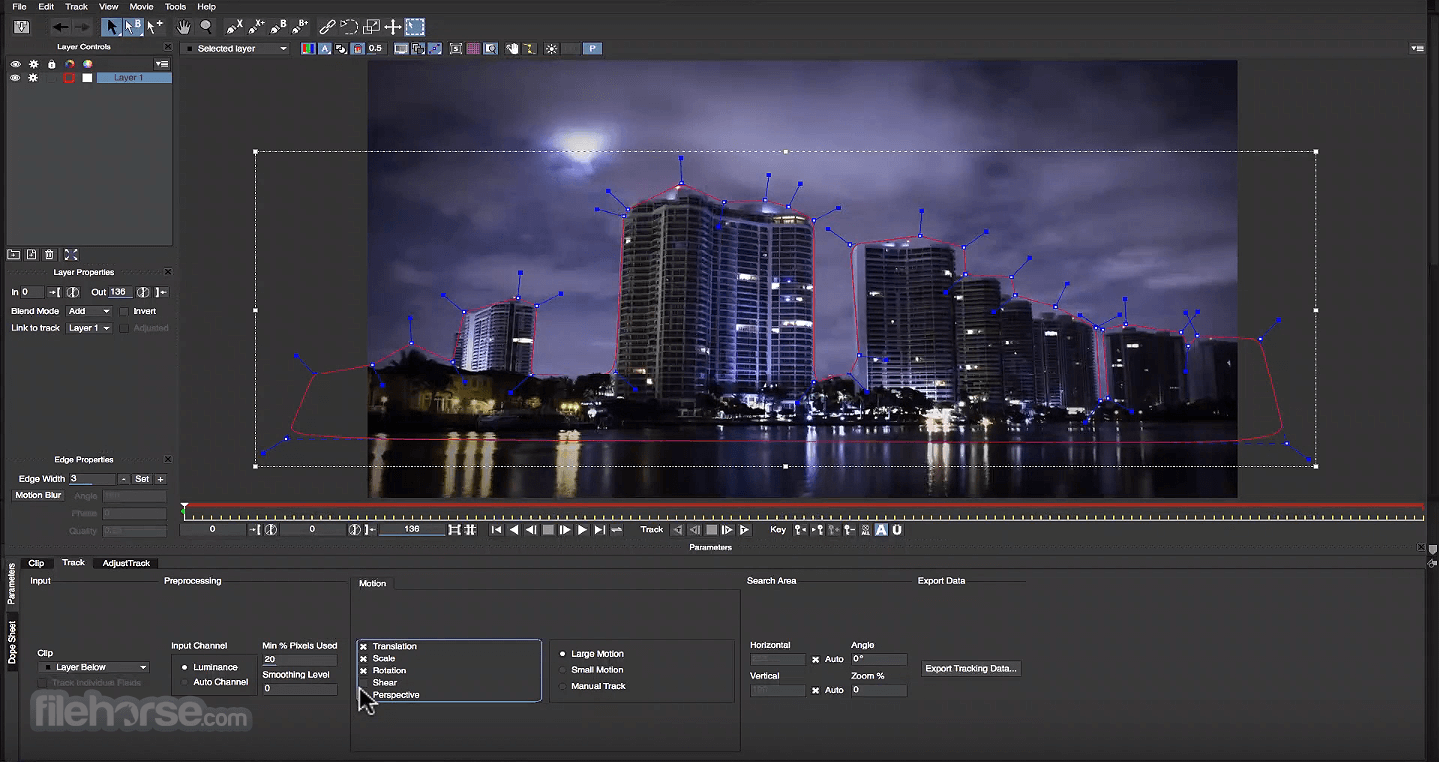
- Feature Name: Integrated Mocha Planar Tracking. Almost every effect in the library includes a built-in tracking module directly within the effect control panel. Clicking the Mocha button launches a dedicated tracking interface where editors can draw splines around a moving object to track its perspective and translation over time. This data then isolates the effect strictly to the tracked area, entirely bypassing the need to generate complex manual keyframes on the host timeline.
- Feature Name: Effect and Transition Builder. Rather than stacking individual effects on a timeline, artists can open the Builder interface to create visual combinations using a node-based workflow. Users drag and drop different visual nodes, connect them with virtual wires, and define how parameters interact with each other. The final result collapses back into a single effect layer on the host timeline, keeping the project organized and reducing playback lag.
- Feature Name: S_Glow and S_EdgeRays. The lighting category provides specialized tools for manipulating highlights and generating atmospheric beams. S_Glow isolates the brightest pixels in a frame and diffuses them with customizable color gradients and width controls, avoiding the harsh clipping common in standard blur-based glows. S_EdgeRays detects the alpha channel or luma threshold of a clip to project directional light beams, mimicking volumetric light passing through a window.
- Feature Name: S_Shake and S_Distort. Editors looking to add kinetic energy or chaotic movement to a shot use the distortion tools to manipulate the image geometry. S_Shake simulates handheld camera movement, earthquakes, or impact jolts by generating randomized translation data with customizable motion blur. The distortion category includes tools for melting pixels, creating chromatic aberration, and simulating broken glass, all reacting dynamically to the footage beneath them.
- Feature Name: S_FilmDamage and S_Vintage. This set of stylization tools physically deteriorates digital footage to match archival analog film stocks. Editors can dial in specific amounts of film grain, gate weave, hair, dust, and localized scratches using slider controls in the effects panel. The vintage tools also manipulate the color space to mimic specific film development processes, allowing a digital project to quickly adopt the aesthetic of a degraded 16mm projection.
How to Install Boris FX Sapphire Plug-ins on Windows
- Download the correct Windows installer executable from the official vendor website, ensuring you select the package that matches your specific host application, such as Adobe or OFX.
- Close all running video editing software, including background render engines or project managers, to prevent file locking during the copy process.
- Launch the downloaded setup executable and review the End User License Agreement. This process applies identically whether your workstation runs Windows 10 or Windows 11.
- Select the specific host applications you want the plugins to bind to, or leave the default paths intact so the setup utility can automatically detect your installed software.
- Allow the installer to extract the core effect libraries and copy the plugin files into the common media directory on your primary drive.
- Once the file transfer completes, the Boris FX App Manager will automatically launch, prompting you to sign in with your account credentials.
- Enter your activation details or select the trial mode option within the App Manager to authenticate the local installation.
- Open your video editing application, navigate to the effects library, and search for the newly added categorized folders to apply your first transition.
Boris FX Sapphire Plug-ins Free vs. Paid
Boris FX Sapphire Plug-ins operates exclusively under a premium commercial licensing model, meaning there is no entirely free tier for professional production work. The vendor offers access through monthly and annual subscriptions, as well as a perpetual license option for studios that prefer to own the software outright. The pricing structure scales depending on whether an individual purchases a single-host license—restricted strictly to Adobe applications, for example—or a multi-host license that covers Adobe, Avid, and OFX environments simultaneously. Studios managing multiple editing bays can also purchase floating licenses, allowing the software to be installed on numerous machines while a central server dictates how many active sessions run concurrently.
For editors looking to test the toolset before committing to a purchase, a free trial is readily available directly from the vendor's site. This trial is fully functional, granting access to every lighting tool, distortion effect, and the complete node-based builder, but it enforces a strict visual limitation. Any footage rendered using the trial version will display a prominent red watermark across the entire frame. This watermark renders the output entirely unusable for final client delivery or public distribution.
To remove the watermark, a user must purchase a valid license and authenticate their system through the official desktop application manager. Upon successful activation, the host application will immediately clear the watermark from the preview monitor, and previously rendered sequences can be exported cleanly without needing to rebuild the effects. This evaluation setup allows artists to verify hardware compatibility, test render speeds, and pitch specific visual concepts to clients before securing the project budget necessary to cover the license cost.
Boris FX Sapphire Plug-ins vs. Boris FX Continuum vs. Maxon Red Giant VFX
Boris FX Continuum targets a fundamentally different post-production workflow than its stylized counterpart, focusing primarily on image restoration, daily broadcast finishing, and green screen extraction. Editors relying on Continuum frequently use its Primatte Studio for advanced keying, or its specialized tools for fixing flickering lights, removing digital noise, and stabilizing shaky drone footage. A user should choose Continuum when their primary daily tasks involve rescuing problematic footage, generating broadcast news lower-thirds, and executing invisible visual effects. However, Continuum lacks the highly specific, physically accurate lighting models and the advanced node-based transition building architecture that high-end motion graphics artists demand.
Maxon Red Giant VFX operates entirely within the After Effects ecosystem, providing compositors with tools like Supercomp for managing complex layer interactions, and optical tools for generating realistic glows. Red Giant excels for artists who spend their entire day deep inside single-shot composites, offering tight integration with standard layer modes and camera trackers. A user should choose Red Giant VFX when their pipeline is strictly tied to Adobe architecture and they need dedicated compositing management panels. The main drawback of the Red Giant suite is its heavy reliance on specific host software, often struggling to provide the exact same user experience when working inside multi-host OFX environments.
Boris FX Sapphire Plug-ins is the better fit when an editor requires hyper-realistic, highly stylized visual effects that translate identically across multiple video editing applications. If an artist needs to build a complex, multi-layered lens flare in Premiere Pro, and then immediately hand that exact setup to a colorist working in DaVinci Resolve, this suite maintains total parity across platforms. It provides the strongest workflow for commercial and feature film finishers who want immediate access to aggressive stylization, pristine lighting, and the ability to build custom transitions using a node-based interface, all without ever leaving their editing timeline.
Common Issues and Fixes
- Problem description. Plugins not appearing in the host application after installation. This typically occurs because the video editing software was left open while the installer was running, or the wrong installer type was selected for the host program. To resolve this, close the editing software completely, verify that you downloaded the correct Adobe, Avid, or OFX package, and run the setup utility again to force the files into the proper directory.
- Problem description. A large red watermark appears over the final rendered footage. This visual indicator means the software cannot verify an active license and has reverted to trial mode. Open the local licensing manager tool, verify your internet connection, sign in to your vendor account, and ensure your current subscription or perpetual activation has not expired or failed to synchronize.
- Problem description. Integrated tracking interface fails to launch when clicked. Clicking the track button inside the effect controls may result in no action if the system graphics drivers are outdated or conflicting with the module. Navigate to your GPU manufacturer's website, download the latest Studio or PRO driver, and perform a clean installation to ensure the compute architecture communicates correctly with the host application.
- Problem description. Timeline playback drops frames heavily when applying lighting effects. Complex lighting calculations, especially those involving customized optical flares or diffused glows, demand significant localized processing power. To improve timeline responsiveness, check the effect parameters to ensure GPU acceleration is enabled, and lower the preview playback resolution within your video editor until you are ready to perform a final export.
- Problem description. The effect builder window opens on the wrong monitor in a multi-display setup. The node-based interface occasionally defaults to the primary system display rather than the monitor housing the video editor. Drag the builder window to your preferred screen and close it; the interface will typically remember the new coordinate positioning the next time you launch a custom transition or effect layout.
Version 2026 — November 2025
- Added S_FilmBurn, a new effect and transition that simulates authentic analogue film aesthetics using high-resolution scans of physical film stock, complete with customizable controls for light leaks, grain, and sprocket artifacts.
- Introduced S_MochaWhip, a dynamic AI-powered transition that utilizes Mocha tracking to isolate a subject and seamlessly whip it into the next scene.
- Expanded S_LensFlare with a new "Pro Lens Flare Pack" containing 8 cinematic presets inspired by real-world optical characteristics like anamorphic streaks and diffusion.
- Updated S_Grunge with over 80 new high-resolution texture stamps, including oil paint, chalk, ink, and splatter patterns.
- Improved Effect Builder workflow by adding visual parameter linking, allowing users to easily inspect driver and driven connections directly within the node graph.
- Included 11 new professionally curated presets for the Effect Builder to showcase advanced multi-layered looks.