Wondershare Filmora serves as a middle ground for video creators who need advanced multi-track editing capabilities without the steep learning curve of professional film-industry suites. Designed for vloggers, small business marketers, educators, and social media managers, this desktop application provides a traditional non-linear timeline layout paired with a vast library of drag-and-drop effects. Instead of forcing users to build complex visual effects from scratch or manually keyframe every motion path, the software incorporates template-driven designs and automated tools to handle repetitive editing tasks. Whether you are assembling a 4K travel documentary, cutting together an interview, or producing short-form vertical content, the interface organizes media, audio, and titles into an easily digestible workspace.
Choosing a dedicated desktop application over browser-based editing alternatives makes a noticeable difference when working with large, high-bitrate media files. Web editors often struggle with timeline lag, upload bottlenecks, and limited local rendering power when processing multiple streams of 4K video. By installing the software locally on a Windows PC, editors can utilize their dedicated graphics hardware to accelerate playback, encode final exports faster, and manage heavy media caches directly on their own solid-state drives. The local workflow also means you maintain direct control over your raw footage organization without waiting for gigabytes of data to sync to a remote server before you can make your first cut. For projects with heavy color correction or dense audio mixing, having immediate access to local hardware resources prevents workflow interruptions.
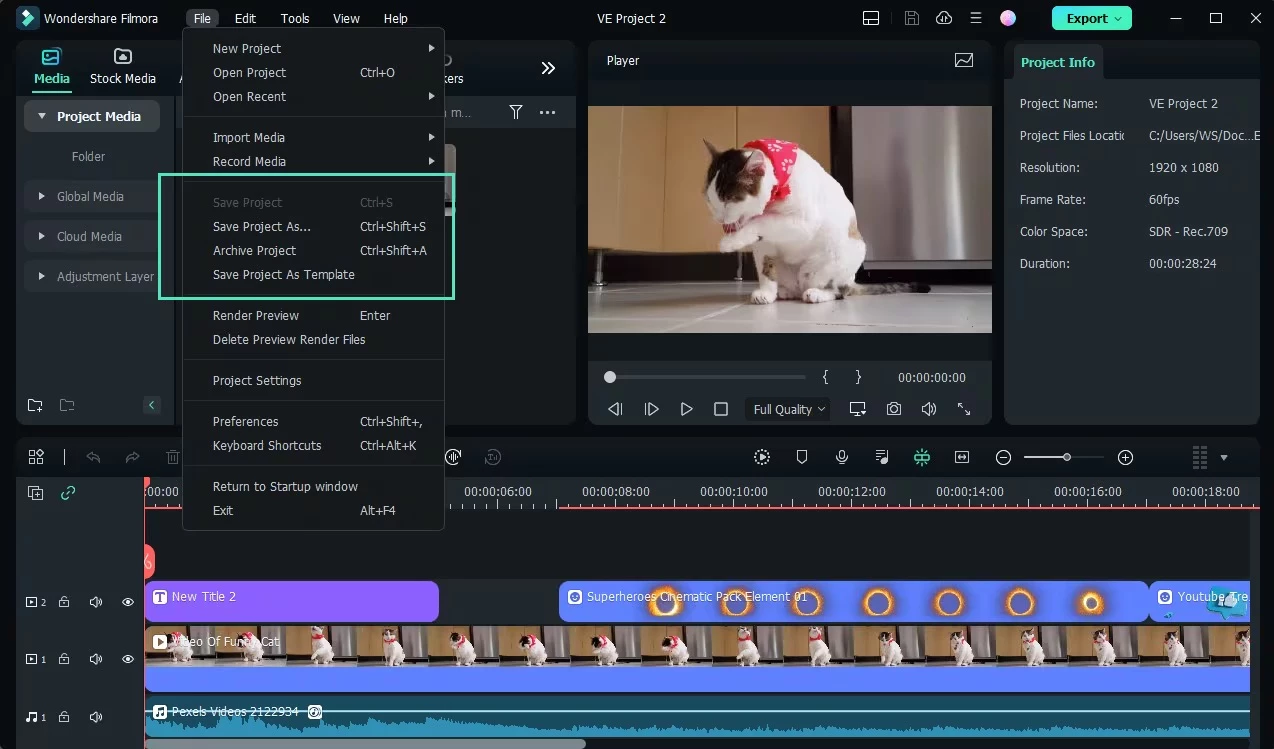
Beyond standard trimming and splicing, the modern iteration of this editor leans heavily into automated processes to reduce the manual labor typically associated with audio cleaning and subject isolation. Tasks that traditionally required dedicated third-party plugins or hours of manual scrubbing—such as masking out a background, isolating dialogue from ambient room noise, or generating accurate subtitle text—are integrated directly into the main interface. This approach allows independent creators to output polished, multi-layered videos at a high frequency. The workspace layout includes a preview window, a media pool, and an inspector panel, maintaining a familiar editing structure while burying complex mathematical adjustments behind accessible sliders and single-click buttons.
Key Features
- Magnetic Timeline and Multi-Track Editing: The core workspace allows editors to drag, drop, and snap video clips together on a timeline that automatically closes gaps between media. Users can stack dozens of independent audio, video, and text layers to build complex compositions. Tools like the Pen Tool enable custom shape drawing and mask creation directly in the preview window, allowing for detailed composite shots without relying on external compositing applications. The track headers provide simple toggles for muting audio, hiding video layers, or locking tracks to prevent accidental edits during complex assembly.
- Smart Short Clips: For creators who produce long-form content but also need to feed vertical social media channels, this tool automatically scans long landscape videos to identify highlight moments. It extracts these segments, reframes the aspect ratio to vertical, and generates multiple independent short clips. This eliminates the need to manually scrub through an hour-long podcast interview just to find a 30-second soundbite suitable for vertical distribution, delivering ready-to-export clips with automatically reframed subjects.
- AI Motion Tracking: Attaching a text callout, a graphic, or a privacy blur to a moving subject traditionally requires manual keyframing frame by frame. This tool simplifies the process: the user draws a tracking box around the target object in the preview window, and the software analyzes the movement. The tracked path can then be assigned to any imported asset, keeping names, arrows, or mosaic blurs pinned to a person as they walk across the screen, adapting to changes in scale and speed.
- Silence Detection: Editing talking-head videos, lectures, or podcasts often involves cutting out hundreds of small pauses, breaths, and dead air. This feature scans an entire audio track, identifies audio levels that fall below a specified volume threshold, and automatically removes those quiet segments. The timeline then ripples shut, condensing a long recording into a tight, fast-paced dialogue track in minutes instead of hours, saving editors from monotonous razor-tool clicking.
- AI Portrait Cutout: Removing the background behind a subject usually demands a physical green screen and careful chroma key adjustments. This built-in effect analyzes the human subject in the frame and isolates them from their surroundings dynamically. Editors can then drop new backgrounds, animated charts, or gameplay footage on the track below, effectively placing the speaker in a completely new environment without complicated studio setups or perfect lighting conditions.
- Speech-to-Text and Auto Captions: Manually typing out subtitles for a ten-minute video is a tedious process. This utility listens to the dialogue track, transcribes the spoken words, and generates an accurate text layer synchronized with the audio. Editors can then select different font styles, colors, and animation presets to make the captions visually engaging, ensuring the final video remains accessible for viewers watching with their volume turned off in public spaces.
How to Install Wondershare Filmora on Windows
- Navigate to the official Wondershare website and download the Windows installer executable to your local disk.
- Open your Windows Downloads folder and double-click the setup file to launch the installation wizard.
- Review the end-user license agreement, click to accept, and select your target installation directory. Keeping the default system drive path is recommended to ensure the fastest application loading times on your primary solid-state drive.
- Click the install button to begin the process. The setup program will act as a downloader, connecting to the vendor servers to retrieve the full application package and unpack the necessary files onto your system.
- Once the progress bar completes, click the prompt to launch the application directly from the setup window, or use the newly created desktop shortcut.
- Upon the first launch, a login screen will appear. You must sign in using your Wondershare ID, or create a new account, as the software requires authentication to grant access to the editing workspace, cloud assets, and your specific license tier.
- Begin a new project. Note that some specific generative tools or advanced effects may trigger a brief background download the first time you click them, as the software retrieves specific models locally to save initial installation space.
Wondershare Filmora Free vs. Paid
The software operates on a freemium model, allowing anyone to download the application, create an account, and test almost the entire editing toolkit without upfront payment. In this free tier, users can import media, build complex timelines, and experiment with various effects and transitions. However, the free version restricts the final output by applying a large, permanent Wondershare watermark across the center of any exported video. To remove this watermark and use the software for public or commercial projects, users must upgrade to one of the paid license tiers.
The vendor offers subscription plans, typically divided into Basic and Advanced tiers. The Basic subscription, costing roughly $49.99 annually, removes the export watermark, provides continuous updates, and includes standard technical support. The Advanced tier, often priced around $69.99 annually, builds on the Basic plan by adding a monthly allotment of credits used exclusively for generating content via the software's generative tools, such as text-to-video generation or voice cloning.
For users who prefer to avoid recurring subscriptions, a Perpetual plan is available for a one-time payment of approximately $79.99. This license grants lifetime access to the specific major release available at the time of purchase, including minor updates for that cycle. However, it does not cover upgrades to future major iterations of the software. Regardless of the chosen plan, users who exhaust their allotted generative credits may need to purchase additional credit packs separately if they rely heavily on automated generation tools rather than traditional timeline editing.
Wondershare Filmora vs. CapCut Desktop vs. DaVinci Resolve
CapCut Desktop is designed around modern, mobile-first content creation, offering a highly streamlined interface heavily reliant on vertical reframing and automatic stylish captions. It connects directly to TikTok's ecosystem, making it a favorite for daily short-form creators. You should choose CapCut Desktop if your primary goal is pumping out fast, trend-chasing vertical videos with minimal manual editing, though you will have to navigate a heavily paywalled effect library and mandatory cloud logins that interrupt offline work.
DaVinci Resolve sits at the opposite end of the spectrum as a professional, film-industry standard application. It features an incredibly deep node-based compositing page for visual effects and the Fairlight audio workspace for broadcast-quality sound mixing. You should choose DaVinci Resolve if you are working on independent films, need pro-level color grading for raw camera formats, and have the patience to learn a highly technical, complex interface without paying a subscription fee.
Wondershare Filmora occupies the middle ground, offering a more traditional track-based timeline than CapCut, but with a much shallower learning curve than DaVinci Resolve. It replaces complex node graphs with simple drag-and-drop effects and automates tedious tasks like background removal and audio syncing. You should choose Wondershare Filmora if you are producing long-form YouTube videos, documentaries, or educational content and need prosumer-level control without spending weeks learning how to operate a professional cinema editor.
Common Issues and Fixes
- Timeline playback lags or stutters. Editing high-resolution 4K video can overwhelm system resources, causing the preview window to drop frames. Go to File, open Preferences, select the Performance tab, and enable the option to automatically create proxies. This forces the software to generate lower-resolution temporary files for smooth playback while using the original high-quality files for the final export.
- Video export freezes or outputs a green screen. Rendering failures are frequently tied to hardware encoding conflicts with specific graphics drivers. Navigate to the Export menu, disable the "Enable GPU accelerated video encoding" checkbox, and attempt to export the project again using software-based CPU rendering.
- The application crashes immediately on startup. Strict antivirus programs or Windows Defender settings can mistakenly block the executable files from launching. Open your Windows Security settings, navigate to the Virus & Threat Protection menu, and add the Wondershare Filmora installation folder to your exclusion list to allow the application to run normally.
- Storage space fills up quickly after multiple projects. The editor generates temporary render files and proxy media in the background, which accumulate and consume local disk space. Go to File, click Preferences, and select the Media Cache tab. Click the "Clear" button to delete old render data, or toggle the automatic deletion setting to manage cache cleanup automatically.
Version 15.1.0 — December 2025
- Added "AI Mate," a new conversational assistant that allows users to execute edits, generate creative assets, and receive feature guidance through chat commands.
- Introduced "Auto Normalization" for one-click audio adjustments, ensuring loudness meets standard platform levels (LUFS/LKFS) via built-in presets.
- Implemented "Switchable Workspace Layouts" with five predefined interface options, including a dedicated Dual Monitor mode for improved multitasking.
- Improved "Smart Cutout" precision with upgraded smudging interactions, allowing for more accurate identification of complex edges and reduced manual adjustments.
- Enhanced "Dynamic Captions" functionality to support batch text processing and included new exclusive animation effects for subtitles.
- Upgraded the internal audio processing engine to a 32-bit pipeline, delivering higher fidelity and expanded dynamic range for professional sound quality.