Adobe Media Encoder operates as the central rendering and transcoding engine for professional video production pipelines. Instead of locking up a primary editing application while a project exports, this dedicated desktop software takes over the processing in the background. Video editors, motion designers, and broadcast professionals rely on it to process complex timelines from Premiere Pro and After Effects, outputting final master files, social media proxies, or broadcast-ready packages while they continue working on their next sequence. By separating the creative process from the computational process, the application removes a significant bottleneck in daily video production.
For real-world workflows, the application solves the specific problem of sequential rendering. A browser-based or lightweight converter cannot interpret complex timeline data, layered motion graphics, or color grades natively from a project file. Because it reads the native project files through Dynamic Link, it bypasses the need to export an uncompressed intermediate file first. Users queue up multiple sequences, apply different encoding presets to each—such as a high-bitrate ProRes 422 master, a compressed H.264 file for web delivery, and an audio-only WAV extraction—and let the software process the batch overnight or during a lunch break. This multi-format delivery is a daily reality for freelancers and agencies who must deliver the same video across television, YouTube, and vertical video platforms.
The desktop architecture is necessary here because video transcoding relies on local hardware acceleration, specifically multi-core CPUs and discrete GPUs. While cloud rendering exists, transferring hundreds of gigabytes of raw camera media over an internet connection is often impractical and costly. This tool keeps the computational lifting local, utilizing hardware video encoders to turn massive RAW media into optimized deliverables. Furthermore, the desktop environment allows the software to interact directly with local file systems and network-attached storage arrays, pulling source clips and writing massive output files with minimal latency. Users maintain full control over bitrates, frame rates, color space conversions, and audio channel mapping, ensuring the final output meets strict delivery specifications for clients or broadcast networks.
Key Features
- Background Queue Processing: The primary Queue panel allows you to stack multiple export jobs from different projects and process them sequentially without tying up your editing software. You can duplicate a job within the queue to export the same timeline into three different formats simultaneously, and a real-time interface indicator tracks the total number of processed and remaining items. This means you can line up twenty sequences at the end of the workday and leave the machine to process them unattended.
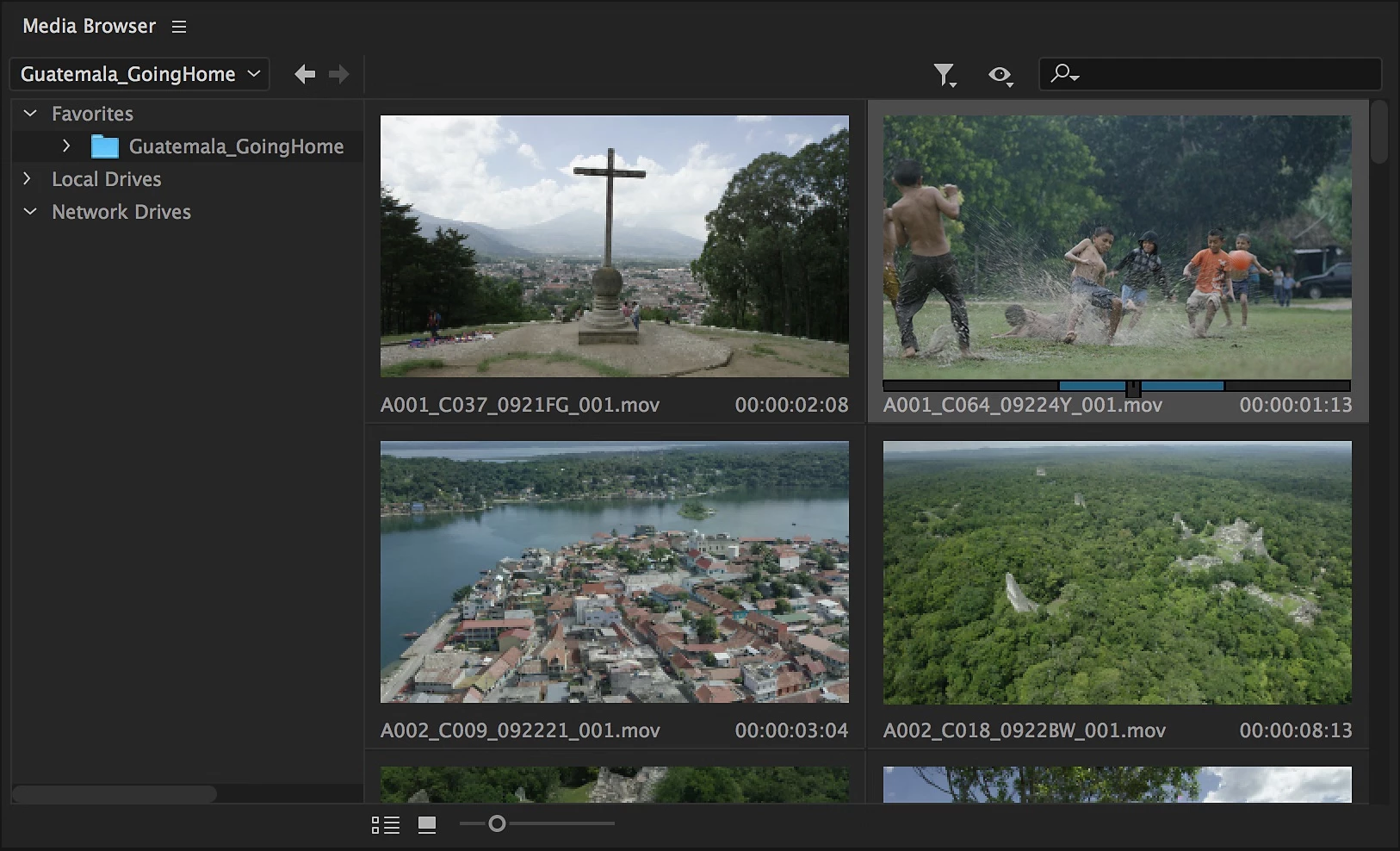
- Dynamic Link Integration: Rather than exporting a massive intermediary file from your editor, you can import native project files directly into the encoding queue using the Media Browser panel. The software reads the raw timelines, applying all effects, color correction, and text layers at render time without requiring an intermediate render pass. This direct connection ensures that any last-minute changes saved in the source project are automatically reflected in the queued export job.
- Automated Watch Folders: You can designate specific directories on your local drive or network storage to monitor for incoming media. When a new video file drops into the folder, the software automatically picks it up, transcodes it into a predefined format using a chosen preset, and saves the result in a designated output directory. This is frequently used by studios for automatic proxy generation, where camera raw files are converted into lightweight editing formats as soon as they are copied onto the server.
- Extensive Preset Browser: A dedicated panel houses built-in encoding templates for broadcast standards, specific social media platforms, and camera formats. Users can create, save, and import custom .epr preset files to ensure strict bitrate, resolution, and audio compliance across an entire team. Instead of manually configuring complex export settings for every render, editors simply drag and drop the required preset directly onto the pending job in the queue.
- Media Intelligence and Pre-Analysis: The software can generate sidecar files for incoming media to analyze visual objects and audio characteristics before editing begins. This creates metadata that allows editors to search for specific spoken dialogue or visual elements immediately upon importing the media into their main project. By handling this analysis externally, the primary editing software remains responsive.
- Hardware-Accelerated Encoding: The rendering engine taps into local GPU resources and dedicated silicon to reduce export times for H.264 and HEVC codecs. You can toggle between software-only encoding or hardware acceleration directly in the export settings dialog depending on system stability. This utilization of discrete graphics cards often turns an hour-long render into a ten-minute task.
- Destination Publishing: The export settings dialog includes a Publish tab that allows users to securely connect their social media or video hosting accounts directly to the application. Once a render finishes, the software can automatically upload the final video file to YouTube, Vimeo, or a designated FTP server, complete with titles, descriptions, and privacy settings configured prior to export.
How to Install Adobe Media Encoder on Windows
- Navigate to the official vendor website and download the Creative Cloud Desktop application installer for Windows. This central manager is mandatory, as the encoder cannot be installed via a standalone offline executable.
- Run the downloaded executable file and sign in with your active account credentials when prompted by the setup window. If you do not have an account, you must create one to proceed.
- Wait for the desktop manager to finish installing and updating its core background services, which requires an active and stable internet connection.
- Open the newly installed desktop app, navigate to the "All Apps" section, locate the video category, and find the specific listing for the encoder.
- Click the install button next to the application name. The manager will automatically determine whether your Windows 10 or Windows 11 system requires the standard x64 architecture package or the native Windows ARM package.
- Review your default installation path preferences in the desktop manager settings if you need to install the software on a secondary drive instead of the primary C: drive.
- Allow the download and installation process to complete; the progress bar in the desktop manager will indicate when it finishes extracting and placing the application files.
- Launch the application from your Start menu or directly from the desktop manager to verify the installation, initialize the local preference files, and confirm your subscription status.
Adobe Media Encoder Free vs. Paid
Adobe Media Encoder is not sold as a standalone software product and does not have a permanent free tier. It is strictly available as part of a paid subscription model through the vendor's central software ecosystem. Users cannot purchase a perpetual, one-time license for the application, nor can they buy it independently of the primary video editing tools it supports.
To access the encoder, you must subscribe to either a single-app plan for a related video tool, such as Premiere Pro or After Effects, or purchase the complete All Apps plan. The single-app subscriptions cost roughly $22.99 per month for individuals, while the full suite costs around $59.99 per month, depending on current vendor pricing, region, and annual commitments. Educational pricing is often available for students and teachers, providing a discounted rate for the complete suite. Once you have an active subscription to one of these primary editing tools, the encoder is included at no additional cost and is authorized through the same account login.
For users who want to test the software before committing, the vendor offers a 7-day trial. The trial provides full access to the rendering engine, all hardware acceleration features, and the complete library of export formats without applying watermarks or limiting export lengths. This allows professionals to test the export speeds on their specific hardware configuration. Once the trial period ends, the software requires an active paid subscription to continue functioning. If the subscription lapses, the application will lock, and you will not be able to queue new jobs or process existing ones.
The business model relies entirely on recurring cloud authentication. While the software runs locally on your Windows machine and can process files offline for short periods, it requires periodic internet connectivity to validate your subscription license. If the computer remains offline beyond the permitted grace period, the software will prompt you to connect to the internet to verify your account status before allowing further exports.
Adobe Media Encoder vs. HandBrake vs. Shutter Encoder
HandBrake is a free, open-source video transcoder focused purely on converting finished video files from one format to another. It excels at compressing large, uncompressed files into optimized MP4 or MKV containers using a straightforward, bare-bones interface. It is widely used for archiving video or shrinking files for web delivery. However, it cannot read native project files, render motion graphics, or process unflattened timelines directly from professional editing software. It requires you to already have a finished video file exported to your hard drive.
Shutter Encoder is another free, donation-supported tool that handles a massive variety of broadcast codecs, image sequences, and audio conversions, making it a favorite for generating proxy files or stripping audio tracks in professional environments. It uses FFmpeg under the hood and offers deep technical control over the exact conversion math, color space tagging, and metadata preservation. Like HandBrake, it only works with flat, exported media files rather than live project timelines, but it offers a much wider array of professional formats like ProRes and DNxHR.
Adobe Media Encoder is the better choice when your workflow relies on native project files and dynamic timelines. If you need to export a complex timeline full of text layers, color grades, and multi-track audio mixes without rendering a master file first, its direct integration makes it the only practical option. For simply crushing an existing MP4 into a smaller file size, HandBrake or Shutter Encoder will do the job faster, with less system overhead, and without requiring a paid monthly subscription.
Common Issues and Fixes
- Dynamic Link connection gets stuck. When sending a timeline from an editor to the queue, the interface occasionally freezes on a "Connecting to Dynamic Link server" or "Reading XMP" message indefinitely. Fix this by closing both the editing application and the encoder, opening the Windows Task Manager to forcefully end any remaining background processes related to the vendor, clearing the local media cache, and restarting the applications.
- Hardware-accelerated rendering fails or crashes. The export stops halfway through, stays stuck at zero percent, or produces a failed error log, often when encoding complex H.264 or HEVC files with heavy effects. Fix this by navigating to the Queue panel, selecting the problematic job, changing the renderer drop-down option from hardware acceleration to "Software Only," and restarting the export.
- Watch Folders stop processing new files. The application ignores new media dropped into a designated monitoring folder, failing to trigger the automatic transcoding process. Fix this by checking the Watch Folders panel to ensure the "Auto-Encode Watch Folders" checkbox is actively checked, verify that the destination drive has sufficient free space, and ensure the application has correct read/write permissions for that specific directory.
- Missing fonts during project import. A warning appears stating that fonts are missing or substituted when importing a native project file directly into the encoder, resulting in incorrect text rendering in the final video. Fix this by opening the original project file in its native editing application, syncing or installing the required fonts locally through the operating system, saving the project, and then re-importing the updated file into the queue.
- Exports exhibit visual artifacting or glitches. The final transcoded video contains pixelated blocks, dropped frames, or weird color shifts that were not present in the original timeline. Fix this by disabling "Maximum Render Quality" if you are scaling down footage, ensuring your GPU drivers are updated to the latest Studio or Enterprise branch, or switching to a different codec profile.
Version 25.6 — November 2025
- Restored functionality for Behance uploads, resolving failures experienced in previous versions.
- Fixed an issue where the Video Effect Manager failed to display fxFactory effects on macOS systems.
- Improved overall application stability and performance for smoother encoding workflows.