OBS Studio is a screen recording and live video production application that allows users to capture desktop activity, composite multiple media layers, and broadcast the final output to external ingest servers. It serves broadcasters, tutorial creators, and event producers who need strict control over their video encoding parameters, audio routing, and scene layouts. Instead of relying on a web-based capture tool, this desktop client processes video locally, allowing high-bitrate recording and complex multi-camera switching without relying solely on a browser environment. Local processing means users dictate the exact framerate, resolution, and color format of their output, utilizing local hardware to compress data before it ever reaches a network connection.
Users construct distinct layouts, called Scenes, by combining multiple visual Sources. These sources include application windows, full monitor displays, webcam feeds, static image files, scrolling text overlays, and direct inputs from capture cards. The interface provides a dedicated audio mixing desk for managing all active sound devices, allowing creators to isolate a microphone track from desktop audio or apply specific audio filters to eliminate background keyboard clicks. It outputs video to standard container formats including MKV, MP4, MOV, and FLV. By utilizing hardware-accelerated encoders such as NVENC or QuickSync, the application minimizes the central processing unit load during heavy gameplay or intensive application demonstrations.
Broadcasters rely on this tool because it provides direct access to server ingest URLs and stream keys, bypassing intermediary commercial services. It supports custom RTMP destinations, enabling video distribution to custom enterprise servers alongside major public platforms like Twitch and YouTube. Furthermore, the application supports local plugin integration, enabling custom user interface docks, specialized external hardware encoders, and direct control surface interactions over a local area network. This offline-first approach ensures that the application functions fully for local recording even when an active internet connection is entirely unavailable.
Key Features
- Scene Composition and Sources: The application relies on a modular layout where users combine various visual elements into a single canvas. By adding a Window Capture or Video Capture Device from the Sources dock, users stack overlapping layers, scale them using bounding box handles, and apply cropping by holding specific modifier keys.
- Advanced Audio Mixer: The built-in audio mixing panel provides individual volume sliders, mute toggles, and peak meters for every active audio device. Users navigate to the Advanced Audio Properties menu to assign specific inputs to distinct audio tracks, ensuring that a microphone feed and a background music track remain separated in the final multi-track media file.
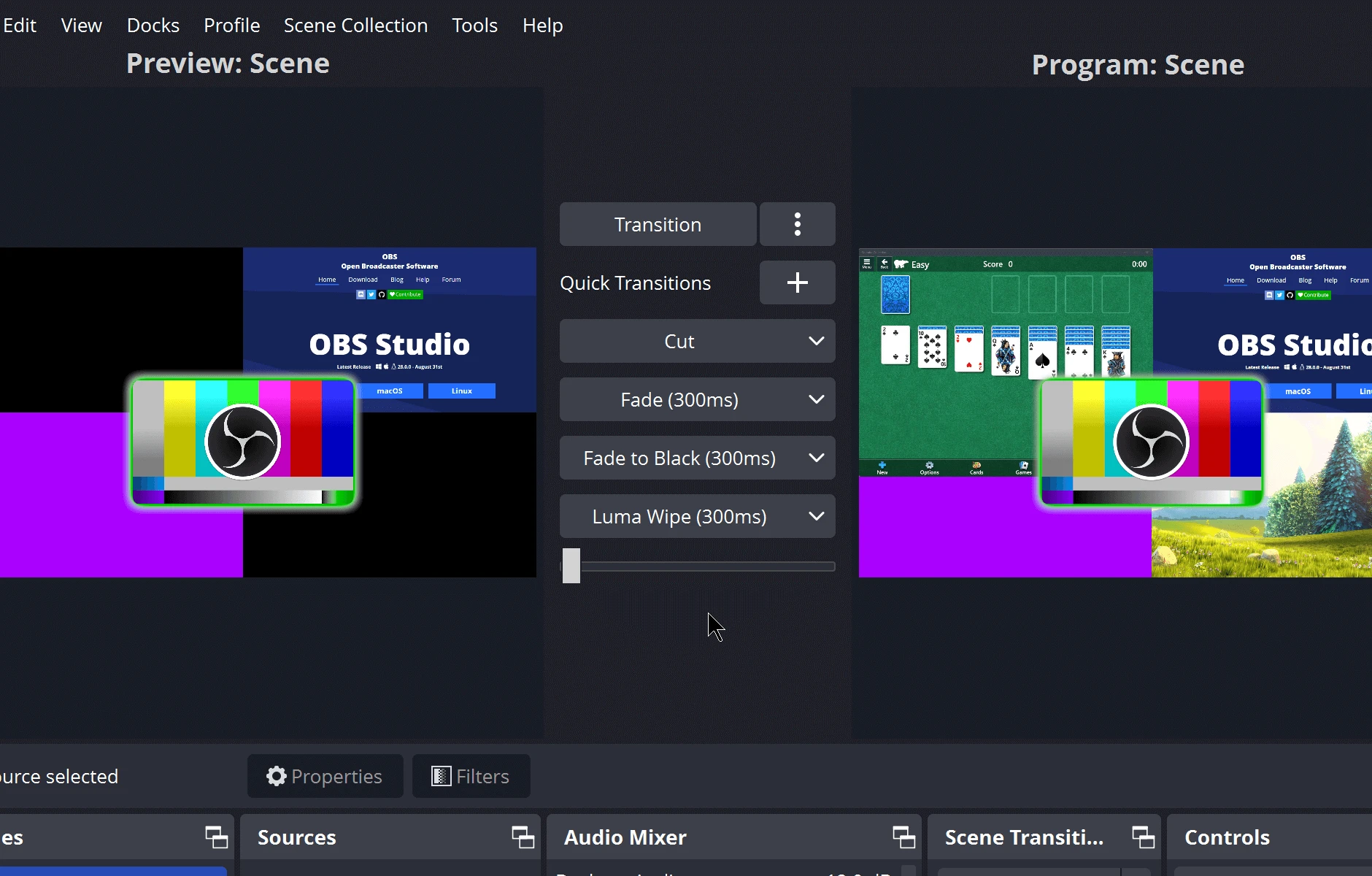
- Studio Mode Dual-Screen Preview: Activating Studio Mode splits the central viewing area into two distinct monitors. The left screen acts as a Preview scene, allowing operators to modify text overlays, adjust camera angles, or queue a completely different layout in the background before hitting the Transition button to push those changes to the live Program feed on the right.
- Hardware Encoder Integration: To prevent the central processor from stalling under heavy video processing tasks, the software interfaces directly with graphics card hardware encoders. By selecting options like NVENC or AMF in the Output settings tab, the compression workload shifts to dedicated silicon, maintaining high framerates in the active application being recorded.
- Virtual Camera Output: Clicking the Start Virtual Camera button in the main control dock pipes the active video scene directly into the operating system as a standard webcam feed. This allows users to route their composited graphics, multi-camera layouts, and media files directly into standard video conferencing applications like Zoom or Microsoft Teams without physical routing cables.
- Replay Buffer Configuration: Operators configure a rolling memory cache by enabling the Replay Buffer in the Output settings. This allows users to press a designated hotkey to save the last few minutes of active screen time as a discrete video file, capturing sudden events without recording hours of continuous, unnecessary footage to the hard drive.
- Filter and VST Plugin Support: Users right-click any visual source or audio device to open a dedicated Filters menu. Video filters include chroma keying for green screens and image masking, while audio filters support standard noise gates, compressors, and third-party VST 2.x plugins to modify equalization and remove background static locally.
How to Install OBS Studio on Windows
- Download the official Windows installer executable directly to your local storage drive.
- Double-click the downloaded executable file to initiate the setup wizard, prompting the user account control dialog to grant installation permissions.
- Read and accept the terms of the GNU General Public License to proceed to the directory selection screen.
- Select the destination folder; the default path routes to the standard Program Files directory, requiring administrative privileges for successful file extraction.
- Choose whether to create a desktop shortcut, then click Install to extract the core application files, default transition elements, and foundational plugins.
- Click Finish to close the wizard. Leaving the default checkbox active will immediately launch the application executable.
- Upon the initial launch, respond to the Auto-Configuration Wizard prompt. This automated tool tests the system hardware, measures network bandwidth, and applies a set of baseline settings optimized either for live network broadcasting or high-quality local recording.
- Navigate to the Settings menu to manually verify the base canvas resolution, ensuring it matches the primary desktop monitor before beginning any recording tasks.
OBS Studio Free vs. Paid
The application operates entirely under a free and open-source model, distributed under the GNU General Public License. There is no trial period, no premium tier, and no requirement to purchase a license code. Users download the complete application binary with all recording modules, audio mixing capabilities, and streaming protocols fully unlocked from the moment of installation.
Unlike commercial broadcasting software that restricts output resolution, caps the recording framerate, or places a forced visual watermark on exported videos for non-paying users, this tool imposes zero artificial limitations. The software permits local recording to disk at the maximum capabilities of the installed hardware and allows unlimited continuous streaming duration. It functions completely offline for local media creation without demanding a mandatory user account, an email registration, or a subscription login.
Financial maintenance for the development project relies strictly on community donations, corporate sponsorships, and backing from major hardware and streaming platforms rather than direct consumer sales. Enterprise users, commercial broadcasting studios, and individual home creators receive the exact same application build. While the core client remains strictly free, users might encounter third-party plugin developers who independently monetize their specific external add-ons, though these external purchases are strictly optional and not required for standard production tasks.
OBS Studio vs. Streamlabs Desktop vs. XSplit Broadcaster
Streamlabs Desktop targets beginner to intermediate streamers by integrating alert boxes, chat overlays, and monetization dashboards directly into the main user interface. It requires a mandatory account login to synchronize configuration profiles across cloud servers and actively pushes users toward a premium monthly subscription to unlock custom visual themes, multi-platform streaming capabilities, and advanced on-screen widgets. Because it embeds multiple browser-based elements directly into the default layout, it demands significantly higher system resources, drawing heavier loads on the processor and memory compared to a standalone barebones client.
XSplit Broadcaster operates as a commercial proprietary production suite that emphasizes dedicated customer support, an intuitive drag-and-drop element interface, and built-in remote guest management tools. It offers a limited free tier that forcibly applies a visual watermark on any output rendered above a standard definition threshold, requiring a recurring subscription or a high-priced perpetual license to access professional features like clean 1080p rendering and advanced audio track routing. The interface deliberately hides many complex encoding variables behind simplified menus, focusing on immediate ease of use for corporate presentations, webinars, and casual gaming sessions.
OBS Studio remains the better fit for operators who require strict, granular control over their local encoding environment, maximum hardware efficiency, and zero recurring financial obligations. By completely avoiding built-in commercial widgets and forced background cloud synchronizations, it leaves substantially more computing overhead available for the primary applications being recorded. This strict resource efficiency makes it the preferred client for complex multi-PC setups, professional broadcasting studios, and technical users willing to navigate manual menus to fine-tune their bitrate, keyframe intervals, and audio offset parameters.
Common Issues and Fixes
- Black screen on Game Capture. This occurs when the target game and the recording application render on entirely different graphics processors, a frequent conflict on laptops with dual graphics cards. To fix this, open the Windows OS graphics settings menu and manually assign the broadcasting application to run strictly on the high-performance dedicated graphics unit.
- Dropped frames during a live broadcast. Network congestion or an unstable connection to the ingest server prevents the application from pushing data packets fast enough, resulting in stuttering playback for viewers. Lower the video bitrate in the Output settings menu, switch to a different regional ingest server, or enable the dynamic bitrate option in the Advanced network settings to accommodate fluctuating upload speeds automatically.
- Audio desync in recorded files. Heavy hardware processing delays can cause the microphone audio feed to drift ahead of the slower webcam video feed. Open the Advanced Audio Properties window via the gear icon in the audio mixer and apply a positive millisecond value in the Sync Offset column for the microphone track to delay the sound and align it visually with the lip movements.
- Overloaded encoder warning. The processor or graphics card cannot compress the video frames at the requested resolution and framerate, causing immediate stuttering in the output file. Reduce the output scaled resolution in the Video settings tab, drop the framerate from 60 to 30, or switch the active encoder from the software-based x264 option to a hardware alternative like NVENC.
- Desktop audio failing to capture. Windows audio routing configurations sometimes prevent the application from hearing system sounds, particularly when using external USB headsets. Navigate to the Settings menu, select the Audio tab, and manually change the Global Desktop Audio Device from Default to the specific hardware output device actively handling the system sound.
Version 32.0.4 — December 2025
- Resolved a bug from the previous update that caused audio sources to persist in the Audio Mixer even after their parent scene was deleted.
- Corrected audio device delays that were triggered by the recently introduced audio deduplication logic.
- Addressed a user interface glitch where modifications to the transition duration were not visually updating as expected.