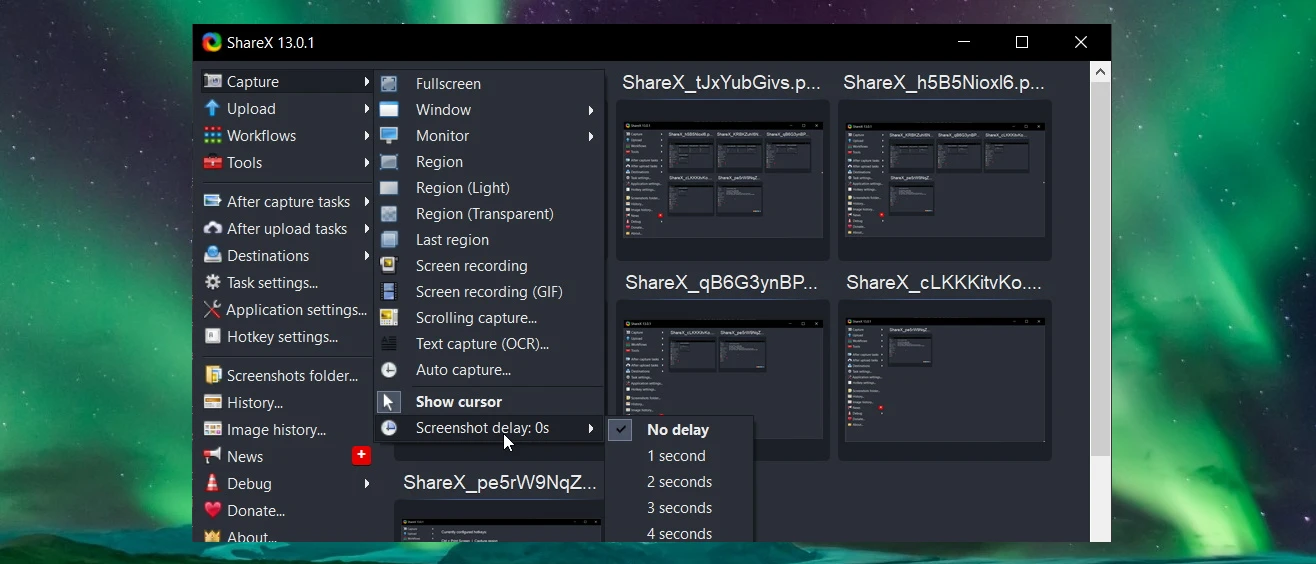
ShareX operates as an open-source screen capture and file-sharing productivity application designed for Windows 10 and Windows 11 users who require strict control over how they record, annotate, and export visual media. Unlike basic screenshot utilities that merely copy an image to the clipboard, this desktop client functions as a multi-step automation engine, executing custom tasks immediately after a keyboard shortcut triggers a capture. Professionals working in technical support, software documentation, QA testing, and systems administration rely on it to bypass the manual editing and file-handling sequences usually required to process instructional graphics.
The application intercepts standard print-screen keyboard inputs and maps them to specialized capture methods, ranging from active monitors and individual application windows to custom-drawn regions and full-page scrolling captures. Once the capture triggers, the built-in workflow logic takes over. The software can automatically apply predefined image effects, insert a custom watermark, save the PNG or JPEG file to a designated local directory, and upload the result to one of dozens of supported destination servers. This direct-to-destination pipeline drastically reduces the time required to share visual assets in active workplace chat environments or complex IT ticketing systems. The user immediately receives a shortened URL in their clipboard, ready to paste into any communication channel.
Beyond static images, the software embeds a video recording interface relying on standard encoding libraries to produce MP4 screen recordings and animated GIF files for demonstrating sequential tasks. The dashboard acts as a central repository for utility operations, holding a dedicated image editor, a screen ruler, an on-screen color picker, a hash checker, and a DNS changer. Because the application runs quietly in the system tray with low background resource consumption, it serves as an always-on utility toolkit for individuals who continuously document, measure, and share visual information throughout their daily computing sessions.
Key Features
- Task Automation Workflows: The software relies on an 'After capture tasks' menu to dictate exactly what happens when you press a hotkey. Users can configure the application to automatically save the file locally, perform optical character recognition, copy the resulting file path to the clipboard, and upload the media to a designated server.
- Advanced Capture Modes: Users can select from fullscreen captures, targeted active windows, freehand custom regions, or specialized scrolling captures for documenting long web pages and extensive document views. The interface also supports delayed captures for grabbing transient menus, auto-capture intervals for creating time-lapse documentation, and specific text-capture modes.
- Integrated Image Annotator: Captured images open directly in the internal editing interface, allowing users to add text blocks, draw strict vector arrows, blur sensitive personal information, and apply step-by-step numbered counters for tutorials. These annotation tools include customizable stroke weights, exact hex color selections, and drop shadows managed directly within the top toolbar.
- FFmpeg Screen Recording: The utility records active desktop usage by designating a specific screen region and generating either a standard MP4 video file or an animated GIF. The recording module allows users to specify custom framerates, select audio input sources like desktop audio or external microphones, and choose specific video codecs.
- Destination Upload Support: The platform routes images, text snippets, and general files to over eighty distinct hosting providers, including Imgur, Dropbox, Google Drive, Pastebin, and custom FTP or Amazon S3 buckets. Users configure their specific API keys, OAuth tokens, or account credentials within the 'Destinations' settings menu to build private file hosting pipelines.
- Productivity Utility Tools: The main interface houses several distinct micro-tools completely separate from screen capturing, including a screen ruler for measuring pixel distances and an eyedropper for extracting precise RGB and Hex color codes from any window. It also includes an image combiner, a video converter, and a QR code generator, consolidating multiple desktop tasks into one dashboard.
How to Install ShareX on Windows
- Download the official executable setup package targeting Windows environments directly from the primary project repository or authorized software library.
- Launch the downloaded setup application to trigger the installation wizard and review the standard GNU General Public License terms before proceeding.
- Choose a destination folder on your local storage drive, noting that the directory defaults to the standard Program Files path on your primary partition.
- Select your preferred supplementary installation tasks, such as creating a standard desktop shortcut, adding the application to the Windows context menu, and configuring the software to launch automatically during system startup.
- Proceed with the final installation phase, allowing the wizard to extract the core application files, register necessary shell extensions, and write the required configuration data to the local disk.
- Finish the setup wizard and launch the application for the first time, observing that the main dashboard window opens and a dedicated icon appears inside the Windows system tray.
- Right-click the newly created system tray icon to access the primary navigation menu, open 'Application settings', and verify that the default keyboard shortcuts do not conflict with your existing desktop applications.
ShareX Free vs. Paid
ShareX is entirely free and open-source software distributed under the GNU General Public License, meaning it features no paid tiers, subscription models, or hidden premium upgrades. Every advanced capture mode, image annotation tool, and destination upload integration is available immediately upon installation without requiring a user account. The software imposes no trial restrictions, artificial time limits on video recordings, or mandatory watermarks on exported files.
The development team sustains the project entirely through voluntary community donations, corporate sponsorships, and marketplace support rather than utilizing traditional commercial software licensing models. Because there is no enterprise tier or pro version restricting commercial use, business administrators and IT departments can deploy the software across corporate networks and office workstations without navigating complex licensing agreements or tracking individual seat counts.
While the core desktop application requires absolutely no financial payment, users who heavily integrate third-party cloud services must manage the separate costs associated with those external platforms. Uploading massive daily screen recordings to a personal Amazon S3 bucket, a paid Dropbox environment, or a Google Drive account will consume storage and bandwidth quotas dictated by those specific hosting providers, which operate independently from the capture utility itself.
ShareX vs. Snagit vs. Greenshot
Snagit targets corporate professionals, instructional designers, and marketing teams who require highly polished graphic templates, specialized text extraction workflows, and dedicated technical support in exchange for a commercial software license. It provides a highly refined, visually approachable interface for users who want complex document assembly tools and visually appealing step-by-step tutorial assets without needing to configure deep technical workflows or manage raw API upload credentials.
Greenshot offers a highly localized, minimal open-source alternative for users who exclusively need basic screenshot capabilities and a strictly straightforward image editor without navigating complex configuration menus. It lacks the deep automation pipelines, native video recording tools, and extensive third-party upload destinations found in modern utility apps, making it suitable for older hardware environments or individuals who feel overwhelmed by dense settings panels.
ShareX stands out as the optimal choice for technical users, software developers, and daily power users who prioritize execution speed, complex workflow automation, and diverse file hosting integrations without paying for a commercial license. It actively trades initial ease-of-use and aesthetic menu polish to deliver maximum configurability, allowing users to build an exact, uncompromised sequence of capture, edit, save, and upload events strictly tailored to their specific administrative tasks.
Common Issues and Fixes
- Accidental public image uploading. New users frequently find their private screenshots uploaded to public image hosts like Imgur immediately after capture. To stop this behavior, click on the 'After capture tasks' menu in the main window and click the 'Upload image to host' option so that it is no longer highlighted in bold text.
- Screen recording fails to initialize. Initiating a video screen record sequence may throw a configuration error if the necessary external video encoding libraries are absent. Resolve this by opening 'Task settings', navigating to 'Screen recorder', clicking 'Screen recording options', and selecting the 'Download' button to acquire the required FFmpeg executable directly to the application folder.
- Scrolling capture misses sections of the web page. Modern web browsers utilizing smooth scrolling mechanics or dynamic loading elements can break the scrolling capture logic, resulting in stitched images with overlapping text. Fix this by opening the scrolling capture window and adjusting the 'Scroll delay' to a higher value, such as 300 milliseconds, giving the page enough time to render before the next frame is captured.
- Custom keyboard shortcuts fail to register. The application might be unable to intercept standard print-screen or modifier keys if another desktop utility currently controls those specific inputs. Open 'Hotkey settings', look for any conflicts explicitly marked in red text, and either close the conflicting background application or assign an entirely new key combination to the specific capture task.
- High system memory usage from capture history. The dashboard retains a detailed history of all captured files and their generated thumbnail representations, which can slowly consume system memory over long periods of continuous operation. To alleviate this, open 'Application settings', navigate to the 'History' tab, and lower the 'Max item count' or manually clear the history log to free up background resources.
Version 19.0.2 — January 2026
- Disabled automatic uploading by default for all fresh software installations.
- Introduced an AI-powered "Analyze image" tool (opt-in feature requiring personal API keys for providers like OpenAI or Gemini).
- Upgraded the bundled FFmpeg application to version 8.0.
- Added a new "Spotlight" effect to both the region capture interface and the built-in image editor.
- Integrated a central crosshair indicator into the region capture tool for better visual alignment.
- Refined the Light and Transparent region capture modes for a smoother selection experience.
- Expanded Image History settings by adding "Thumbnail height" and "Automatically load more images" preferences.
- Created a dedicated keyboard shortcut to immediately stop auto-capture tasks.
- Adjusted settings exports to automatically append the computer's name to the output file.
- Allowed users to easily rotate and flip stickers in the image editor using Ctrl + Arrow key shortcuts.
- Transitioned the database framework from System.Data.SQLite to Microsoft.Data.Sqlite.
- Included several new advanced configurations, such as a "Skip files" toggle for the Directory Indexer and a "Scale step" option for pinned screen items.